> ## Documentation Index
> Fetch the complete documentation index at: https://docs.zapier.com/llms.txt
> Use this file to discover all available pages before exploring further.
# Making HTTP requests
> How to make HTTP requests from your Zapier integration to interact with your API
There are two ways to make HTTP requests:
1. [**Shorthand HTTP requests**](#shorthand-http-requests) - Easy to use, but limits what you can control. Best for simple requests.
2. [**Manual HTTP requests**](#manual-http-requests) - Gives you full control over the request and response.
Use these helper constructs to reduce boilerplate:
1. `requestTemplate` - an object literal of [HTTP request options](#http-request-options) that will be merged with every request.
2. `beforeRequest` - [middleware](#using-http-middleware) that mutates every request before it is sent.
3. `afterResponse` - [middleware](#using-http-middleware) that mutates every response before it is completed.
You can install any HTTP client you like—but this is discouraged as you might
lose [automatic HTTP logging](/integrations/build-cli/overview#http-logging)
and middleware.
## Shorthand HTTP requests
For simple HTTP requests that do not require special pre- or post-processing, you can specify the [HTTP request options](#http-request-options) as an object literal in your app definition.
This features:
1. Lazy `{{curly}}` replacement.
2. JSON and form body de-serialization.
3. Automatic non-2xx error raising.
```js theme={null}
const triggerShorthandRequest = {
url: "https://{{bundle.authData.subdomain}}.example.com/v2/api/recipes.json",
method: "GET",
params: {
sort_by: "id",
sort_order: "DESC",
},
};
const App = {
// ...
triggers: {
example: {
// ...
operation: {
// ...
perform: triggerShorthandRequest,
},
},
},
};
```
In the URL above, `{{bundle.authData.subdomain}}` is automatically replaced with the live value from the bundle. If the call returns a non-2xx status code, an error is automatically raised. The response body is automatically parsed as JSON or form-encoded and returned.
An error will be raised if the response cannot be parsed as JSON or form-encoded. To use shorthand requests with other response types, add [middleware](#using-http-middleware) that sets `response.data` to the parsed response.
## Manual HTTP requests
Use this when you need full control over the request/response. For example:
1. To do processing (usually involving [`bundle.inputData`](/integrations/build-cli/core#bundle-inputdata)) before a request is made.
2. To do processing of an API's response before you return data to Zapier.
3. To process an unusual response type, such as XML.
To make a manual request, pass your [request options](#http-request-options) to `z.request()` then use the resulting [response object](#http-response-object) to return the data you want:
```js theme={null}
const listRecipes = async (z, bundle) => {
// Custom processing of bundle.inputData would go here...
const httpRequestOptions = {
url: `https://${bundle.authData.subdomain}.example.com/v2/api/recipes.json`,
method: "GET",
params: {
cuisine: bundle.inputData.cuisine,
},
};
const response = await z.request(httpRequestOptions);
const recipes = response.data;
// Custom processing of recipes would go here...
return recipes;
};
const App = {
// ...
triggers: {
example: {
// ...
operation: {
// ...
perform: listRecipes,
},
},
},
};
```
Note that the `url` above is a [template literal](https://developer.mozilla.org/en-US/docs/Web/JavaScript/Reference/Template_literals), which is JavaScript feature and is evaluated immediately when that line of code is executed.
### When to use template literals or `{{curlies}}`?
You will see both [template literals](https://developer.mozilla.org/en-US/docs/Web/JavaScript/Reference/Template_literals) `${var}` and (double) "curlies" `{{var}}` used in examples.
Template literals (like `${var}` or plain `var`) get evaluated as soon as the line of code is executed. During build time (`zapier-platform build` and `zapier-platform push`, or the deprecated `zapier build` and `zapier push`), the CLI tool imports your JavaScript module tree to generate a `definition.json` file, which is used to tell Zapier what triggers and actions your integration has.
If you use a placeholder like `${process.env.VAR}` at the module level (e.g., in a [shorthand request](/integrations/build-cli/overview#shorthand-http-requests)), it will be substituted with your local environment's value for `VAR` and saved to `definition.json`. This means the value you set via `zapier-platform env:set` (or deprecated `zapier env:set`) won't be used in some occasions in production. So just keep in mind:
**Rule of thumb:** Use `${var}` or access `var` directly inside functions. Use `{{var}}` in [shorthand requests](/integrations/build-cli/overview#shorthand-http-requests).
If you're not familiar with template literals, know that `const val = "a" + b + "c"` is essentially the same as:
```js theme={null}
const val = `a${b}c`;
```
Since v17, `z.request()` no longer replaces `{{var}}` and will throw an error if there's `{{var}}` in the request object.
### POST and PUT requests
To POST or PUT data to your API you can do this:
```js theme={null}
const App = {
// ...
triggers: {
example: {
// ...
operation: {
// ...
perform: async (z, bundle) => {
const recipe = {
name: "Baked Falafel",
style: "mediterranean",
directions: "Get some dough....",
};
const options = {
method: "POST",
url: "https://example.com/api/v2/recipes.json",
body: recipe,
};
const response = await z.request(options);
// Throw and try to extract message from standard error responses
if (response.status !== 201) {
throw new z.errors.Error(
`Unexpected status code ${response.status}`,
"CreateRecipeError",
response.status,
);
}
return response.data; // or response.json if you're using core v9 or older
},
},
},
},
};
```
You don't need to serialize your request data using `JSON.stringify()` before
setting the `body`. `z.request()` does that for you.
## Using HTTP middleware
HTTP middleware is a function or piece of code that sits between a client request and the server response, allowing you to inspect, modify, or handle the request or response before they reach their destination. You use middleware to perform common tasks like adding security headers, logging requests, handling errors, or modifying data in a centralized way without repeating code. Common examples include adding a header to all outgoing responses to improve security, or catching and handling weird errors so that users receive a friendly error message instead of the system-generated message.
To process all HTTP requests in a certain way, use the `beforeRequest` and `afterResponse` middleware functions.
Middleware functions go in your app definition:
```js theme={null}
const addHeader = (request, z, bundle) => {
request.headers["my-header"] = "from zapier";
return request;
};
// This example only works on core v10+!
const parseXML = (response, z, bundle) => {
// Parse content that is not JSON
// eslint-disable-next-line no-undef
response.data = xml.parse(response.content);
return response;
};
// This example only works on core v10+!
const handleWeirdErrors = (response, z) => {
// Prevent `throwForStatus` from throwing for a certain status.
if (response.status === 456) {
response.skipThrowForStatus = true;
} else if (response.status === 200 && response.data.success === false) {
throw new z.errors.Error(response.data.message, response.data.code);
}
return response;
};
const App = {
// ...
beforeRequest: [addHeader],
afterResponse: [parseXML, handleWeirdErrors],
// ...
};
```
A `beforeRequest` middleware function takes a request options object, and returns a (possibly mutated) request object. An `afterResponse` middleware function takes a response object, and returns a (possibly mutated) response object. Middleware functions are executed in the order specified in the app definition, and each subsequent middleware receives the request or response object returned by the previous middleware.
Middleware functions can be asynchronous - just make the middleware function `async` or return a promise.
The second argument for middleware is the `z` object, but it does *not* include `z.request()` as using that would easily create infinite loops.
Here is the full request lifecycle when you call `z.request({...})`:
1. set defaults on the `request` object
2. run your `beforeRequest` middleware functions in order
3. add applicable auth headers (e.g. adding `Basic ...` for `basic` auth), if applicable
4. add `request.params` to `request.url`
5. execute the `request`, store the result in `response`
6. try to auto-parse response body for non-raw requests, store result in `response.data`
7. log the request to Zapier's logging server
8. if the status code is `401`, you're using a refresh-able auth (such as `oauth2` or `session`) *and* `autoRefresh` is `true` in your auth configuration, throw a `RefreshAuthError`. The server will attempt to refresh the authentication again and retry the whole step
9. run your `afterResponse` middleware functions in order
10. call `response.throwForStatus()` unless `response.skipThrowForStatus` is `true`
The resulting response object is returned from `z.request()`.
Check out this
[example](https://github.com/zapier/zapier-platform/tree/main/example-apps/middleware)
for a working example integration using HTTP middleware.
### Error response handling
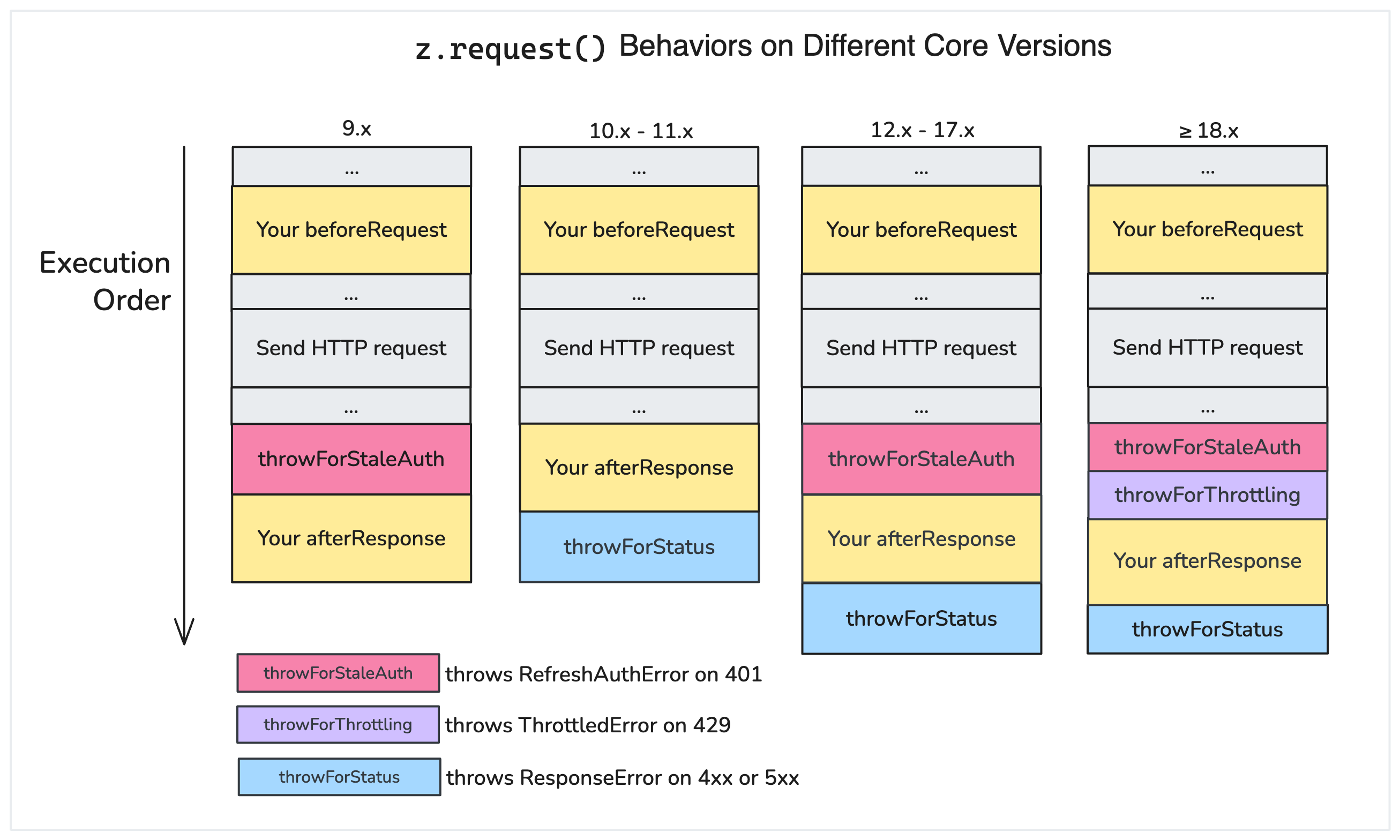
`z.request()` has some built-in middleware to help you handle error responses in the most sensible way. But in different major core versions, it acts a little differently. Here's a diagram to illustrate that:
#### v10.x and above: automatic throw for error status
If you're using core v10.x and above, you don't need to manually handle `response.status >= 400` or call `response.throwForStatus()` after every `z.request()` call, as the built-in `throwForStatus` middleware will do that for you.
However, you can disable automatic error throwing by setting `skipThrowForStatus` on the request object:
```js theme={null}
// Disable automatic error throwing on the request object
const perform = async (z, bundle) => {
const response = await z.request({
url: "...",
skipThrowForStatus: true, // <- disable automatic error throwing
});
// Now you handle error response on your own.
// The following is equivalent to response.throwForStatus(),
// but you have to remember to do it on every request
if (response.status >= 400) {
throw new z.errors.ResponseError(response);
}
};
```
Since your `afterResponse` runs before the built-in `throwForStatus` middleware, you can also "hijack" the error response in your `afterResponse`. For example, if the API uses a status code ≥ 400 that should not be treated as an error, you can do this:
```js theme={null}
// Don't throw an error when response status is 456
const disableAutoThrowOn456 = (response, z) => {
if (response.status === 456) {
response.skipThrowForStatus = true;
}
return response;
};
const App = {
// ...
afterResponse: [disableAutoThrowOn456],
// ...
};
```
For developers using v9.x and below, it's your responsibility to throw an exception for an error response. That means you should call `response.throwForStatus()` or throw an error yourself, likely following the `z.request()` call.
#### v12.x and above: the built-in `throwForStaleAuth` middleware
In v12.x, we brought back the built-in `throwForStaleAuth` middleware that throws `z.errors.RefreshAuthError` when a `401 Unauthorized` response is received and your authentication supports auto-refresh (such as `oauth2` or `session` auth).
This means you'd **never** see a 401 response in your `afterResponse` middleware if your authentication type is `oauth2` or `session` and you enable `auoRefresh`. The 401 response would be handled by the built-in `throwForStaleAuth` middleware before your `afterResponse` can see it.
We added the built-in `throwForStaleAuth` middleware because we've seen developers' `afterResponse` unintentionally "swallow" the 401 response and prevent the auth refresh from happening. For example, if you had an `afterResponse` middleware on v11.x as follows, `autoRefresh` would not work:
```js theme={null}
// BAD: Don't do this on v10 and v11, because it swallows 401 responses!
const handleError = (response, z) => {
if (response.status >= 400) {
throw new z.errors.Error(`API returned error status ${response.status}`);
}
return response;
};
const App = {
afterResponse: [handleError],
// ...
};
```
#### v18.x and above: the built-in `throwForThrottling` middleware
In v18.x, we added a built-in `throwForThrottling` middleware that throws `z.errors.ThrottledError` when a `429 Too Many Requests` response is received. `ThrottledError` tells Zapier to retry the request after some time.
This means in ≥ v18 you'd never see a 429 response in your `afterResponse` middleware, **unless** you set `throwForThrottlingEarly` to false globally or in the `z.request()` options.
To set `throwForThrottlingEarly` globally, add it to `App.flags`:
```js theme={null}
const App = {
flags: {
// Globally disable the built-in throwForThrottling middleware.
// This affects all z.request() calls.
throwForThrottlingEarly: false,
},
// ... rest of app
};
```
To set `throwForThrottlingEarly` per request, add it to the `z.request()` options:
```js theme={null}
// Your afterResponse can see 429s
const response = await z.request({
url: "https://example.com/api",
throwForThrottlingEarly: false,
});
```
If you disable `throwForThrottlingEarly` or use v17.x and below, make sure you don't unintentionally swallow 429 responses in your `afterResponse` middleware. For example, the following code would prevent Zapier from retrying the request:
```js theme={null}
// BAD: Don't do this prior to v18 if you want Zapier to retry 429s!
const handleError = (response, z) => {
if (response.status >= 400) {
throw new z.errors.Error(`API returned error status ${response.status}`);
}
return response;
};
const App = {
afterResponse: [handleError],
// ...
};
```
## HTTP Request Options
[Shorthand requests](#shorthand-http-requests) and [manual requests](#manual-http-requests) support the following HTTP `options`:
* `url`: HTTP url, you can provide it as a separate argument (`z.request(url, options)`) or as part of the `options` object (`z.request({url: url, ...})`).
* `method`: HTTP method, default is `GET`.
* `headers`: request headers object, format `{'header-key': 'header-value'}`.
* `params`: URL query params object, format `{'query-key': 'query-value'}`.
* `body`: request body, can be a string, buffer, readable stream or plain object. When it is an object/array and the `Content-Type` header is `application/x-www-form-urlencoded` the body will be transformed to query string parameters, otherwise we'll set the header to `application/json; charset=utf-8` and JSON encode the body. Default is `null`.
* `allowGetBody`: include `body` in `GET` requests. Set to `true` to enable. Default is `false`. Set only if required by the receiving API. See [section 4.3.1 in RFC 7231](https://www.rfc-editor.org/rfc/rfc7231#section-4.3.1).
* `json`: shortcut object/array/etc. you want to JSON encode into body. Default is `null`.
* `form`: shortcut object. you want to form encode into body. Default is `null`.
* `raw`: set this to stream the response instead of consuming it immediately. Default is `false`.
* `redirect`: set to `manual` to extract redirect headers, `error` to reject redirect, default is `follow`.
* `follow`: maximum redirect count, set to `0` to not follow redirects. default is `20`.
* `compress`: support gzip/deflate content encoding. Set to `false` to disable. Default is `true`.
* `agent`: Node.js `http.Agent` instance, allows custom proxy, certificate etc. Default is `null`.
* `timeout`: request / response timeout in ms. Set to `0` to disable (OS limit still applies), timeout reset on `redirect`. Default is `0` (disabled).
* `signal` (*added in v15.14.1*): enables cancelling requests via a timeout set by an `AbortController`. More details in `node-fetch` docs [here](https://www.npmjs.com/package/node-fetch#request-cancellation-with-abortsignal). Default is `null`.
* `size`: maximum response body size in bytes. Set to `0` to disable. Default is `0` (disabled).
* `skipThrowForStatus` (*added in v10.0.0*): don't call `response.throwForStatus()` before resolving the request with `response`. See [HTTP Response Object](#http-response-object).
* `throwForThrottlingEarly` (*added in v18.0.0*): set to `false` to disable the built-in `throwForThrottling` middleware that throws `z.errors.ThrottledError` on `429 Too Many Requests` responses. See [HTTP middleware](#using-http-middleware) for more details. Default is `true`.
```js theme={null}
const response = await z.request({
url: "https://example.com",
method: "POST",
headers: {
"Content-Type": "application/json",
},
// only provide body, json or form...
body: { hello: "world" }, // or '{"hello": "world"}' or 'hello=world'
json: { hello: "world" },
form: { hello: "world" },
// access node-fetch style response.body
raw: false,
redirect: "follow",
follow: 20,
compress: true,
agent: null,
timeout: 0,
size: 0,
});
```
## HTTP Response Object
The response object returned by `z.request([url], options)` supports the following fields and methods:
* `status`: The response status code, i.e. `200`, `404`, etc.
* `content`: The response content as a String. For Buffer, try `options.raw = true`.
* `data` (*added in v10.0.0*): The response content as an object if the content is JSON or `application/x-www-form-urlencoded` (`undefined` otherwise).
* `headers`: Response headers object. The header keys are all lower case.
* `getHeader(key)`: Retrieve response header, case insensitive: `response.getHeader('My-Header')`
* `skipThrowForStatus` (*added in v10.0.0*): don't call `throwForStatus()` before resolving the request with this response.
* `throwForStatus()`: Throws an error if `400 <= statusCode < 600`.
* `request`: The original request options object (see above).
Additionally, if `request.raw` is `true`, the raw response has the following properties:
* `json()`: Get the response content as an object, if `options.raw = true` and content is JSON (returns a promise). `undefined` in non-raw requests.
* `body`: A stream available only if you provide `options.raw = true`.
```js theme={null}
const response = await z.request({
// options
});
// A bunch of examples for demonstration
response.status;
response.headers["Content-Type"];
response.getHeader("content-type");
response.request; // original request options
response.throwForStatus();
if (options.raw === false) {
// (default)
// If you're core v10+
response.data; // same as... z.JSON.parse(response.content); // or...
querystring.parse(response.content);
// If you're core v9 or older...
response.json; // same as
z.JSON.parse(response.content);
} else {
const buf = await response.buffer();
buf.toString();
const text = await response.text();
const json = await response.json();
response.body.pipe(otherStream);
}
```