> ## Documentation Index
> Fetch the complete documentation index at: https://docs.zapier.com/llms.txt
> Use this file to discover all available pages before exploring further.
# Troubleshoot trigger timeouts
## Testing trigger in Zap editor
### Constraint
When a user clicks **Test Trigger** in the Zap editor, the output of your `perform` (polling) or `performList` (REST Hook) must be returned within 30 seconds.
### Errors user will see if constraint is hit
* *“The app did not respond in-time. It may or may not have completed successfully.”*
* *“Problem creating Sample: Our computers ran into a problem”*
* *“We couldn't find any more x. Create a new x in your account and try again.”*
### Best practice
The Zap editor will only process three new records at a time for sample data, so one way of speeding up the response is by limiting returned results to three records when a trigger is tested.
To determine when the request is for sample data, use the bundle meta parameter `bundle.meta.isLoadingSample`. When that is set to `true`, the user is testing in the Zap editor, and your integration can respond with a limited payload. More on `bundle.meta` properties [here](https://github.com/zapier/zapier-platform/blob/main/packages/cli/README.md#bundlemeta).
## Trigger runs in a Zap
### Constraint
Each time a Zap executes, the trigger's `perform` method must finish processing in 30 seconds. Polling triggers run on an interval based on a [user's Zapier plan](https://zapier.com/pricing) (between 1 and 15 minutes). REST Hook triggers run on an inbound POST to their subscription URL.
### Errors user will see if constraint is hit
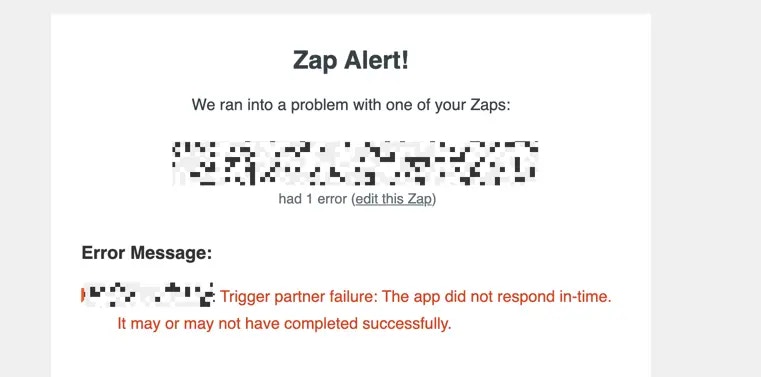
* User will receive an email with an error message, usually with *“Trigger partner failure”* in the message text. An example of the email sent when the trigger errors due to a timeout:
{" "}
 {" "}
### Best practices
* For polling triggers, if your API endpoint supports request filtering around number of records or datetime, use these to reduce the number of records returned
* For both types of triggers, optimize the `perform` scripting for manipulating the payload
* Use [console logging](https://github.com/zapier/zapier-platform/blob/main/packages/cli/README.md#console-logging) efficiently. It can help you determine where issues might lie, but too much console logging can cause timeouts due to logging overhead.
* If you have multiple requests per record that are causing timeouts, use the Zapier platform [dehydration functions](https://github.com/zapier/zapier-platform/blob/main/packages/cli/README.md#dehydration). Instead of making the request immediately, a dehydration pointer is created, and the request will only be made if the Zap needs a hydrated property in a later step.
***
*Need help? [Tell us about your problem](https://developer.zapier.com/contact) and we'll connect you with the right resource or contact support.*
{" "}
### Best practices
* For polling triggers, if your API endpoint supports request filtering around number of records or datetime, use these to reduce the number of records returned
* For both types of triggers, optimize the `perform` scripting for manipulating the payload
* Use [console logging](https://github.com/zapier/zapier-platform/blob/main/packages/cli/README.md#console-logging) efficiently. It can help you determine where issues might lie, but too much console logging can cause timeouts due to logging overhead.
* If you have multiple requests per record that are causing timeouts, use the Zapier platform [dehydration functions](https://github.com/zapier/zapier-platform/blob/main/packages/cli/README.md#dehydration). Instead of making the request immediately, a dehydration pointer is created, and the request will only be made if the Zap needs a hydrated property in a later step.
***
*Need help? [Tell us about your problem](https://developer.zapier.com/contact) and we'll connect you with the right resource or contact support.*