> ## Documentation Index
> Fetch the complete documentation index at: https://docs.zapier.com/llms.txt
> Use this file to discover all available pages before exploring further.
# Change trigger or action key
## Change scenario
In cases where a trigger/action/search's custom code needs to be rewritten or a new v2 is replacing an older v1.
## Impact to users
Deleting a trigger/action/search in a new version is a breaking change - which would prevent migration of your users to the new version. Updating an existing trigger/action/search's custom code would allow for migration but break users' Zaps if the output changes.
 The triggers, actions, and searches are identified by their **key**, such as `new_contact` or `create_post`, so if you remove that key from the app's definition, or change it (possible in CLI apps only), this message appears when you attempt to migrate.
## Best practices
* If you have already renamed the **key** (possible in CLI apps only) for a trigger/action/search, you'll need to switch it back to the previous **key** to proceed with migrating users.
* If you need to remove a trigger/action/search, change its visibility to **hidden** instead. Use the Visibility Options dropdown in the [UI](https://platform.zapier.com/polling-trigger#1-add-the-trigger-settings), or the `hidden` key in the [CLI](https://github.com/zapier/zapier-platform/blob/main/packages/schema/docs/build/schema.md#basicdisplayschema).
The triggers, actions, and searches are identified by their **key**, such as `new_contact` or `create_post`, so if you remove that key from the app's definition, or change it (possible in CLI apps only), this message appears when you attempt to migrate.
## Best practices
* If you have already renamed the **key** (possible in CLI apps only) for a trigger/action/search, you'll need to switch it back to the previous **key** to proceed with migrating users.
* If you need to remove a trigger/action/search, change its visibility to **hidden** instead. Use the Visibility Options dropdown in the [UI](https://platform.zapier.com/polling-trigger#1-add-the-trigger-settings), or the `hidden` key in the [CLI](https://github.com/zapier/zapier-platform/blob/main/packages/schema/docs/build/schema.md#basicdisplayschema).
 Migrated Zaps that used the hidden trigger/action/search will now show it as Deprecated in the Zap editor, but will continue to function as long as the endpoints remain valid.
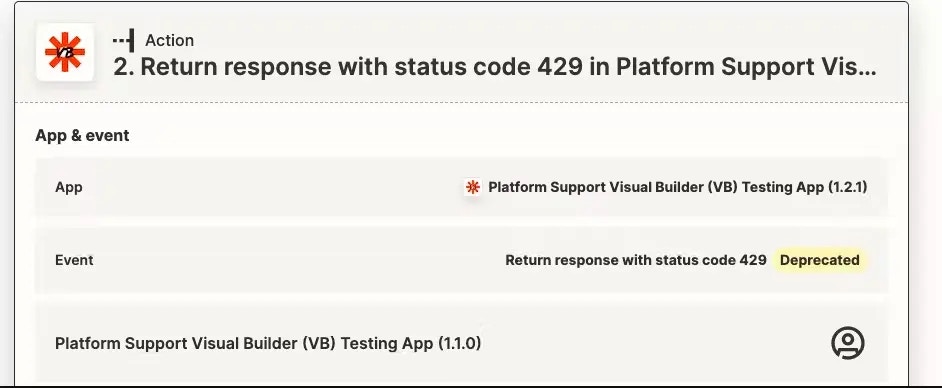 Once a user selects a different trigger/action/search when editing their Zap, they will not be able to retrieve the hidden one. New users will not see any `hidden` trigger/action/search as available for selection.
* If you need to add a new trigger/action/search that replaces the hidden one, create a duplicate and give it a new **key** (such as appending `_v2` on the end), and keep the Name and Description the same if the functionality for a user is the same.
Once a user selects a different trigger/action/search when editing their Zap, they will not be able to retrieve the hidden one. New users will not see any `hidden` trigger/action/search as available for selection.
* If you need to add a new trigger/action/search that replaces the hidden one, create a duplicate and give it a new **key** (such as appending `_v2` on the end), and keep the Name and Description the same if the functionality for a user is the same.
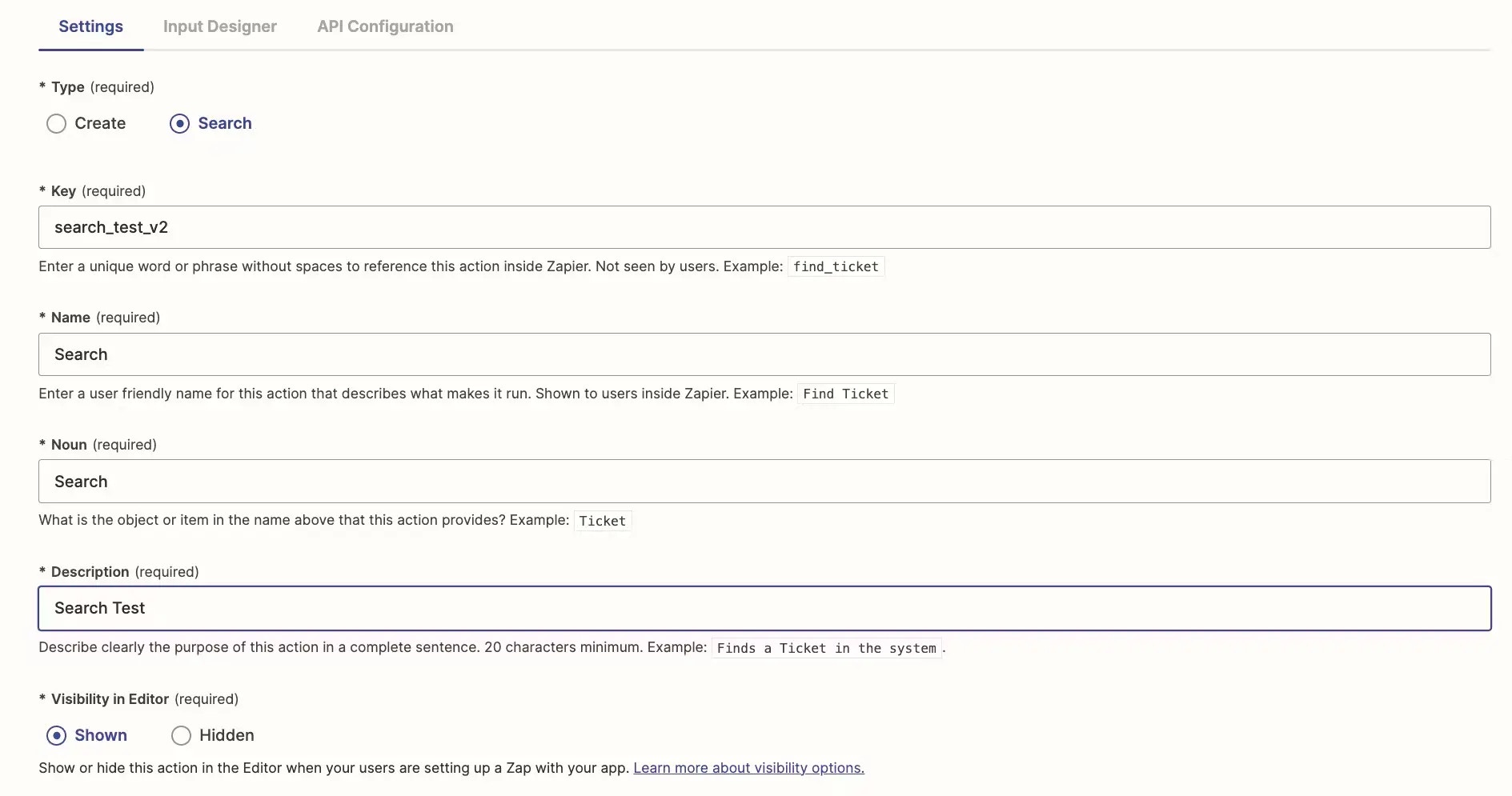 * This way existing Zaps continue to work once migrated with the previous (and now hidden) definition, and new Zaps will only be able to select the new definition.
* In cases where the endpoint in the hidden trigger/action/search will be sunset and begin to return errors in the future, the impact to users would be as follows:
Once the API has been sunset, active Zaps (turned on) using the impacted trigger/action/search will produce errors when they run. Depending on [user's email notification settings](https://help.zapier.com/hc/en-us/articles/8496289225229), owners of these Zaps will be sent email notifications about these errors.
If those Zaps exceed the error ratio **and** users have not [overridden related settings in their Zaps](https://help.zapier.com/hc/en-us/articles/8496037690637-Troubleshoot-errors-in-Zapier#i-want-my-zap-to-continue-running-even-when-there-are-errors--0-6), those Zaps will be automatically turned off.
* If you'd like to add custom errors within Zapier for the hidden trigger/action/search at the time of the endpoint sunset, you could consider the following:
Create a new version of the integration that immediately throws a `z.errors.Error` exception in the `perform` method of the impacted trigger/action/search. Learn more for apps maintained in the [UI](/integrations/manage/planning-changes#custom-error-handling-in-the-ui) or the [CLI](https://github.com/zapier/zapier-platform/blob/main/packages/cli/README.md#zerrors).
*Promote* and then *migrate* users to this new version as close to the sunset date as possible.
The benefits of this approach are:
* Throwing an explicit exception will ensure impacted Zaps will hit the error ratio (and be turned off) at the earliest possible time.
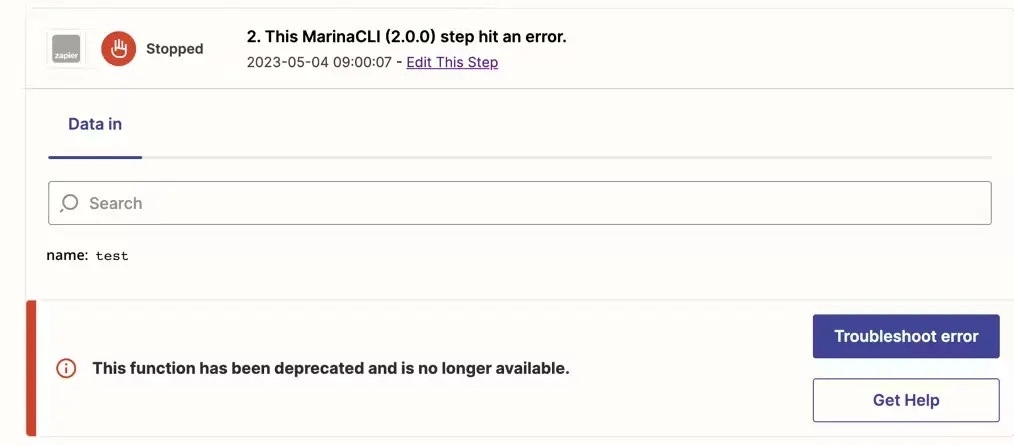
* You can add a user-friendly message to the exception that users will see in both Zaps Runs on the [Zap History](https://help.zapier.com/hc/en-us/articles/8496291148685-View-and-manage-your-Zap-history) and also in email error notifications, e.g. *This function has been deprecated and is no longer available.*
* Here's an example of how a custom error message would be displayed on an action in the Zap History:
* This way existing Zaps continue to work once migrated with the previous (and now hidden) definition, and new Zaps will only be able to select the new definition.
* In cases where the endpoint in the hidden trigger/action/search will be sunset and begin to return errors in the future, the impact to users would be as follows:
Once the API has been sunset, active Zaps (turned on) using the impacted trigger/action/search will produce errors when they run. Depending on [user's email notification settings](https://help.zapier.com/hc/en-us/articles/8496289225229), owners of these Zaps will be sent email notifications about these errors.
If those Zaps exceed the error ratio **and** users have not [overridden related settings in their Zaps](https://help.zapier.com/hc/en-us/articles/8496037690637-Troubleshoot-errors-in-Zapier#i-want-my-zap-to-continue-running-even-when-there-are-errors--0-6), those Zaps will be automatically turned off.
* If you'd like to add custom errors within Zapier for the hidden trigger/action/search at the time of the endpoint sunset, you could consider the following:
Create a new version of the integration that immediately throws a `z.errors.Error` exception in the `perform` method of the impacted trigger/action/search. Learn more for apps maintained in the [UI](/integrations/manage/planning-changes#custom-error-handling-in-the-ui) or the [CLI](https://github.com/zapier/zapier-platform/blob/main/packages/cli/README.md#zerrors).
*Promote* and then *migrate* users to this new version as close to the sunset date as possible.
The benefits of this approach are:
* Throwing an explicit exception will ensure impacted Zaps will hit the error ratio (and be turned off) at the earliest possible time.
* You can add a user-friendly message to the exception that users will see in both Zaps Runs on the [Zap History](https://help.zapier.com/hc/en-us/articles/8496291148685-View-and-manage-your-Zap-history) and also in email error notifications, e.g. *This function has been deprecated and is no longer available.*
* Here's an example of how a custom error message would be displayed on an action in the Zap History:
 ***
*Need help? [Tell us about your problem](https://developer.zapier.com/contact) and we'll connect you with the right resource or contact support.*
***
*Need help? [Tell us about your problem](https://developer.zapier.com/contact) and we'll connect you with the right resource or contact support.*