> ## Documentation Index
> Fetch the complete documentation index at: https://docs.zapier.com/llms.txt
> Use this file to discover all available pages before exploring further.
# Clone a version
> Cloning allows you to duplicate an existing version of your integration. This is particularly useful when you want to introduce new features or fixes without altering the original integration. When a previous version of your integration has more than 5 active users, you will need to clone that version to make modifications.
> **Note**: The term “cloning” is specific to the Platform UI and is not used with Platform CLI. However, the concept is similar to updating the version number in your `package.json` file and running [`zapier push`](https://github.com/zapier/zapier-platform/blob/main/packages/cli/docs/cli.md#push) to create a new version you can access within your Zaps for testing.
## How to clone an integration version
1. Log into the [Platform UI](https://zapier.com/app/developer).
2. Select your **integration**.
3. In the *Manage* section in the left sidebar, click **Versions**.
4. On your existing version, click the **three dots icon**
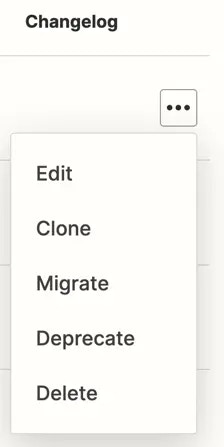 5. From the dropdown menu, select **Clone**.
6. The *Clone Version* dialog box will appear. In the dropdown field, select which **version** you want to clone your existing version too.
* **Patch (e.g., 1.0.0 to 1.0.1)**: Ideal for backward-compatible changes such as bug fixes or updating help text.
* **Minor (e.g., 1.0.0 to 1.1.0)**: Use this for adding new functionalities that do not disrupt existing features, like creating a new trigger or action.
* **Major (e.g., 1.0.0 to 2.0.0)**: Choose this option for changes that are likely to break existing Zaps, like removing triggers or actions, altering authentication methods, or revamping the entire integration.
7. Click **Clone**.
8. A dialog box will appear confirming you've cloned your version.
Now you can make edits and improvements to your integration.
## Video Tutorial
You can refer to this video on cloning an integration version:
***
*Need help? [Tell us about your problem](https://developer.zapier.com/contact) and we'll connect you with the right resource or contact support.*
5. From the dropdown menu, select **Clone**.
6. The *Clone Version* dialog box will appear. In the dropdown field, select which **version** you want to clone your existing version too.
* **Patch (e.g., 1.0.0 to 1.0.1)**: Ideal for backward-compatible changes such as bug fixes or updating help text.
* **Minor (e.g., 1.0.0 to 1.1.0)**: Use this for adding new functionalities that do not disrupt existing features, like creating a new trigger or action.
* **Major (e.g., 1.0.0 to 2.0.0)**: Choose this option for changes that are likely to break existing Zaps, like removing triggers or actions, altering authentication methods, or revamping the entire integration.
7. Click **Clone**.
8. A dialog box will appear confirming you've cloned your version.
Now you can make edits and improvements to your integration.
## Video Tutorial
You can refer to this video on cloning an integration version:
***
*Need help? [Tell us about your problem](https://developer.zapier.com/contact) and we'll connect you with the right resource or contact support.*