> ## Documentation Index
> Fetch the complete documentation index at: https://docs.zapier.com/llms.txt
> Use this file to discover all available pages before exploring further.
# Versions
> Versions in the Developer Platform allow developers to create multiple iterations of their integration to experiment with and implement new features without affecting existing users. Each integration can have many versions, but only one version can have a public status at a one time.
Versions allow you to have:
* **Seamless user experience**: Existing users have uninterrupted service, while new features are being tested and deployed.
* **Incremental upgrades**: Developers can facilitate phased roll outs of new features, allowing for thorough testing and feedback collection before full deployment.
* **Version management**: Developers have a structured approach to migrate users to updated versions and deprecate older versions when applicable.
## Version numbering
Zapier uses [semantic versioning](https://semver.org/) (semver) for integration versions. A version number has three parts: **`MAJOR.MINOR.PATCH`** (for example, `1.2.3`).
Choosing the right version number communicates the impact of your changes to users, determines whether you can [migrate users automatically](/integrations/manage/migrate), and controls whether the platform allows you to [promote](/integrations/manage/promote) the version.
### Patch versions
**Format:** `1.0.0` → `1.0.1`
Increment the patch version for backward-compatible fixes that don't change the interface users interact with. Existing Zaps continue to work identically.
| Change | Why it's a patch |
| -------------------------------------------------------------------- | --------------------------------------- |
| Fix a bug in a perform function that was returning incorrect data | Output structure and keys stay the same |
| Update help text or field descriptions | No functional change for users |
| Refactor internal code without changing inputs, outputs, or behavior | Invisible to users |
| Fix error handling so a clearer message is returned | No change to the happy path |
| Update an API endpoint URL (same request/response shape) | Same data in, same data out |
### Minor versions
**Format:** `1.0.3` → `1.1.0`
Increment the minor version when you add new functionality that doesn't break existing Zaps. Users on the previous version are unaffected, and you can migrate them automatically.
| Change | Why it's a minor |
| ------------------------------------------------------------------- | ------------------------------------------------- |
| Add a new trigger (e.g., "New Invoice") | Existing triggers still work; this is additive |
| Add a new action or search | No existing Zaps reference the new action |
| Add a new **optional** input field to an existing trigger or action | Existing Zaps don't send the field and still work |
| Add new output fields to an existing trigger or action | Existing Zaps don't reference the new fields yet |
| Add a new optional OAuth scope | Existing connections still work without it |
### Major versions
**Format:** `1.3.6` → `2.0.0`
Increment the major version when you make changes that break compatibility with existing Zaps. These changes require users to take action — reconnecting accounts, reconfiguring Zap steps, or providing new information.
The platform **blocks promotion** of a new version containing breaking changes unless you increment the major version. For example, if the current public version is `1.5.0` and your new version removes a trigger, you must promote as `2.0.0` or higher — attempting to promote as `1.6.0` is rejected with an error explaining which breaking changes were detected.
| Change | Why it's a major |
| ---------------------------------------------------------- | --------------------------------------------------------- |
| Remove a trigger, action, or search | Existing Zaps that use it will break |
| Change the authentication type (e.g., API Key → OAuth 2.0) | Users must re-authenticate |
| Change a trigger from polling to webhook (or vice versa) | Existing Zap subscriptions are incompatible |
| Remove or rename input field keys | Existing Zaps send data the new version doesn't expect |
| Remove or rename output field keys | Downstream Zap steps that reference those keys will break |
| Add a new **required** input field with no default | Existing Zaps don't provide the field and will error |
| Remove a searchOrCreate combination | Zaps using "find or create" for that resource will break |
| Require new OAuth scopes that invalidate existing tokens | Users must re-authorize |
### What gets detected automatically?
When you [promote](/integrations/manage/promote) a new version, the platform compares it against the current public version at the **schema level** — looking at the structure of your triggers, actions, searches, and authentication. The following schema-level breaking changes are detected automatically and pause promotion when found within the same major version:
* **Removed triggers, actions, or searches** — a key present in the current public version is missing in the new version
* **Authentication type change** — the auth type (e.g., `oauth2`, `apiKey`, `session`) differs between versions
* **Trigger type change** — a trigger switched between polling and hook type
* **Removed searchOrCreate keys** — a searchOrCreate present in the current version is missing
* **Removed input field keys** — an input field key on an existing trigger/action was removed
* **Optional input field made required without a default** — an existing optional field is now required but has no default value, so existing Zaps that don't supply it will break
* **Authentication field changes** — removing an auth field, adding a new required auth field, or changing an auth field's type breaks existing connected accounts
* **Input field type changes** — changing the type of an input field (e.g., `string` → `list`)
* **Incompatible JSON field schema changes** — backward-incompatible changes to `json`-type input field schemas
These checks cover **schema-level** changes only. Some breaking changes happen outside the schema and are not automatically detected — for example, removing or renaming **output** field keys, changing the behavior of a perform function, or altering response structures. These are still your responsibility to catch. Always review the full [versioning matrix](/integrations/manage/planning-changes) before promoting.
**Hiding is not a breaking change.** Instead of removing a trigger, action, or search, you can set its visibility to **Hidden** (in the Platform UI) or `hidden: true` (in the Platform CLI). Existing Zaps continue to work but new users cannot select it. This is the recommended way to phase out functionality without a major version bump. See [Replacing keys](/integrations/manage/change-keys) for the full pattern.
### Sequential version numbering
The platform enforces **sequential version numbers** — you cannot skip versions when pushing. Each new version must have a valid predecessor:
| You push | Requirement |
| -------------------- | --------------------------------------- |
| `1.0.0` | Always allowed (starting version) |
| `1.0.1` (patch bump) | `1.0.0` must exist |
| `1.3.0` (minor bump) | At least one `1.2.x` version must exist |
| `2.0.0` (major bump) | At least one `1.x.x` version must exist |
You also cannot insert an **intermediate** version if a higher version already exists in the same range. For example, if `1.5.0` already exists, you cannot push `1.4.0`.
[Labeled versions](/integrations/manage/labeled-versions) (e.g., `2.0.0-beta`) are exempt from sequential numbering checks. This lets you experiment with future version numbers without needing every predecessor in place.
### Migration and major versions
You can only [migrate users automatically](/integrations/manage/migrate) between versions that share the same major version number. For example:
* `1.0.0` → `1.2.0` — **allowed** (same major)
* `1.9.0` → `2.0.0` — **not allowed** (crosses major boundary)
When you increment the major version, users on the previous major version must update manually. You can [deprecate the old version](/integrations/manage/deprecate) to prompt them, but be aware this is disruptive. See [Migrate users to a new version](/integrations/manage/migrate) for best practices.
After a version is promoted, the platform automatically determines the **next compatible version** for users within the same major version line. Users on an older version will be prompted to upgrade to the next available version following semver ordering.
### Choosing the right version
When deciding which version number to use:
1. **Are you only fixing bugs or improving internal code?** → Bump the **patch** version.
2. **Are you adding new triggers, actions, or optional fields?** → Bump the **minor** version.
3. **Are you removing or renaming anything, changing auth, or requiring new user input?** → Bump the **major** version.
When in doubt, check the [versioning matrix](/integrations/manage/planning-changes) for your specific change. If the matrix shows "Breaking Change" for your scenario, use a major version bump.
You can use [labeled versions](/integrations/manage/labeled-versions) (e.g., `2.0.0-beta`) while you're still developing. This lets you defer the final version number decision until you're ready to promote.
### Labeled versions for development
In addition to semantic versions, you can use **labeled versions** while building features. These use a label suffix like `2.0.0-beta` or `0.0.0-my-feature` and let you defer version number decisions until you're ready. Learn more about [working with labeled versions](/integrations/manage/labeled-versions).
## Managing versions in Platform UI
To manage your versions:
1. Log into the [Platform UI](https://zapier.com/app/developer).
2. Select your **integration**.
3. In the *Manage* section in the left sidebar, click your **Versions**.
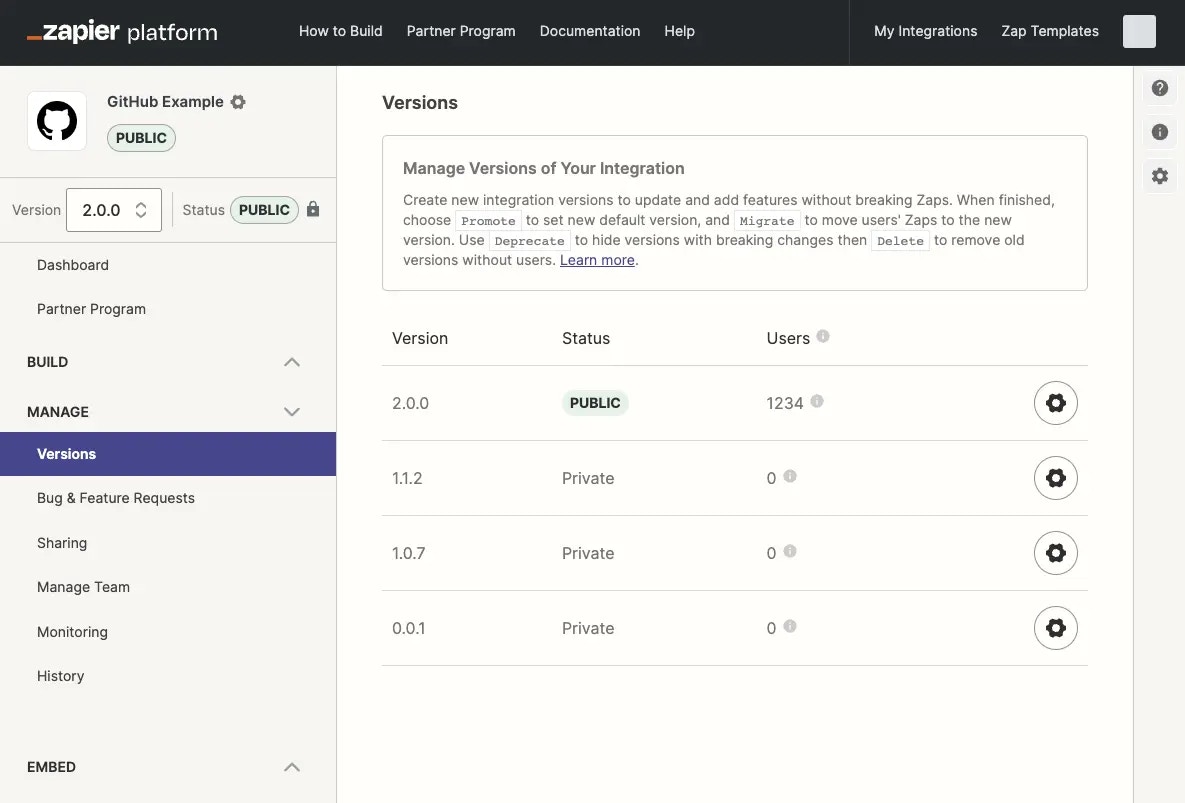
This page shows a list of all versions of the integration, along with status, number of active users and active Zaps on each. For public integrations will also show the changelogs input when a new version is promoted.
 Learn more on:
* [Work with labeled versions](/integrations/manage/labeled-versions)
* [Clone a version](/integrations/manage/clone)
* [Promote a version](/integrations/manage/promote)
* [Migrate users to a new version](/integrations/manage/migrate)
* [Deprecate or delete an version](/integrations/manage/deprecate)
## Managing versions in Platform CLI
Integrations created with the Platform CLI cannot be edited in the Platform UI, however you can view the available versions in the Platform UI. You can also run the [`zapier-platform versions`](https://github.com/zapier/zapier-platform/blob/master/packages/cli/docs/cli.md#versions) command (or deprecated `zapier versions`) to see the same information in your local terminal.
### What do I do if I am blocked from promoting or migrating integration versions?
Zapier may fix bugs or add new features to your integration and release these as part of a new integration version.
In the event that Zapier has made changes to an integration version you own, you will be unable to do the following until you update your local files by running `zapier pull`:
* push changes to the promoted version
* promote a new version
* migrate from one version to another version
Run `zapier pull` to update your local files with the latest version and remove these restrictions. Any destructive file changes will prompt you with a confirmation dialog before continuing.
## Who can view your versions?
For public integrations, which are searchable in the Zap editor or in the app directory, a user who selects your integration in the Zap Editor will be using the current public version by default.
For both [private and public integrations](/integrations/quickstart/private-vs-public-integrations), only team members added to the integration, or users with whom you have shared private versions with specifically, will see those versions as well.
### **How will my users identify a new version?**
As an integration admin, you will always see all the integration versions when connecting the app, but the end user should see only the published version.
For end users, the public version will be the one showing only the name of the integration, with no version number on it.
For private integrations, you can either invite the users to the new version via the users’ email addresses or use the sharing link to invite the users.
## Editing versions
To make sure that existing Zaps can continue to work consistently, the Developer Platform only allows you to edit versions that have a private status and have fewer than 5 users. Versions that are public or have more than 5 users will show a warning message prompting you to clone the version instead.
Learn more on:
* [Work with labeled versions](/integrations/manage/labeled-versions)
* [Clone a version](/integrations/manage/clone)
* [Promote a version](/integrations/manage/promote)
* [Migrate users to a new version](/integrations/manage/migrate)
* [Deprecate or delete an version](/integrations/manage/deprecate)
## Managing versions in Platform CLI
Integrations created with the Platform CLI cannot be edited in the Platform UI, however you can view the available versions in the Platform UI. You can also run the [`zapier-platform versions`](https://github.com/zapier/zapier-platform/blob/master/packages/cli/docs/cli.md#versions) command (or deprecated `zapier versions`) to see the same information in your local terminal.
### What do I do if I am blocked from promoting or migrating integration versions?
Zapier may fix bugs or add new features to your integration and release these as part of a new integration version.
In the event that Zapier has made changes to an integration version you own, you will be unable to do the following until you update your local files by running `zapier pull`:
* push changes to the promoted version
* promote a new version
* migrate from one version to another version
Run `zapier pull` to update your local files with the latest version and remove these restrictions. Any destructive file changes will prompt you with a confirmation dialog before continuing.
## Who can view your versions?
For public integrations, which are searchable in the Zap editor or in the app directory, a user who selects your integration in the Zap Editor will be using the current public version by default.
For both [private and public integrations](/integrations/quickstart/private-vs-public-integrations), only team members added to the integration, or users with whom you have shared private versions with specifically, will see those versions as well.
### **How will my users identify a new version?**
As an integration admin, you will always see all the integration versions when connecting the app, but the end user should see only the published version.
For end users, the public version will be the one showing only the name of the integration, with no version number on it.
For private integrations, you can either invite the users to the new version via the users’ email addresses or use the sharing link to invite the users.
## Editing versions
To make sure that existing Zaps can continue to work consistently, the Developer Platform only allows you to edit versions that have a private status and have fewer than 5 users. Versions that are public or have more than 5 users will show a warning message prompting you to clone the version instead.
 When making integration updates in newer versions, consider the potential impact on user migration and existing Zaps. Ensuring your API and app integration on Zapier remains backwards compatible is crucial to [avoid disruption to users](/integrations/manage/planning-changes).
### **Is there any way to bulk-update the API endpoints?**
While there's no automatic way to do this in the Platform UI, you might consider migrating your integration to the CLI, which can streamline the process of updating endpoints. You can find more information on how to export your integration to the Platform CLI in this guide: [Export Integration to Platform CLI](/integrations/manage/export-cli).
If updating the base URL is your main concern, you could use environment variables to host the base URL. You can reference it using `{{process.env.YOUR_KEY}}`, which might make future bulk updates easier.
***
[*Need help? Tell us about your problem and we'll connect you with the right resource or contact support.*](https://developer.zapier.com/contact)
When making integration updates in newer versions, consider the potential impact on user migration and existing Zaps. Ensuring your API and app integration on Zapier remains backwards compatible is crucial to [avoid disruption to users](/integrations/manage/planning-changes).
### **Is there any way to bulk-update the API endpoints?**
While there's no automatic way to do this in the Platform UI, you might consider migrating your integration to the CLI, which can streamline the process of updating endpoints. You can find more information on how to export your integration to the Platform CLI in this guide: [Export Integration to Platform CLI](/integrations/manage/export-cli).
If updating the base URL is your main concern, you could use environment variables to host the base URL. You can reference it using `{{process.env.YOUR_KEY}}`, which might make future bulk updates easier.
***
[*Need help? Tell us about your problem and we'll connect you with the right resource or contact support.*](https://developer.zapier.com/contact)