> ## Documentation Index
> Fetch the complete documentation index at: https://docs.zapier.com/llms.txt
> Use this file to discover all available pages before exploring further.
# Zapier Partner Sandbox
> Zapier Partner Sandbox is a complimentary account for members of your integration team, designed to support the ongoing development of your Zapier integration.
## What is Zapier Partner Sandbox?
Zapier Partner Sandbox (ZPS) is a complimentary Partner Program benefit that gives your integration team access to a workspace with premium Zap features at no cost. It's designed to support the ongoing development and maintenance of your Zapier integration.
ZPS includes:
* 50 Zaps (enabled concurrently)
* 2,000 free tasks per month
* Actions for specific Zapier apps do not count towards task usage per our standard [task usage policy](https://help.zapier.com/hc/en-us/articles/8496196837261-How-is-task-usage-measured-in-Zapier#h_01HKCHCC1X6535JW9WPWV2TV9Y)
* 5-minute update time for polling Zaps
* Multi-step Zaps
* 5 Premium Integrations
* Paths (3 paths wide by 3 paths deep)
ZPS does not include other premium features beyond what's listed above (eg static IP, pay-per-task billing). It also does not include premium features for Zapier Tables or Zapier Forms.
## Who is eligible?
ZPS is available to partners with a beta or public integration published on Zapier. Each Admin or Collaborator on a qualifying integration team can request access.
## How to apply
Visit the "Manage Team" page in the Developer Platform for your qualifying integration, and submit the form linked at the top of the page.
## How to access ZPS
When your request is approved, you'll continue to log into Zapier using your existing account. Click the icon in the top-right corner (1) to switch between your personal Zapier account (2) and the ZPS account (3). Your personal account shows the name set on your profile, while the ZPS account shows a "ZPS" avatar and "App XXX" (where "XXX" is your app ID).
 Zaps created in ZPS will have access to the premium features listed above. Your personal Zapier account will remain unchanged.
## FAQ
ZPS is intended for: - **Integration development:** The ongoing development
and maintenance of your Zapier integration. - **Sales enablement and
demos:** Building and showcasing workflows that highlight your integration's
capabilities with Zapier. These demos can be used in sales presentations or
marketing materials for your prospective clients. If you need Zapier for
commercial purposes beyond what's described above, you'll need to upgrade
your personal account to one of our [in-market
plans](https://zapier.com/pricing). We reserve the right to revoke ZPS
access if we suspect it's being used for commercial purposes outside of the
above.
Send us an email at [partners@zapier.com](mailto:partners@zapier.com) and we'll take care of it.
Not at this time. We are not issuing credits in lieu of ZPS access.
You can't manually add or remove members. Qualifying users can request
access by submitting the form linked at the top of the "Manage Team" page in
the Developer Platform for their qualifying integration.
Your access can be revoked under the following circumstances: - Your
integration reverts to private status - You are removed from the integration
team - We suspect ZPS is being used for commercial purposes outside of its
intended use Zapier reserves the right to modify, suspend, or discontinue
this benefit at any time, with or without notice.
No, ZPS is exclusively for partners with a beta or public integration.
ZPS accounts are owned and maintained by Zapier. They are created on a
per-integration basis.
Yes. [Learn
more](https://help.zapier.com/hc/en-us/articles/8496275081357-Move-Zaps-between-accounts).
No. Once your access to ZPS is removed, Zaps in that account cannot be
transferred to your personal account.
Yes. Visit the "Manage Team" page in the Developer Platform for each of
your qualifying integrations and submit the form linked at the top of the
page.
Yes. Visit the "Members" page in the [Admin
Center](https://zapier.com/app/admin/members).
That's the system owner of the ZPS account, it's a service account owned and
maintained by Zapier.
Yes. You can share Zaps and folders with other members who have access to
the same ZPS account. [Learn
more](https://help.zapier.com/hc/en-us/articles/39703938224781-Manage-assets-in-your-Zapier-account).
Zapier's standard task usage policies apply. [Learn
more](https://help.zapier.com/hc/en-us/articles/8496196837261-How-is-usage-measured-in-Zapier).
No. The 2,000/month task limit applies to the ZPS account as a whole, not
per user. If you have access to multiple ZPS accounts, each one has its own
separate task limit.
Not at this time. ZPS does not support metered billing.
You'll need to wait for the task usage to reset at the start of the next
billing cycle. When viewing your ZPS workspace, you can see how many days
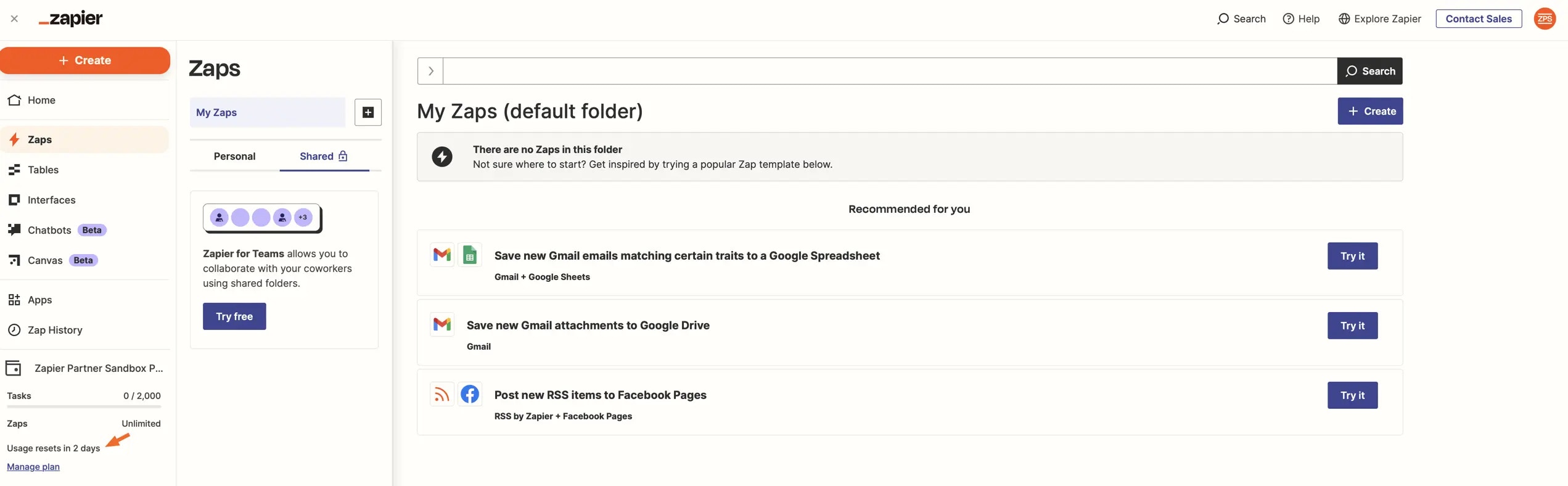
remain until the usage resets in the bottom-left corner.
Zaps created in ZPS will have access to the premium features listed above. Your personal Zapier account will remain unchanged.
## FAQ
ZPS is intended for: - **Integration development:** The ongoing development
and maintenance of your Zapier integration. - **Sales enablement and
demos:** Building and showcasing workflows that highlight your integration's
capabilities with Zapier. These demos can be used in sales presentations or
marketing materials for your prospective clients. If you need Zapier for
commercial purposes beyond what's described above, you'll need to upgrade
your personal account to one of our [in-market
plans](https://zapier.com/pricing). We reserve the right to revoke ZPS
access if we suspect it's being used for commercial purposes outside of the
above.
Send us an email at [partners@zapier.com](mailto:partners@zapier.com) and we'll take care of it.
Not at this time. We are not issuing credits in lieu of ZPS access.
You can't manually add or remove members. Qualifying users can request
access by submitting the form linked at the top of the "Manage Team" page in
the Developer Platform for their qualifying integration.
Your access can be revoked under the following circumstances: - Your
integration reverts to private status - You are removed from the integration
team - We suspect ZPS is being used for commercial purposes outside of its
intended use Zapier reserves the right to modify, suspend, or discontinue
this benefit at any time, with or without notice.
No, ZPS is exclusively for partners with a beta or public integration.
ZPS accounts are owned and maintained by Zapier. They are created on a
per-integration basis.
Yes. [Learn
more](https://help.zapier.com/hc/en-us/articles/8496275081357-Move-Zaps-between-accounts).
No. Once your access to ZPS is removed, Zaps in that account cannot be
transferred to your personal account.
Yes. Visit the "Manage Team" page in the Developer Platform for each of
your qualifying integrations and submit the form linked at the top of the
page.
Yes. Visit the "Members" page in the [Admin
Center](https://zapier.com/app/admin/members).
That's the system owner of the ZPS account, it's a service account owned and
maintained by Zapier.
Yes. You can share Zaps and folders with other members who have access to
the same ZPS account. [Learn
more](https://help.zapier.com/hc/en-us/articles/39703938224781-Manage-assets-in-your-Zapier-account).
Zapier's standard task usage policies apply. [Learn
more](https://help.zapier.com/hc/en-us/articles/8496196837261-How-is-usage-measured-in-Zapier).
No. The 2,000/month task limit applies to the ZPS account as a whole, not
per user. If you have access to multiple ZPS accounts, each one has its own
separate task limit.
Not at this time. ZPS does not support metered billing.
You'll need to wait for the task usage to reset at the start of the next
billing cycle. When viewing your ZPS workspace, you can see how many days
remain until the usage resets in the bottom-left corner.
 ## Terms of Use
Zapier Partner Sandbox is a benefit of our Developer Program which Zapier may, in its sole discretion, choose to make available to select partners. Because Zapier Partner Sandbox may be made available to you at no additional charge, you must agree to the following in order to use Zapier Partner Sandbox:
1. Your use of Zapier Partner Sandbox is subject to Zapier's [Terms of Use](https://zapier.com/legal/website-terms-of-use)
2. Zapier Partner Sandbox is a discretionary benefit intended to support (together, the “Purpose”): A. Integration Development. The ongoing development of your integration. B. Sales Enablement/Demonstrations. Demonstrations of specific illustrative workflows that highlight the capabilities and benefits of your integration with Zapier. These demonstrations can be used as part of sales presentations or marketing materials to your prospective clients, but as mentioned below in (6), production data should not be run through any such workflows.
3. Zapier Partner Sandbox may only be used for the Purpose and not for any other purposes, including other commercial ones. If you need to use Zapier outside of the Purpose, including as a customer to create/develop automation workflows in support of your business (other than the demonstration ones referenced above), you must upgrade your personal account to a currently offered plan, which you may view at: [http://zapier.com/pricing](http://zapier.com/pricing).
4. The Zapier Partner Sandbox workspace is owned and operated by Zapier, with access granted exclusively to qualifying users.
5. In the event that Zapier determines that an account is being used outside of the Purpose, Zapier reserves all rights, including being able to revoke access to Zapier Partner Sandbox.
6. Because Zapier Partner Sandbox may only be used for the Purpose, and the Zapier Partner Sandbox workspace is owned and operated by Zapier, you agree not to submit any production data through Zaps created within the Zapier Partner Sandbox workspace. You further agree that for program management purposes, the Zapier Partnerships team has access to Zaps created within the Zapier Partner Sandbox workspace and that you should not have the expectation of privacy that you would with a Zapier customer account.
7. Zapier Partner Sandbox is provided on an “as-is” basis. Zapier reserves the right to modify, suspend, or discontinue this benefit at any time, with or without notice to you. Zapier may also update these Zapier Partner Sandbox terms at any time, and you can always find the most current version in our platform documentation.
8. The provisions of Section 3(e) (Beta Release) are incorporated by reference. In particular, Zapier is not and will not be liable for any Zaps or data that run through the Zapier Partner Sandbox workspace. Users acknowledge and assume full responsibility for their Zaps and any associated data stored in the Zapier Partner Sandbox workspace.
9. Other members of Integration Partner's team may apply for access to the workspace (and will be asked to agree to these terms as well in order to maintain their access). Zapier reserves the right to audit membership to the workspace and remove members at Zapier’s discretion. Attempts to facilitate unauthorized access to the workspace may result in removal from ZPS.
***
*Need help? [Tell us about your problem](https://developer.zapier.com/contact) and we'll connect you with the right resource or contact support.*
## Terms of Use
Zapier Partner Sandbox is a benefit of our Developer Program which Zapier may, in its sole discretion, choose to make available to select partners. Because Zapier Partner Sandbox may be made available to you at no additional charge, you must agree to the following in order to use Zapier Partner Sandbox:
1. Your use of Zapier Partner Sandbox is subject to Zapier's [Terms of Use](https://zapier.com/legal/website-terms-of-use)
2. Zapier Partner Sandbox is a discretionary benefit intended to support (together, the “Purpose”): A. Integration Development. The ongoing development of your integration. B. Sales Enablement/Demonstrations. Demonstrations of specific illustrative workflows that highlight the capabilities and benefits of your integration with Zapier. These demonstrations can be used as part of sales presentations or marketing materials to your prospective clients, but as mentioned below in (6), production data should not be run through any such workflows.
3. Zapier Partner Sandbox may only be used for the Purpose and not for any other purposes, including other commercial ones. If you need to use Zapier outside of the Purpose, including as a customer to create/develop automation workflows in support of your business (other than the demonstration ones referenced above), you must upgrade your personal account to a currently offered plan, which you may view at: [http://zapier.com/pricing](http://zapier.com/pricing).
4. The Zapier Partner Sandbox workspace is owned and operated by Zapier, with access granted exclusively to qualifying users.
5. In the event that Zapier determines that an account is being used outside of the Purpose, Zapier reserves all rights, including being able to revoke access to Zapier Partner Sandbox.
6. Because Zapier Partner Sandbox may only be used for the Purpose, and the Zapier Partner Sandbox workspace is owned and operated by Zapier, you agree not to submit any production data through Zaps created within the Zapier Partner Sandbox workspace. You further agree that for program management purposes, the Zapier Partnerships team has access to Zaps created within the Zapier Partner Sandbox workspace and that you should not have the expectation of privacy that you would with a Zapier customer account.
7. Zapier Partner Sandbox is provided on an “as-is” basis. Zapier reserves the right to modify, suspend, or discontinue this benefit at any time, with or without notice to you. Zapier may also update these Zapier Partner Sandbox terms at any time, and you can always find the most current version in our platform documentation.
8. The provisions of Section 3(e) (Beta Release) are incorporated by reference. In particular, Zapier is not and will not be liable for any Zaps or data that run through the Zapier Partner Sandbox workspace. Users acknowledge and assume full responsibility for their Zaps and any associated data stored in the Zapier Partner Sandbox workspace.
9. Other members of Integration Partner's team may apply for access to the workspace (and will be asked to agree to these terms as well in order to maintain their access). Zapier reserves the right to audit membership to the workspace and remove members at Zapier’s discretion. Attempts to facilitate unauthorized access to the workspace may result in removal from ZPS.
***
*Need help? [Tell us about your problem](https://developer.zapier.com/contact) and we'll connect you with the right resource or contact support.*