> ## Documentation Index
> Fetch the complete documentation index at: https://docs.zapier.com/llms.txt
> Use this file to discover all available pages before exploring further.

# Scripting in converted legacy Web Builder integrations

> This guide provides instructions on editing and maintaining existing scripting methods for legacy web builder integrations that have been converted to either the Platform UI or Platform CLI.

## Introduction

> **Note**: This guide isn't for new integrations built in Platform CLI or Platform UI. For new integrations, use the [Platform UI](/integrations/quickstart/ui-tutorial) or the [Platform CLI](/integrations/reference/cli-docs) to build an integration in code.

If you are creating new functionality, check maintaining your converted integration for the best way forward.

Much like [Code Mode](/integrations/build/code-mode), Zapier's Web Builder Scripting was the previous way to allow you to directly manipulate the requests and responses that are exchanged between your app's API and Zapier. It continues to be supported using both the Platform UI and CLI.

## Access and edit scripting

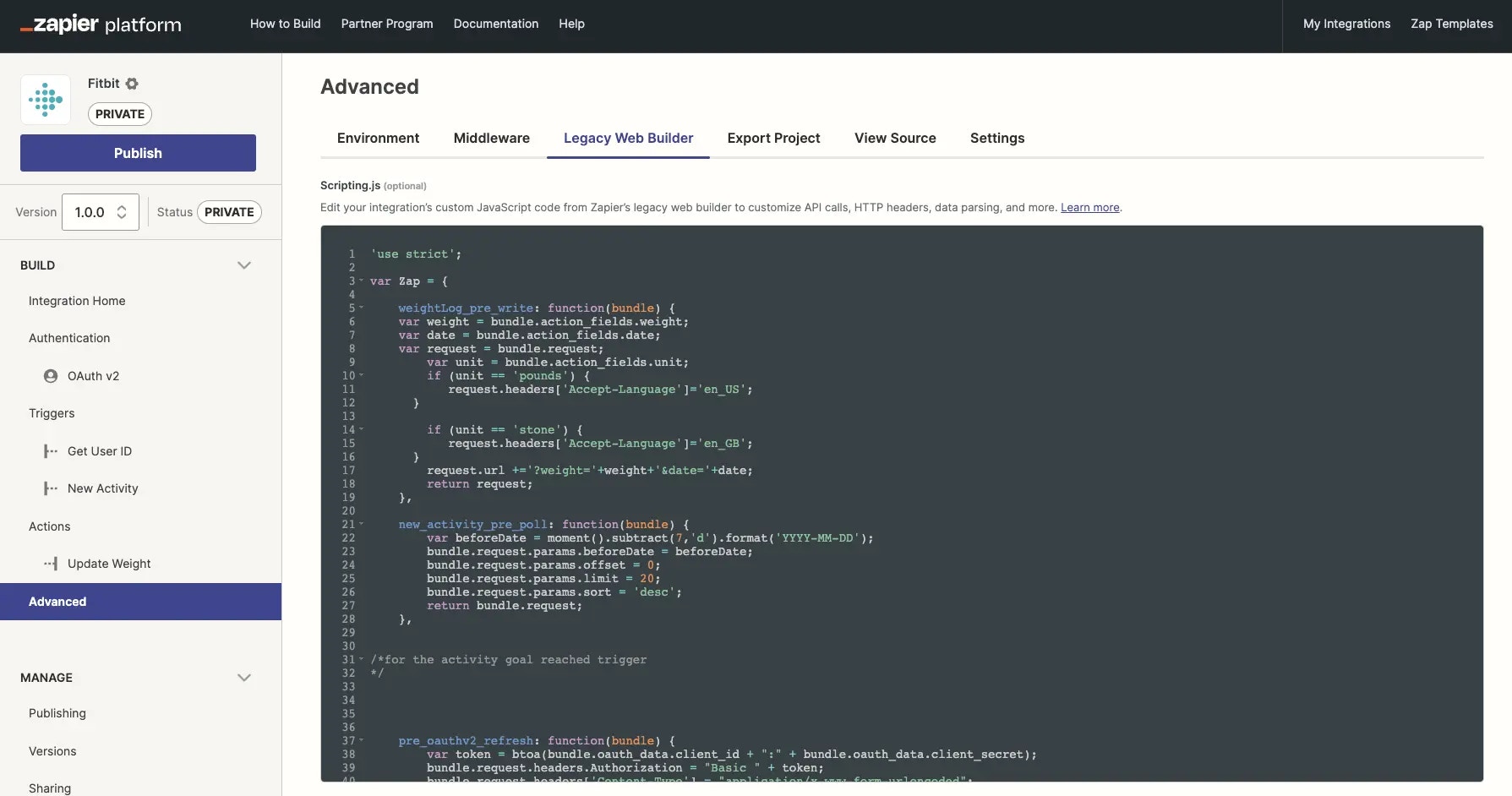
For integrations converted to Platform UI, you can access and edit these scripting methods by:

1. Log into the [Platform UI](https://zapier.com/app/developer).
2. Select your **integration**.
3. In the *Build* section in the left sidebar, click **Advanced**.
4. Click the **Legacy Web Builder** tab.
   <Frame>
     <img src="https://mintcdn.com/zapier-82f0e938/2ebL4bG5uJP5JVc0/images/e776d2b6349552e6347ca2757f4d06c1.webp?fit=max&auto=format&n=2ebL4bG5uJP5JVc0&q=85&s=0ba4ba24a05166212ade13b8e93c5973" width="1789" height="942" data-path="images/e776d2b6349552e6347ca2757f4d06c1.webp" />
   </Frame>

For integrations converted to Platform CLI, you can access and edit these scripting methods in the **Scripting.js** file. Its default location in the root directory of your CLI integration.

Every converted Web Builder integration will have a root module `Zap` defined in this Scripting.js file. By default, it is a blank JavaScript object. You add to it by specifying one or more of the [available methods](/integrations/reference/legacy-scripting#available-methods). Each method accepts a single variable called `bundle`, which is a JSON serializable object. The content of the bundle varies depending on the method you are implementing. The output of your method must also be a serializable object.

Below is an example of implementing a method to be a pass-through:

```javascript theme={null}
var Zap = {
  my_trigger_pre_poll: function (bundle) {
    // your code to modify bundle.request before sent
    return bundle.request;
  },
};
```

**Note**: All code written in the Scripting API must adhere to [strict mode](https://developer.mozilla.org/en-US/docs/Web/JavaScript/Reference/Strict_mode), which is a subset of Javascript. Any issues with your code that violate this will be shown in the Scripting API editor with red X marks in the sidebar. The code will run in the current Node.js used for the platform - you can track this [here](/integrations/news).

## Available methods

There are various methods for manipulating requests Zapier makes to your API. Below is the complete list of methods you can use in scripting. You may provide any, all, or none of these methods.

### Trigger methods

Many of the trigger methods follow a naming pattern of key + method name, where key is the key given to the trigger when you created it. Below, Zapier uses the convention of `KEY` as the placeholder for the trigger's actual key. For example, if you define a trigger with the key “my\_trigger” and want to implement the pre\_poll method, you would write a method called `my_trigger_pre_poll`.

### Polling

#### `KEY_pre_poll`

Runs before the request to the polling URL can modify the request before it is sent.

```javascript theme={null}
var Zap = {
KEY_pre_poll: function(bundle) {
/\*
Argument:
bundle.request.method: <string> # "GET"
bundle.request.url: <string>
bundle.request.auth: <array>
bundle.request.headers: <object>
bundle.request.params: <object>

     bundle.url_raw: <string>
     bundle.auth_fields: <object>
     bundle.trigger_fields: <object> # the fields provided by the user during setup
     bundle.zap: <object> # info about the zap
     bundle.meta: <object> # extra runtime information you can use

The response should be bundle.request or a similar object
\*/
return {
url: bundle.request.url,
method: bundle.request.method,
auth: bundle.request.auth,
headers: bundle.request.headers,
params: bundle.request.params,
data: bundle.request.data
}; // or return bundle.request;

}
}
```

See [bundle.request](/integrations/reference/legacy-scripting#prepared-request-via-bundlerequest).

> **Note**: This code is only valid for Zapier's Legacy Web Builder. It's mostly incompatible with Zapier's Platform CLI and Platform UI.

#### `KEY_post_poll`

It runs after Zapier receives a response from the polling URL. Can parse the response to format the data that enters Zapier or throw an [exception](/integrations/reference/legacy-scripting/#available-exceptions). Zapier will automatically throw for status codes 4xx and 5xx after the method runs.

```javascript theme={null}
var Zap = {
KEY_post_poll: function(bundle) {
/\*
Argument:
bundle.response.status_code: <integer>
bundle.response.headers: <object>
bundle.response.content: <str>

     bundle.request: <original object from KEY_pre_poll bundle>

     bundle.auth_fields: <object>
     bundle.trigger_fields: <object> # the fields provided by the user during setup
     bundle.zap: <object> # info about the zap
     bundle.meta: <object> # extra runtime information you can use

The response should be JSON serializable:
[
<object>, # with unique 'id' key
<object> # with unique 'id' key
]
\*/
return [];

}
}
```

> **Note**: This code is only valid for Zapier's Legacy Web Builder. It's mostly incompatible with Zapier's Platform CLI and Platform UI.

#### `KEY_poll`

It runs in place of pre\_poll and post\_poll. When you get a bundle, you are expected to make the request and return a list of results or throw an [exception](/integrations/reference/legacy-scripting/#available-exceptions). Zapier will **not** throw for status codes like 4xx and 5xx automatically!

```javascript theme={null}
var Zap = {
KEY_poll: function(bundle) {
/\*
Arguments:
bundle.request.method: <string> # "GET"
bundle.request.url: <string>
bundle.request.auth: <array>
bundle.request.headers: <object>
bundle.request.params: <object>

     bundle.url_raw: <string>
     bundle.auth_fields: <object>
     bundle.trigger_fields: <object> # the fields provided by the user during setup
     bundle.zap: <object> # info about the zap
     bundle.meta: <object> # extra runtime information you can use

     If you include a callback in the arguments, you can also perform async:
       callback(err, response)

You must make the request yourself. The response should be JSON serializable:
[
<object>, # with unique 'id' key
<object> # with unique 'id' key
]
\*/
return []; // or callback(null, [])

}
}
```

Learn more about [bundle.request](/integrations/reference/legacy-scripting#bundle-details).

> **Note**: This code is only valid for Zapier's Legacy Web Builder. It's mostly incompatible with Zapier's Platform CLI and Platform UI.

### Static and REST hooks

#### `KEY_catch_hook`

It runs when Zapier receive a static or subscription hook from your API and can parse the response to format the data that enters Zapier.

```javascript theme={null}
var Zap = {
KEY_catch_hook: function(bundle) {
/\*
Argument:
bundle.request.method: <str> # 'GET', 'POST', 'PATCH', 'PUT', 'DELETE'
bundle.request.headers: <object>
bundle.request.querystring: <str> # parse with \$.param(bundle.request.querystring)
bundle.request.content: <str>

     bundle.cleaned_request: <object> or <array> # our best guess at parsing
                                                 # and combining the request
                                                 # (including handling JSON & XML).
     bundle.auth_fields: <object>
     bundle.trigger_fields: <object> # the fields provided by the user during setup
     bundle.zap: <object> # info about the zap

The response should be either a JSON serializable array...
[
<object>,
<object>
]

...or a single object:
<object>
\*/
return []; // or {}

}
}
```

> **Note**: This code is only valid for Zapier's Legacy Web Builder. It's mostly incompatible with Zapier's Platform CLI and Platform UI.

### REST hooks and notification REST hooks

#### `pre_subscribe`

It runs before Zapier subscribes.

```javascript theme={null}
var Zap = {
pre_subscribe: function(bundle) {
/\*
Argument:
bundle.request.method: <string> # "POST"
bundle.request.url: <string>
bundle.request.auth: <array>
bundle.request.headers: <object>
bundle.request.params: <object>
bundle.request.data: <string>

     bundle.auth_fields: <object>
     bundle.trigger_fields: <object> # the data from trigger fields
     bundle.target_url: <string> # our unique Zapier url for this subscription
     bundle.event: <string> # the event being subscribed to
     bundle.zap: <object> # info about the zap

The response should be bundle.request or a similar object
\*/
return {
url: bundle.request.url,
method: bundle.request.method,
auth: bundle.request.auth,
headers: bundle.request.headers,
params: bundle.request.params,
data: bundle.request.data
}; // or return bundle.request;

}
}
```

Learn more in [bundle.request](/integrations/reference/legacy-scripting#bundle-details).

> **Note**: This code is only valid for Zapier's legacy web builder, and is mostly incompatible with Platform CLI and Platform UI).

#### `post_subscribe`

It runs after Zapier subscribes. It is exclusively for storing results that are needed later for pre\_unsubscribe.

```javascript theme={null}
var Zap = {
post_subscribe: function(bundle) {
/\*
Argument:
bundle.response.status_code: <integer>
bundle.response.headers: <object>
bundle.response.content: <str>

     bundle.request: <original object from pre_subscribe bundle>

     bundle.target_url: <string> # our unique Zapier url for this subscription
     bundle.event: <string> # the event (if any) that was subscribed to
     bundle.auth_fields: <object>
     bundle.trigger_fields: <object> # the data from trigger fields
     bundle.zap: <object> # info about the zap

The response should be JSON serializable, you'll have access to it as
subscribe_data in the unsubscribe call. Normally you'd store some state
about the hook resource you created, for example, some apps need
an ID to locate and unsubscribe from a hook.

\*/
return ""; // or {}, or []

}
}
```

> **Note**: This code is only valid for Zapier's Legacy Web Builder. It's mostly incompatible with Zapier's Platform CLI and Platform UI.

#### `pre_unsubscribe`

It runs before Zapier unsubscribes.

```javascript theme={null}
var Zap = {
pre_unsubscribe: function(bundle) {
/\*
Argument:
bundle.request.method: <string> # "POST"
bundle.request.url: <string>
bundle.request.auth: <array>
bundle.request.headers: <object>
bundle.request.params: <object>
bundle.request.data: <string>

     bundle.target_url: <string> # our unique Zapier url for this subscription
     bundle.subscribe_data <json> # any data you returned from post_subscribe
     bundle.event: <string> # the event (if any) being unsubscribed from
     bundle.auth_fields: <object>
     bundle.trigger_fields: <object> # the data from trigger fields
     bundle.zap: <object> # info about the zap

The response should be bundle.request or a similar object
\*/
return {
url: bundle.request.url,
method: bundle.request.method,
auth: bundle.request.auth,
headers: bundle.request.headers,
params: bundle.request.params,
data: bundle.request.data
}; // or return bundle.request;

}
}
```

Learn more in [bundle.request](/integrations/reference/legacy-scripting#bundle-details).

> **Note**: This code is only valid for Zapier's Legacy Web Builder. It's mostly incompatible with Zapier's Platform CLI and Platform UI.

### Notification REST hooks

#### `KEY_pre_hook`

It runs before the consuming call.

```javascript theme={null}
var Zap = {
KEY_pre_hook: function(bundle) {
/\*
Argument:
bundle.request.method: <string>
bundle.request.headers: <object>
bundle.request.querystring: <string> # parse using \$.param(bundle.request.querystring)
bundle.request.content: <string>

     bundle.auth_fields: <object>
     bundle.trigger_fields: <object> # the fields provided by the user during setup
     bundle.zap: <object> # info about the zap

The response should be bundle.request or a similar object
\*/
return {
url: bundle.request.url,
method: bundle.request.method,
auth: bundle.request.auth,
headers: bundle.request.headers,
params: bundle.request.params,
data: bundle.request.data
}; // or return bundle.request;

}
}
```

Learn more in [bundle.request](/integrations/reference/legacy-scripting#bundle-details).

> **Note**: This code is only valid for Zapier's Legacy Web Builder. It's mostly incompatible with Zapier's Platform CLI and Platform UI.

#### `KEY_post_hook`

It runs after Zapier receive a response from the consuming call and can parse the response to format the data that enters Zapier or throw an [exception](/integrations/reference/legacy-scripting/#available-exceptions). Zapier will automatically throw for status codes 4xx and 5xx after the method runs.

```javascript theme={null}
var Zap = {
KEY_post_hook: function(bundle) {
/\*
Argument:
bundle.response.status_code: <integer>
bundle.response.headers: <object>
bundle.response.content: <str>

     bundle.request: <original object from KEY_pre_hook bundle>

     bundle.auth_fields: <object>
     bundle.trigger_fields: <object> # the fields provided by the user during setup
     bundle.zap: <object> # info about the zap

The response should be JSON serializable:
[
<object>,
<object>
]
\*/
return [];

}
}
```

> **Note**: This code is only valid for Zapier's Legacy Web Builder. It's mostly incompatible with Zapier's Platform CLI and Platform UI.

### Available to all triggers

#### `KEY_pre_custom_trigger_fields`

It runs before the request to the custom field URL (if provided).

> Note: Although this method does not end with `result_fields` like there are for [actions](#key_pre_custom_action_fields) and [searches](#key_pre_custom_search_fields) it does in fact define custom fields and labels for the **result** (sample) of the trigger and not for its **Edit Template** step in the Zap editor.

```javascript theme={null}
var Zap = {
KEY_pre_custom_trigger_fields: function(bundle) {
/\*
Argument:
bundle.request.method: <string> # "GET"
bundle.request.url: <string>
bundle.request.auth: <array>
bundle.request.headers: <object>
bundle.request.params: <object>

     bundle.url_raw: <string>
     bundle.auth_fields: <object>
     bundle.trigger_fields: <object> # the fields provided by the user during setup
     bundle.zap: <object> # info about the zap

The response should be bundle.request or a similar object
\*/
return {
url: bundle.request.url,
method: bundle.request.method,
auth: bundle.request.auth,
headers: bundle.request.headers,
params: bundle.request.params,
data: bundle.request.data
}; // or return bundle.request;

}
}
```

Learn more in [bundle.request](/integrations/reference/legacy-scripting#bundle-details).

> **Note**: This code is only valid for Zapier's Legacy Web Builder. It's mostly incompatible with Zapier's Platform CLI and Platform UI.

#### `KEY_post_custom_trigger_fields`

Runs after the response for custom fields is received. Can parse the response to format the data that enters Zapier or throw an [exception](/integrations/reference/legacy-scripting/#available-exceptions). Zapier will throw for status codes 4xx and 5xx after the method runs automatically.

> Note: Although this method does not end with `result_fields` like there are for [actions](#key_pre_custom_action_fields) and [searches](#key_pre_custom_search_fields) it does in fact define custom fields and labels for the **result** (sample) of the trigger and not for its **Edit Template** step in the Zap Editor.

```javascript theme={null}
var Zap = {
KEY_post_custom_trigger_fields: function(bundle) {
/\*
Argument:
bundle.response.status_code: <integer>
bundle.response.headers: <object>
bundle.response.content: <str>

     bundle.request: <original object from KEY_pre_hook bundle>

     bundle.url_raw: <string>
     bundle.auth_fields: <object>
     bundle.trigger_fields: <object> # the fields provided by the user during setup
     bundle.zap: <object> # info about the zap

The response should be JSON serializable:
[

# `type` can be unicode, int, bool

# `key` should be unique and match a key found in the JSON representation Zapier receive from your API

# `label` is a human-readable name Zapier can give this field in the UI

{'type': <str>, 'key': <str>, 'label': <str>}
]
\*/
return [];

}
}
```

> **Note**: This code is only valid for Zapier's Legacy Web Builder. It's mostly incompatible with Zapier's Platform CLI and Platform UI.

## Action Methods

Action methods follow a naming pattern of key + method name, where key is the key given to the action when you created it. Below, Zapier use the convention of `KEY` as the placeholder for the action's actual key. For example, if you define an action with the key “my\_action” and you want to implement the pre\_write method, you would write a method called `my_action_pre_write`.

### `KEY_pre_write`

Runs before the request to the action URL, can modify the request before it is sent.

```javascript theme={null}
var Zap = {
KEY_pre_write: function(bundle) {
/\*
Argument:
bundle.request.method: <string> # "POST"
bundle.request.url: <string>
bundle.request.auth: <array>
bundle.request.headers: <object>
bundle.request.params: <object>
bundle.request.data: <string>
bundle.request.files: <object>

     bundle.url_raw: <string>
     bundle.auth_fields: <object>
     bundle.action_fields: <object> # pruned and replaced users' fields
     bundle.action_fields_full: <object> # all replaced users' fields
     bundle.action_fields_raw: <object> # before Zapier replace users' variables
     bundle.zap: <object> # info about the zap

The response should be bundle.request or a similar object
\*/
return {
url: bundle.request.url,
method: bundle.request.method,
auth: bundle.request.auth,
headers: bundle.request.headers,
params: bundle.request.params,
data: bundle.request.data
}; // or return bundle.request;

}
}
```

Learn more about [bundle.request](/integrations/reference/legacy-scripting#bundle-details).

> **Note**: This code is only valid for Zapier's Legacy Web Builder. It's mostly incompatible with Zapier's Platform CLI and Platform UI.

### `KEY_post_write`

Runs after Zapier receive a response from the action endpoint, can modify the response or throw an [exception](/integrations/reference/legacy-scripting/#available-exceptions). Zapier will throw for status codes 4xx and 5xx after the method runs automatically. *Note:* If the action occurs as part of a search-or-create Zap, the output of this method is *not* exactly what the user sees. In that case, the action will be followed up with a request to fetch the written record, and Zapier will present the user with the output from that follow-up request. If you need to modify the returned data in that scenario, use `_post_read_resource`.

```javascript theme={null}
var Zap = {
KEY_post_write: function(bundle) {
/\*
Argument:
bundle.response.status_code: <integer>
bundle.response.headers: <object>
bundle.response.content: <str>

     bundle.request: <original object from KEY_pre_write bundle>

     bundle.auth_fields: <object>
     bundle.action_fields: <object> # pruned and replaced users' fields
     bundle.action_fields_full: <object> # all replaced users' fields
     bundle.action_fields_raw: <object> # before Zapier replace users' variables
     bundle.zap: <object> # info about the zap

The response will be used to give the user more fields to use
in the next step of the Zap. Please return a JSON serializable object.

return <object>;
\*/

}
}
```

> **Note**: This code is only valid for Zapier's Legacy Web Builder. It's mostly incompatible with Zapier's Platform CLI and Platform UI.

### `KEY_write`

Runs in place of pre*write and post\_write. You get a bundle and are expected to make the request and return the appropriate response or throw an [exception](/integrations/reference/legacy-scripting/#available-exceptions). Zapier will **not** throw for status codes like 4xx and 5xx automatically! \_Note:* If the action occurs as part of a search-or-create Zap, the output of this method is *not* exactly what the user sees. In that case, the action will be followed up with a request to fetch the written record, and Zapier will present the user with the output from that follow-up request. If you need to modify the returned data in that scenario, use `_post_read_resource`.

```javascript theme={null}
var Zap = {
KEY_write: function(bundle, [callback]) {
/\*
Arguments:

     bundle.request.method: <string> # "POST"
     bundle.request.url: <string>
     bundle.request.auth: <array>
     bundle.request.headers: <object>
     bundle.request.params: <object>
     bundle.request.data: <string>
     bundle.request.files: <object>

     bundle.url_raw: <string>
     bundle.auth_fields: <object>
     bundle.action_fields: <object> # pruned and replaced users' fields
     bundle.action_fields_full: <object> # all replaced users' fields
     bundle.action_fields_raw: <object> # before Zapier replace users' variables
     bundle.zap: <object> # info about the zap

If you include a callback in the arguments, you can also perform async:
callback(err, response)

The response will be used to give the user more fields to use
in the next step of the Zap. Please return a JSON serializable object.

return <object>;
\*/
// your code to modify bundle.request before sent
var response = z.request(bundle.request);
return z.JSON.parse(response.content);

}
}
```

Learn more about [bundle.request](/integrations/reference/legacy-scripting#bundle-details).

> **Note**: This code is only valid for Zapier's Legacy Web Builder. It's mostly incompatible with Zapier's Platform CLI and Platform UI.

### `KEY_pre_custom_action_fields`

Runs before the request to the custom field URL (if provided).

```javascript theme={null}
var Zap = {
KEY_pre_custom_action_fields: function(bundle) {
/\*
Argument:
bundle.request.method: <string> # "GET"
bundle.request.url: <string>
bundle.request.auth: <array>
bundle.request.headers: <object>
bundle.request.params: <object>

     bundle.url_raw: <string>
     bundle.auth_fields: <object>
     bundle.action_fields: <object> # the raw action fields (if applicable)
     bundle.zap: <object> # info about the zap (details below)

The response should be bundle.request or a similar object
\*/
return {
url: bundle.request.url,
method: bundle.request.method,
auth: bundle.request.auth,
headers: bundle.request.headers,
params: bundle.request.params,
data: bundle.request.data
}; // or return bundle.request;

}
}
```

Learn more about [bundle.request](/integrations/reference/legacy-scripting#bundle-details).

> **Note**: This code is only valid for Zapier's Legacy Web Builder. It's mostly incompatible with Zapier's Platform CLI and Platform UI.

### `KEY_post_custom_action_fields`

Runs after the response for custom fields is received. Can parse the response to format the data that enters Zapier or throw an [exception](/integrations/reference/legacy-scripting/#available-exceptions). Zapier will throw for status codes 4xx and 5xx after the method runs automatically.

```javascript theme={null}
var Zap = {
KEY_post_custom_action_fields: function(bundle) {
/\*
Argument:
bundle.response.status_code: <integer>
bundle.response.headers: <object>
bundle.response.content: <str>

     bundle.request: <original object from KEY_pre_custom_action_fields bundle>

     bundle.url_raw: <string>
     bundle.auth_fields: <object>
     bundle.action_fields: <object> # the fields provided by the user during setup
     bundle.zap: <object> # info about the zap

The response should be JSON serializable:
[

# `type` can be unicode, int, bool

# `key` should be unique, and will be the "key" in "key: value" in the POST

# `help_text` and `label` are also available

{'type': <str>, 'key': <str>}
]
\*/
return []; // return fields in the order you want them displayed in the UI. They'll be appended after the regular action fields

}
}
```

> **Note**: This code is only valid for Zapier's Legacy Web Builder. It's mostly incompatible with Zapier's Platform CLI and Platform UI.

### `KEY_custom_action_fields`

Allows you to completely take over the handling of retrieving and processing field metadata for custom action fields. Pre- and Post- methods will not be called if you've implemented this method. This method will be passed a bundle and must return an array of custom field metadata. If a request to an endpoint fails, you will need to throw an exception - the platform will not do it automatically.

```javascript theme={null}
var Zap = {KEY_custom_action_fields: function(bundle) {
/\*
Argument:
bundle.request.method: <string> # GET
bundle.request.url: <string> # ""
bundle.request.auth: <array>
bundle.request.headers: <object>
bundle.request.params: <object>

       bundle.url_raw: <string> # ""
       bundle.auth_fields: <object>
       bundle.action_fields: <object> # the raw action fields (if applicable)
       bundle.zap: <object> # info about the zap

The response should be JSON serializable:
[

           # "type": "unicode",
           # "key": "json_key", // the field "name", will be used to construct a label if none is provided
           # "required": false, // whether this field must be filled out. defaults to true
           # "label": "Pretty Label", // optional
           # "help_text": "Helps to explain things to users.", // optional
           # "choices": { // optional
               "raw": "label"
           } // can also be a flat array if raw is the label
           {'type': <str>, 'key': <str>}

        ]
      */
      return []; // return fields in the order you want them displayed in the UI. They'll be appended after the regular action fields

}

}
```

Learn more about [bundle.request](/integrations/reference/legacy-scripting#bundle-details).

> **Note**: This code is only valid for Zapier's Legacy Web Builder. It's mostly incompatible with Zapier's Platform CLI and Platform UI.

### `KEY_custom_action_result_fields`

It allows you to completely take over the handling of retrieving and processing field metadata for custom fields when users are working with *results* of your action in the Zap editor. Pre- and Post- methods will not be called if you've implemented this method. This method will be passed a bundle and must return an array of custom field metadata. If a request to an endpoint fails, you will need to throw an exception - the platform will not do it automatically.

```javascript theme={null}
var Zap = {KEY_custom_action_result_fields: function(bundle) {
/\*
Argument:
bundle.response.status_code: <integer>
bundle.response.headers: <object>
bundle.response.content: <str>

       bundle.request: <original object from KEY_pre_custom_action_fields bundle>

       bundle.url_raw: <string>
       bundle.auth_fields: <object>
       bundle.action_fields: <object> # the raw action fields (if applicable)
       bundle.zap: <object> # info about the zap

The response should be JSON serializable:
[

# `type` can be unicode, int, bool

# `key` should be unique, and will be the "key" in "key: value" in the response content

# `label` is also available

{'type': <str>, 'key': <str>, 'label': <str>}
]
\*/
return []; // return fields in the order you want them displayed in the UI. They'll be appended after the regular action fields
}

}
```

> **Note**: This code is only valid for Zapier's Legacy Web Builder. It's mostly incompatible with Zapier's Platform CLI and Platform UI.

### `KEY_pre_custom_action_result_fields`

Runs before the request to the custom response fields URL (if provided).

```javascript theme={null}
var Zap = {
KEY_pre_custom_action_result_fields: function(bundle) {
/\*
Argument:
bundle.request.method: <string> # "GET"
bundle.request.url: <string>
bundle.request.auth: <array>
bundle.request.headers: <object>
bundle.request.params: <object>

       bundle.url_raw: <string>
       bundle.auth_fields: <object>
       bundle.action_fields: <object> # the raw action fields (if applicable)
       bundle.zap: <object> # info about the zap (details below)

The response should be bundle.request or a similar object
\*/
return {
url: bundle.request.url,
method: bundle.request.method,
auth: bundle.request.auth,
headers: bundle.request.headers,
params: bundle.request.params,
data: bundle.request.data
}; // or return bundle.request;

}
}
```

Learn more about [bundle.request](/integrations/reference/legacy-scripting#bundle-details).

> **Note**: This code is only valid for Zapier's Legacy Web Builder. It's mostly incompatible with Zapier's Platform CLI and Platform UI.

### `KEY_post_custom_action_result_fields`

Runs after the response for custom response fields is received. Can parse the response to format the data that enters Zapier or throw an exception [exception](/integrations/reference/legacy-scripting/#available-exceptions). Zapier will throw for status codes 4xx and 5xx after the method runs automatically.

```javascript theme={null}
var Zap = {
KEY_post_custom_action_result_fields: function(bundle) {
/\*
Argument:
bundle.response.status_code: <integer>
bundle.response.headers: <object>
bundle.response.content: <str>

       bundle.request: <original object from KEY_pre_custom_action_fields bundle>

       bundle.url_raw: <string>
       bundle.auth_fields: <object>
       bundle.action_fields: <object> # the raw action fields (if applicable)
       bundle.zap: <object> # info about the zap

The response should be JSON serializable:
[

# `type` can be unicode, int, bool

# `key` should be unique, and will be the "key" in "key: value" in the response content

# `label` is also available

{'type': <str>, 'key': <str>, 'label': <str>}
]
\*/
return []; // return fields in the order you want them displayed in the UI. They'll be appended after the regular action fields
}

}
```

## Search Methods

Search methods follow a naming pattern of key + method name, where key is the key given to the search when you created it. Below, Zapier use the convention of `KEY` as the placeholder for the search's actual key. For example, if you define an search with the key “my\_search” and you want to implement the pre\_search method, you would write a method called `my_search_pre_search`.

### `KEY_pre_search`

Runs before the request to the search URL, can modify the request before it is sent.

```javascript theme={null}
var Zap = {
KEY_pre_search: function(bundle) {
/\*
Argument:
bundle.request.method: <string> # "GET"
bundle.request.url: <string>
bundle.request.auth: <array>
bundle.request.headers: <object>
bundle.request.params: <object>

     bundle.url_raw: <string>
     bundle.auth_fields: <object>
     bundle.search_fields: <object> # pruned and replaced users' fields
     bundle.zap: <object> # info about the zap

The response should be bundle.request or a similar object
\*/
return {
url: bundle.request.url,
method: bundle.request.method,
auth: bundle.request.auth,
headers: bundle.request.headers,
params: bundle.request.params,
data: bundle.request.data
}; // or return bundle.request;

}
}
```

Learn more about [bundle.request](/integrations/reference/legacy-scripting#bundle-details).

> **Note**: This code is only valid for Zapier's Legacy Web Builder. It's mostly incompatible with Zapier's Platform CLI and Platform UI.

### `KEY_post_search`

Runs after Zapier receive a response from the search endpoint, can modify the response or throw an [exception](/integrations/reference/legacy-scripting/#available-exceptions). Zapier will throw for status codes 4xx and 5xx after the method runs automatically. *Note:* The output of the method is *not* exactly what the user sees. Zapier follow searches up with requests for the individual resources and present the user with the output from those follow-up requests. If you wish to modify the number (or ordering) of the search results, use `_post_search`. If you wish to modify the data the user sees, use `_post_read_resource`. One other thing to be aware of is that searches must return an *array* of objects, so if your search endpoint returns a single object, you can use this method to wrap your object in an array.

> Note we'll only use the first object in the array for now, so if you can add optional fields to help narrow the search down, it's a great idea.

```javascript theme={null}
var Zap = {
KEY_post_search: function(bundle) {
/\*
Argument:
bundle.response.status_code: <integer>
bundle.response.headers: <object>
bundle.response.content: <str>

     bundle.request: <original object from KEY_pre_search bundle>

     bundle.auth_fields: <object>
     bundle.search_fields: <object> # pruned and replaced users' fields
     bundle.zap: <object> # info about the zap

The response is an array, which may contain zero or more matches.

If multiple matches are found, sort the array with the "best match" first.

Use the available exceptions to vary errors.
_/
return [ ]; // no matches
/_ --- or --- _/
return [ { ... } ]; // return a single match
/_ --- or --- \*/
return [ { ... }, { ... }, ... ]; // several matches, with "best match" first

}
}
```

> **Note**: This code is only valid for Zapier's Legacy Web Builder. It's mostly incompatible with Zapier's Platform CLI and Platform UI.

### `KEY_search`

Runs in place of pre\_search and post\_search. You get a bundle and are expected to make the request and return the appropriate response or throw an [exception](/integrations/reference/legacy-scripting/#available-exceptions). Zapier will **not** throw for status codes like 4xx and 5xx automatically! Note: The output of the method is not exactly what the user sees. Zapier follow searches up with requests for the individual resources and present the user with the output from those follow-up requests. If you wish to modify the number (or ordering) of the search results, you can do that inside `_search`. If you wish to modify the data the user sees, use `_post_read_resource`.

> Note we'll only use the first object in the array for now, so if you can add optional fields to help narrow the search down, it's a great idea.

```javascript theme={null}
var Zap = {
KEY_search: function(bundle, [callback]) {
/\*
Arguments:

     bundle.request.method: <string> # "GET"
     bundle.request.url: <string>
     bundle.request.auth: <array>
     bundle.request.headers: <object>
     bundle.request.params: <object>

     bundle.url_raw: <string>
     bundle.auth_fields: <object>
     bundle.search_fields: <object> # pruned and replaced users' fields

     bundle.zap: <object> # info about the zap

If you include a callback in the arguments, you can also perform async:
callback(err, response)

The response will be used to give the user more fields to use
in the next step of the Zap. Please return a JSON serializable object.
\*/

return {...}; // or callback(null, {...})

}
}
```

Learn more about [bundle.request](/integrations/reference/legacy-scripting#bundle-details).

> **Note**: This code is only valid for Zapier's Legacy Web Builder. It's mostly incompatible with Zapier's Platform CLI and Platform UI.

### `KEY_pre_custom_search_fields`

Runs before the request to the custom field URL (if provided).

```javascript theme={null}
var Zap = {
KEY_pre_custom_search_fields: function(bundle) {
/\*
Argument:
bundle.request.method: <string> # "GET"
bundle.request.url: <string>
bundle.request.auth: <array>
bundle.request.headers: <object>
bundle.request.params: <object>

     bundle.url_raw: <string>
     bundle.auth_fields: <object>
     bundle.search_fields: <object> # the raw search fields (if applicable)

     bundle.zap: <object> # info about the zap (details below)

The response should be bundle.request or a similar object
\*/
return {
url: bundle.request.url,
method: bundle.request.method,
auth: bundle.request.auth,
headers: bundle.request.headers,
params: bundle.request.params,
data: bundle.request.data
}; // or return bundle.request;

}
}
```

Learn more about [bundle.request](/integrations/reference/legacy-scripting#bundle-details).

> **Note**: This code is only valid for Zapier's Legacy Web Builder. It's mostly incompatible with Zapier's Platform CLI and Platform UI.

### `KEY_post_custom_search_fields`

Runs after the response for custom fields is received. Can parse the response to format the data that enters Zapier or throw an [exception](/integrations/reference/legacy-scripting/#available-exceptions). Zapier will throw for status codes 4xx and 5xx after the method runs automatically.

```javascript theme={null}
var Zap = {
KEY_post_custom_search_fields: function(bundle) {
/\*
Argument:
bundle.response.status_code: <integer>
bundle.response.headers: <object>
bundle.response.content: <str>

     bundle.request: <original object from KEY_pre_custom_search_fields bundle>

     bundle.url_raw: <string>
     bundle.auth_fields: <object>
     bundle.zap: <object> # info about the zap

The response should be JSON serializable:
[

# `type` can be unicode, int, bool

# `key` should be unique, and will be the "key" in "key: value" in the POST

# `help_text` and `label` are also available

{'type': <str>, 'key': <str>}
]
\*/
return []; // return fields in the order you want them displayed in the UI. They'll be appended after the regular search fields

}
}
```

> **Note**: This code is only valid for Zapier's Legacy Web Builder. It's mostly incompatible with Zapier's Platform CLI and Platform UI.

### `KEY_custom_search_fields`

Allows you to completely take over the handling of retrieving and processing field metadata for custom search action fields. Pre- and Post- methods will not be called if you've implemented this method. This method will be passed a bundle and must return an array of custom field metadata. If a request to an endpoint fails, you will need to throw an exception - the platform will not do it automatically.

```javascript theme={null}
var Zap = {KEY_custom_search_fields: function(bundle)
{
/\*
Argument:
bundle.request.method: <string> # "GET"
bundle.request.url: <string>
bundle.request.auth: <array>
bundle.request.headers: <object>
bundle.request.params: <object>

     bundle.auth_fields: <object>
     bundle.zap: <object> # info about the zap

The response should be JSON serializable:
[

# `type` can be unicode, int, bool

# `key` should be unique, and will be the "key" in "key: value" in the POST

# `help_text` and `label` are also available

{'type': <str>, 'key': <str>}
]
\*/

return []; // return fields in the order you want them displayed in the UI. They'll be appended after the regular search fields
}
}
```

Learn more about [bundle.request](/integrations/reference/legacy-scripting#bundle-details).

> **Note**: This code is only valid for Zapier's Legacy Web Builder. It's mostly incompatible with Zapier's Platform CLI and Platform UI.

### `KEY_custom_search_result_fields`

Allows you to completely take over the handling of retrieving and processing field metadata for custom fields when users are working with *results* of your search action in the Zap editor. Pre- and Post- methods will not be called if you've implemented this method. This method will be passed a bundle and must return an array of custom field metadata. If a request to an endpoint fails, you will need to throw an exception - the platform will not do it automatically.

```javascript theme={null}
var Zap = {
KEY_custom_search_result_fields: function(bundle) {
/\*
Argument:
bundle.response.status_code: <integer>
bundle.response.headers: <object>
bundle.response.content: <str>

           bundle.request: <original object from KEY_pre_custom_search_fields bundle>

           bundle.url_raw: <string>
           bundle.auth_fields: <object>
           bundle.zap: <object> # info about the zap
      The response should be JSON serializable:
          [
              # `type` can be unicode, int, bool
              # `key` should be unique, and will be the "key" in "key: value" in the response content
              # `label` should be provided
              {'type': <str>, 'key': <str>, 'label': <str>}
          ]
       */
       return []; // return fields in the order you want them displayed in the UI. They'll be appended after the regular search fields

}

}
```

> **Note**: This code is only valid for Zapier's legacy web builder, and is mostly incompatible with Platform CLI and Platform UI).

### `KEY_pre_custom_search_result_fields`

Runs before the request to the custom search result field URL (if provided)

```javascript theme={null}
var Zap = {
KEY_pre_custom_search_result_fields: function(bundle) {
/\*
Argument:
bundle.request.method: <string> # "GET"
bundle.request.url: <string>
bundle.request.auth: <array>
bundle.request.headers: <object>
bundle.request.params: <object>

       bundle.url_raw: <string>
       bundle.auth_fields: <object>
       bundle.search_fields: <object> # the raw search fields (if applicable)
       bundle.zap: <object> # info about the zap (details below)

The response should be bundle.request or a similar object
\*/
return {
url: bundle.request.url,
method: bundle.request.method,
auth: bundle.request.auth,
headers: bundle.request.headers,
params: bundle.request.params,
data: bundle.request.data
}; // or return bundle.request;
}

}
```

Learn more about [bundle.request](/integrations/reference/legacy-scripting#bundle-details).

> **Note**: This code is only valid for Zapier's Legacy Web Builder. It's mostly incompatible with Zapier's Platform CLI and Platform UI.

### `KEY_post_custom_result_search_fields`

Runs after the response for custom search result fields is received. Can parse the response to format the data that enters Zapier or throw an [exception](/integrations/reference/legacy-scripting/#available-exceptions). Zapier will throw for status codes 4xx and 5xx after the method runs automatically.

```javascript theme={null}
var Zap = {
KEY_post_custom_search_result_fields: function(bundle) {
/\*
Argument:
bundle.response.status_code: <integer>
bundle.response.headers: <object>
bundle.response.content: <str>

       bundle.request: <original object from KEY_pre_custom_search_fields bundle>

       bundle.url_raw: <string>
       bundle.auth_fields: <object>
       bundle.zap: <object> # info about the zap

The response should be JSON serializable:
[

# `type` can be unicode, int, bool

# `key` should be unique, and will be the "key" in "key: value" in the response content

# `label` should be provided

{'type': <str>, 'key': <str>, 'label': <str>}
]
\*/
return []; // return fields in the order you want them displayed in the UI. They'll be appended after the regular search fields
}

}
```

> **Note**: This code is only valid for Zapier's Legacy Web Builder. It's mostly incompatible with Zapier's Platform CLI and Platform UI.

### `KEY_pre_read_resource`

Runs before Zapier do the request to read an individual resource. Use to modify the request before it is sent.

```javascript theme={null}
var Zap = {
KEY_pre_read_resource: function(bundle) {
/\*
Argument:
bundle.request.method: <string> # "GET"
bundle.request.url: <string>
bundle.request.auth: <array>
bundle.request.headers: <object>
bundle.request.params: <object>

     bundle.url_raw: <string>
     bundle.auth_fields: <object>
     bundle.read_fields: <object> # the response data from the search (or the write in case of search-or-create)
     bundle.read_context: <object> # the original params passed into the search (or the write in case of search-or-write)
     bundle.zap: <object> # info about the zap (details below)

The response should be bundle.request or a similar object
\*/
return {
url: bundle.request.url,
method: bundle.request.method,
auth: bundle.request.auth,
headers: bundle.request.headers,
params: bundle.request.params,
data: bundle.request.data
}; // or return bundle.request;

}
}
```

Learn more about [bundle.request](/integrations/reference/legacy-scripting#bundle-details).

> **Note**: This code is only valid for Zapier's Legacy Web Builder. It's mostly incompatible with Zapier's Platform CLI and Platform UI.

### `KEY_post_read_resource`

Runs after Zapier do the request to read an individual resource. Use to modify the data returned or throw an [exception](/integrations/reference/legacy-scripting/#available-exceptions). Zapier will throw for status codes 4xx and 5xx after the method runs automatically.

```javascript theme={null}
var Zap = {
KEY_post_read_resource: function(bundle) {
/\*
Argument:
bundle.response.status_code: <integer>
bundle.response.headers: <object>
bundle.response.content: <str>

     bundle.request: <original object from KEY_pre_read_resource bundle>

     bundle.url_raw: <string>
     bundle.auth_fields: <object>
     bundle.read_fields: <object> # the response data from the search (or the write in case of search-or-create)
     bundle.read_context: <object> # the original params passed into the search (or the write in case of search-or-write)

     bundle.zap: <object> # info about the zap

The response will be used to give the user more fields to use
in the next step of the Zap. Please return a JSON serializable object.

return <object>;
\*/
return {...};

}
}
```

> **Note**: This code is only valid for Zapier's Legacy Web Builder. It's mostly incompatible with Zapier's Platform CLI and Platform UI.

### `KEY_read_resource`

Runs in place of pre\_read\_resource and post\_read\_resource. You get a bundle and are expected to make the request and return the appropriate response or throw an [exception](/integrations/reference/legacy-scripting/#available-exceptions). Zapier will **not** throw for status codes like 4xx and 5xx automatically!

```javascript theme={null}
var Zap = {
KEY_read_resource: function(bundle, [callback]) {
/\*
Arguments:

     bundle.request.method: <string> # "GET"
     bundle.request.url: <string>
     bundle.request.auth: <array>
     bundle.request.headers: <object>
     bundle.request.params: <object>

     bundle.url_raw: <string>
     bundle.auth_fields: <object>
     bundle.read_fields: <object> # the response data from the search (or the write in case of search-or-create)
     bundle.read_context: <object> # the original params passed into the search (or the write in case of search-or-write)

     bundle.zap: <object> # info about the zap

If you include a callback in the arguments, you can also perform async:
callback(err, response)

     The response should be an object representing the resource. Can also use the available exceptions to vary errors.

\*/
return {...}; // or callback(null, {...})

}
}
```

Learn more about [bundle.request](/integrations/reference/legacy-scripting#bundle-details).

> **Note**: This code is only valid for Zapier's Legacy Web Builder. It's mostly incompatible with Zapier's Platform CLI and Platform UI.

## Authentication Methods

### `pre_oauthv2_token`

Modify the request we'd send to the access token endpoint.

> Be aware that for legacy reasons the request does not follow [RFC6749](https://tools.ietf.org/html/rfc6749#section-4.1.3) and passes the parameters via the query string. If you define `pre_oauthv2_token` then it is up to you correct this if needed. Without the method, Zapier will retry the request conform standards if the API returns an error on the first attempt.

```javascript theme={null}
var Zap = {
pre_oauthv2_token: function(bundle) {
/\*
Argument:
bundle.request.method: <string> # "POST"
bundle.request.url: <string>
bundle.request.auth: <array>
bundle.request.headers: <object> # {"Accept": "application/json", "Content-Length": 0}
bundle.request.params: <object> client_id, client_secret, redirect_uri, grant_type:authorization_code, code

     bundle.load: <object> # identical to bundle.request.params
     bundle.oauth_data: <object> # obj that contains your client_id, client_secret, etc...
     bundle.zap: <object> # info about the zap

The response should be an object of:
url: <string>
method: <string> # 'GET', 'POST', 'PATCH', 'PUT', 'DELETE'
headers: <object>
params: <object> # this will be mapped into the query string
data: <string> or null # request body: optional if POST, not needed if GET
\*/
return {
url: bundle.request.url,
method: bundle.request.method,
headers: bundle.request.headers,
params: bundle.request.params,
data: bundle.request.data
}; // or return bundle.request;

}
}
```

Learn more about [bundle.request](/integrations/reference/legacy-scripting#bundle-details).

> **Note**: This code is only valid for Zapier's Legacy Web Builder. It's mostly incompatible with Zapier's Platform CLI and Platform UI.

### `post_oauthv2_token`

Modify the response from the access token endpoint or throw an [exception](/integrations/reference/legacy-scripting/#available-exceptions). Zapier will throw for status codes 4xx and 5xx **before** the method runs automatically.

```javascript theme={null}
var Zap = {
post_oauthv2_token: function(bundle) {
/\*
Argument:
bundle.response.status_code: <integer>
bundle.response.headers: <object>
bundle.response.content: <str>

     bundle.oauth_data: <object> # client id/secret and oauth related URLs
     bundle.auth_fields: <object>

\*/
// If you have defined extra fields besides access_token
// and refresh_token in the Extra Requested Fields setup,
// you may return them here as well.
return z.JSON.parse(bundle.response.content);

}
}
```

> **Note**: This code is only valid for Zapier's Legacy Web Builder. It's mostly incompatible with Zapier's Platform CLI and Platform UI.

### `pre_oauthv2_refresh`

Modify the request we'd send to the refresh token endpoint. Only use if you have set the auth type for your App to be OAuth V2 with Refresh.

```javascript theme={null}
var Zap = {
pre_oauthv2_refresh: function(bundle) {
/\*
Argument:
bundle.request.method: <string> # "POST"
bundle.request.url: <string>
bundle.request.auth: <array>
bundle.request.headers: <object>
bundle.request.data: <object> # client_id, client_secret, refresh_token, grant_type

     bundle.load: <object> # same as bundle.request.data
     bundle.auth_fields: <object>
     bundle.oauth_data: <object> # obj that contains your client_id, client_secret, etc...
     bundle.zap: <object> # info about the zap

The response should be an object of:
url: <string>
method: <string> # 'GET', 'POST', 'PATCH', 'PUT', 'DELETE'
headers: <object>
params: <object> # this will be mapped into the query string
data: <string> or null # request body: optional if POST, not needed if GET
\*/
return {
url: bundle.request.url,
method: bundle.request.method,
headers: bundle.request.headers,
params: bundle.request.params,
data: bundle.request.data
}; // or return bundle.request;

}
}
```

Learn more about [bundle.request](/integrations/reference/legacy-scripting#bundle-details).

> **Note**: This code is only valid for Zapier's Legacy Web Builder. It's mostly incompatible with Zapier's Platform CLI and Platform UI.

### `get_session_info`

Zapier exposes a `get_session_info()` function for APIs that require any form of session-based authorization. Feel free to use the following skeleton function to inspire your session authorization:

> Zapier will only invoke this function on an as-needed basis. It will be called when your API returns a 401 or when you raise an `InvalidSessionException` in your `KEY_post_poll` or `KEY_post_write` functions. Zapier will retry the request if the function returns new session info successfully.

```javascript theme={null}
Zap = {
get*session_info: function(bundle) {
/*
Argument:
bundle.auth*fields: <object>
bundle.zap: <object> # info about the zap
*/

// Make z.request calls as needed.

// Returned object will be mixed into bundle.auth_fields in future calls.
return {'api_key': api_key};

}
};
```

> **Note**: This code is only valid for Zapier's Legacy Web Builder. It's mostly incompatible with Zapier's Platform CLI and Platform UI.

### `get_connection_label`

Zapier exposes a `get_connection_label()` function for APIs that need customization on their Connection Label:

> Zapier will only invoke this function after the authentication is tested (when a new account is connected, and when the “test” button is pressed).

```javascript theme={null}
Zap = {
get*connection_label: function(bundle) {
/*
Argument:
bundle.test*result: <object> # results from the test trigger, if it returned an object
bundle.auth_fields: <object>
bundle.zap: <object> # info about the zap
*/

// Make z.request calls as needed.

// Returned string will be used as a Connection Label.
// Please note it should be short and easily identifiable
return 'partners@zapier.com';

}
};
```

> **Note**: This code is only valid for Zapier's Legacy Web Builder. It's mostly incompatible with Zapier's Platform CLI and Platform UI.

## Built-in Functions and Tools

### Available Libraries

Our scripting engine uses JavaScript. As you'd expect, it provides the standard JavaScript interfaces (JSON, Math, Date and more) as well as `$` for jQuery (1.8.3), `_` for Underscore (1.4.4), and `moment` for Moment.js (2.0.0 with timezone), `crypto`, and `async` (0.2.9). Plus, it has some handy Zapier specific tools on the `z` object!

> **Note:** Do not use Underscore's collection methods (`_.each()`, `_.map()`…) on objects. This [will break](https://github.com/jashkenas/underscore/issues/2407#issuecomment-169541016) if the object has a `length` property. Use `Object.keys(obj, fn)` instead.

### Unavailable Objects

Some “common” objects you might expect to find Zapier don't provide access to include `root`, `child_process`, `Function`, `module`, `process`, `global`, and `setInterval` (they'll be `undefined` at runtime).

### Making Outbound Requests (z.request)

The `z.request` function allows you to make external calls. It performs in a synchronous manner for ease of use, but also provides standard asynchronous features as well if you pass an optional callback.

#### Usage

* Asynchronous: `z.request(request, [callback])`
* Synchronous: `var response = z.request()`

#### Options

* `request <Object>`: Takes all [options for the NPM request package](https://www.npmjs.com/package/request#requestoptions-callback) plus some that allow it to accept what most pre-scripting methods receive as `bundle.request`:
* `request <Object>`: Means you can also pass `bundle` and we'll extract `bundle.request` to work with.
* `auth <Array> | <Object>`: If `auth` is an `Array`, it will be transforrmed to `{'user':auth[0], 'pass':auth[1]}` to match the package's [HTTP Authentication](https://www.npmjs.com/package/request#http-authentication). If your Zapier app is configured to use Basic Auth then `bundle.request.auth` will be array with 2 elements for the username and password. If it uses Digest Auth then the third element will be `false`. In this case, when `auth[2]` is set, Zapier will set `auth.sendImmediately` to `auth[2]` and also default `jar` to `true` since most digest servers require cookies.
* `params <Object>`: Will become `qs` unless that already exists.
* `data <string>` Will become `body` unless that already exists. While `bundle.request.data` will always be a `String`, be aware that `body` also accepts a `Buffer`, `ReadStream` or - if `json` is set to `true` - any JSON-serializable object.
* `callback Function ([error], response)`: Will be called on completion, with: - `error <Error>`: Any error, when applicable. - `response <Object>`: See *Response*.

#### Response

You will not receive the full response but a selection from [`http.IncomingMessage`](https://nodejs.org/api/http.html#http_class_http_incomingmessage) that matches what most post-scripting methods receive as `bundle.response`:

* `status_code <number>`: The 3-digit HTTP response status code. E.G. `404`.
* `headers <Array>`: Key-value pairs of header names (lower-cased) and values.
* `content <string>`: If `http.IncomingMessage.body` is a `string` or `Buffer` then we'll wrap it in `String()`.

### Errors

When you call `z.request()` without a callback and an error occurs, it will be thrown. Wrap your call in `try/catch` block to handle it.

### Example

Let's call [http://httpbin.org/get?hello=world](http://httpbin.org/get?hello=world) with a header to tell it Zapier like JSON:

```javascript theme={null}
var request = {
  method: "GET",
  url: "http://httpbin.org/get",
  params: {
    hello: "world",
  },
  headers: {
    Accept: "application/json",
  },
};

// Synchronous
var response = z.request(request);
console.log("Status: " + response.status_code);
console.log("Headers: " + JSON.stringify(response.headers));
console.log("Content: " + response.content);

// Asynchronous
z.request(request, function (err, response) {
  if (err) {
    // you can always throw it, we'll catch it, but it
    // is better to throw a user-friendly ErrorException
    throw err;
  }

  console.log("Status: " + response.status_code);
  console.log("Headers: " + JSON.stringify(response.headers));
  console.log("Content: " + response.content);
});
```

> Please note that your scripts have 30 seconds, including waiting for and processing any requests. If you need to do lots of extra API calls, especially in a loop, you should look our hydration routine.

### Parsing JSON (z.JSON.parse)

The `z.JSON.parse` function acts a lot like the native `JSON.parse`, but adds some helpful logging and error handling.

`z.JSON.parse(string)`, where `string` is the string representation of a valid JSON object. An error will be thrown if the structure is invalid.

```javascript theme={null}
var response = z.request({
  method: "GET",
  url: "https://api.someservice.com/me",
  auth: [bundle.auth_fields.api_key, ""],
});
var str = response.content;
var obj = z.JSON.parse(str);
// return obj.fields.whatever[0];
```

### Hashing

Zapier support both hashing and HMAC hashing.

```javascript theme={null}
// z.hash(algorithm, string, encoding="hex", input_encoding="binary")
var hash = z.hash("sha256", "my awesome string");

// z.hmac(algorithm, key, string, encoding="hex")
var hmac_hash = z.hmac("sha256", "key", "string");

// Node.js crypto's library does not officially document using input encodings with hmac, but you can do the following:
var crypto = require("crypto");
crypto
  .createHmac("sha256", "key")
  .update("string", "input_encoding")
  .digest("encoding");
```

For output encoding (the `encoding` parameter) Zapier defaults to `hex` and also support `base64` as a parameter value. For input encoding (the `input_encoding` parameter) Zapier default to `binary` and also support `utf8` as a parameter value. You should use `utf8` if you expect data to be hashed that may include UTF8 characters.

The following hash algorithms are supported:

`DSA-SHA1-old`, `dsa`, `dsa-sha`, `dsa-sha1`, `dsaEncryption`, `dsaWithSHA`, `dsaWithSHA1`, `dss1`, `ecdsa-with-SHA1`, `md4`, `md4WithRSAEncryption`, `md5`, `md5WithRSAEncryption`, `mdc2`, `mdc2WithRSA`, `ripemd`, `ripemd160`, `ripemd160WithRSA`, `rmd160`, `rsa-md4`, `rsa-md5`, `rsa-mdc2`, `rsa-ripemd160`, `rsa-sha`, `rsa-sha1`, `rsa-sha1-2`, `rsa-sha224`, `rsa-sha256`, `rsa-sha384`, `rsa-sha512`, `sha`, `sha1`, `sha224`, `sha256`, `sha384`, `sha512`, `ssl2-md5`, `ssl3-md5`, `ssl3-sha1`, `whirlpool`

### Base 64 Encoding

If you're looking to turn some text to base64 for something like Basic Auth or otherwise, use this simple function available from Node.js:

```javascript theme={null}
var b64data = btoa("this is my string to turn into base64");
```

### Hydration & Dehydration

Dehydration is what Zapier calls the creation of a pointer to some data, this is what you'll normally use to provide data that may not be needed now but could the future.

Hydration is the opposite of dehydration. It is the consumption of a pointer that returns data. Let's show an example!

```javascript theme={null}
var Zap = {
get_contact: function(bundle) {
/\*
Argument:
bundle.auth_fields: <object>
bundle.zap: <object> # info about the zap

           Anything else you might need, like bundle.request.headers, will need to be passed in when you call z.dehydrate()
       */
       var contact = z.JSON.parse(z.request({
           method: 'GET',
           url: 'https://api.fancycrm.com/v1/contacts/' + bundle.contact_id + '.json',
           auth: [bundle.auth_fields.api_key, ''] // you'll need to handle auth
       }).content) || {};
       return contact;

},
deal*post_poll: function(bundle) {
var deals = z.JSON.parse(bundle.response.content);
return *.map(deals, function(deal) {
// this delays Zap.get_contact({contact_id: deal.contact_id, auth_fields: bundle_auth_fields})
deal.contact = z.dehydrate('get_contact', {contact_id: deal.contact_id});
return deal;
});
}

};
```

In the example above, `get_contact` will not be called when post\_poll is called. Instead, a unique hash is created and stored in place of `deal.contact`.

There are two scenarios when `get_contact` will then be called and “hydrated”.

1. When a user is first setting up their Zap in the UI and accessing fields (because `deal.contact` may have keys to choose from on itself).

2. When a user's Zap tries to send `deal.contact` out to another app.

### Files

#### Dehydrating Files

Dehydration is what Zapier call the creation of a pointer to data, this is what you'll normally use in triggers to provide binary data out of band to Zapier. The idea is you don't want to download all the attachments from all 100 records in a poll - that would take way too long and would be wasteful. So Zapier offer a handy way to create pointers that Zapier can consume “on-demand”.

```javascript theme={null}
// you can pass along urls and extra request information

// important: dehydrateFile will not download the file immediately!
// it just creates a pointer that our system understands so it can
// get the file on demand if it is needed

// if you just provide the url, we'll include any standard api
// headers or querystrings you configure for oauth or similar
var url = "https://example.com/test.txt";
var filePointer = z.dehydrateFile(url);

var filePointer = z.dehydrateFile(
  url,

  // you can configure the request using the same options
  // as z.request, but this makes you responsible for authorization
  // and Zapier will not refresh tokens or sessions before hydrating
  {
    method: "post",
    params: {
      custom: "param",
    },
    headers: {
      "X-Download-Key": "abcdef1234567890",
    },
  },

  // you can configure the content filename and length
  // if you leave it out we'll try to determine it for you
  {
    name: "mytextfile.txt",
    length: 123,
  },
);
```

> Please note that request will be done via the [requests library for Python](http://docs.python-requests.org/en/master/user/quickstart/#make-a-request) which is different from [z.request()](/integrations/reference/legacy-scripting#making-outbound-requests-zrequest). You cannot set an `auth` property (e.g. for Basic Auth). Instead provide the exact `params` and `headers`.

#### Hydrating Files

The scripting portion of hydration in actions is incomplete - right now your API will need to adhere to our multipart pattern.

## Bundle Details

### Prepared request via `bundle.request`

All `pre` and methods like `KEY_write` receive a prepared request via `bundle.request`. This object has the same format as what the `pre` methods are expected. This means you can modify and return it. It is also the same format that `z.request()` accepts. This is what you'd do in most `KEY_TYPE` methods.

* `url <string>`: Configured Polling, Action or Search Endpoint URL. Any variables will be resolved.
* `method <string>`: Will be `GET` in most cases, but `POST` for actions (`_write`), `pre_subscribe` and `pre_unsubscribe`.
* `auth <Array>`: Will only be set if the app's Auth Type is *Basic* or *Digest Auth*. The first 2 elements are the username and password. *Digest Auth* has a third element which is always `false`.
* `headers <Object>`: If the Auth Type is *API Key (Headers)* or when it is *OAuth V2*, *OAuth V2 (w/refresh)* or *Session Auth* and you have selected *Header* or *Both* for *Access Token Placement*, then this object will have the required/mapped headers. In addition, Zapier always set `Content-Type: application/json; charset=utf-8` and `Accept: application/json` since `data` defaults to JSON and Zapier prefer to get that back as well.
* `params <Object>`: Will be mapped into the querystring. If the Auth Type is *API Key (Query String)* or when it is *OAuth V2*, *OAuth V2 (w/refresh)* or *Session Auth* and you have selected *Querystring* or *Both* for *Access Token Placement*, then this object will have the required/mapped parameters. If you need to convert this to an actual querystring, use `$.param(bundle.request.params)`. Be aware that Zapier do not automatically set params for your *Trigger Fields*!
* `data <string>`: Will form the body of the request. This will be set to a JSON string for `pre_subscribe`, `pre_unsubscribe` and actions (`_write`) that have one or more fields with *Send to Action Endpoint URL in JSON body* enabled. To parse a JSON string back to an object use `z.JSON.parse(bundle.request.data)`. To stringify an object use `JSON.stringify(your_object)`.
* `files <Object>`: For actions (`_write`) that have file-type *Action Fields* this will be an object with the field keys as keys while the values are an `Array` of: - `[0] <string>` Filename or `null`. - `[1] <string>` URL to a zapier.com endpoint that will stream the file. - `[2] <string>` Mimetype or `null`.

For Static and REST Hooks, `KEY_catch_hook` also receives `bundle.request`, but as this is an incoming request it has a different structure. It does not have an `url` or `auth` property, `params <Object>` is `querstring <string>` and `data` is called `content`.

### Raw URL via `bundle.url_raw`

The `bundle.url_raw` is simply the unrendered version of the URL with `{% templatetag openvariable %}curlies{% templatetag closevariable %}` still intact.

### Auth Fields via `bundle.auth_fields`

The `bundle.auth_fields` is a javascript object that matches the authentication settings provided by the user when the API is connected. For example, if you have an authentication field of `api_key` and `subdomain` you can expect:

```json theme={null}
{
  "api_key": "fc5e038d38a57032085441e7fe7010b0",
  "subdomain": "example"
}
```

### Rendered Fields via `bundle.trigger_fields` or `bundle.action_fields`

Both `bundle.trigger_fields` and `bundle.action_fields` are javascript objects that surface the data given by a user to power a part of a zap. This is after rendering `{% templatetag openvariable %}curlies{% templatetag closevariable %}`. These follow the trigger fields or action fields) you define. For example, maybe you have a field with a key `list_id` and `name`:

```json theme={null}
{
  "list_id": "1234",
  "name": "Joe Blow"
}
```

For actions, this will prune out any fields you chose not to send in the JSON. Use `bundle.action_fields_full` if you want them included as well.

### Raw Fields via `bundle.trigger_fields_raw` or `bundle.action_fields_raw`

Both `bundle.trigger_fields_raw` or `bundle.action_fields_raw` are javascript objects that surface the data given by a user to power a part of a zap. This is before rendering `{% templatetag openvariable %}curlies{% templatetag closevariable %}`. These follow the trigger fields or action fields you define. For example, maybe you have a field with a key `list_id`:

```json theme={null}
{
  "list_id": "1234",
  "name": "{% templatetag openvariable %}first_name{% templatetag closevariable %} {% templatetag openvariable %}last_name{% templatetag closevariable %}"
}
```

For actions, this will prune out any fields you chose not to send in the JSON.

### Trigger Details via `bundle.trigger_data`

This is deprecated and will be going away entirely soon. Instead, use standard action fields which the user maps, to access trigger data.

### Webhook Payload via `bundle.cleaned_request`

The `bundle.cleaned_request` is our best guess at the parsed payload. Zapier does its best to parse JSON, XML and form-encoded data into respective javascript objects. If Zapier cannot parse it correctly - look into `bundle.request.content` and parse it yourself.

### Zap Details via `bundle.zap`

The `bundle.zap` object contains extra information about the zap (FYI: you may not see this information in debug bundles until the `zap` is referenced at least once in your script):

```json theme={null}
{
  "name": "My Fancy Zap Title",
  "live": false,
  "link": "https://zapier.com/app/editor/12345",
  "user": {
    "timezone": "America/Denver"
  }
}
```

You can access the information like this:

```javascript theme={null}
var Zap = {
any_old_pre_poll: function(bundle) {
var zap = bundle.zap;
var message = 'The Zap title is ' + zap.name'!';
// message == "The Zap title is My Fancy Zap Title!"
return bundle.request;
}
}
```

### Extra Request Info via `bundle.meta`

The `bundle.meta` object contains some runtime information about the Zap which you can use.

```javascript theme={null}
{
"frontend": true, // if true, it's being done through the Zap editor/setup
"prefill": false, // if true, this poll is running as a prefill (dynamic dropdown)
// for another poll
"filter": false, // if true, this poll will be filtered afterwards
"hydrate": true, // if true, the results from this poll will be hydrated
"limit": 5, // how many items you should limit the API call to for
// performance reasons. a value of -1 means not limited
"test_poll": false, // if true, means this API call came from the user
// testing their account in the UI
"standard_poll": true, // opposite of bundle.meta.test_poll
"first_poll": false, // if true, means this API call is our initial check for
// items in the API when the Zap is turned on
"page": 0 // which page of API results you should return, useful for
// paging backwards for dynamic dropdowns. It is 0-indexed
// (add 1 via JS if your paging scheme is 1-indexed)
// note this is only available for dynamic dropdowns,
// when bundle.meta.frontend === true
}
```

> Use bundle.meta.page to implement pagination - this is especially important for triggers that power dropdowns.

You can access the information for limited pagination features like this:

```javascript theme={null}
var Zap = {
  any_old_pre_poll: function (bundle) {
    // adds ?page=0 to URL querystring
    bundle.request.params.page = bundle.meta.page;
    return bundle.request;
  },
};
```

## Available exceptions

> **Note**: This guide is for Zapier's legacy web builder. If you use Platform UI, Zapier expects [standard HTTP errors](/integrations/build/auth#common-authentication-error-messages) to be thrown. If you use Platform CLI, learn more in our [CLI error handling docs](https://zapier.github.io/zapier-platform-cli/#error-handling).

In scripting, you have several exception classes at your disposal:

* General errors
* Halting execution
* Stale authentication credentials
* Updating session credentials

### General errors

The most rudimentary exception class is the `ErrorException`. Use it in situations where the user has something misconfigured with their Zap and will need to take action. Typically, this will be for prettifying `4xx` responses and API's that return errors as `200` with a payload that describes the error.

Example: `throw new ErrorException('Your error message.');`

If a Zap raises too many error messages it will be automatically turned off, so only use these if the scenario is truly an error that needs to be fixed.

### Halting execution

Any method can be interrupted or “halted” (not success, not error, but stopped for some specific reason) with a `HaltedException`. You might find yourself using this exception in cases where a required pre-condition is not met. For example, in an action to add notes to a contact where contacts are searched for by email address, you would want to throw a `HaltedException` if a contact was not found. Unlike the `ErrorException`, a Zap will never be turned off when this exception is raised (even if it is raised more often than not).

Example: `throw new HaltedException('Your reason.');`

Any pre\_XXX call can be interrupted **silently** with `StopRequestException`. This will prevent the request from being made and will never cause a user's Zap to be turned off.

Example: `throw new StopRequestException('Your reason.');`

### Stale authentication credentials

For apps that require manual refresh of authorization on a regular basis, Zapier provide a mechanism to notify users of expired credentials. With the `ExpiredAuthException`, the current call is interrupted, the Zap is turned off (to prevent more calls with expired credentials), and a predefined email is sent out informing the user to refresh the credentials.

Example: `throw new ExpiredAuthException('Your message.');`

For apps that use OAuth, but do not return a typical 401 when tokens expire, you can use the `RefreshTokenException` in a post\_XXX. This will signal to Zapier to attempt to refresh the access token and then repeat the failed call.

Example: `throw new RefreshTokenException('Your message.');`

### Updating Session Credentials

For session-based APIs only, stale authorization credentials can be refreshed by throwing the `InvalidSessionException`. This will tell Zapier to invoke your provided `get_session_info()` function. Zapier will store these results for you and make them available to every `poll` and `write`. Zapier will throw the exception for you if the API responds with a 401 status.

## Code examples

### Trigger pre-poll examples

> **Note** This code is only valid for the v2 platform. It's incompatible with Platform CLI and Platform UI.

```javascript theme={null}
"use strict";

var Zap = {
// STRAIGHT PASS THROUGH
// same as not providing the method at all
// for illustration purposes only
simple_pre_poll: function(bundle) {
return bundle.request;
},

// CHANGE REQUEST METHOD
// for endpoints that don't like the default GET
simple_pre_poll: function(bundle) {
bundle.request.method = 'POST';
return bundle.request;
},

// PLACE A HEADER BASED ON USER INPUT
// a trigger field that should be added as a header but
// if there isn't one, default to "None"
some_header_pre_poll: function(bundle) {
var request = bundle.request;
request.headers["X-Project-ID"] = bundle.trigger_fields.project_id || "None";
return request;
},

// SUBSTITUTE HUMAN FRIENDLY CHOICES
// if you add a trigger field with human friendly choices:
// Yesterday,Today,Tomorrow
// but the querystring should be:
// &when=-1, &when=0, or &when=1
event_pre_poll: function(bundle) {
var request = bundle.request;
switch (bundle.trigger_fields.when) {
case "Yesterday":
request.params.when = -1;
break;
case "Today":
request.params.when = 0;
break;
default:
request.params.when = 1;
}
return request;
},

// BUILD THE URL YOURSELF
// this does exactly what Zapier do when transforming the URL
// from bundle.url*raw to bundle.request.url
// utilizes underscores template system (preloaded with proper syntax)
room_pre_poll: function(bundle) {
var request = bundle.request;
// bundle.url_raw is 'http://{{account_name}}.campfirenow.com/room/{{room_id}}/speak.json'
// bundle.auth_fields is {account_name: 'myaccount', api_key: '1234567890'}
request.url = *.template(bundle.url*raw)(bundle.auth_fields);
// request.url is 'http://myaccount.campfirenow.com/room/{{room_id}}/speak.json'
// bundle.auth_fields is {room_id: 12345, message: 'Hello world!'}
request.url = *.template(request.url)(bundle.trigger_fields);
// request.url is 'http://myaccount.campfirenow.com/room/12345/speak.json'
return request;
}
}
```

### Trigger post-poll examples

> **Note** This code is only valid for the v2 platform. It's incompatible with Platform CLI and Platform UI.

```javascript theme={null}
"use strict";

var Zap = {
// STRAIGHT PASS THROUGH OF JSON
// same as not providing the method at all
// for illustration purposes only
straight_post_poll: function(bundle) {
// bundle.response.content is '[{"id":1234,"title":"Hello!"}, ... ]'
return z.JSON.parse(bundle.response.content);
},

// WRAP IN ARRAY
// for APIs that return a single object
straight_post_poll: function(bundle) {
// bundle.response.content is '{"id":1234,"title":"Hello!"}'
return [z.JSON.parse(bundle.response.content)];
},

// CENTS INTO DOLLARS
// take a key in cents and offer it up as a dollar formatted string
sale*post_poll: function(bundle) {
// bundle.response.content is '[{"id":1234,"cents":925}, ... ]'
var results = z.JSON.parse(bundle.response.content);
*.each(results, function(result) {
result.dollars = "$" + (Math.floor(result.cents / 100)) + "." + (result.cents % 100);
})
// results is '[{"id":1234,"cents":925,"dollars":"$9.25"}, ... ]'
return results;
},

// XML INTO JSON
// given an string of xml data, turn that into JSON:
// <messages type="array">
// <message>
// <id type="integer">2</id>
// <title>Anyone home?</title>
// <body>I can't seem to see anything!</body>
// </message>
// <message>
// <id type="integer">1</id>
// <title>Hello there world!</title>
// <body>I am just tickled to see you!</body>
// </message>
// </messages>
my*xml_doc_post_poll: function(bundle) {
// bundle.response.content is xml string from API, $ is preloaded jQuery
var xml = $(\$.parseXML(bundle.response.content)).find('message');
// build javascript primitives: array of objects
var results = *.map(xml, function(element){
return {
id: $(element).find('id').text(),
title: $(element).find('title').text(),
body: \$(element).find('body').text()
};
});
// results is '[{"id":"2","title":"Anyone home?","body":"I can't seem to see anything!"}, ... ]'
return results;
}
}
```

### Catching webhooks example

> **Note** This code is only valid for the v2 platform. It's incompatible with Platform CLI and Platform UI.

```javascript theme={null}
"use strict";

var Zap = {
// STRAIGHT PASS THROUGH OF CLEANED_REQUEST
// same as not providing the method at all
// for illustration purposes only
straight_catch_hook: function(bundle) {
// bundle.cleaned_request is usually an object or array
return bundle.cleaned_request;
},

// PLACE QUERY STRING AS MAIN OBJECT
// in this example our hook is just a GET with a query string
// there is no request content or body, maybe a url like this:
// GET https://zapier.com//hooks/catch/123/n/456789/?name=bryan&age=27
simple_get_catch_hook: function(bundle) {
// bundle.cleaned_request includes the query string already parsed
// but you could parse it yourself from bundle.request.querystring:
var example = \$.param(bundle.request.querystring);

// but let's just return the cleaned_request version:
return bundle.cleaned_request.querystring; // {"name":"bryan","age":27}

},

// MOVE LIST ON SUBKEY TO MAIN OBJECT
// if a json POST contains a list on a root object's key "data"
// Zapier can move the list to the parent to trigger for each item
// the content/body might look like:
// {"data":[{"name":"bryan","age":27},{"name":"mike","age":23}]}
myjson_catch_hook: function(bundle) {
// bundle.cleaned_request includes the json already parsed
// but you could parse it yourself from bundle.request.content:
var example = z.JSON.parse(bundle.request.content).data;

// but let's just return the cleaned_request version:
return bundle.cleaned_request.data; // the array

}

// FILTER OUT CERTAIN STATIC WEBHOOKS
// if your hooks are noisy, then you may want to filter based on
// some static value, or even user provided trigger fields
filter_out_catch_hook: function(bundle) {
// manually create json from the posted string
var json = z.JSON.parse(bundle.request.content);

// filter out hooks that aren't the event type Zapier cares about
if (json.event_type != 'new_comment') {
return []; // return [] or {} to take no action
}

// filter out hooks that aren't the status that the user expected
if (bundle.trigger_fields.status && json.status != bundle.trigger_fields.status) {
return []; // return [] or {} to take no action
}

// else
return json;

},
}
```

### Action pre-write examples

> **Note** This code is only valid for the v2 platform. It's incompatible with Platform CLI and Platform UI.

```javascript theme={null}
"use strict";

var Zap = {
// STRAIGHT PASS THROUGH
// same as not providing the method at all
// for illustration purposes only
pass_through_pre_write: function(bundle) {
return bundle.request;
},

// WRAP FIELDS IN TOP-LEVEL ARRAY UNDER DATA KEY
wrap_in_array_pre_write: function(bundle) {
bundle.request.data = JSON.stringify({data: [bundle.action_fields]})
return bundle.request;
},

// DO NOT UNFLATTEN **
// by default Zapier will turn fields like {custom**c: 12}
// into {custom: {c: 12}}, but this can avoid this by
// using the "full" action fields, like this
dont_unwrap_pre_write: function(bundle) {
bundle.request.data = JSON.stringify(bundle.action_fields_full);
return bundle.request;
},

// LIMIT STRING LENGTH
// a field called message cannot be longer than 256 characters
message_pre_write: function(bundle) {
var outbound = z.JSON.parse(bundle.request.data);
outbound.message = outbound.message.substring(0, 256);
bundle.request.data = JSON.stringify(outbound);
return bundle.request;
},

// GENERATE XML FOR POSTING
// you'll have access to your action fields
// we'd normally POST as JSON, but this shows how to do XML
xml_doc_pre_write: function(bundle) {
// root el is ignored in .html()
var xml = $("<XMLDocument><message/></XMLDocument>");
// bundle.action_fields is {title: "Anyone home?", body: "I can't seem to see anything!"}
Object.keys(bundle.action_fields).forEach(function(key){
$(xml.find("message")).append(\$("<" + key + " />").text(bundle.action_fields[key]));
})
// '<message><title>Anyone home?</title><body>I can't seem to see anything!</body></message>'
bundle.request.data = xml.html();
// set the headers
bundle.request.headers['Content-Type'] = "application/xml; charset=utf-8";
bundle.request.headers['Accept'] = "application/xml";
return bundle.request;
},

// FORM ENCODE INSTEAD OF JSON
// sometimes you don't want to JSON encode, so this example shows how
// to form encode POST data instead (just like a form submission)
my_form_pre_write: function(bundle) {
// build a querystring from the object with all fields
bundle.request.data = \$.param(bundle.action_fields_full);
// correct the content type header
bundle.request.headers['Content-Type'] = 'application/x-www-form-urlencoded';
return bundle.request;
}
}
```

### Search post-write examples

> **Note** This code is only valid for the v2 platform. It's incompatible with Platform CLI and Platform UI.

Sometimes, a search endpoint will return a successful response despite the search being unsuccessful. To account for this, you need to manipulate the response in a [`_post_search`](#key_post_search) method:

```javascript theme={null}
// let's say the response content looks like this:
// {
// "search_results": {},
// "time": "2018-04-01T01:02:03.456-00:00"
// }
// by default, our system will interpret this as a successful search
// and return the "search_results" and "time" keys -- what Zapier really
// wants is the content nested under that search_results key (which in
// this example is an empty object, because there was no search match)

var Zap = {
  my_search_key_post_search: function (bundle) {
    var response = z.JSON.parse(bundle.response.content);
    return response.search_results;
  },
};
```

### REST hook subscription xamples

> Heads up! This code is only valid for the v2 platform, and is incompatible with today's [Platform CLI and Platform UI](/integrations/quickstart/ui-vs-cli).

```javascript theme={null}
var Zap = {
pre_subscribe: function(bundle) {
bundle.request.method = 'POST';
bundle.request.headers['Content-Type'] = 'application/x-www-form-urlencoded';
bundle.request.data = \$.param({
url: bundle.target_url,
list_id: bundle.trigger_fields.list_id, // from trigger field
append_data: 1
});
return bundle.request;
},
post_subscribe: function(bundle) {
// must return a json serializable object for use in pre_unsubscribe
var data = z.JSON.parse(bundle.response.content);
// Zapier need this in order to build the {% templatetag openvariable %}webhook_id{% templatetag closevariable %}
// in the rest hook unsubscribe url
return {webhook_id: data.id};
},
pre_unsubscribe: function(bundle) {
bundle.request.method = 'DELETE';
// bundle.subscribe_data is from return data in post_subscribe method
bundle.request.url = 'https://example.com/x.php?id=' + bundle.subscribe_data.webhook_id;
bundle.request.data = null;
return bundle.request;
},
};
```

**Adding trigger fields to subscription payload**

```javascript theme={null}
var Zap = {
  pre_subscribe: function (bundle) {
    if (Object.keys(bundle.trigger_fields).length) {
      var data = z.JSON.parse(bundle.request.data);
      var dataWithFields = Object.assign({}, data, bundle.trigger_fields);
      bundle.request.data = JSON.stringify(dataWithFields);
    }
    return bundle.request;
  },
};
```

### Session authentication examples

> **Note** This code is only valid for the v2 platform. It's incompatible with Platform CLI and Platform UI.

```javascript theme={null}
var Zap = {
  get_session_info: function (bundle) {
    var api_key, api_key_request_payload, api_key_response;

    // Assemble the meta data for our key swap request
    api_key_request_payload = {
      method: "POST",
      url: "https://api.domain-name.com/api/login",
      params: bundle.auth_fields,
      headers: {
        "Content-Type": "application/json", // Could be anything.
        Accept: "application/json",
      },
    };

    // Fire off the key exchange request.
    api_key_response = z.request(api_key_request_payload);

    // Extract the `api_key` from returned JSON.
    api_key = z.JSON.parse(api_key_response.content).api_key;

    // This structure is an example. You may need to add
    // a different key name, or multiple keys, depending
    // on your API's requirements.
    // This will be mixed into bundle.auth_fields in future calls.
    return { api_key: api_key };
  },

  new_contact_post_poll: function (bundle) {
    // Zapier will catch bundle.response.status_code === 401
    // If your API doesn't conform to this standard, you can handle it yourself:
    if (z.JSON.parse(bundle.response.content).code === 401) {
      throw new InvalidSessionException(); // Call get_session_info() and try the request again
    }

    return z.JSON.parse(bundle.response.content);
  },
};
```

## Testing and Debugging

As your legacy scripting methods are now running within the platform, you'll want to use the tools available on each.

If you have `console.log` references, these will be translated to `z.console.log`, so the console logs can be made available in our different logging tools.

For Platform UI: /build/test-auth#monitoring

For Platform CLI: /reference/cli-docs#logging

***

[Previous: Custom Actions and API Requests Actions](/integrations/reference/custom-actions-api-requests) [Next: Changelog](/integrations/reference/changelog)

***

*Need help? [Tell us about your problem](https://developer.zapier.com/contact) and we'll connect you with the right resource or contact support.*
