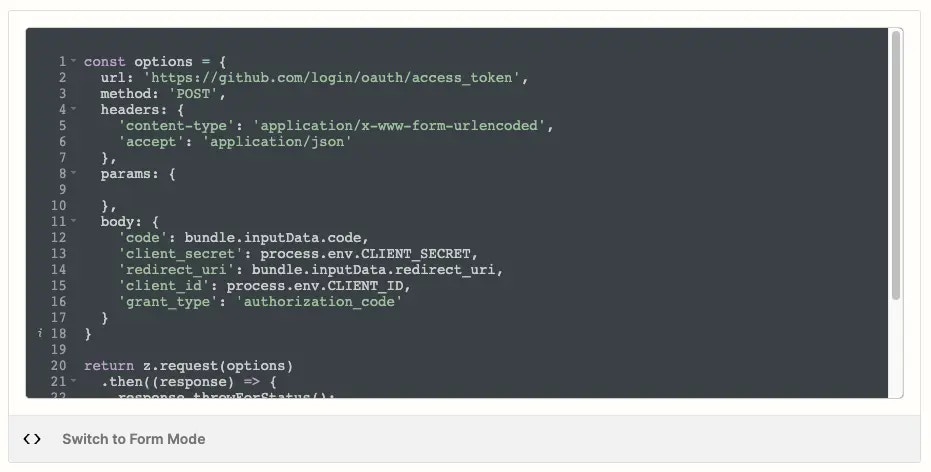
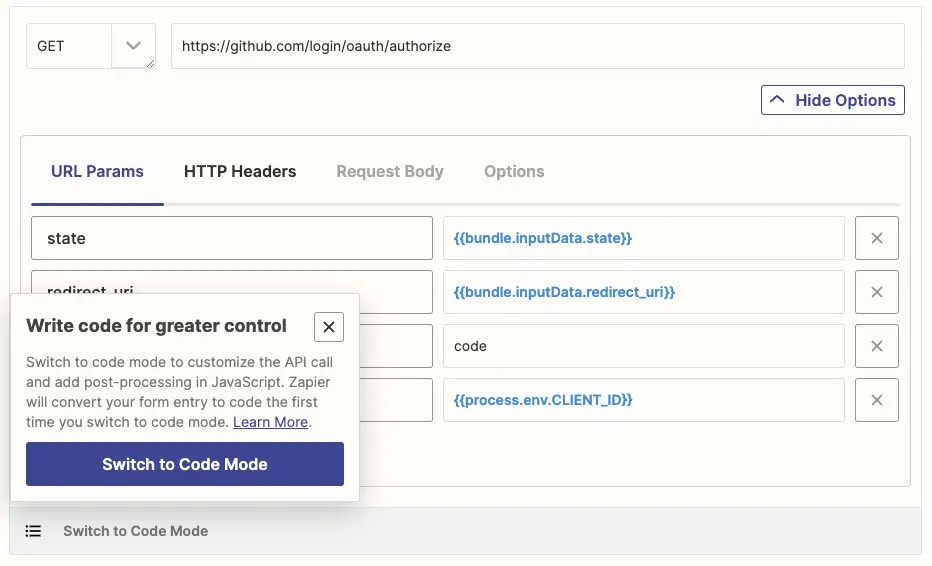
In the Platform UI, when building your authentication, triggers and actions, you will create each component of your integration using Form Mode. However if you need to add further customization to your API calls, you can use Code Mode.You can use Code Mode to:
Transform your API response into JSON format
Add user authentication details and input form data to the API call
To use Code Mode, Zapier recommends for users to have an understanding of Javascript and making HTTP requests.Code Mode is available to use in the API request settings:
For authentications, Code Mode is in the Configure a Test Request & Connection Label setting. Note, for OAuth v2, Code Mode is in the OAuth v2 Endpoint Configuration setting.
For triggers and actions, Code Mode is in the API Configuration setting.
Changes made in Code Mode are not saved automatically. Once you have added the code you want, click Save & Continue.
You can write JavaScript code, using Zapier’s default code as a base or writing custom code. Use the z object for Zapier specific features, including z.console to write to the console log, z.JSON to parse JSON and z.errors to handle errors. Learn more in Zapier’s CLI Z Object docs.
You can import from Node’s standard library with z.require, for example, z.require('querystring') or z.require('crypto'). Zapier strongly recommend you keep it simple when coding in Platform UI. Building and testing complex code is better suited with the Platform CLI.NPM modules are not supported within the Platform UI. You’d need to export your project to Platform CLI and use npm to add additional libraries.
Each trigger and action has a 30 second time limit. To ensure that Zap workflows run smoothly, keep your custom code as lightweight and efficient as possible. If your code takes longer than 30 seconds to run, it will time out and user’s Zap workflows will error. We also can’t guarantee that all imported libraries will be supported within our runtime environment.Here are some specific things you can do to improve the performance of your custom code:
Use efficient algorithms and data structures.
Avoid unnecessary loops and recursions.
Optimize your code for the specific task it is performing.
Avoid using imported libraries that are not essential to triggers or actions.
When working in Code Mode, it’s important to handle errors correctly so that Zapier can respond appropriately and ensure Zap workflows run as expected. While it might feel natural to throw a standard JavaScript Error, this will not work as expected in Zapier integrations. Instead, you should use the z.error error classes provided by the platform.Don’t
if (response.status === 401) { throw new Error("Authentication failed. Please reconnect your account.");}
Do
if (response.status === 401) { throw new z.errors.RefreshAuthError();}
When you switch to Code Mode, Zapier uses your code when making API calls. Any previous settings from Form Mode will not be discarded. This is because Form Mode and Code Mode cannot be used together.If you switch back to Form Mode, click Switch to Form Mode. Your previous Form Mode settings will be restored. Zapier will save the code you entered in Code Mode so you can use it again if you switch back to Code Mode.
{"docsConfig":{"theme":"mint","$schema":"https://mintlify.com/docs.json","name":"Zapier","colors":{"primary":"#FF4F00","light":"#FE6C2A","dark":"#FF4F00"},"logo":{"light":"https://mintcdn.com/zapier-82f0e938/uPbDC0jSuXgHCaWD/logo/light.svg?fit=max\u0026auto=format\u0026n=uPbDC0jSuXgHCaWD\u0026q=85\u0026s=b6a37289cb22ac1a9681572651874765","dark":"https://mintcdn.com/zapier-82f0e938/b1yEJJDZ7v1EncmE/logo/dark.svg?fit=max\u0026auto=format\u0026n=b1yEJJDZ7v1EncmE\u0026q=85\u0026s=2c393c141bc7fbb0051aaa46b103f5e8","href":"https://zapier.com"},"favicon":"https://mintcdn.com/zapier-82f0e938/1jtyk4mqAs_J-p30/favicon.png?fit=max\u0026auto=format\u0026n=1jtyk4mqAs_J-p30\u0026q=85\u0026s=a26d7c83b71f1cdec48ae963245f407f","api":{"openapi":["https://api.zapier.com/schema","api-reference/specs/trigger-inbox.yaml","api-reference/specs/actions.yaml","api-reference/specs/connections.yaml","api-reference/specs/agentic-management.yaml"]},"background":{"color":{"light":"#FFFEFB"}},"navbar":{"primary":{"type":"button","label":"Sign Up","href":"https://zapier.com/sign-up"}},"footer":{},"seo":{"indexing":"all"},"integrations":{"gtm":{"tagId":"GTM-K7GFJTV"}},"contextual":{"options":["copy","view",{"title":"Open in ChatGPT","description":"Ask ChatGPT about this page","icon":"/images/logos/branded/openai.svg","href":{"base":"https://chatgpt.com/","query":[{"key":"q","value":"Read https://docs.zapier.com$path.md and help me apply it. Ask what I am building before giving steps."}]}},{"title":"Open in Claude","description":"Ask Claude about this page","icon":"/images/logos/branded/claude.svg","href":{"base":"https://claude.ai/new","query":[{"key":"q","value":"Read https://docs.zapier.com$path.md and help me apply it. Ask what I am building before giving steps."}]}},{"title":"Open in Perplexity","description":"Ask Perplexity about this page","icon":"/images/logos/branded/perplexity.svg","href":{"base":"https://www.perplexity.ai/search","query":[{"key":"q","value":"Read https://docs.zapier.com$path.md and help me apply it. Ask what I am building before giving steps."}]}},{"title":"Open in Claude Code","description":"Use this page in Claude Code","icon":"/images/logos/branded/claude.svg","href":{"base":"claude://code/new","query":[{"key":"q","value":"Read https://docs.zapier.com$path.md and help me apply it to this project. Check what is already here before giving steps."}]}},{"title":"Open in Codex","description":"Use this page in Codex","icon":"/images/logos/branded/openai.svg","href":{"base":"codex://new","query":[{"key":"prompt","value":"Read https://docs.zapier.com$path.md and help me apply it to this project. Check what is already here before giving steps."}]}},{"title":"Open in Cursor","description":"Use this page in Cursor","icon":"/images/logos/branded/cursor.svg","href":{"base":"cursor://anysphere.cursor-deeplink/prompt","query":[{"key":"text","value":"Read https://docs.zapier.com$path.md and help me apply it to this project. Check what is already here before giving steps."}]}}],"display":"header"},"metadata":{"timestamp":true},"styling":{"latex":false},"navigation":{"global":{"anchors":[{"anchor":"Community","icon":"users","href":"https://community.zapier.com/"},{"anchor":"Changelog","icon":"rss","href":"/white-label/changelog"},{"anchor":"Contact Us","icon":"envelope","href":"https://developer.zapier.com/contact"}]},"pages":[]}},"deployment":{"deploymentMetadataValue":{"subdomain":"zapier-82f0e938","hasAudioNarration":false,"actualSubdomain":"zapier-82f0e938","customDomains":["docs.zapier.com"],"gitSource":{"type":"gitlab","owner":"zapier/public-api","repo":"public-api-docs","projectId":56036607,"deployBranch":"main","contentDirectory":"","isPrivate":true,"mountPath":"","label":""},"feedback":{"thumbs":true},"entitlements":{"AI_CHAT":{"status":"ENABLED"},"REMOVE_BRANDING":{"status":"ENABLED"},"CONTEXTUAL_FEEDBACK":{"status":"ENABLED"},"CODE_SNIPPET_FEEDBACK":{"status":"ENABLED"},"WEB_MCP":{"status":"ENABLED"},"NARRATION":{"status":"ENABLED"}},"buildId":"6af39a7da0d75dada7863e98","clientVersion":"0.0.4102","searchFilterCounts":[{"language":"default","tag":"Build a Zapier integration","count":149},{"language":"default","tag":"Developer Platform","count":149},{"language":"default","tag":"Embed Zapier","count":105},{"language":"default","tag":"Powered by Zapier","count":86},{"language":"default","tag":"Use Zapier in your tools","count":80},{"language":"default","tag":"Zapier MCP","count":69},{"language":"default","tag":"API reference","count":60},{"language":"default","tag":"Build with UI","count":52},{"language":"default","tag":"API specification","count":50},{"language":"default","tag":"Get started","count":47}]},"assistantConfig":{"enableStarterQuestions":true,"enableContextualStarterQuestions":false},"basePath":"","hasChatPermissions":true,"hasWebMcpPermissions":true,"toggles":[{"name":"kill-isr","enabled":true,"variant":{"name":"disabled","enabled":false,"feature_enabled":true},"impressionData":false},{"name":"custom-rbac-roles","enabled":true,"variant":{"name":"disabled","enabled":false,"feature_enabled":true},"impressionData":false},{"name":"agent-mintlify-slack","enabled":true,"variant":{"name":"disabled","enabled":false,"feature_enabled":true},"impressionData":false},{"name":"agent-integrations-settings","enabled":true,"variant":{"name":"disabled","enabled":false,"feature_enabled":true},"impressionData":false},{"name":"rbac-expansion","enabled":true,"variant":{"name":"disabled","enabled":false,"feature_enabled":true},"impressionData":false},{"name":"automations-pr-grouping","enabled":true,"variant":{"name":"disabled","enabled":false,"feature_enabled":true},"impressionData":false},{"name":"custom-prefix","enabled":true,"variant":{"name":"disabled","enabled":false,"feature_enabled":true},"impressionData":false},{"name":"analytics-v7","enabled":true,"variant":{"name":"disabled","enabled":false,"feature_enabled":true},"impressionData":false},{"name":"user-flows-analytics","enabled":true,"variant":{"name":"disabled","enabled":false,"feature_enabled":true},"impressionData":false},{"name":"no-publish-flow","enabled":true,"variant":{"name":"disabled","enabled":false,"feature_enabled":true},"impressionData":false},{"name":"workos-onboarding","enabled":true,"variant":{"name":"disabled","enabled":false,"feature_enabled":true},"impressionData":false},{"name":"llms-txt-v2","enabled":true,"variant":{"name":"disabled","enabled":false,"feature_enabled":true},"impressionData":false},{"name":"snapshot-serving-live","enabled":true,"variant":{"name":"disabled","enabled":false,"feature_enabled":true},"impressionData":false},{"name":"stripTemperatureMiddleware","enabled":true,"variant":{"name":"disabled","enabled":false,"feature_enabled":true},"impressionData":false},{"name":"support-platform-pylon-zendesk","enabled":true,"variant":{"name":"disabled","enabled":false,"feature_enabled":true},"impressionData":false},{"name":"snapshot-serving","enabled":true,"variant":{"name":"disabled","enabled":false,"feature_enabled":true},"impressionData":false},{"name":"instant-rollback","enabled":true,"variant":{"name":"disabled","enabled":false,"feature_enabled":true},"impressionData":false},{"name":"granular-notifications-server","enabled":true,"variant":{"name":"disabled","enabled":false,"feature_enabled":true},"impressionData":false},{"name":"granular-notifications","enabled":true,"variant":{"name":"disabled","enabled":false,"feature_enabled":true},"impressionData":false},{"name":"automations-fable","enabled":true,"variant":{"name":"disabled","enabled":false,"feature_enabled":true},"impressionData":false},{"name":"fixed-ai-action-pricing","enabled":true,"variant":{"name":"disabled","enabled":false,"feature_enabled":true},"impressionData":false},{"name":"automation-resolve-merge-conflict","enabled":true,"variant":{"name":"disabled","enabled":false,"feature_enabled":true},"impressionData":false},{"name":"scoped-publishing","enabled":true,"variant":{"name":"disabled","enabled":false,"feature_enabled":true},"impressionData":false},{"name":"mintql","enabled":true,"variant":{"name":"disabled","enabled":false,"feature_enabled":true},"impressionData":false},{"name":"page-level-analytics","enabled":true,"variant":{"name":"disabled","enabled":false,"feature_enabled":true},"impressionData":false},{"name":"editor-version-history-v2","enabled":true,"variant":{"name":"disabled","enabled":false,"feature_enabled":true},"impressionData":false},{"name":"billing-page-v2","enabled":true,"variant":{"name":"disabled","enabled":false,"feature_enabled":true},"impressionData":false},{"name":"full-page-search","enabled":true,"variant":{"name":"disabled","enabled":false,"feature_enabled":true},"impressionData":false},{"name":"workspace-projects","enabled":true,"variant":{"name":"disabled","enabled":false,"feature_enabled":true},"impressionData":false},{"name":"assistant-v5","enabled":true,"variant":{"name":"disabled","enabled":false,"feature_enabled":true},"impressionData":false},{"name":"fork-pr-previews","enabled":true,"variant":{"name":"disabled","enabled":false,"feature_enabled":true},"impressionData":false},{"name":"revalidation-jwt","enabled":true,"variant":{"name":"disabled","enabled":false,"feature_enabled":true},"impressionData":false},{"name":"workos-sso-scim","enabled":true,"variant":{"name":"disabled","enabled":false,"feature_enabled":true},"impressionData":false},{"name":"hobby-abuse-scan","enabled":true,"variant":{"name":"disabled","enabled":false,"feature_enabled":true},"impressionData":false},{"name":"dashboard-inbox","enabled":true,"variant":{"name":"disabled","enabled":false,"feature_enabled":true},"impressionData":false},{"name":"workos-signup","enabled":true,"variant":{"name":"disabled","enabled":false,"feature_enabled":true},"impressionData":false},{"name":"turbopuffer-dual-write","enabled":true,"variant":{"name":"disabled","enabled":false,"feature_enabled":true},"impressionData":false},{"name":"workos-enabled","enabled":true,"variant":{"name":"disabled","enabled":false,"feature_enabled":true},"impressionData":false},{"name":"approve-review-flow","enabled":true,"variant":{"name":"disabled","enabled":false,"feature_enabled":true},"impressionData":false},{"name":"editor-metadata","enabled":true,"variant":{"name":"disabled","enabled":false,"feature_enabled":true},"impressionData":false},{"name":"sso-setup-deadline-banner","enabled":true,"variant":{"name":"disabled","enabled":false,"feature_enabled":true},"impressionData":false},{"name":"turbopuffer-serve","enabled":true,"variant":{"name":"disabled","enabled":false,"feature_enabled":true},"impressionData":false},{"name":"live-agents","enabled":true,"variant":{"name":"disabled","enabled":false,"feature_enabled":true},"impressionData":false}],"starterQuestions":[{"_id":"6ac8f1f2b9b3f8640f05a146","deploymentId":"67001931f47db52dbf2b872a","questionText":"How do I build a public Zapier integration?","status":"active","generatedBy":"manual","createdAt":"2026-10-09T13:53:54.782Z","updatedAt":"2026-10-09T13:53:54.782Z","__v":0},{"_id":"6ac8f1e5b9b3f8640f05a0d1","deploymentId":"67001931f47db52dbf2b872a","questionText":"What's the difference between the SDK and Platform CLI?","status":"active","generatedBy":"manual","createdAt":"2026-10-09T13:53:41.586Z","updatedAt":"2026-10-09T13:53:41.586Z","__v":0},{"_id":"6ac8f1d4b9b3f8640f05a051","deploymentId":"67001931f47db52dbf2b872a","questionText":"How do I connect Zapier MCP to my MCP client?","status":"active","generatedBy":"manual","createdAt":"2026-10-09T13:53:24.465Z","updatedAt":"2026-10-09T13:53:24.465Z","__v":0}],"googleFontsInlined":false},"customCss":[{"filePath":"styles.css","content":"@font-face{font-family:\"Degular Display - Semibold\";src:url('https://fonts.zapier.com/Degular/DegularDisplay-Semibold.woff2');font-display:fallback;font-weight:400}@font-face{font-family:\"Serrif\";src:url('/fonts/serrif-300.woff2') format('woff2');font-display:swap;font-weight:300;font-style:normal}@font-face{font-family:\"Degular Display\";src:url('/fonts/degular-display-500.woff2') format('woff2');font-display:swap;font-weight:500;font-style:normal}@font-face{font-family:\"Degular Display\";src:url('/fonts/degular-display-600.woff2') format('woff2');font-display:swap;font-weight:600;font-style:normal}header h1,h2,h3,h4{font-family:\"Degular Display - Semibold\";font-weight:normal!important;letter-spacing:0.08rem!important}#chat-assistant-floating-input,.chat-assistant-floating-input,[data-component-part=\"chat-assistant-floating-input\"]{display:none!important}.card h2{font-size:1.2rem}.card code{text-decoration:none}:root:not(.dark) .card,:root:not(.dark) .code-block,:root:not(.dark) .code-block-background,:root:not(.dark) .code-group,:root:not(.dark) .shiki,:root:not(.dark) .code-block pre,:root:not(.dark) .code-group pre{background-color:#FFFEFB!important}.cta-button{display:inline-flex;align-items:center;gap:8px;padding:12px 24px;width:fit-content;background:#FF4F00;color:#FFFFFF!important;font-weight:600;font-size:15px;letter-spacing:0.01em;text-decoration:none!important;border:none;border-radius:8px;box-shadow:0 2px 8px rgba(255, 79, 0, 0.25);transition:all 0.2s ease;margin:1em 0}.cta-button:hover{background:#E64600;color:#FFFFFF!important;text-decoration:none!important;box-shadow:0 4px 12px rgba(255, 79, 0, 0.35);transform:translateY(-1px)}.cta-button:active{transform:translateY(0);box-shadow:0 1px 4px rgba(255, 79, 0, 0.3)}blockquote.sr-only+h2{margin-top:0}#navbar a[href=\"https://zapier.com\"],#navbar a[href=\"https://zapier.com\"] img{padding-right:0!important;margin-right:0!important}.docs-nav-label{color:#201515!important;font-family:\"Degular Display - Medium\", ui-sans-serif, system-ui, sans-serif;font-weight:400;font-size:1.5rem;letter-spacing:0.01em;margin-left:-0.6rem;text-decoration:none!important;transition:color 0.15s ease;vertical-align:middle;cursor:pointer}.docs-nav-label:hover{color:#939084!important;text-decoration:none!important}.dark .docs-nav-label{color:#FFFEFB!important}.dark .docs-nav-label:hover{color:#C5C0B1!important}[role=\"menu\"]:focus,[role=\"menu\"]:focus-visible{outline-width:1px}footer:not(#zapier-universal-footer){display:none!important}#zapier-universal-footer{display:block!important;background-color:#fffdf9;font-family:'Inter', Helvetica, arial, sans-serif;font-size:14px;line-height:24px;color:#201515;-webkit-font-smoothing:antialiased;width:100%;margin-top:2rem}.dark #zapier-universal-footer{background-color:#2d2e2e;color:#fffdf9}.zuf{max-width:1200px;margin:0 auto;padding:30px;display:grid;grid-template-rows:auto;grid-template-columns:100%;grid-template-areas:'links' 'socials' 'logo' 'meta';justify-items:center;align-items:center;gap:30px}@media (min-width: 650px){.zuf{grid-template-columns:max-content 1fr;grid-template-areas:'links links'\n 'socials socials'\n 'logo meta'}}@media (min-width: 980px){.zuf{grid-template-columns:max-content 1fr;grid-template-areas:'socials links'\n 'logo meta'}}.zuf-row--top,.zuf-row--bottom{display:contents}.zuf-socials{grid-area:socials;display:inline-flex;flex-wrap:wrap;align-items:center;gap:10px}@media (min-width: 980px){.zuf-socials{justify-self:start}}.zuf-follow{font-size:14px;line-height:20px;font-weight:400;color:#574e4c;white-space:nowrap}.dark .zuf-follow{color:#a8a5a0}.zuf-icon{display:flex;align-items:center;justify-content:center;width:30px;height:30px;border-radius:100%;background-color:#a8a5a0;text-decoration:none!important;transition:background-color 0.15s ease}.zuf-icon svg,.zuf-icon img{width:16px;height:16px;fill:#fffdf9}.dark .zuf-icon{background-color:#403f3e}.dark .zuf-icon svg{fill:#fffdf9}.zuf-icon[aria-label*=\"Facebook\"]:hover,.zuf-icon[aria-label*=\"Facebook\"]:focus{background-color:#3b5998;outline:none}.zuf-icon[aria-label*=\"LinkedIn\"]:hover,.zuf-icon[aria-label*=\"LinkedIn\"]:focus{background-color:#0976b4;outline:none}.zuf-icon[aria-label*=\"X\"]:hover,.zuf-icon[aria-label*=\"X\"]:focus{background-color:#00aced;outline:none}.zuf-icon[aria-label*=\"YouTube\"]:hover,.zuf-icon[aria-label*=\"YouTube\"]:focus{background-color:#e52d27;outline:none}.zuf-icon[aria-label*=\"blog\"]:hover,.zuf-icon[aria-label*=\"blog\"]:focus{background-color:#ff4f00;outline:none}.zuf-links{grid-area:links;display:flex;flex-wrap:wrap;align-items:center;justify-content:center;column-gap:12.5px;row-gap:10px;width:100%}@media (min-width: 980px){.zuf-links{justify-content:flex-end}}.zuf-links a{font-family:'Inter', Helvetica, arial, sans-serif;font-size:14px;line-height:24px;font-weight:500;color:#201515!important;padding:0 5px;white-space:nowrap;text-decoration:none!important}.zuf-links a:hover,.zuf-links a:focus{color:#3d4592!important;outline:none}.dark .zuf-links a{color:#fffdf9!important}.dark .zuf-links a:hover,.dark .zuf-links a:focus{color:#90a1ed!important}.zuf-logo{grid-area:logo;display:inline-flex;align-items:center;text-decoration:none!important}.zuf-logo svg{display:block}.zuf-logo path{fill:#201515}.dark .zuf-logo path{fill:#fffdf9}.zuf-logo path[fill=\"#FF4F00\"]{fill:#FF4F00!important}@media (min-width: 650px){.zuf-logo{justify-self:start}}.zuf-meta{grid-area:meta;font-size:14px;line-height:24px;font-weight:400;color:#574e4c;display:flex;flex-wrap:wrap;align-items:center;justify-content:center;row-gap:10px}.dark .zuf-meta{color:#a8a5a0}.zuf-meta a{padding:5px 10px;color:#574e4c!important;text-decoration:none!important}.zuf-meta a:hover,.zuf-meta a:focus{color:#3d4592!important;outline:none}.dark .zuf-meta a{color:#a8a5a0!important}.dark .zuf-meta a:hover,.dark .zuf-meta a:focus{color:#90a1ed!important}@media (min-width: 650px){.zuf-meta{justify-self:end;justify-content:flex-end}}.zuf-meta span{margin-right:10px}@media (max-width: 979px){.zuf{padding:20px}}"},{"filePath":"index.css","content":".docs-landing{width:100%;margin:0 auto}#navbar{background:#fffef8!important;backdrop-filter:none!important}.dark #navbar{background:#18181b!important}.docs-landing-hero-bg{background:#201515}.docs-landing-hero-bg .dl-hero-title{color:#ffffff}.docs-landing-hero-bg .docs-landing-lead{color:rgba(255, 255, 255, 0.6)}.dark .docs-landing-hero-bg{background:#26201f;border-bottom:1px solid rgba(255, 255, 255, 0.08)}.docs-landing-hero{display:grid;grid-template-columns:minmax(0, 1fr);gap:clamp(1.5rem, 3.5vw, 2.5rem);align-items:center;max-width:1180px;margin:0 auto;padding:48px clamp(1.25rem, 4vw, 2rem) clamp(1.25rem, 2.5vw, 1.75rem)}.docs-landing-hero-inner{text-align:center}.dl-hero-copy{text-align:center;max-width:640px;margin:0 auto}.docs-landing-eyebrow{font-family:\"Inter\", ui-sans-serif, system-ui, sans-serif;font-size:0.75rem;font-weight:600;letter-spacing:0.14em;text-transform:uppercase;color:#605d52;margin:0 0 1.25rem}.docs-landing-title{font-family:\"Degular Display - Semibold\", ui-sans-serif, system-ui, sans-serif;font-size:clamp(2.25rem, 4.5vw, 3.25rem);line-height:1.08;font-weight:400!important;margin:0 0 1rem;letter-spacing:0.08rem!important}.docs-landing-lead{font-family:\"Inter\", ui-sans-serif, system-ui, sans-serif;font-size:1rem;line-height:1.5;color:#201515;margin:0 auto;max-width:62ch}.dark .docs-landing-lead{color:var(--muted-foreground, #a1a1aa)}.docs-landing-media{border-radius:14px;overflow:hidden;box-shadow:0 1px 2px rgba(15, 23, 42, 0.06),\n 0 12px 40px rgba(15, 23, 42, 0.12);border:1px solid rgba(255, 79, 0, 0.12);background:rgba(255, 79, 0, 0.04)}.docs-landing-video{display:block;width:100%;height:auto;vertical-align:middle}.docs-landing-products{max-width:1180px;margin:0 auto;padding:clamp(2.5rem, 5vw, 4rem) clamp(1.25rem, 4vw, 2rem) clamp(3rem, 6vw, 5rem)}.docs-landing-section-title{font-family:\"Degular Display - Semibold\", ui-sans-serif, system-ui, sans-serif;font-size:clamp(1.5rem, 2.5vw, 1.875rem);font-weight:400!important;text-align:left;margin:0 0 2.25rem;letter-spacing:0.08rem!important}.dl-hero-title{font-family:\"Degular Display\", ui-sans-serif, system-ui, sans-serif;font-size:clamp(2.5rem, 4.8vw, 3.5rem);line-height:1.1;font-weight:500;letter-spacing:-0.03em!important;color:var(--foreground, #18181b);margin:0 0 0.6875rem}.dark .dl-hero-title{color:var(--foreground, #fafafa)}.dl-hero-title-accent{color:#ff4f00}.dark .dl-hero-title-accent{color:#ff8a5c}.dl-hero-demo{display:flex;align-items:center;justify-content:center;aspect-ratio:1 / 1;min-height:fit-content;padding:clamp(1rem, 3vw, 1.75rem);border:1px solid rgba(9, 9, 11, 0.1);border-radius:10px;background-image:url('/images/pattern-abstract.jpg');background-size:cover;background-position:center;background-repeat:no-repeat;overflow:hidden}.dark .dl-hero-demo{border-color:rgba(255, 255, 255, 0.12)}.dl-demo-panel{width:100%;border:1px solid rgba(9, 9, 11, 0.1);border-radius:12px;background:#ffffff;box-shadow:0 1px 2px rgba(15, 23, 42, 0.06),\n 0 12px 40px rgba(15, 23, 42, 0.14);overflow:hidden}.dark .dl-demo-panel{background:#18181b;border-color:rgba(255, 255, 255, 0.12)}.dl-demo-clients{display:flex;flex-wrap:wrap;align-items:center;gap:0.5rem;padding:0.5rem 0.75rem;border-bottom:1px solid rgba(9, 9, 11, 0.08)}.dark .dl-demo-clients{border-bottom-color:rgba(255, 255, 255, 0.1)}.dl-demo-chip{width:36px;height:36px;border-radius:8px;border:1px solid rgba(9, 9, 11, 0.1);background:#ffffff;flex:none;margin:0!important}.dark .dl-demo-chip{border-color:rgba(255, 255, 255, 0.14)}.dl-demo-chip--padded{padding:6px}.dl-demo-arch-agents{display:flex;gap:0.625rem;padding:1rem 1rem 0.75rem}.dl-demo-arch-col{flex:1;display:flex;flex-direction:column;gap:0.375rem}.dl-demo-arch-label{font-size:0.6875rem;font-weight:500;color:var(--muted-foreground, #71717a);margin:0 0 0.125rem;letter-spacing:0.01em}.dl-demo-arch-label--spacer{visibility:hidden;pointer-events:none;user-select:none}.dl-demo-arch-chip{display:flex;align-items:center;gap:0.4375rem;padding:0.3125rem 0.5625rem;border-radius:7px;border:1px solid rgba(9, 9, 11, 0.1);background:#ffffff;font-size:0.75rem;font-weight:500;color:#09090b;line-height:1;white-space:nowrap}.dl-demo-arch-chip--muted{background:transparent;border-style:dashed;color:var(--muted-foreground, #71717a)}.dl-demo-arch-chip--logo{justify-content:center;padding:0.375rem;width:36px;height:36px}.dl-demo-arch-icon{width:22px;height:22px;border-radius:4px;flex:none}.dl-demo-arch-chip--icon-pad .dl-demo-arch-icon{padding:3px}.dl-demo-arch-merge{position:relative;height:28px;margin:0 1rem}.dl-demo-arch-merge::before{content:'';position:absolute;left:25%;right:25%;top:0;height:14px;border-left:1px solid rgba(9, 9, 11, 0.1);border-right:1px solid rgba(9, 9, 11, 0.1);border-bottom:1px solid rgba(9, 9, 11, 0.1);border-bottom-left-radius:4px;border-bottom-right-radius:4px}.dl-demo-arch-merge::after{content:'';position:absolute;left:50%;transform:translateX(-50%);top:14px;bottom:0;width:1px;background:rgba(9, 9, 11, 0.1)}.dl-demo-arch-zapier{display:flex;align-items:center;justify-content:center;gap:0.5rem;margin:0 1rem;padding:0.625rem 1rem;border:1px solid rgba(9, 9, 11, 0.1);border-radius:10px;background:#ffffff}.dl-demo-arch-stem{display:flex;justify-content:center;height:20px}.dl-demo-arch-stem::after{content:'';width:1px;height:100%;background:rgba(9, 9, 11, 0.1)}.dl-demo-arch-apps{display:flex;flex-wrap:wrap;align-items:center;justify-content:center;gap:0.375rem;padding:0 1rem 0.875rem}.dl-demo-arch-app{display:inline-flex;align-items:center;padding:0.25rem 0.625rem;border-radius:6px;border:1px solid rgba(9, 9, 11, 0.1);background:#ffffff;font-size:0.6875rem;font-weight:500;color:#09090b;white-space:nowrap}.dl-demo-arch-app--more{background:transparent;border-color:#e06c2c;color:#e06c2c;font-weight:600;text-decoration:none}.dl-demo-arch-app--more:hover{background:rgba(224, 108, 44, 0.06)}.dark .dl-demo-arch-stem::after{background:rgba(255, 255, 255, 0.1)}.dark .dl-demo-arch-app{background:rgba(255, 255, 255, 0.06);border-color:rgba(255, 255, 255, 0.12);color:#fafafa}.dl-demo-arch-zapier-badge{font-size:0.8125rem;font-weight:600;color:#09090b;letter-spacing:-0.01em}.dl-demo-arch-zapier-plus{font-size:0.8125rem;font-weight:600;color:#e06c2c}.dark .dl-demo-arch-chip{background:rgba(255, 255, 255, 0.06);border-color:rgba(255, 255, 255, 0.12);color:#fafafa}.dark .dl-demo-arch-chip--muted{background:transparent;border-color:rgba(255, 255, 255, 0.15);color:var(--muted-foreground, #a1a1aa)}.dark .dl-demo-arch-merge::before{border-color:rgba(255, 255, 255, 0.1)}.dark .dl-demo-arch-merge::after{background:rgba(255, 255, 255, 0.1)}.dark .dl-demo-arch-zapier{background:rgba(255, 255, 255, 0.04);border-color:rgba(255, 255, 255, 0.1)}.dark .dl-demo-arch-zapier-badge{color:#fafafa}.dl-demo-more{display:inline-flex;align-items:center;justify-content:center;width:36px;height:36px;border-radius:8px;border:1px dashed rgba(9, 9, 11, 0.22);font-size:0.9375rem;font-weight:500;line-height:1;color:var(--muted-foreground, #52525b);flex:none}.dark .dl-demo-more{border-color:rgba(255, 255, 255, 0.2);color:var(--muted-foreground, #a1a1aa)}.dl-demo-body{display:flex;flex-direction:column;gap:0.375rem;padding:0.5625rem 0.75rem 0.625rem}.dl-demo-prompt{padding:0.4375rem 0.625rem;border:1px solid rgba(9, 9, 11, 0.1);border-radius:7px;font-size:0.75rem;color:var(--muted-foreground, #52525b)}.dl-demo-row{display:flex;align-items:center;justify-content:space-between;gap:1rem;padding:0.4375rem 0.625rem;border:1px solid rgba(9, 9, 11, 0.1);border-radius:7px}.dark .dl-demo-prompt,.dark .dl-demo-row{border-color:rgba(255, 255, 255, 0.12)}.dl-demo-status{font-size:0.6875rem;font-weight:700;letter-spacing:0.12em;text-transform:uppercase;color:#ff4f00}.dl-demo-action{display:flex;align-items:center;justify-content:space-between;gap:0.75rem;padding:0.375rem 0.625rem;border-left:2px solid #ff4f00;border-radius:0 7px 7px 0;background:rgba(9, 9, 11, 0.03)}.dark .dl-demo-action{background:rgba(255, 255, 255, 0.04)}.dl-demo-action span{font-size:0.75rem;text-align:right;color:var(--muted-foreground, #52525b)}.dl-demo-foot{display:flex;align-items:center;justify-content:space-between;gap:1rem;padding-top:0.25rem;font-size:0.75rem;color:var(--muted-foreground, #52525b)}.dl-hero-demo code{font-family:ui-monospace, SFMono-Regular, Menlo, Consolas, monospace;font-size:0.75rem;background:none;border:none;padding:0;color:var(--foreground, #18181b)}.dark .dl-hero-demo code{color:var(--foreground, #fafafa)}.dl-section{max-width:1180px;margin:0 auto;padding:clamp(1.5rem, 3vw, 2.25rem) clamp(1.25rem, 4vw, 2rem)}.dl-eyebrow{font-size:0.6875rem;font-weight:700;letter-spacing:0.12em;text-transform:uppercase;color:#ff4f00;margin:0 0 0.4375rem}.dl-heading{font-size:clamp(1.375rem, 2.4vw, 1.75rem);line-height:1.2;font-weight:600;letter-spacing:-0.01em!important;color:var(--foreground, #18181b);margin:0 0 0.5rem;max-width:40ch}.dark .dl-heading{color:var(--foreground, #fafafa)}.dl-lead{font-size:0.9375rem;line-height:1.55;color:var(--muted-foreground, #52525b);margin:0 0 1.25rem;max-width:68ch}.dark .dl-lead{color:var(--muted-foreground, #a1a1aa)}.dl-grid{display:grid;gap:0.75rem;align-items:stretch}.dl-grid--2{grid-template-columns:repeat(2, minmax(0, 1fr))}.dl-grid--3{grid-template-columns:repeat(3, minmax(0, 1fr))}.dl-grid--4{grid-template-columns:repeat(4, minmax(0, 1fr))}.dl-card{display:flex;flex-direction:column;gap:0.5rem;padding:1.125rem 1.25rem 1.25rem;border:1px solid rgba(9, 9, 11, 0.1);background:#f8f4f0}.dark .dl-card{border-color:rgba(255, 255, 255, 0.12);background:rgba(255, 255, 255, 0.02)}.dl-card-mark{align-self:flex-start;margin-bottom:0.25rem;color:#ff4f00}.dl-card-eyebrow{font-size:0.6875rem;font-weight:700;letter-spacing:0.12em;text-transform:uppercase;color:#ff4f00;margin:0}.dl-card-title{font-family:\"Serrif\", ui-serif, serif;font-size:1.5rem;font-weight:300;line-height:1.1;letter-spacing:-0.03em;color:var(--foreground, #18181b);margin:0}.dark .dl-card-title{color:var(--foreground, #fafafa)}.dl-card-desc{font-family:\"Inter\", ui-sans-serif, system-ui, sans-serif;font-size:0.9375rem;line-height:1.55;color:var(--muted-foreground, #52525b);margin:0}.dark .dl-card-desc{color:var(--muted-foreground, #a1a1aa)}.dl-pills{display:flex;flex-wrap:wrap;gap:0.375rem;margin:0.125rem 0 0}.dl-pill{font-size:0.75rem;line-height:1;padding:0.375rem 0.625rem;border-radius:999px;border:1px solid rgba(9, 9, 11, 0.14);color:var(--muted-foreground, #52525b);white-space:nowrap}.dark .dl-pill{border-color:rgba(255, 255, 255, 0.16);color:var(--muted-foreground, #a1a1aa)}.dl-pill>a{color:inherit!important;text-decoration:none!important}.dl-pill:has(>a):hover{border-color:rgba(9, 9, 11, 0.34)}.dark .dl-pill:has(>a):hover{border-color:rgba(255, 255, 255, 0.34)}.dl-pill--accent{border-color:rgba(255, 79, 0, 0.35);background:rgba(255, 79, 0, 0.06);color:#ff4f00}.dark .dl-pill--accent{border-color:rgba(255, 79, 0, 0.45);color:#ff8a5c}.dl-code{font-family:ui-monospace, SFMono-Regular, Menlo, Consolas, monospace;font-size:0.8125rem;line-height:1.7;background:rgba(9, 9, 11, 0.04);border-radius:8px;padding:0.75rem 0.875rem;margin:0.125rem 0;overflow-x:auto;color:var(--foreground, #18181b)}.dl-code span{display:block;white-space:pre}.dl-code--shell span::before{content:\"\\276F \";color:#ff4f00}.dark .dl-code{background:rgba(255, 255, 255, 0.05);color:var(--foreground, #fafafa)}.dl-cta{margin-top:auto;padding-top:0.5rem;font-size:0.875rem;font-weight:600;color:#ff4f00!important;text-decoration:none!important}.dl-cta:hover{text-decoration:underline!important}@media screen and (max-width: 1024px){.dl-grid--3,.dl-grid--4{grid-template-columns:repeat(2, minmax(0, 1fr))}}@media screen and (max-width: 640px){.dl-grid--2,.dl-grid--3,.dl-grid--4{grid-template-columns:1fr}}.docs-landing-next{max-width:1180px;margin:0 auto;padding:clamp(1.5rem, 3vw, 2.25rem) clamp(1.25rem, 4vw, 2rem) clamp(2.25rem, 4vw, 3.25rem)}.docs-landing-next-title{font-size:2rem;line-height:1.2;font-weight:600;letter-spacing:-0.01em!important;color:var(--foreground, #18181b);margin:0 0 1.25rem}.dark .docs-landing-next-title{color:var(--foreground, #fafafa)}.docs-landing-next-grid{display:grid;grid-template-columns:repeat(4, minmax(0, 1fr));column-gap:clamp(1.5rem, 4vw, 3rem)}.docs-landing-next-item{position:relative;display:block;padding:0.875rem 0 1.25rem;border-top:1px solid rgba(9, 9, 11, 0.12);text-decoration:none!important;transition:border-top-color 0.2s ease}.docs-landing-next-item:hover{border-top-color:#ff4f00}.dark .docs-landing-next-item{border-top-color:rgba(255, 255, 255, 0.14)}.docs-landing-next-item-title{display:block;font-size:1rem;font-weight:600;color:var(--foreground, #18181b);margin-bottom:0.25rem}.docs-landing-next-item-title::after{content:\" \\2192\";color:#ff4f00}.dark .docs-landing-next-item-title{color:var(--foreground, #fafafa)}.docs-landing-next-item:hover .docs-landing-next-item-title{text-decoration:underline}.docs-landing-next-item-desc{display:block;font-size:0.9375rem;line-height:1.55;color:var(--muted-foreground, #52525b)}.dark .docs-landing-next-item-desc{color:var(--muted-foreground, #a1a1aa)}@media screen and (max-width: 768px){.docs-landing-next-grid{grid-template-columns:1fr}}.hero-container{display:flex;flex-direction:row;align-items:center;justify-content:center;text-align:left;padding:6rem 2rem;width:80%;border-bottom:2px solid #ff4f00;margin:0 auto}.hero-text{width:600px;margin-right:2rem}@media screen and (max-width: 1024px){.docs-landing-hero{grid-template-columns:1fr}.docs-landing-media{max-width:640px;margin:0 auto}}@media screen and (max-width: 1300px){.hero-container{flex-direction:column;text-align:center}.hero-text{margin-right:0rem;margin-bottom:2rem}.hero-video{max-width:600px}}.dl-section-heading{font-size:2rem;line-height:1.2;font-weight:600;letter-spacing:-0.01em!important;color:var(--foreground, #18181b);margin:0 0 1.25rem}.dark .dl-section-heading{color:var(--foreground, #fafafa)}.dl-bands{display:grid;grid-template-columns:repeat(2, minmax(0, 1fr));gap:0.75rem}.dl-band{display:flex;flex-direction:column;border:1px solid rgba(9, 9, 11, 0.1);overflow:hidden;background:#f8f4f0}.dark .dl-band{border-color:rgba(255, 255, 255, 0.12);background:rgba(255, 255, 255, 0.02)}.dl-band-main{display:flex;flex-direction:column;gap:0.5rem;padding:1.125rem 1.25rem 1.25rem;border-bottom:1px solid rgba(9, 9, 11, 0.1)}.dark .dl-band-main{background:rgba(255, 255, 255, 0.02);border-bottom-color:rgba(255, 255, 255, 0.12)}.dl-band-badge{align-self:flex-start;margin:0;padding:0.1875rem 0.4375rem;border:1px solid rgba(255, 79, 0, 0.4);border-radius:5px;font-size:0.625rem;font-weight:700;letter-spacing:0.12em;text-transform:uppercase;color:#ff4f00}.dl-band-title{font-family:\"Serrif\", ui-serif, serif;font-size:1.5rem;font-weight:300!important;line-height:1.1;letter-spacing:-0.03em!important;color:var(--foreground, #18181b);margin:0.125rem 0 0!important}.dark .dl-band-title{color:var(--foreground, #fafafa)}.dl-band-title-mark{align-self:flex-start;margin-bottom:16px;color:#ff4f00}.dl-band-icon{align-self:flex-start;margin-bottom:8px;color:#ff4f00}.dl-band-desc{font-family:\"Inter\", ui-sans-serif, system-ui, sans-serif;font-size:0.9375rem;line-height:1.55;color:var(--muted-foreground, #52525b);margin:0;max-width:none}.dark .dl-band-desc{color:var(--muted-foreground, #a1a1aa)}.dl-band-main .dl-hero-demo{box-shadow:none;margin-top:0.375rem}.dl-band-media{display:block;width:100%;height:auto;border:1px solid rgba(9, 9, 11, 0.1);border-radius:10px;margin:0.375rem 0 0!important}.dark .dl-band-media{border-color:rgba(255, 255, 255, 0.12)}.dl-band-list{display:flex;flex:1;flex-direction:column}.dl-band-row{position:relative;display:grid;grid-template-columns:28px 1fr;grid-template-rows:auto auto;column-gap:0.625rem;row-gap:0.1875rem;align-items:center;flex:1;padding:0.8125rem 2.25rem 0.8125rem 1.25rem;border-bottom:1px solid rgba(9, 9, 11, 0.08);text-decoration:none!important;transition:background 0.15s ease}.dl-band-row .dl-band-row-icon{grid-row:1 / -1;align-self:center}.dl-band-row .dl-band-row-title{grid-column:2}.dl-band-row .dl-band-row-desc{grid-column:2}.dl-band-row:not(:has(.dl-band-row-icon)){grid-template-columns:1fr}.dl-band-row:not(:has(.dl-band-row-icon)) .dl-band-row-title,.dl-band-row:not(:has(.dl-band-row-icon)) .dl-band-row-desc{grid-column:1}.dark .dl-band-row{border-bottom-color:rgba(255, 255, 255, 0.1)}.dl-band-row:last-child{border-bottom:none}.dl-band-row:hover{background:rgba(255, 79, 0, 0.04)}.dl-band-row::after{content:\"\\2192\";position:absolute;top:50%;right:1rem;transform:translateY(-50%);font-size:1rem;color:#ff4f00;transition:transform 0.15s ease}.dl-band-row:hover::after{transform:translateY(-50%) translateX(2px)}.dl-band-row>a,.docs-landing-next-item>a{position:absolute;inset:0;z-index:1}.dl-band-row>a:focus-visible,.docs-landing-next-item>a:focus-visible{outline:2px solid #ff4f00;outline-offset:-2px}.dl-band-row-icon{display:flex;align-items:center;justify-content:center;flex-shrink:0;width:28px;height:28px;color:#ff4f00}.dark .dl-band-row-icon{color:#ff8a5c}.dl-band-row-icon svg{width:16px;height:16px}.dl-band-row-title{font-size:0.9375rem;font-weight:600;color:var(--foreground, #18181b)}.dark .dl-band-row-title{color:var(--foreground, #fafafa)}.dl-band-row:hover .dl-band-row-title{text-decoration:underline}.dl-band-row-desc{font-size:0.875rem;line-height:1.5;color:var(--muted-foreground, #52525b)}.dark .dl-band-row-desc{color:var(--muted-foreground, #a1a1aa)}@media screen and (max-width: 900px){.dl-bands{grid-template-columns:1fr}}"}],"page":{"pagePath":"integrations/build/code-mode","slug":"/integrations/build/code-mode","pageMetadata":{"title":"Use Code Mode to refine your API call","description":null,"href":"/integrations/build/code-mode"},"pageType":"default","mdx":{"mdxSource":{"compiledSource":"\"use strict\";const{Fragment:_Fragment,jsx:_jsx,jsxs:_jsxs}=arguments[0];const{useMDXComponents:_provideComponents}=arguments[0];function _createMdxContent(props){const _components={a:`a`,code:`code`,em:`em`,li:`li`,p:`p`,pre:`pre`,span:`span`,strong:`strong`,ul:`ul`,..._provideComponents(),...props.components},{Card,CardGroup,CodeBlock,Frame,Heading,OptimizedImage}=_components;if(!Card)_missingMdxReference(`Card`,true);if(!CardGroup)_missingMdxReference(`CardGroup`,true);if(!CodeBlock)_missingMdxReference(`CodeBlock`,true);if(!Frame)_missingMdxReference(`Frame`,true);if(!Heading)_missingMdxReference(`Heading`,true);if(!OptimizedImage)_missingMdxReference(`OptimizedImage`,true);return _jsxs(_Fragment,{children:[_jsx(Frame,{children:_jsx(OptimizedImage,{src:`https://mintcdn.com/zapier-82f0e938/1jtyk4mqAs_J-p30/images/1fa2f12c1c41a49f3d7aeff4d2706f7c.webp?fit=max\u0026auto=format\u0026n=1jtyk4mqAs_J-p30\u0026q=85\u0026s=9b7cee390540952e249074b3491a152d`,alt:``,\"data-og-width\":`931`,width:`931`,\"data-og-height\":`472`,height:`472`,\"data-path\":`images/1fa2f12c1c41a49f3d7aeff4d2706f7c.webp`,\"data-optimize\":`true`,\"data-opv\":`3`,srcset:`https://mintcdn.com/zapier-82f0e938/1jtyk4mqAs_J-p30/images/1fa2f12c1c41a49f3d7aeff4d2706f7c.webp?w=280\u0026fit=max\u0026auto=format\u0026n=1jtyk4mqAs_J-p30\u0026q=85\u0026s=b476565cc36bb5074b8858fc046237f1 280w, https://mintcdn.com/zapier-82f0e938/1jtyk4mqAs_J-p30/images/1fa2f12c1c41a49f3d7aeff4d2706f7c.webp?w=560\u0026fit=max\u0026auto=format\u0026n=1jtyk4mqAs_J-p30\u0026q=85\u0026s=636b7e79d0b016b41158f5a4f55fab6a 560w, https://mintcdn.com/zapier-82f0e938/1jtyk4mqAs_J-p30/images/1fa2f12c1c41a49f3d7aeff4d2706f7c.webp?w=840\u0026fit=max\u0026auto=format\u0026n=1jtyk4mqAs_J-p30\u0026q=85\u0026s=26396bd5d60775e2652bb8951b8739c3 840w, https://mintcdn.com/zapier-82f0e938/1jtyk4mqAs_J-p30/images/1fa2f12c1c41a49f3d7aeff4d2706f7c.webp?w=1100\u0026fit=max\u0026auto=format\u0026n=1jtyk4mqAs_J-p30\u0026q=85\u0026s=28f14c577100092e0a6cefdbf3899150 1100w, https://mintcdn.com/zapier-82f0e938/1jtyk4mqAs_J-p30/images/1fa2f12c1c41a49f3d7aeff4d2706f7c.webp?w=1650\u0026fit=max\u0026auto=format\u0026n=1jtyk4mqAs_J-p30\u0026q=85\u0026s=8d9c3da67b794e1ebd3f361d1dd998c2 1650w, https://mintcdn.com/zapier-82f0e938/1jtyk4mqAs_J-p30/images/1fa2f12c1c41a49f3d7aeff4d2706f7c.webp?w=2500\u0026fit=max\u0026auto=format\u0026n=1jtyk4mqAs_J-p30\u0026q=85\u0026s=b6cafa48352f9982eda88d5cc316b0c1 2500w`})}),`\n`,_jsx(_components.p,{children:`In the Platform UI, when building your authentication, triggers and actions, you will create each component of your integration using Form Mode. However if you need to add further customization to your API calls, you can use Code Mode.`}),`\n`,_jsx(_components.p,{children:`You can use Code Mode to:`}),`\n`,_jsxs(_components.ul,{children:[`\n`,_jsx(_components.li,{children:`Transform your API response into JSON format`}),`\n`,_jsx(_components.li,{children:`Add user authentication details and input form data to the API call`}),`\n`,_jsx(_components.li,{children:`Use ‘z’ object library to customize your API call`}),`\n`,_jsx(_components.li,{children:`Improve error response handling`}),`\n`]}),`\n`,_jsx(Heading,{level:`2`,id:`getting-started-with-code-mode`,children:`Getting started with Code Mode`}),`\n`,_jsxs(_components.p,{children:[`To use Code Mode, Zapier recommends for users to have an understanding of Javascript and making `,_jsx(_components.a,{href:`/integrations/reference/cli-docs#making-http-requests`,children:`HTTP requests`}),`.`]}),`\n`,_jsx(_components.p,{children:`Code Mode is available to use in the API request settings:`}),`\n`,_jsxs(_components.ul,{children:[`\n`,_jsxs(_components.li,{children:[`For authentications, Code Mode is in the `,_jsx(_components.em,{children:`Configure a Test Request \u0026 Connection Label`}),` setting. Note, for OAuth v2, Code Mode is in the `,_jsx(_components.em,{children:`OAuth v2 Endpoint Configuration`}),` setting.`]}),`\n`,_jsxs(_components.li,{children:[`For triggers and actions, Code Mode is in the `,_jsx(_components.em,{children:`API Configuration`}),` setting.`]}),`\n`]}),`\n`,_jsx(Frame,{children:_jsx(OptimizedImage,{src:`https://mintcdn.com/zapier-82f0e938/MptVjeuYuatFg3LM/images/554f0c395459b37fd34312566feac891.webp?fit=max\u0026auto=format\u0026n=MptVjeuYuatFg3LM\u0026q=85\u0026s=b770c78ccbc78049e03cfb20ad9eb434`,alt:``,\"data-og-width\":`932`,width:`932`,\"data-og-height\":`566`,height:`566`,\"data-path\":`images/554f0c395459b37fd34312566feac891.webp`,\"data-optimize\":`true`,\"data-opv\":`3`,srcset:`https://mintcdn.com/zapier-82f0e938/MptVjeuYuatFg3LM/images/554f0c395459b37fd34312566feac891.webp?w=280\u0026fit=max\u0026auto=format\u0026n=MptVjeuYuatFg3LM\u0026q=85\u0026s=802b5fcd220ab652ba3c69e280377733 280w, https://mintcdn.com/zapier-82f0e938/MptVjeuYuatFg3LM/images/554f0c395459b37fd34312566feac891.webp?w=560\u0026fit=max\u0026auto=format\u0026n=MptVjeuYuatFg3LM\u0026q=85\u0026s=a2d19cd86d9e2075963db7c87b19708c 560w, https://mintcdn.com/zapier-82f0e938/MptVjeuYuatFg3LM/images/554f0c395459b37fd34312566feac891.webp?w=840\u0026fit=max\u0026auto=format\u0026n=MptVjeuYuatFg3LM\u0026q=85\u0026s=7323a11e3baf083fd61c44f564f742d8 840w, https://mintcdn.com/zapier-82f0e938/MptVjeuYuatFg3LM/images/554f0c395459b37fd34312566feac891.webp?w=1100\u0026fit=max\u0026auto=format\u0026n=MptVjeuYuatFg3LM\u0026q=85\u0026s=d05145c65dbbf8a3a7f27ee84ea68d76 1100w, https://mintcdn.com/zapier-82f0e938/MptVjeuYuatFg3LM/images/554f0c395459b37fd34312566feac891.webp?w=1650\u0026fit=max\u0026auto=format\u0026n=MptVjeuYuatFg3LM\u0026q=85\u0026s=345d1b142cf3a0365132982d9f7947f7 1650w, https://mintcdn.com/zapier-82f0e938/MptVjeuYuatFg3LM/images/554f0c395459b37fd34312566feac891.webp?w=2500\u0026fit=max\u0026auto=format\u0026n=MptVjeuYuatFg3LM\u0026q=85\u0026s=2752da071fb1803b29299727df9d8da4 2500w`})}),`\n`,_jsxs(_components.p,{children:[`Changes made in Code Mode are not saved automatically. Once you have added the code you want, click `,_jsx(_components.strong,{children:`Save \u0026 Continue`}),`.`]}),`\n`,_jsx(Heading,{level:`2`,id:`capabilities-of-code-mode`,children:`Capabilities of Code Mode`}),`\n`,_jsxs(Heading,{level:`3`,id:`use-z-object-to-customize-your-api-call`,children:[`Use `,_jsx(_components.code,{children:`z`}),` object to customize your API call`]}),`\n`,_jsxs(_components.p,{children:[`You can write JavaScript code, using Zapier’s default code as a base or writing custom code. Use the `,_jsx(_components.code,{children:`z`}),` object for Zapier specific features, including `,_jsx(_components.code,{children:`z.console`}),` to write to the console log, `,_jsx(_components.code,{children:`z.JSON`}),` to parse JSON and `,_jsx(_components.code,{children:`z.errors`}),` to handle errors. Learn more in `,_jsx(_components.a,{href:`https://github.com/zapier/zapier-platform/blob/main/packages/cli/README.md#z-object`,children:`Zapier’s CLI Z Object docs`}),`.`]}),`\n`,_jsx(Heading,{level:`3`,id:`add-user-authentication-details-and-input-form-data`,children:`Add user authentication details and input form data`}),`\n`,_jsxs(_components.p,{children:[`You can use Zapier bundles to access authentication data, data from user input forms and request data. Learn more in `,_jsx(_components.a,{href:`/integrations/build/bundle`,children:`Zapier data bundles`}),`.`]}),`\n`,_jsx(Heading,{level:`3`,id:`importing-libraries`,children:`Importing libraries`}),`\n`,_jsxs(_components.p,{children:[`You can import from Node’s standard library with `,_jsx(_components.code,{children:`z.require`}),`, for example, `,_jsx(_components.code,{children:`z.require('querystring')`}),` or `,_jsx(_components.code,{children:`z.require('crypto')`}),`. Zapier strongly recommend you keep it simple when coding in Platform UI. Building and testing complex code is better suited with the Platform CLI.`]}),`\n`,_jsxs(_components.p,{children:[`NPM modules are not supported within the Platform UI. You’d need to export your project to `,_jsx(_components.a,{href:`https://github.com/zapier/zapier-platform/blob/main/packages/cli/README.md`,children:`Platform CLI`}),` and use `,_jsx(_components.code,{children:`npm`}),` to add additional libraries.`]}),`\n`,_jsx(Heading,{level:`3`,id:`performance-considerations`,children:`Performance considerations`}),`\n`,_jsx(_components.p,{children:`Each trigger and action has a 30 second time limit. To ensure that Zap workflows run smoothly, keep your custom code as lightweight and efficient as possible. If your code takes longer than 30 seconds to run, it will time out and user’s Zap workflows will error. We also can’t guarantee that all imported libraries will be supported within our runtime environment.`}),`\n`,_jsx(_components.p,{children:`Here are some specific things you can do to improve the performance of your custom code:`}),`\n`,_jsxs(_components.ul,{children:[`\n`,_jsx(_components.li,{children:`Use efficient algorithms and data structures.`}),`\n`,_jsx(_components.li,{children:`Avoid unnecessary loops and recursions.`}),`\n`,_jsx(_components.li,{children:`Optimize your code for the specific task it is performing.`}),`\n`,_jsx(_components.li,{children:`Avoid using imported libraries that are not essential to triggers or actions.`}),`\n`]}),`\n`,_jsx(Heading,{level:`3`,id:`error-handling-in-code-mode`,children:`Error handling in Code Mode`}),`\n`,_jsxs(_components.p,{children:[`When working in Code Mode, it’s important to handle errors correctly so that Zapier can respond appropriately and ensure Zap workflows run as expected. While it might feel natural to throw a standard JavaScript `,_jsx(_components.code,{children:`Error`}),`, this will not work as expected in Zapier integrations. Instead, you should use the `,_jsx(_components.code,{children:`z.error`}),` error classes provided by the platform.`]}),`\n`,_jsx(_components.p,{children:_jsx(_components.strong,{children:`Don’t`})}),`\n`,_jsx(CodeBlock,{filename:``,numberOfLines:`3`,language:`javascript`,children:_jsx(_components.pre,{className:`shiki shiki-themes github-light-default dark-plus`,style:{backgroundColor:`#ffffff`,\"--shiki-dark-bg\":`#0B0C0E`,color:`#1f2328`,\"--shiki-dark\":`#D4D4D4`},language:`javascript`,children:_jsxs(_components.code,{language:`javascript`,numberOfLines:`3`,children:[_jsxs(_components.span,{className:`line`,children:[_jsx(_components.span,{style:{color:`#CF222E`,\"--shiki-dark\":`#C586C0`},children:`if`}),_jsx(_components.span,{style:{color:`#1F2328`,\"--shiki-dark\":`#D4D4D4`},children:` (`}),_jsx(_components.span,{style:{color:`#1F2328`,\"--shiki-dark\":`#9CDCFE`},children:`response`}),_jsx(_components.span,{style:{color:`#1F2328`,\"--shiki-dark\":`#D4D4D4`},children:`.`}),_jsx(_components.span,{style:{color:`#1F2328`,\"--shiki-dark\":`#9CDCFE`},children:`status`}),_jsx(_components.span,{style:{color:`#CF222E`,\"--shiki-dark\":`#D4D4D4`},children:` ===`}),_jsx(_components.span,{style:{color:`#0550AE`,\"--shiki-dark\":`#B5CEA8`},children:` 401`}),_jsx(_components.span,{style:{color:`#1F2328`,\"--shiki-dark\":`#D4D4D4`},children:`) {`})]}),`\n`,_jsxs(_components.span,{className:`line`,children:[_jsx(_components.span,{style:{color:`#CF222E`,\"--shiki-dark\":`#C586C0`},children:` throw`}),_jsx(_components.span,{style:{color:`#CF222E`,\"--shiki-dark\":`#569CD6`},children:` new`}),_jsx(_components.span,{style:{color:`#8250DF`,\"--shiki-dark\":`#DCDCAA`},children:` Error`}),_jsx(_components.span,{style:{color:`#1F2328`,\"--shiki-dark\":`#D4D4D4`},children:`(`}),_jsx(_components.span,{style:{color:`#0A3069`,\"--shiki-dark\":`#CE9178`},children:`\"Authentication failed. Please reconnect your account.\"`}),_jsx(_components.span,{style:{color:`#1F2328`,\"--shiki-dark\":`#D4D4D4`},children:`);`})]}),`\n`,_jsx(_components.span,{className:`line`,children:_jsx(_components.span,{style:{color:`#1F2328`,\"--shiki-dark\":`#D4D4D4`},children:`}`})}),`\n`]})})}),`\n`,_jsx(_components.p,{children:_jsx(_components.strong,{children:`Do`})}),`\n`,_jsx(CodeBlock,{filename:``,numberOfLines:`3`,language:`javascript`,children:_jsx(_components.pre,{className:`shiki shiki-themes github-light-default dark-plus`,style:{backgroundColor:`#ffffff`,\"--shiki-dark-bg\":`#0B0C0E`,color:`#1f2328`,\"--shiki-dark\":`#D4D4D4`},language:`javascript`,children:_jsxs(_components.code,{language:`javascript`,numberOfLines:`3`,children:[_jsxs(_components.span,{className:`line`,children:[_jsx(_components.span,{style:{color:`#CF222E`,\"--shiki-dark\":`#C586C0`},children:`if`}),_jsx(_components.span,{style:{color:`#1F2328`,\"--shiki-dark\":`#D4D4D4`},children:` (`}),_jsx(_components.span,{style:{color:`#1F2328`,\"--shiki-dark\":`#9CDCFE`},children:`response`}),_jsx(_components.span,{style:{color:`#1F2328`,\"--shiki-dark\":`#D4D4D4`},children:`.`}),_jsx(_components.span,{style:{color:`#1F2328`,\"--shiki-dark\":`#9CDCFE`},children:`status`}),_jsx(_components.span,{style:{color:`#CF222E`,\"--shiki-dark\":`#D4D4D4`},children:` ===`}),_jsx(_components.span,{style:{color:`#0550AE`,\"--shiki-dark\":`#B5CEA8`},children:` 401`}),_jsx(_components.span,{style:{color:`#1F2328`,\"--shiki-dark\":`#D4D4D4`},children:`) {`})]}),`\n`,_jsxs(_components.span,{className:`line`,children:[_jsx(_components.span,{style:{color:`#CF222E`,\"--shiki-dark\":`#C586C0`},children:` throw`}),_jsx(_components.span,{style:{color:`#CF222E`,\"--shiki-dark\":`#569CD6`},children:` new`}),_jsx(_components.span,{style:{color:`#1F2328`,\"--shiki-dark\":`#9CDCFE`},children:` z`}),_jsx(_components.span,{style:{color:`#1F2328`,\"--shiki-dark\":`#D4D4D4`},children:`.`}),_jsx(_components.span,{style:{color:`#1F2328`,\"--shiki-dark\":`#9CDCFE`},children:`errors`}),_jsx(_components.span,{style:{color:`#1F2328`,\"--shiki-dark\":`#D4D4D4`},children:`.`}),_jsx(_components.span,{style:{color:`#8250DF`,\"--shiki-dark\":`#DCDCAA`},children:`RefreshAuthError`}),_jsx(_components.span,{style:{color:`#1F2328`,\"--shiki-dark\":`#D4D4D4`},children:`();`})]}),`\n`,_jsx(_components.span,{className:`line`,children:_jsx(_components.span,{style:{color:`#1F2328`,\"--shiki-dark\":`#D4D4D4`},children:`}`})}),`\n`]})})}),`\n`,_jsxs(_components.p,{children:[`Learn more in the `,_jsx(_components.a,{href:`https://docs.zapier.com/integrations/build-cli/overview#error-handling`,children:`CLI Error Handling docs`}),`.`]}),`\n`,_jsx(Heading,{level:`2`,id:`switching-between-form-mode-to-code-mode`,children:`Switching between Form Mode to Code Mode`}),`\n`,_jsx(_components.p,{children:`When you switch to Code Mode, Zapier uses your code when making API calls. Any previous settings from Form Mode will not be discarded. This is because Form Mode and Code Mode cannot be used together.`}),`\n`,_jsxs(_components.p,{children:[`If you switch back to Form Mode, click `,_jsx(_components.strong,{children:`Switch to Form Mode`}),`. Your previous Form Mode settings will be restored. Zapier will save the code you entered in Code Mode so you can use it again if you switch back to Code Mode.`]}),`\n`,_jsx(Heading,{level:`2`,id:`code-mode-resources`,children:`Code Mode resources`}),`\n`,_jsx(_components.p,{children:`Here are some resources that will be helpful when using the code mode:`}),`\n`,_jsxs(CardGroup,{cols:3,children:[_jsx(Card,{title:`HTTP Request Options`,icon:`gear`,horizontal:false,href:`https://docs.zapier.com/integrations/build-cli/overview#http-request-options`}),_jsx(Card,{title:`HTTP Response Object`,icon:`file-code`,horizontal:false,href:`https://docs.zapier.com/integrations/build-cli/overview#http-response-object`}),_jsx(Card,{title:`HTTP Requests`,icon:`server`,horizontal:false,href:`https://docs.zapier.com/integrations/build-cli/overview#making-http-requests`}),_jsx(Card,{title:`Dynamic Dropdowns`,icon:`list`,horizontal:false,href:`https://docs.zapier.com/integrations/build-cli/dynamic-dropdowns`}),_jsx(Card,{title:`Return Types`,icon:`code`,horizontal:false,href:`https://docs.zapier.com/integrations/build-cli/overview#return-types`}),_jsx(Card,{title:`Bundle Object`,icon:`box`,horizontal:false,href:`https://docs.zapier.com/integrations/build-cli/core#bundle-object`}),_jsx(Card,{title:`Environment Variables`,icon:`leaf`,horizontal:false,href:`https://docs.zapier.com/integrations/build-cli/overview#defining-environment-variables`}),_jsx(Card,{title:`Placeholders vs Template Literals`,icon:`code`,horizontal:false,href:`https://docs.zapier.com/integrations/build-cli/faqs#when-to-use-placeholders-or-curlies%3F`}),_jsx(Card,{title:`Error Handling`,icon:`triangle-exclamation`,horizontal:false,href:`https://docs.zapier.com/integrations/build-cli/overview#error-handling`}),_jsx(Card,{title:`Error Response Handling`,icon:`bug`,horizontal:false,href:`https://docs.zapier.com/integrations/build-cli/overview#error-response-handling`}),_jsxs(Card,{title:`Schema Docs`,icon:`book`,horizontal:true,children:[_jsx(_components.p,{children:_jsx(_components.a,{href:`https://github.com/zapier/zapier-platform/blob/zapier-platform-schema@14.1.2/packages/schema/docs/build/schema.md`,children:`14.x`})}),_jsxs(_components.p,{children:[_jsx(_components.a,{href:`https://github.com/zapier/zapier-platform/blob/zapier-platform-schema@13.0.0/packages/schema/docs/build/schema.md`,children:`13.x`}),`\n`,_jsx(_components.a,{href:`https://github.com/zapier/zapier-platform/blob/zapier-platform-schema%4012.2.1/packages/schema/docs/build/schema.md`,children:`12.x`})]})]})]})]})}function MDXContent(props={}){const{wrapper:MDXLayout}={..._provideComponents(),...props.components};return MDXLayout?_jsx(MDXLayout,{...props,children:_jsx(_createMdxContent,{...props})}):_createMdxContent(props)}return{default:MDXContent};function _missingMdxReference(id,component){throw new Error(`Expected `+(component?`component`:`object`)+\" `\"+id+\"` to be defined: you likely forgot to import, pass, or provide it.\")}","frontmatter":{},"scope":{"config":{},"pageMetadata":{"title":"Use Code Mode to refine your API call","description":null,"href":"/integrations/build/code-mode"}}},"mdxSourceWithNoJs":null},"mdxExtracts":{"tableOfContents":[{"title":"Getting started with Code Mode","slug":"getting-started-with-code-mode","depth":2,"children":[]},{"title":"Capabilities of Code Mode","slug":"capabilities-of-code-mode","depth":2,"children":[{"title":"Use z object to customize your API call","slug":"use-z-object-to-customize-your-api-call","depth":3,"children":[]},{"title":"Add user authentication details and input form data","slug":"add-user-authentication-details-and-input-form-data","depth":3,"children":[]},{"title":"Importing libraries","slug":"importing-libraries","depth":3,"children":[]},{"title":"Performance considerations","slug":"performance-considerations","depth":3,"children":[]},{"title":"Error handling in Code Mode","slug":"error-handling-in-code-mode","depth":3,"children":[]}]},{"title":"Switching between Form Mode to Code Mode","slug":"switching-between-form-mode-to-code-mode","depth":2,"children":[]},{"title":"Code Mode resources","slug":"code-mode-resources","depth":2,"children":[]}],"codeExamples":{}},"jsLinks":["/_mintlify/custom/zapier-82f0e938/f426fe1f80e04ec5/content/welcome.js","/_mintlify/custom/zapier-82f0e938/8e22ee5176c0f2d3/content/page-view.js","/_mintlify/custom/zapier-82f0e938/ba23268896a334a3/content/events-core.js","/_mintlify/custom/zapier-82f0e938/4309c68d24e0365b/content/webmcp.js","/_mintlify/custom/zapier-82f0e938/00b5c2b78afe2715/logo-nav.js","/_mintlify/custom/zapier-82f0e938/4312bb950916a05a/universal-footer.js"],"subdomain":"zapier-82f0e938","siteName":"Zapier","title":"Use Code Mode to refine your API call - Zapier","navMaps":{"firstHrefInVersion":{},"firstHrefInLanguage":{}},"lastModified":"2026-11-06T08:11:05.289Z","gitLastModified":"2026-10-22T11:56:13.000Z","originalFileLocation":"integrations/build/code-mode.mdx"},"headHtml":"\u003cscript data-mint-head>(function(){var d=document.documentElement,p=null;if(!p){try{p=localStorage.getItem(\"isDarkMode\")}catch(e){}if(p==='true')p='dark';else if(p==='false')p='light';if(p!=='light'\u0026\u0026p!=='dark'\u0026\u0026p!=='system')p=\"system\"}var r=p==='system'?(matchMedia(\"(prefers-color-scheme: dark)\").matches?'dark':'light'):p;d.classList.remove(r==='dark'?'light':'dark');d.classList.add(r);d.setAttribute(\"data-theme-preference\",p)})();\u003c/script>\u003cmeta data-mint-head name=\"application-name\" content=\"Zapier\">\u003cmeta data-mint-head name=\"generator\" content=\"Mintlify\">\u003clink data-mint-head rel=\"icon\" type=\"image/png\" sizes=\"192x192\" href=\"/mintlify-assets/_mintlify/favicons/zapier-82f0e938/YBlPOOl2M7kSqqiA/_generated/favicon/android-chrome-192x192.png\" media=\"(prefers-color-scheme: light)\">\u003clink data-mint-head rel=\"apple-touch-icon\" type=\"image/png\" sizes=\"180x180\" href=\"/mintlify-assets/_mintlify/favicons/zapier-82f0e938/YBlPOOl2M7kSqqiA/_generated/favicon/apple-touch-icon.png\">\u003clink data-mint-head rel=\"icon\" type=\"image/png\" sizes=\"16x16\" href=\"/mintlify-assets/_mintlify/favicons/zapier-82f0e938/YBlPOOl2M7kSqqiA/_generated/favicon/favicon-16x16.png\" media=\"(prefers-color-scheme: light)\">\u003clink data-mint-head rel=\"icon\" type=\"image/png\" sizes=\"32x32\" href=\"/mintlify-assets/_mintlify/favicons/zapier-82f0e938/YBlPOOl2M7kSqqiA/_generated/favicon/favicon-32x32.png\" media=\"(prefers-color-scheme: light)\">\u003clink data-mint-head rel=\"shortcut icon\" type=\"image/x-icon\" href=\"/mintlify-assets/_mintlify/favicons/zapier-82f0e938/YBlPOOl2M7kSqqiA/_generated/favicon/favicon.ico\" media=\"(prefers-color-scheme: light)\">\u003clink data-mint-head rel=\"icon\" type=\"image/png\" sizes=\"192x192\" href=\"/mintlify-assets/_mintlify/favicons/zapier-82f0e938/YBlPOOl2M7kSqqiA/_generated/favicon-dark/android-chrome-192x192.png\" media=\"(prefers-color-scheme: dark)\">\u003clink data-mint-head rel=\"icon\" type=\"image/png\" sizes=\"16x16\" href=\"/mintlify-assets/_mintlify/favicons/zapier-82f0e938/YBlPOOl2M7kSqqiA/_generated/favicon-dark/favicon-16x16.png\" media=\"(prefers-color-scheme: dark)\">\u003clink data-mint-head rel=\"icon\" type=\"image/png\" sizes=\"32x32\" href=\"/mintlify-assets/_mintlify/favicons/zapier-82f0e938/YBlPOOl2M7kSqqiA/_generated/favicon-dark/favicon-32x32.png\" media=\"(prefers-color-scheme: dark)\">\u003clink data-mint-head rel=\"shortcut icon\" type=\"image/x-icon\" href=\"/mintlify-assets/_mintlify/favicons/zapier-82f0e938/YBlPOOl2M7kSqqiA/_generated/favicon-dark/favicon.ico\" media=\"(prefers-color-scheme: dark)\">\u003cmeta data-mint-head property=\"og:title\" content=\"Use Code Mode to refine your API call - Zapier\">\u003cmeta data-mint-head property=\"og:site_name\" content=\"Zapier\">\u003cmeta data-mint-head property=\"og:url\" content=\"https://docs.zapier.com/integrations/build/code-mode\">\u003cmeta data-mint-head property=\"og:type\" content=\"website\">\u003cmeta data-mint-head property=\"og:image\" content=\"https://zapier-82f0e938.mintlify.site/_mintlify/api/og/v2?division=Advanced+features\u0026amp;title=Use+Code+Mode+to+refine+your+API+call\u0026amp;theme=f38249568906c3b8e9c7c960\u0026amp;signature=edb830580853f56433aa34ca1eb597a41fc6116b09610e4ca3514c105cbef599\">\u003cmeta data-mint-head property=\"og:image:width\" content=\"1200\">\u003cmeta data-mint-head property=\"og:image:height\" content=\"630\">\u003cmeta data-mint-head name=\"twitter:card\" content=\"summary_large_image\">\u003cmeta data-mint-head name=\"twitter:title\" content=\"Use Code Mode to refine your API call - Zapier\">\u003cmeta data-mint-head name=\"twitter:image\" content=\"https://zapier-82f0e938.mintlify.site/_mintlify/api/og/v2?division=Advanced+features\u0026amp;title=Use+Code+Mode+to+refine+your+API+call\u0026amp;theme=f38249568906c3b8e9c7c960\u0026amp;signature=edb830580853f56433aa34ca1eb597a41fc6116b09610e4ca3514c105cbef599\">\u003cmeta data-mint-head name=\"twitter:image:width\" content=\"1200\">\u003cmeta data-mint-head name=\"twitter:image:height\" content=\"630\">\u003cmeta data-mint-head name=\"msapplication-config\" content=\"/mintlify-assets/_mintlify/favicons/zapier-82f0e938/YBlPOOl2M7kSqqiA/_generated/favicon/browserconfig.xml\">\u003cmeta data-mint-head name=\"apple-mobile-web-app-title\" content=\"Zapier\">\u003cmeta data-mint-head name=\"msapplication-TileColor\" content=\"#FF4F00\">\u003clink data-mint-head rel=\"canonical\" href=\"https://docs.zapier.com/integrations/build/code-mode\">\u003clink data-mint-head rel=\"alternate\" type=\"application/xml\" href=\"/sitemap.xml\">\u003clink data-mint-head rel=\"alternate\" type=\"text/markdown\" href=\"/integrations/build/code-mode.md\">\u003cscript data-mint-head type=\"application/ld+json\">{\"@context\":\"https://schema.org\",\"@graph\":[{\"@type\":\"Organization\",\"@id\":\"https://docs.zapier.com/#organization\",\"name\":\"Zapier\",\"url\":\"https://docs.zapier.com\",\"logo\":{\"@type\":\"ImageObject\",\"url\":\"https://mintcdn.com/zapier-82f0e938/uPbDC0jSuXgHCaWD/logo/light.svg?fit=max\u0026auto=format\u0026n=uPbDC0jSuXgHCaWD\u0026q=85\u0026s=b6a37289cb22ac1a9681572651874765\"}},{\"@type\":\"WebSite\",\"@id\":\"https://docs.zapier.com#website\",\"name\":\"Zapier\",\"url\":\"https://docs.zapier.com\",\"publisher\":{\"@id\":\"https://docs.zapier.com/#organization\"}},{\"@type\":\"WebPage\",\"@id\":\"https://docs.zapier.com/integrations/build/code-mode#webpage\",\"url\":\"https://docs.zapier.com/integrations/build/code-mode\",\"name\":\"Use Code Mode to refine your API call\",\"dateModified\":\"2026-10-22T11:56:13.000Z\",\"isPartOf\":{\"@id\":\"https://docs.zapier.com#website\"},\"breadcrumb\":{\"@id\":\"https://docs.zapier.com/integrations/build/code-mode#breadcrumb\"}},{\"@type\":\"BreadcrumbList\",\"@id\":\"https://docs.zapier.com/integrations/build/code-mode#breadcrumb\",\"itemListElement\":[{\"@type\":\"ListItem\",\"position\":1,\"name\":\"Build with UI\",\"item\":\"https://docs.zapier.com/integrations/quickstart/ui-tutorial\"},{\"@type\":\"ListItem\",\"position\":2,\"name\":\"Advanced features\",\"item\":\"https://docs.zapier.com/integrations/build/env\"},{\"@type\":\"ListItem\",\"position\":3,\"name\":\"Use Code Mode to refine your API call\",\"item\":\"https://docs.zapier.com/integrations/build/code-mode\"}]},{\"@type\":[\"Article\",\"TechArticle\"],\"@id\":\"https://docs.zapier.com/integrations/build/code-mode#article\",\"headline\":\"Use Code Mode to refine your API call\",\"name\":\"Use Code Mode to refine your API call\",\"url\":\"https://docs.zapier.com/integrations/build/code-mode\",\"mainEntityOfPage\":{\"@id\":\"https://docs.zapier.com/integrations/build/code-mode#webpage\"},\"dateModified\":\"2026-10-22T11:56:13.000Z\",\"publisher\":{\"@id\":\"https://docs.zapier.com/#organization\"},\"isPartOf\":{\"@id\":\"https://docs.zapier.com#website\"}}]}\u003c/script>","agentPointerHref":"/integrations/build/code-mode.md","siteName":"Zapier","nav":{"global":{"anchors":[{"anchor":"Community","icon":"users","href":"https://community.zapier.com/"},{"anchor":"Changelog","icon":"rss","href":"/white-label/changelog"},{"anchor":"Contact Us","icon":"envelope","href":"https://developer.zapier.com/contact"}]},"tabs":[{"tab":"Home","hidden":true,"searchable":true,"pages":[{"title":"Home","href":""}]},{"tab":"Use Zapier in your tools","menu":[{"item":"Install Zapier","description":"Gets you to a first action. Zapier MCP by default, with the SDK and CLI as alternatives.","pages":[{"title":"Install Zapier","href":"/install"}]},{"item":"Zapier MCP","description":"Connect from inside your AI client. Your agent runs actions across 9,000+ apps.","pages":[{"title":"Zapier MCP","href":"/mcp/home"}]},{"item":"Zapier SDK","description":"TypeScript for code projects, with OAuth and retries handled. Open beta.","pages":[{"title":"Zapier SDK","href":"/sdk"}]},{"item":"Proxy API","description":"Make authenticated HTTP requests to any app API through Zapier.","pages":[{"title":"Proxy API","href":"/proxy-api/overview"}]}],"pages":[{"title":"Use Zapier in your tools","href":"/install"}]},{"tab":"Build a Zapier integration","menu":[{"item":"Developer Platform","description":"Build a private integration for your own team, or a public one for the App Directory.","groups":[{"group":" ","pages":[{"title":"Zapier integration builder: developer documentation and guides","sidebarTitle":"Welcome","icon":"party-horn","href":"/integrations"},{"title":"Integration platform login","url":"https://zapier.com/platform/login","icon":"user","href":"/integrations/dev-platform-login"},{"title":"Platform News","icon":"rss","href":"/integrations/news"}]},{"group":"Quick start","pages":[{"title":"Zapier Developer Platform integration guide: build with UI or CLI","sidebarTitle":"Introduction","href":"/integrations/quickstart/build-integration"},{"group":"Developer tools","pages":[{"title":"Platform UI vs Platform CLI","href":"/integrations/quickstart/ui-vs-cli"},{"title":"Zapier Developer Platform UI quickstart tutorial","sidebarTitle":"Platform UI tutorial","href":"/integrations/quickstart/ui-tutorial"},{"title":"Zapier Platform CLI tutorial: authentication, triggers, deployment","sidebarTitle":"Platform CLI tutorial","href":"/integrations/quickstart/cli-tutorial"},{"title":"Get help with the Zapier Developer Platform","href":"/integrations/quickstart/get-help"}]},{"group":"Glossary","pages":[{"title":"Zapier Glossary","mode":"wide","href":"/integrations/quickstart/glossary"}]},{"group":"How it works","pages":[{"title":"How Zapier integrations work: authentication, triggers, actions","sidebarTitle":"How Zapier works","href":"/integrations/quickstart/how-zapier-works"},{"title":"Zapier Developer Platform: Integration structure reference","sidebarTitle":"Integration structure","href":"/integrations/quickstart/zapier-integration-structure"},{"title":"Zapier integration types: private vs public developer guide","sidebarTitle":"Private vs public integrations","href":"/integrations/quickstart/private-vs-public-integrations"}]},{"title":"Zapier integration triggers and actions reference guide","sidebarTitle":"Recommended triggers and actions","href":"/integrations/quickstart/recommended-triggers-and-actions"},{"title":"App Developer Services","href":"/integrations/quickstart/app-developer-services"}]},{"group":"Build with UI","pages":[{"title":"Zapier Developer Platform UI quickstart tutorial","sidebarTitle":"Platform UI tutorial","href":"/integrations/quickstart/ui-tutorial"},{"group":"Actions","pages":[{"title":"Zapier actions: Create, search, delete API implementation","sidebarTitle":"Action","href":"/integrations/build/action"},{"title":"Add a create action","href":"/integrations/build/create"},{"title":"Add a search action","href":"/integrations/build/search"},{"title":"Reorder or remove action","href":"/integrations/build/reorder-action"},{"title":"Add a search or create action","href":"/integrations/build/search-or-create"}]},{"group":"Advanced features","pages":[{"title":"Zapier environment variables: OAuth and API key management","sidebarTitle":"Use environment variables in your API call","href":"/integrations/build/env"},{"title":"Add error response handling","href":"/integrations/build/errors"},{"title":"Reference user-entered details with data bundles","description":"Zapier stores data from users' authentication and input forms for API calls in the `bundle` object. You can reference that data in your integration using either `{{bundle.bundleName.field}}` or `${bundle.bundleName.field}`, depending on the context. Replace `bundleName` with the bundle name and `field` with the input field key or API response field key you need.","href":"/integrations/build/bundle"},{"title":"Use Code Mode to refine your API call","href":"/integrations/build/code-mode"},{"title":"Static IP address configuration for Zapier integrations","sidebarTitle":"Enable static IP address connection for customers","description":"How to enable static IP routing on Zapier integrations. Provides IP ranges for us-east-1 and us-west-2. Available on Professional, Team, and Enterprise plans.","href":"/integrations/build/static-ip"}]},{"group":"Authentication","pages":[{"title":"Zapier integration authentication: OAuth v2, API key, session auth","sidebarTitle":"Overview","href":"/integrations/build/auth"},{"title":"Zapier API key authentication: implementation guide","sidebarTitle":"Add authentication with API key","href":"/integrations/build/apikeyauth"},{"title":"Basic authentication configuration in Zapier visual builder","sidebarTitle":"Basic authentication","href":"/integrations/build/basicauth"},{"title":"Add authentication with Digest Authentication","href":"/integrations/build/digestauth"},{"title":"OAuth v2 authentication configuration: Zapier Platform UI guide","sidebarTitle":"Add authentication with OAuth v2","href":"/integrations/build/oauth"},{"title":"Session auth implementation guide for Zapier integrations","sidebarTitle":"Session authentication","href":"/integrations/build/sessionauth"},{"title":"Add a connection label","href":"/integrations/build/connection-label"},{"title":"Use computed fields in OAuth or Session Authentication","href":"/integrations/build/computed-fields"},{"title":"Compute a field from the data of the Test API call","href":"/integrations/build/computed-test-field"},{"title":"Add authentication fields to Request Template","href":"/integrations/build/requesttemplate"},{"title":"Validate domain and subdomain input fields during authentication","href":"/integrations/build/subdomain-validation"}]},{"group":"Input fields","pages":[{"title":"Zapier Developer Platform input field types and definitions","sidebarTitle":"Field types","href":"/integrations/build/field-definitions"},{"title":"Zapier Platform UI: add input fields to triggers and actions","sidebarTitle":"Add input fields to triggers and actions","href":"/integrations/build/add-fields"},{"title":"Dynamic fields: Fetch API fields in Zapier integrations","sidebarTitle":"Dynamic fields","href":"/integrations/build/dynamic-field"},{"title":"Line item groups in Zapier actions: Developer documentation","sidebarTitle":"Line item groups","href":"/integrations/build/line-items"}]},{"group":"Output fields","pages":[{"title":"Sample data and output fields in Zapier integration triggers","sidebarTitle":"Output data, defining sample data and output fields","href":"/integrations/build/sample-data"},{"title":"Response types Zapier expects","href":"/integrations/build/response-types"}]},{"group":"Testing","pages":[{"title":"Test authentication","href":"/integrations/build/test-auth"},{"title":"Test triggers and actions - Zapier integration builder docs","sidebarTitle":"Test triggers or actions","href":"/integrations/build/test-triggers-actions"},{"title":"Zapier CLI canary testing: integration version validation","sidebarTitle":"Testing tools","href":"/integrations/build/test-tools"},{"title":"Test and monitor Zapier integrations: Zapier Developer Platform UI","sidebarTitle":"Test and monitor","href":"/integrations/build/test-monitoring"}]},{"group":"Triggers","pages":[{"title":"Zapier integration triggers: polling and REST Hook implementation","sidebarTitle":"Trigger","href":"/integrations/build/trigger"},{"title":"Add a polling trigger","href":"/integrations/build/polling-trigger"},{"title":"REST Hook trigger implementation guide: Zapier Platform UI","sidebarTitle":"Add a REST Hook trigger","href":"/integrations/build/hook-trigger"},{"title":"Reorder or remove triggers","href":"/integrations/build/reorder-trigger"},{"title":"Zapier polling trigger deduplication: Implementation guide","sidebarTitle":"Deduplication","href":"/integrations/build/deduplication"},{"title":"Use pagination in triggers","href":"/integrations/build/pagination-trigger"},{"title":"REST hook triggers: Zapier CLI webhook subscription guide","sidebarTitle":"REST Hook triggers","href":"/integrations/build/cli-hook-trigger"}]},{"group":"Troubleshooting","pages":[{"title":"Zapier operating constraints","href":"/integrations/build/operating-constraints"},{"title":"Troubleshoot trigger timeouts","href":"/integrations/build/troubleshoot-trigger-timeouts"},{"title":"Troubleshoot trigger request or response payload sizes","href":"/integrations/build/troubleshoot-trigger-payload"},{"title":"Zapier action timeouts: handling the 30-second limit","sidebarTitle":"Troubleshoot action timeouts","href":"/integrations/build/troubleshoot-action-timeouts"},{"title":"Troubleshoot Zapier action payload: 20MB response, 6MB request","sidebarTitle":"Troubleshoot payload size","href":"/integrations/build/troubleshoot-action-payload"},{"title":"Troubleshoot custom fields","href":"/integrations/build/troubleshoot-custom-fields"},{"title":"Reduce requests to your API","href":"/integrations/build/reduce-api-requests"},{"title":"Zapier throttle types: API, webhook, and polling limits","sidebarTitle":"Troubleshoot throttles","href":"/integrations/build/troubleshoot-throttles"},{"title":"Hydration/dehydration limits","href":"/integrations/build/hydration-limits"},{"title":"Error: An array is expected","href":"/integrations/build/error-array-expected"},{"title":"Error: Got a non-object result, expected an object from create","href":"/integrations/build/error-non-object"},{"title":"Error: Got a non-object result in the array, expected only objects","href":"/integrations/build/error-non-object-array"},{"title":"Error: Cannot retrieve App******CLIAPI@*** app","href":"/integrations/build/error-cannot-retrieve-app"}]},{"title":"Use form mode to setup your API calls","href":"/integrations/build/form-mode"}]},{"group":"Build with CLI","pages":[{"title":"Zapier Platform CLI tutorial: authentication, triggers, deployment","sidebarTitle":"Platform CLI tutorial","href":"/integrations/quickstart/cli-tutorial"},{"title":"Zapier Platform CLI: Node.js integration development framework","sidebarTitle":"Overview","href":"/integrations/build-cli/overview"},{"group":"Input fields","pages":[{"title":"Zapier CLI field types: Input, dynamic, line items","sidebarTitle":"Configuration","href":"/integrations/build-cli/input-fields"},{"title":"Zapier Developer Platform input field types and definitions","sidebarTitle":"Field types","href":"/integrations/build/field-definitions"},{"title":"Dynamic dropdowns: Zapier CLI API integration implementation","sidebarTitle":"Dynamic dropdowns","href":"/integrations/build-cli/dynamic-dropdowns"}]},{"title":"Zapier CLI: making HTTP requests with z.request","sidebarTitle":"Making HTTP requests","href":"/integrations/build-cli/making-http-requests"},{"title":"Testing and debugging","href":"/integrations/build-cli/testing-and-debugging"},{"title":"Zapier CLI: Dehydration and hydration for API optimization","sidebarTitle":"Hydration","href":"/integrations/build-cli/hydration"},{"title":"Zapier CLI TypeScript integration development guide","sidebarTitle":"TypeScript integrations","href":"/integrations/build-cli/typescript-integrations"},{"group":"Advanced topics","pages":[{"title":"Download the source code of a CLI integration","href":"/integrations/build-cli/download-source-code"},{"title":"Empty values in input data","sidebarTitle":"Empty values in input data","href":"/integrations/build-cli/empty-values-in-input-data"}]},{"title":"Zapier CLI FAQs: Node.js, XML/SOAP, pagination, and more","sidebarTitle":"FAQs","href":"/integrations/build-cli/faqs"},{"title":"Zapier CLI core reference: z object and bundle object","sidebarTitle":"Core reference","href":"/integrations/build-cli/core"},{"title":"CLI command reference","url":"https://github.com/zapier/zapier-platform/blob/main/packages/cli/docs/cli.md","href":"/integrations/reference/cli"},{"title":"Schema reference","url":"https://github.com/zapier/zapier-platform/blob/main/packages/schema/docs/build/schema.md","href":"/integrations/reference/schema"}]},{"group":"Manage","pages":[{"group":"Account and team","pages":[{"title":"Zapier integration teams: admin and collaborator roles","sidebarTitle":"Add team members to integration","href":"/integrations/manage/add-team"}]},{"group":"Integration changes","pages":[{"title":"Planning and implementing integration changes","href":"/integrations/manage/planning-changes"},{"title":"Change OAuth scope","href":"/integrations/manage/auth-scope"},{"title":"Change authentication type","href":"/integrations/manage/auth-scheme"},{"title":"Add required authentication field","href":"/integrations/manage/auth-required"},{"title":"Change authentication field keys","href":"/integrations/manage/auth-keys"},{"title":"Change trigger or action key","href":"/integrations/manage/change-keys"},{"title":"Add new required input field","href":"/integrations/manage/required-input"},{"title":"Change input form field key","href":"/integrations/manage/input-key"},{"title":"Change output field key","href":"/integrations/manage/output-key"},{"title":"Change output data response","href":"/integrations/manage/output"},{"title":"Change trigger from polling to REST Hook","href":"/integrations/manage/change-trigger"},{"title":"Update perform method for polling trigger","href":"/integrations/manage/change-perform"},{"title":"Changes to your API can impact your integration","href":"/integrations/manage/change-api"},{"title":"Zapier Developer Platform: Export UI integration to CLI","sidebarTitle":"Export to CLI","href":"/integrations/manage/export-cli"},{"title":"Export integration to Platform UI","href":"/integrations/manage/export-ui"},{"title":"Essential tips for integrating quality health practices","href":"/integrations/manage/essential-tips-iq"}]},{"group":"Integration performance","pages":[{"title":"Zapier integration API outage error handling reference","sidebarTitle":"API outage","href":"/integrations/manage/api-outage"},{"title":"Embed insights definitions","href":"/integrations/manage/embed-insights"},{"title":"Zapier integration issue tracker and user feedback","sidebarTitle":"User feedback and bugs","href":"/integrations/manage/user-feedback"},{"title":"Zapier error handling: HTTP status codes \u0026 API responses","sidebarTitle":"Error response handling","href":"/integrations/manage/error-handling"},{"title":"Active users retention","href":"/integrations/manage/active-users"},{"title":"Integration insights definitions","href":"/integrations/manage/integration-insights"},{"title":"Zap activation rates","href":"/integrations/manage/zap-activation"},{"title":"Embed activation rates","href":"/integrations/manage/embed-activation"}]},{"group":"Sharing","pages":[{"title":"Zapier integration sharing: public links and email invites","sidebarTitle":"Share your integration","href":"/integrations/manage/sharing"}]},{"group":"Versions","pages":[{"title":"Zapier integration versioning: semantic versioning implementation","sidebarTitle":"Versions","href":"/integrations/manage/versions"},{"title":"Work with labeled versions","href":"/integrations/manage/labeled-versions"},{"title":"Clone a version","href":"/integrations/manage/clone"},{"title":"Zapier integration version promotion: UI and CLI","sidebarTitle":"Promote a version","href":"/integrations/manage/promote"},{"title":"Zapier Developer Platform: Integration version migration","sidebarTitle":"Migrate users","href":"/integrations/manage/migrate"},{"title":"Automatic migrations between versions","href":"/integrations/manage/automatic-migrations"},{"title":"Version lifecycle states","href":"/integrations/manage/version-lifecycle-states"},{"title":"Zapier integration version deprecation and deletion process","sidebarTitle":"Deprecate a version","href":"/integrations/manage/deprecate"},{"title":"Manage a legacy integration","href":"/integrations/manage/versions-legacy"},{"title":"Integration CI Pipelines using Changesets and Snapshot Versions","href":"/integrations/manage/changeset-workflow"}]},{"title":"Manage integration maintenance preferences","href":"/integrations/manage/manage-integration-maintenance-preference"}]},{"group":"Publish","pages":[{"group":"Branding","pages":[{"title":"Zapier integration branding guidelines: logo, naming, and directory","sidebarTitle":"Integration branding guidelines","href":"/integrations/publish/branding-guidelines"},{"title":"Zapier integration branding: UI and CLI configuration","sidebarTitle":"Integration branding","href":"/integrations/publish/add-or-modify-branding"},{"title":"Add integration branding in Platform CLI","href":"/integrations/publish/branding-cli"}]},{"group":"Launch process","pages":[{"title":"Zapier public integration publishing: Developer Platform guide","sidebarTitle":"Build your first public integration on Zapier","href":"/integrations/publish/public-integration"},{"title":"Zapier integration guidelines: OAuth, webhooks, REST APIs","sidebarTitle":"Build guidelines","href":"/integrations/publish/integration-build-guidelines"},{"title":"Zapier integration publishing requirements documentation","sidebarTitle":"Publishing requirements","href":"/integrations/publish/integration-publishing-requirements"},{"title":"Zap templates: developer documentation for publishing workflows","sidebarTitle":"Zap templates","href":"/integrations/publish/zap-templates"},{"title":"Create help documentation for your users","href":"/integrations/publish/user-help"},{"title":"Best practices for showcasing your integration","href":"/integrations/publish/best-practices"},{"title":"Zapier Partner Sandbox: free developer workspace","sidebarTitle":"Zapier Partner Sandbox","href":"/integrations/publish/zps"}]},{"group":"Partner program","pages":[{"title":"Zapier Partner Program: 4-tier system for integration partners","sidebarTitle":"Partner Program","href":"/integrations/publish/partner-program"},{"title":"Integration success strategies","href":"/integrations/publish/partner-faq"},{"title":"Zapier partner program benefits by tier level","sidebarTitle":"Partner program benefits","href":"/integrations/publish/benefits-guide"}]},{"group":"Validation checks","pages":[{"title":"Zapier integration validation checks: error code reference","sidebarTitle":"Integration check reference","href":"/integrations/publish/integration-checks-reference"}]}]},{"group":"Embed","pages":[{"title":"Powered by Zapier: Embed guide for published integrations","sidebarTitle":"Powered by Zapier","href":"/integrations/embed/powered-by-zapier"}]},{"group":"Reference","pages":[{"group":"Use cases","pages":[{"title":"Zapier integration structure for a forms app","href":"/integrations/reference/forms-app"},{"title":"Zapier integration structure for a CRM app","href":"/integrations/reference/crm-app"},{"title":"Zapier integration structure for a project management app","href":"/integrations/reference/project-app"},{"title":"Zapier integration structure for an AI app","href":"/integrations/reference/ai-app"}]},{"group":"Video tutorials","pages":[{"title":"Creating dynamic dropdown fields","href":"/integrations/reference/dynamic-dropdown-tutorial"},{"title":"Managing integration team members","href":"/integrations/reference/managing-team-tutorial"},{"title":"Cloning a version","href":"/integrations/reference/cloning-a-version-tutorial"},{"title":"Promoting a version","href":"/integrations/reference/promoting-a-version-tutorial"},{"title":"Zapier integration OAuth v2 authentication tutorial","sidebarTitle":"OAuth v2 tutorial","href":"/integrations/reference/implementing-oauth-tutorial"},{"title":"Zapier environment variables: OAuth credential management tutorial","sidebarTitle":"Using environment variables","href":"/integrations/reference/using-environment-variables-tutorial"},{"title":"Utilizing Request Template","href":"/integrations/reference/request-template-tutorial"},{"title":"Embedding the Zapier Workflow Element","href":"/integrations/reference/zapier-workflow-element-tutorial"},{"title":"Implementing REST Hook triggers","href":"/integrations/reference/rest-hook-trigger-tutorial"},{"title":"Utilizing the Monitoring Tool","href":"/integrations/reference/monitoring-tool-tutorial"},{"title":"Zapier integration error handling: API response control","sidebarTitle":"Error handling tutorial","href":"/integrations/reference/error-handling-tutorial"},{"title":"Using Dictionary Fields","href":"/integrations/reference/dictionary-fields-tutorial"}]},{"title":"Zapier Custom Actions and API requests: Support policy","sidebarTitle":"Custom Actions and API requests","href":"/integrations/reference/custom-actions-api-requests"},{"title":"Scripting in converted legacy Web Builder integrations","href":"/integrations/reference/legacy-scripting"},{"title":"CLI command reference","url":"https://github.com/zapier/zapier-platform/blob/main/packages/cli/docs/cli.md","href":"/integrations/reference/cli"},{"title":"Schema reference","url":"https://github.com/zapier/zapier-platform/blob/main/packages/schema/docs/build/schema.md","href":"/integrations/reference/schema"}]}]}]},{"tab":"Embed Zapier","menu":[{"item":"Powered by Zapier","description":"Embed Zapier. Users pay Zapier directly.","pages":[{"title":"Powered by Zapier","href":"/powered-by-zapier"}]},{"item":"White Label","description":"Native automation. No user Zapier account; your product pays Zapier.","pages":[{"title":"White Label","href":"/white-label/getting-started"}]}],"pages":[{"title":"Embed Zapier","href":"/powered-by-zapier"}]},{"tab":"API reference","pages":[{"title":"API reference","href":"/api-reference/overview"}]}]},"basePath":"","title":"Use Code Mode to refine your API call - Zapier","buildId":"dpl_596ePT575z4qnAFksq1biRW97aLY","deploymentId":"dpl_596ePT575z4qnAFksq1biRW97aLY","dynamics":["07c022d89b","a74be98ba7"],"chunks":["Frame-BXrZabKK.js","DynamicMarkdown-CtasenyM.js","zoom-image-lightbox-C5F0mVLH.js","lightbox-handle-r17bVUz3.js"]}