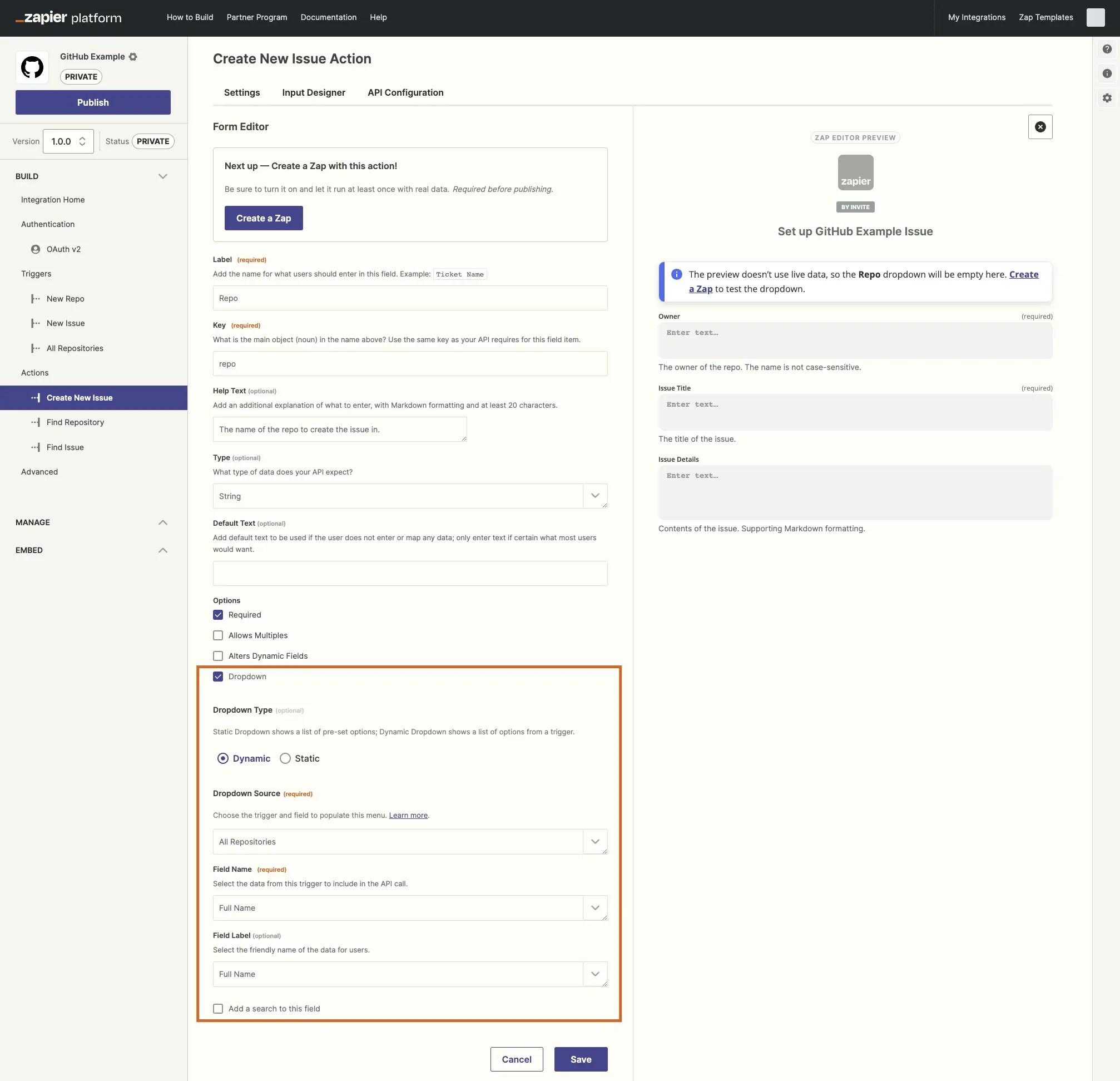
By default, Zapier triggers fetch new or recently updated data to start Zap workflows, and only need to find the most recently added items. Triggers can also be used to populate dynamic dropdown fields, and there they need to find all possible items to populate the field.
These triggers used for populating dynamic dropdown fields will often find dozens or hundreds of items. Many APIs let you split the results into pages. The first API call will return the first set of results — often 20 to 100. The items from this result would be seen as options in the dynamic dropdown field. If you want additional entries, you can make a new API call requesting page 2 and get the next set of results, iterating through the pages until the API has sent every possible option.
In the Build section in the left sidebar, click on the trigger that should power the dynamic dropdown field. This can be an existing trigger or a new trigger you set as Hidden if its only purpose is to power the dynamic dropdown.
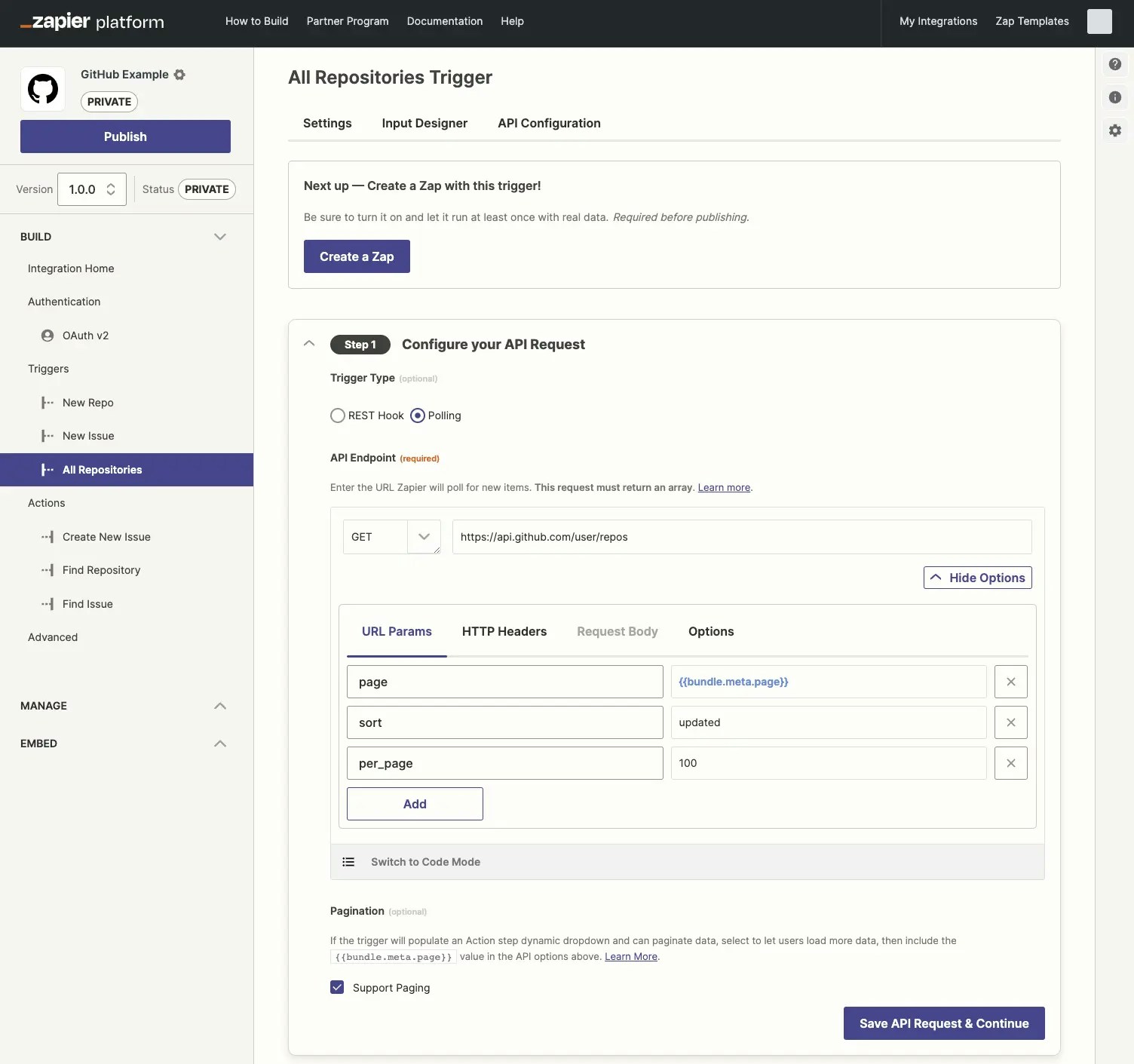
Go to the API Configuration tab
In the Configure your API Request section, select the Support Paging checkbox, which should only be applied to triggers built to power dynamic dropdown menus. This enables Zapier’s bundle.meta.page value which tracks the pages Zapier has loaded, along with a Load more option in the user-facing Zapier editor’s dropdown menus.
In the API Endpoint section, click Show Options to include bundle.meta.page in your API call as Zapier does not include that automatically, then add a new URL Param for your API’s paging option (or optionally add it to your HTTP Headers if your API expects the paging value there). Use the page request field name from your API on the left, and {{bundle.meta.page}} on the right to have Zapier pull in the correct page value.
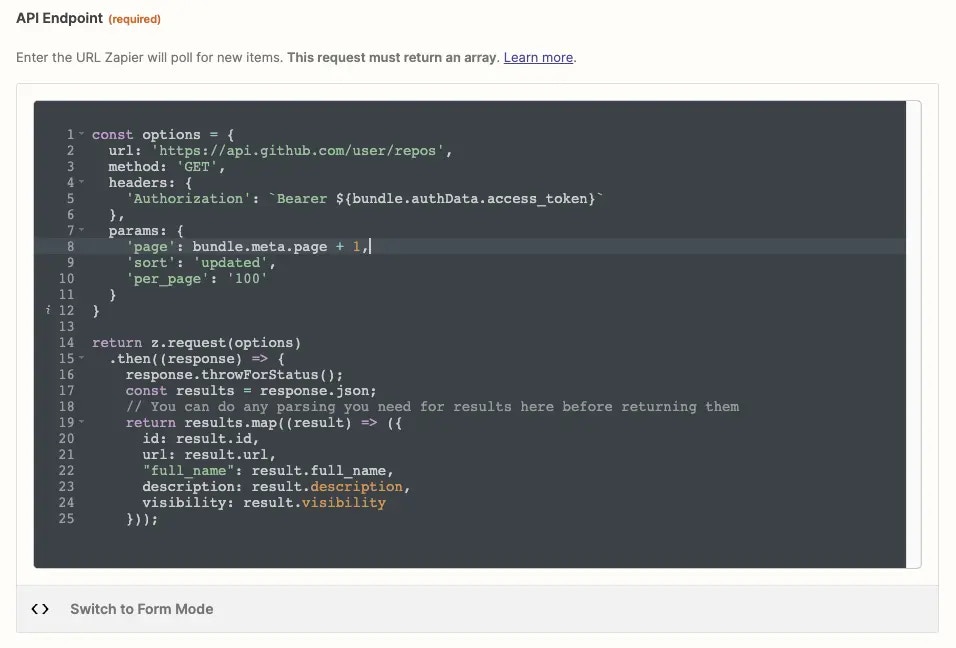
Note that Zapier’s bundle.meta.page value uses zero-based numbering. The first time Zapier fetches data from your API, it uses a page value of 0, followed by 1 the second time, and so on. If your API expects the first API call to request page 1, with 2 for the second page and so on, you’ll need to switch to code mode and add + 1 to bundle.meta.page. So pagination in the code would look like the below (substituting page with the correct field name your API uses for pagination):'page': bundle.meta.page + 1
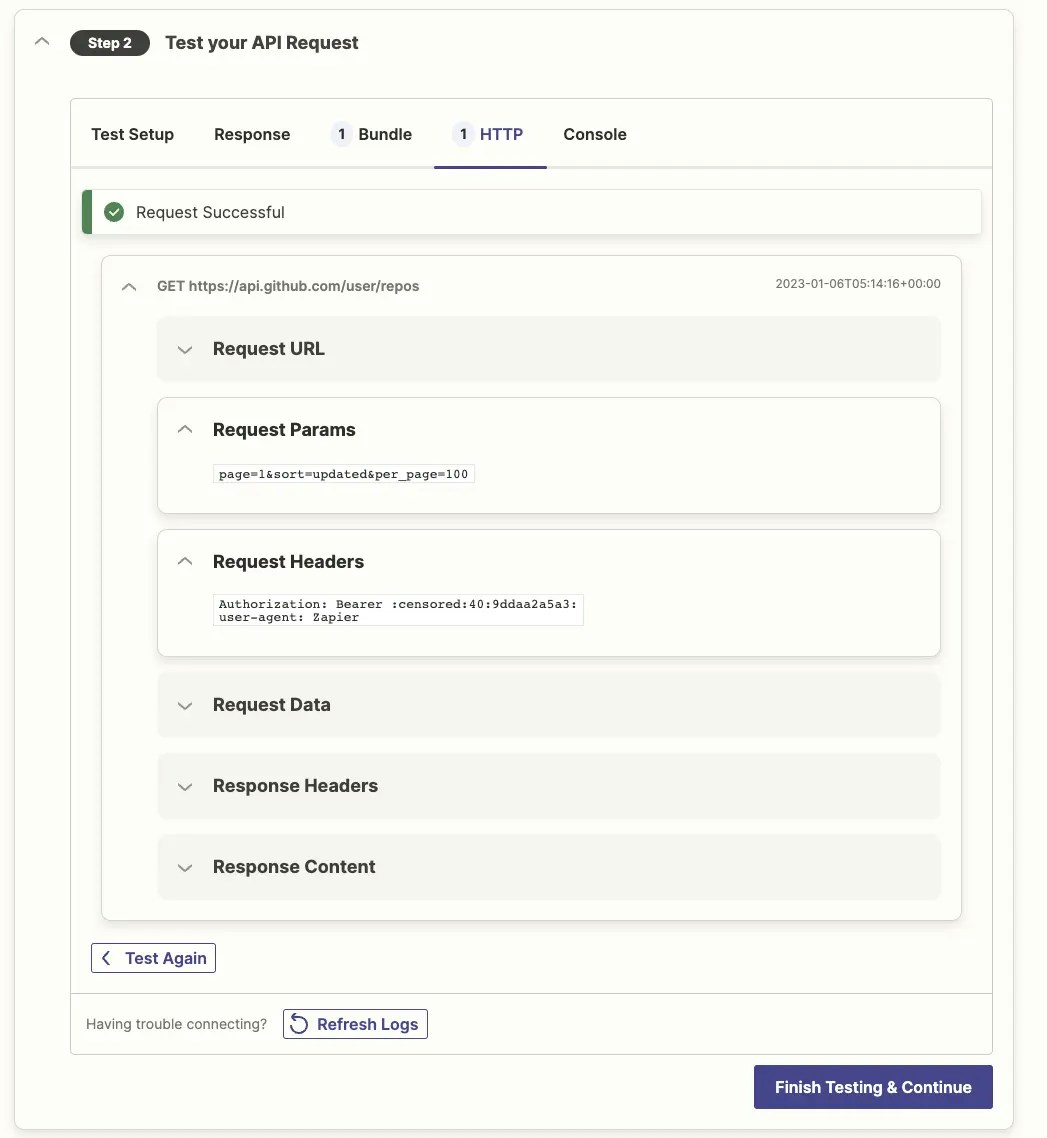
Test the API Request in the Platform UI and check the HTTP tab to see the request Zapier sent your app. Zapier should show a page=0 value (or the correct term for pages in your API) under the Request Params header by default, or page=1 if you’re customizing the page requests to start at 1.
Build an action in the Platform UI that uses this trigger in a dynamic dropdown.
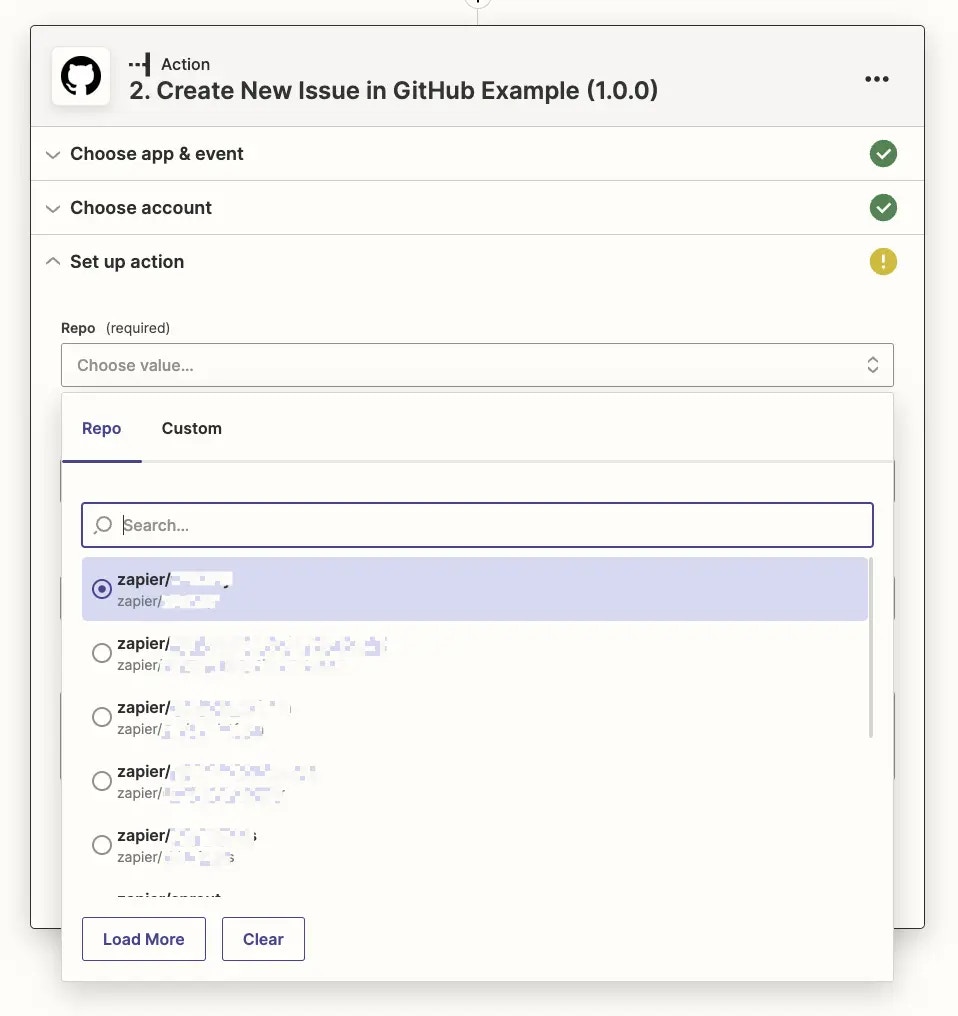
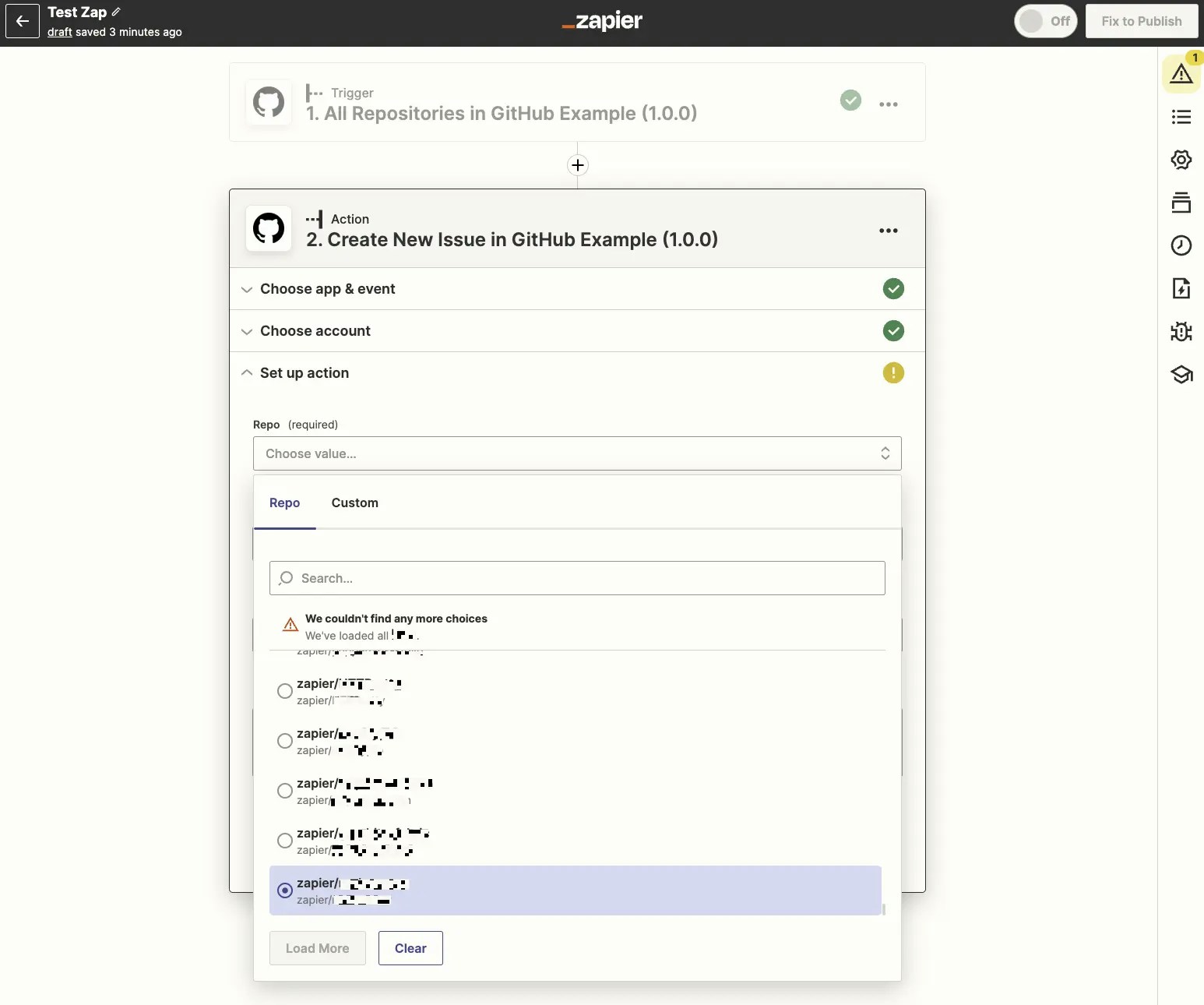
Make a new Zap in the user-facing Zap editor that uses your action with the dynamic dropdown field. Click the dropdown field, scroll to the end, and click the Load More button. Repeat until it loads the last options, which will show a We couldn’t find any more choices prompt.
Last modified on October 22, 2026
Was this page helpful?
{"docsConfig":{"theme":"mint","$schema":"https://mintlify.com/docs.json","name":"Zapier","colors":{"primary":"#FF4F00","light":"#FE6C2A","dark":"#FF4F00"},"logo":{"light":"https://mintcdn.com/zapier-82f0e938/uPbDC0jSuXgHCaWD/logo/light.svg?fit=max\u0026auto=format\u0026n=uPbDC0jSuXgHCaWD\u0026q=85\u0026s=b6a37289cb22ac1a9681572651874765","dark":"https://mintcdn.com/zapier-82f0e938/b1yEJJDZ7v1EncmE/logo/dark.svg?fit=max\u0026auto=format\u0026n=b1yEJJDZ7v1EncmE\u0026q=85\u0026s=2c393c141bc7fbb0051aaa46b103f5e8","href":"https://zapier.com"},"favicon":"https://mintcdn.com/zapier-82f0e938/1jtyk4mqAs_J-p30/favicon.png?fit=max\u0026auto=format\u0026n=1jtyk4mqAs_J-p30\u0026q=85\u0026s=a26d7c83b71f1cdec48ae963245f407f","api":{"openapi":["https://api.zapier.com/schema","api-reference/specs/trigger-inbox.yaml","api-reference/specs/actions.yaml","api-reference/specs/connections.yaml","api-reference/specs/agentic-management.yaml"]},"background":{"color":{"light":"#FFFEFB"}},"navbar":{"primary":{"type":"button","label":"Sign Up","href":"https://zapier.com/sign-up"}},"footer":{},"seo":{"indexing":"all"},"integrations":{"gtm":{"tagId":"GTM-K7GFJTV"}},"contextual":{"options":["copy","view",{"title":"Open in ChatGPT","description":"Ask ChatGPT about this page","icon":"/images/logos/branded/openai.svg","href":{"base":"https://chatgpt.com/","query":[{"key":"q","value":"Read https://docs.zapier.com$path.md and help me apply it. Ask what I am building before giving steps."}]}},{"title":"Open in Claude","description":"Ask Claude about this page","icon":"/images/logos/branded/claude.svg","href":{"base":"https://claude.ai/new","query":[{"key":"q","value":"Read https://docs.zapier.com$path.md and help me apply it. Ask what I am building before giving steps."}]}},{"title":"Open in Perplexity","description":"Ask Perplexity about this page","icon":"/images/logos/branded/perplexity.svg","href":{"base":"https://www.perplexity.ai/search","query":[{"key":"q","value":"Read https://docs.zapier.com$path.md and help me apply it. Ask what I am building before giving steps."}]}},{"title":"Open in Claude Code","description":"Use this page in Claude Code","icon":"/images/logos/branded/claude.svg","href":{"base":"claude://code/new","query":[{"key":"q","value":"Read https://docs.zapier.com$path.md and help me apply it to this project. Check what is already here before giving steps."}]}},{"title":"Open in Codex","description":"Use this page in Codex","icon":"/images/logos/branded/openai.svg","href":{"base":"codex://new","query":[{"key":"prompt","value":"Read https://docs.zapier.com$path.md and help me apply it to this project. Check what is already here before giving steps."}]}},{"title":"Open in Cursor","description":"Use this page in Cursor","icon":"/images/logos/branded/cursor.svg","href":{"base":"cursor://anysphere.cursor-deeplink/prompt","query":[{"key":"text","value":"Read https://docs.zapier.com$path.md and help me apply it to this project. Check what is already here before giving steps."}]}}],"display":"header"},"metadata":{"timestamp":true},"styling":{"latex":false},"navigation":{"global":{"anchors":[{"anchor":"Community","icon":"users","href":"https://community.zapier.com/"},{"anchor":"Changelog","icon":"rss","href":"/white-label/changelog"},{"anchor":"Contact Us","icon":"envelope","href":"https://developer.zapier.com/contact"}]},"pages":[]}},"deployment":{"deploymentMetadataValue":{"subdomain":"zapier-82f0e938","hasAudioNarration":false,"actualSubdomain":"zapier-82f0e938","customDomains":["docs.zapier.com"],"gitSource":{"type":"gitlab","owner":"zapier/public-api","repo":"public-api-docs","projectId":56036607,"deployBranch":"main","contentDirectory":"","isPrivate":true,"mountPath":"","label":""},"feedback":{"thumbs":true},"entitlements":{"AI_CHAT":{"status":"ENABLED"},"REMOVE_BRANDING":{"status":"ENABLED"},"CONTEXTUAL_FEEDBACK":{"status":"ENABLED"},"CODE_SNIPPET_FEEDBACK":{"status":"ENABLED"},"WEB_MCP":{"status":"ENABLED"},"NARRATION":{"status":"ENABLED"}},"buildId":"6af4be157e3af22d78e5aa8b","clientVersion":"0.0.4111","searchFilterCounts":[{"language":"default","tag":"Build a Zapier integration","count":149},{"language":"default","tag":"Developer Platform","count":149},{"language":"default","tag":"Embed Zapier","count":105},{"language":"default","tag":"Powered by Zapier","count":86},{"language":"default","tag":"Use Zapier in your tools","count":80},{"language":"default","tag":"Zapier MCP","count":69},{"language":"default","tag":"API reference","count":60},{"language":"default","tag":"Build with UI","count":52},{"language":"default","tag":"API specification","count":50},{"language":"default","tag":"Get started","count":47}]},"assistantConfig":{"enableStarterQuestions":true,"enableContextualStarterQuestions":false},"basePath":"","hasChatPermissions":true,"hasWebMcpPermissions":true,"toggles":[{"name":"kill-isr","enabled":true,"variant":{"name":"disabled","enabled":false,"feature_enabled":true},"impressionData":false},{"name":"custom-rbac-roles","enabled":true,"variant":{"name":"disabled","enabled":false,"feature_enabled":true},"impressionData":false},{"name":"agent-mintlify-slack","enabled":true,"variant":{"name":"disabled","enabled":false,"feature_enabled":true},"impressionData":false},{"name":"agent-integrations-settings","enabled":true,"variant":{"name":"disabled","enabled":false,"feature_enabled":true},"impressionData":false},{"name":"rbac-expansion","enabled":true,"variant":{"name":"disabled","enabled":false,"feature_enabled":true},"impressionData":false},{"name":"automations-pr-grouping","enabled":true,"variant":{"name":"disabled","enabled":false,"feature_enabled":true},"impressionData":false},{"name":"custom-prefix","enabled":true,"variant":{"name":"disabled","enabled":false,"feature_enabled":true},"impressionData":false},{"name":"analytics-v7","enabled":true,"variant":{"name":"disabled","enabled":false,"feature_enabled":true},"impressionData":false},{"name":"user-flows-analytics","enabled":true,"variant":{"name":"disabled","enabled":false,"feature_enabled":true},"impressionData":false},{"name":"no-publish-flow","enabled":true,"variant":{"name":"disabled","enabled":false,"feature_enabled":true},"impressionData":false},{"name":"workos-onboarding","enabled":true,"variant":{"name":"disabled","enabled":false,"feature_enabled":true},"impressionData":false},{"name":"llms-txt-v2","enabled":true,"variant":{"name":"disabled","enabled":false,"feature_enabled":true},"impressionData":false},{"name":"snapshot-serving-live","enabled":true,"variant":{"name":"disabled","enabled":false,"feature_enabled":true},"impressionData":false},{"name":"stripTemperatureMiddleware","enabled":true,"variant":{"name":"disabled","enabled":false,"feature_enabled":true},"impressionData":false},{"name":"support-platform-pylon-zendesk","enabled":true,"variant":{"name":"disabled","enabled":false,"feature_enabled":true},"impressionData":false},{"name":"snapshot-serving","enabled":true,"variant":{"name":"disabled","enabled":false,"feature_enabled":true},"impressionData":false},{"name":"instant-rollback","enabled":true,"variant":{"name":"disabled","enabled":false,"feature_enabled":true},"impressionData":false},{"name":"granular-notifications-server","enabled":true,"variant":{"name":"disabled","enabled":false,"feature_enabled":true},"impressionData":false},{"name":"granular-notifications","enabled":true,"variant":{"name":"disabled","enabled":false,"feature_enabled":true},"impressionData":false},{"name":"automations-fable","enabled":true,"variant":{"name":"disabled","enabled":false,"feature_enabled":true},"impressionData":false},{"name":"fixed-ai-action-pricing","enabled":true,"variant":{"name":"disabled","enabled":false,"feature_enabled":true},"impressionData":false},{"name":"automation-resolve-merge-conflict","enabled":true,"variant":{"name":"disabled","enabled":false,"feature_enabled":true},"impressionData":false},{"name":"scoped-publishing","enabled":true,"variant":{"name":"disabled","enabled":false,"feature_enabled":true},"impressionData":false},{"name":"mintql","enabled":true,"variant":{"name":"disabled","enabled":false,"feature_enabled":true},"impressionData":false},{"name":"page-level-analytics","enabled":true,"variant":{"name":"disabled","enabled":false,"feature_enabled":true},"impressionData":false},{"name":"editor-version-history-v2","enabled":true,"variant":{"name":"disabled","enabled":false,"feature_enabled":true},"impressionData":false},{"name":"billing-page-v2","enabled":true,"variant":{"name":"disabled","enabled":false,"feature_enabled":true},"impressionData":false},{"name":"full-page-search","enabled":true,"variant":{"name":"disabled","enabled":false,"feature_enabled":true},"impressionData":false},{"name":"workspace-projects","enabled":true,"variant":{"name":"disabled","enabled":false,"feature_enabled":true},"impressionData":false},{"name":"assistant-v5","enabled":true,"variant":{"name":"disabled","enabled":false,"feature_enabled":true},"impressionData":false},{"name":"fork-pr-previews","enabled":true,"variant":{"name":"disabled","enabled":false,"feature_enabled":true},"impressionData":false},{"name":"revalidation-jwt","enabled":true,"variant":{"name":"disabled","enabled":false,"feature_enabled":true},"impressionData":false},{"name":"workos-sso-scim","enabled":true,"variant":{"name":"disabled","enabled":false,"feature_enabled":true},"impressionData":false},{"name":"hobby-abuse-scan","enabled":true,"variant":{"name":"disabled","enabled":false,"feature_enabled":true},"impressionData":false},{"name":"dashboard-inbox","enabled":true,"variant":{"name":"disabled","enabled":false,"feature_enabled":true},"impressionData":false},{"name":"workos-signup","enabled":true,"variant":{"name":"disabled","enabled":false,"feature_enabled":true},"impressionData":false},{"name":"turbopuffer-dual-write","enabled":true,"variant":{"name":"disabled","enabled":false,"feature_enabled":true},"impressionData":false},{"name":"workos-enabled","enabled":true,"variant":{"name":"disabled","enabled":false,"feature_enabled":true},"impressionData":false},{"name":"approve-review-flow","enabled":true,"variant":{"name":"disabled","enabled":false,"feature_enabled":true},"impressionData":false},{"name":"editor-metadata","enabled":true,"variant":{"name":"disabled","enabled":false,"feature_enabled":true},"impressionData":false},{"name":"sso-setup-deadline-banner","enabled":true,"variant":{"name":"disabled","enabled":false,"feature_enabled":true},"impressionData":false},{"name":"turbopuffer-serve","enabled":true,"variant":{"name":"disabled","enabled":false,"feature_enabled":true},"impressionData":false},{"name":"live-agents","enabled":true,"variant":{"name":"disabled","enabled":false,"feature_enabled":true},"impressionData":false}],"starterQuestions":[{"_id":"6ac8f1f2b9b3f8640f05a146","deploymentId":"67001931f47db52dbf2b872a","questionText":"How do I build a public Zapier integration?","status":"active","generatedBy":"manual","createdAt":"2026-10-09T13:53:54.782Z","updatedAt":"2026-10-09T13:53:54.782Z","__v":0},{"_id":"6ac8f1e5b9b3f8640f05a0d1","deploymentId":"67001931f47db52dbf2b872a","questionText":"What's the difference between the SDK and Platform CLI?","status":"active","generatedBy":"manual","createdAt":"2026-10-09T13:53:41.586Z","updatedAt":"2026-10-09T13:53:41.586Z","__v":0},{"_id":"6ac8f1d4b9b3f8640f05a051","deploymentId":"67001931f47db52dbf2b872a","questionText":"How do I connect Zapier MCP to my MCP client?","status":"active","generatedBy":"manual","createdAt":"2026-10-09T13:53:24.465Z","updatedAt":"2026-10-09T13:53:24.465Z","__v":0}],"googleFontsInlined":false},"customCss":[{"filePath":"styles.css","content":"@font-face{font-family:\"Degular Display - Semibold\";src:url('https://fonts.zapier.com/Degular/DegularDisplay-Semibold.woff2');font-display:fallback;font-weight:400}@font-face{font-family:\"Serrif\";src:url('/fonts/serrif-300.woff2') format('woff2');font-display:swap;font-weight:300;font-style:normal}@font-face{font-family:\"Degular Display\";src:url('/fonts/degular-display-500.woff2') format('woff2');font-display:swap;font-weight:500;font-style:normal}@font-face{font-family:\"Degular Display\";src:url('/fonts/degular-display-600.woff2') format('woff2');font-display:swap;font-weight:600;font-style:normal}header h1,h2,h3,h4{font-family:\"Degular Display - Semibold\";font-weight:normal!important;letter-spacing:0.08rem!important}#chat-assistant-floating-input,.chat-assistant-floating-input,[data-component-part=\"chat-assistant-floating-input\"]{display:none!important}.card h2{font-size:1.2rem}.card code{text-decoration:none}:root:not(.dark) .card,:root:not(.dark) .code-block,:root:not(.dark) .code-block-background,:root:not(.dark) .code-group,:root:not(.dark) .shiki,:root:not(.dark) .code-block pre,:root:not(.dark) .code-group pre{background-color:#FFFEFB!important}.cta-button{display:inline-flex;align-items:center;gap:8px;padding:12px 24px;width:fit-content;background:#FF4F00;color:#FFFFFF!important;font-weight:600;font-size:15px;letter-spacing:0.01em;text-decoration:none!important;border:none;border-radius:8px;box-shadow:0 2px 8px rgba(255, 79, 0, 0.25);transition:all 0.2s ease;margin:1em 0}.cta-button:hover{background:#E64600;color:#FFFFFF!important;text-decoration:none!important;box-shadow:0 4px 12px rgba(255, 79, 0, 0.35);transform:translateY(-1px)}.cta-button:active{transform:translateY(0);box-shadow:0 1px 4px rgba(255, 79, 0, 0.3)}blockquote.sr-only+h2{margin-top:0}#navbar a[href=\"https://zapier.com\"],#navbar a[href=\"https://zapier.com\"] img{padding-right:0!important;margin-right:0!important}.docs-nav-label{color:#201515!important;font-family:\"Degular Display - Medium\", ui-sans-serif, system-ui, sans-serif;font-weight:400;font-size:1.5rem;letter-spacing:0.01em;margin-left:-0.6rem;text-decoration:none!important;transition:color 0.15s ease;vertical-align:middle;cursor:pointer}.docs-nav-label:hover{color:#939084!important;text-decoration:none!important}.dark .docs-nav-label{color:#FFFEFB!important}.dark .docs-nav-label:hover{color:#C5C0B1!important}[role=\"menu\"]:focus,[role=\"menu\"]:focus-visible{outline-width:1px}footer:not(#zapier-universal-footer){display:none!important}#zapier-universal-footer{display:block!important;background-color:#fffdf9;font-family:'Inter', Helvetica, arial, sans-serif;font-size:14px;line-height:24px;color:#201515;-webkit-font-smoothing:antialiased;width:100%;margin-top:2rem}.dark #zapier-universal-footer{background-color:#2d2e2e;color:#fffdf9}.zuf{max-width:1200px;margin:0 auto;padding:30px;display:grid;grid-template-rows:auto;grid-template-columns:100%;grid-template-areas:'links' 'socials' 'logo' 'meta';justify-items:center;align-items:center;gap:30px}@media (min-width: 650px){.zuf{grid-template-columns:max-content 1fr;grid-template-areas:'links links'\n 'socials socials'\n 'logo meta'}}@media (min-width: 980px){.zuf{grid-template-columns:max-content 1fr;grid-template-areas:'socials links'\n 'logo meta'}}.zuf-row--top,.zuf-row--bottom{display:contents}.zuf-socials{grid-area:socials;display:inline-flex;flex-wrap:wrap;align-items:center;gap:10px}@media (min-width: 980px){.zuf-socials{justify-self:start}}.zuf-follow{font-size:14px;line-height:20px;font-weight:400;color:#574e4c;white-space:nowrap}.dark .zuf-follow{color:#a8a5a0}.zuf-icon{display:flex;align-items:center;justify-content:center;width:30px;height:30px;border-radius:100%;background-color:#a8a5a0;text-decoration:none!important;transition:background-color 0.15s ease}.zuf-icon svg,.zuf-icon img{width:16px;height:16px;fill:#fffdf9}.dark .zuf-icon{background-color:#403f3e}.dark .zuf-icon svg{fill:#fffdf9}.zuf-icon[aria-label*=\"Facebook\"]:hover,.zuf-icon[aria-label*=\"Facebook\"]:focus{background-color:#3b5998;outline:none}.zuf-icon[aria-label*=\"LinkedIn\"]:hover,.zuf-icon[aria-label*=\"LinkedIn\"]:focus{background-color:#0976b4;outline:none}.zuf-icon[aria-label*=\"X\"]:hover,.zuf-icon[aria-label*=\"X\"]:focus{background-color:#00aced;outline:none}.zuf-icon[aria-label*=\"YouTube\"]:hover,.zuf-icon[aria-label*=\"YouTube\"]:focus{background-color:#e52d27;outline:none}.zuf-icon[aria-label*=\"blog\"]:hover,.zuf-icon[aria-label*=\"blog\"]:focus{background-color:#ff4f00;outline:none}.zuf-links{grid-area:links;display:flex;flex-wrap:wrap;align-items:center;justify-content:center;column-gap:12.5px;row-gap:10px;width:100%}@media (min-width: 980px){.zuf-links{justify-content:flex-end}}.zuf-links a{font-family:'Inter', Helvetica, arial, sans-serif;font-size:14px;line-height:24px;font-weight:500;color:#201515!important;padding:0 5px;white-space:nowrap;text-decoration:none!important}.zuf-links a:hover,.zuf-links a:focus{color:#3d4592!important;outline:none}.dark .zuf-links a{color:#fffdf9!important}.dark .zuf-links a:hover,.dark .zuf-links a:focus{color:#90a1ed!important}.zuf-logo{grid-area:logo;display:inline-flex;align-items:center;text-decoration:none!important}.zuf-logo svg{display:block}.zuf-logo path{fill:#201515}.dark .zuf-logo path{fill:#fffdf9}.zuf-logo path[fill=\"#FF4F00\"]{fill:#FF4F00!important}@media (min-width: 650px){.zuf-logo{justify-self:start}}.zuf-meta{grid-area:meta;font-size:14px;line-height:24px;font-weight:400;color:#574e4c;display:flex;flex-wrap:wrap;align-items:center;justify-content:center;row-gap:10px}.dark .zuf-meta{color:#a8a5a0}.zuf-meta a{padding:5px 10px;color:#574e4c!important;text-decoration:none!important}.zuf-meta a:hover,.zuf-meta a:focus{color:#3d4592!important;outline:none}.dark .zuf-meta a{color:#a8a5a0!important}.dark .zuf-meta a:hover,.dark .zuf-meta a:focus{color:#90a1ed!important}@media (min-width: 650px){.zuf-meta{justify-self:end;justify-content:flex-end}}.zuf-meta span{margin-right:10px}@media (max-width: 979px){.zuf{padding:20px}}"},{"filePath":"index.css","content":".docs-landing{width:100%;margin:0 auto}#navbar{background:#fffef8!important;backdrop-filter:none!important}.dark #navbar{background:#18181b!important}.docs-landing-hero-bg{background:#201515}.docs-landing-hero-bg .dl-hero-title{color:#ffffff}.docs-landing-hero-bg .docs-landing-lead{color:rgba(255, 255, 255, 0.6)}.dark .docs-landing-hero-bg{background:#26201f;border-bottom:1px solid rgba(255, 255, 255, 0.08)}.docs-landing-hero{display:grid;grid-template-columns:minmax(0, 1fr);gap:clamp(1.5rem, 3.5vw, 2.5rem);align-items:center;max-width:1180px;margin:0 auto;padding:48px clamp(1.25rem, 4vw, 2rem) clamp(1.25rem, 2.5vw, 1.75rem)}.docs-landing-hero-inner{text-align:center}.dl-hero-copy{text-align:center;max-width:640px;margin:0 auto}.docs-landing-eyebrow{font-family:\"Inter\", ui-sans-serif, system-ui, sans-serif;font-size:0.75rem;font-weight:600;letter-spacing:0.14em;text-transform:uppercase;color:#605d52;margin:0 0 1.25rem}.docs-landing-title{font-family:\"Degular Display - Semibold\", ui-sans-serif, system-ui, sans-serif;font-size:clamp(2.25rem, 4.5vw, 3.25rem);line-height:1.08;font-weight:400!important;margin:0 0 1rem;letter-spacing:0.08rem!important}.docs-landing-lead{font-family:\"Inter\", ui-sans-serif, system-ui, sans-serif;font-size:1rem;line-height:1.5;color:#201515;margin:0 auto;max-width:62ch}.dark .docs-landing-lead{color:var(--muted-foreground, #a1a1aa)}.docs-landing-media{border-radius:14px;overflow:hidden;box-shadow:0 1px 2px rgba(15, 23, 42, 0.06),\n 0 12px 40px rgba(15, 23, 42, 0.12);border:1px solid rgba(255, 79, 0, 0.12);background:rgba(255, 79, 0, 0.04)}.docs-landing-video{display:block;width:100%;height:auto;vertical-align:middle}.docs-landing-products{max-width:1180px;margin:0 auto;padding:clamp(2.5rem, 5vw, 4rem) clamp(1.25rem, 4vw, 2rem) clamp(3rem, 6vw, 5rem)}.docs-landing-section-title{font-family:\"Degular Display - Semibold\", ui-sans-serif, system-ui, sans-serif;font-size:clamp(1.5rem, 2.5vw, 1.875rem);font-weight:400!important;text-align:left;margin:0 0 2.25rem;letter-spacing:0.08rem!important}.dl-hero-title{font-family:\"Degular Display\", ui-sans-serif, system-ui, sans-serif;font-size:clamp(2.5rem, 4.8vw, 3.5rem);line-height:1.1;font-weight:500;letter-spacing:-0.03em!important;color:var(--foreground, #18181b);margin:0 0 0.6875rem}.dark .dl-hero-title{color:var(--foreground, #fafafa)}.dl-hero-title-accent{color:#ff4f00}.dark .dl-hero-title-accent{color:#ff8a5c}.dl-hero-demo{display:flex;align-items:center;justify-content:center;aspect-ratio:1 / 1;min-height:fit-content;padding:clamp(1rem, 3vw, 1.75rem);border:1px solid rgba(9, 9, 11, 0.1);border-radius:10px;background-image:url('/images/pattern-abstract.jpg');background-size:cover;background-position:center;background-repeat:no-repeat;overflow:hidden}.dark .dl-hero-demo{border-color:rgba(255, 255, 255, 0.12)}.dl-demo-panel{width:100%;border:1px solid rgba(9, 9, 11, 0.1);border-radius:12px;background:#ffffff;box-shadow:0 1px 2px rgba(15, 23, 42, 0.06),\n 0 12px 40px rgba(15, 23, 42, 0.14);overflow:hidden}.dark .dl-demo-panel{background:#18181b;border-color:rgba(255, 255, 255, 0.12)}.dl-demo-clients{display:flex;flex-wrap:wrap;align-items:center;gap:0.5rem;padding:0.5rem 0.75rem;border-bottom:1px solid rgba(9, 9, 11, 0.08)}.dark .dl-demo-clients{border-bottom-color:rgba(255, 255, 255, 0.1)}.dl-demo-chip{width:36px;height:36px;border-radius:8px;border:1px solid rgba(9, 9, 11, 0.1);background:#ffffff;flex:none;margin:0!important}.dark .dl-demo-chip{border-color:rgba(255, 255, 255, 0.14)}.dl-demo-chip--padded{padding:6px}.dl-demo-arch-agents{display:flex;gap:0.625rem;padding:1rem 1rem 0.75rem}.dl-demo-arch-col{flex:1;display:flex;flex-direction:column;gap:0.375rem}.dl-demo-arch-label{font-size:0.6875rem;font-weight:500;color:var(--muted-foreground, #71717a);margin:0 0 0.125rem;letter-spacing:0.01em}.dl-demo-arch-label--spacer{visibility:hidden;pointer-events:none;user-select:none}.dl-demo-arch-chip{display:flex;align-items:center;gap:0.4375rem;padding:0.3125rem 0.5625rem;border-radius:7px;border:1px solid rgba(9, 9, 11, 0.1);background:#ffffff;font-size:0.75rem;font-weight:500;color:#09090b;line-height:1;white-space:nowrap}.dl-demo-arch-chip--muted{background:transparent;border-style:dashed;color:var(--muted-foreground, #71717a)}.dl-demo-arch-chip--logo{justify-content:center;padding:0.375rem;width:36px;height:36px}.dl-demo-arch-icon{width:22px;height:22px;border-radius:4px;flex:none}.dl-demo-arch-chip--icon-pad .dl-demo-arch-icon{padding:3px}.dl-demo-arch-merge{position:relative;height:28px;margin:0 1rem}.dl-demo-arch-merge::before{content:'';position:absolute;left:25%;right:25%;top:0;height:14px;border-left:1px solid rgba(9, 9, 11, 0.1);border-right:1px solid rgba(9, 9, 11, 0.1);border-bottom:1px solid rgba(9, 9, 11, 0.1);border-bottom-left-radius:4px;border-bottom-right-radius:4px}.dl-demo-arch-merge::after{content:'';position:absolute;left:50%;transform:translateX(-50%);top:14px;bottom:0;width:1px;background:rgba(9, 9, 11, 0.1)}.dl-demo-arch-zapier{display:flex;align-items:center;justify-content:center;gap:0.5rem;margin:0 1rem;padding:0.625rem 1rem;border:1px solid rgba(9, 9, 11, 0.1);border-radius:10px;background:#ffffff}.dl-demo-arch-stem{display:flex;justify-content:center;height:20px}.dl-demo-arch-stem::after{content:'';width:1px;height:100%;background:rgba(9, 9, 11, 0.1)}.dl-demo-arch-apps{display:flex;flex-wrap:wrap;align-items:center;justify-content:center;gap:0.375rem;padding:0 1rem 0.875rem}.dl-demo-arch-app{display:inline-flex;align-items:center;padding:0.25rem 0.625rem;border-radius:6px;border:1px solid rgba(9, 9, 11, 0.1);background:#ffffff;font-size:0.6875rem;font-weight:500;color:#09090b;white-space:nowrap}.dl-demo-arch-app--more{background:transparent;border-color:#e06c2c;color:#e06c2c;font-weight:600;text-decoration:none}.dl-demo-arch-app--more:hover{background:rgba(224, 108, 44, 0.06)}.dark .dl-demo-arch-stem::after{background:rgba(255, 255, 255, 0.1)}.dark .dl-demo-arch-app{background:rgba(255, 255, 255, 0.06);border-color:rgba(255, 255, 255, 0.12);color:#fafafa}.dl-demo-arch-zapier-badge{font-size:0.8125rem;font-weight:600;color:#09090b;letter-spacing:-0.01em}.dl-demo-arch-zapier-plus{font-size:0.8125rem;font-weight:600;color:#e06c2c}.dark .dl-demo-arch-chip{background:rgba(255, 255, 255, 0.06);border-color:rgba(255, 255, 255, 0.12);color:#fafafa}.dark .dl-demo-arch-chip--muted{background:transparent;border-color:rgba(255, 255, 255, 0.15);color:var(--muted-foreground, #a1a1aa)}.dark .dl-demo-arch-merge::before{border-color:rgba(255, 255, 255, 0.1)}.dark .dl-demo-arch-merge::after{background:rgba(255, 255, 255, 0.1)}.dark .dl-demo-arch-zapier{background:rgba(255, 255, 255, 0.04);border-color:rgba(255, 255, 255, 0.1)}.dark .dl-demo-arch-zapier-badge{color:#fafafa}.dl-demo-more{display:inline-flex;align-items:center;justify-content:center;width:36px;height:36px;border-radius:8px;border:1px dashed rgba(9, 9, 11, 0.22);font-size:0.9375rem;font-weight:500;line-height:1;color:var(--muted-foreground, #52525b);flex:none}.dark .dl-demo-more{border-color:rgba(255, 255, 255, 0.2);color:var(--muted-foreground, #a1a1aa)}.dl-demo-body{display:flex;flex-direction:column;gap:0.375rem;padding:0.5625rem 0.75rem 0.625rem}.dl-demo-prompt{padding:0.4375rem 0.625rem;border:1px solid rgba(9, 9, 11, 0.1);border-radius:7px;font-size:0.75rem;color:var(--muted-foreground, #52525b)}.dl-demo-row{display:flex;align-items:center;justify-content:space-between;gap:1rem;padding:0.4375rem 0.625rem;border:1px solid rgba(9, 9, 11, 0.1);border-radius:7px}.dark .dl-demo-prompt,.dark .dl-demo-row{border-color:rgba(255, 255, 255, 0.12)}.dl-demo-status{font-size:0.6875rem;font-weight:700;letter-spacing:0.12em;text-transform:uppercase;color:#ff4f00}.dl-demo-action{display:flex;align-items:center;justify-content:space-between;gap:0.75rem;padding:0.375rem 0.625rem;border-left:2px solid #ff4f00;border-radius:0 7px 7px 0;background:rgba(9, 9, 11, 0.03)}.dark .dl-demo-action{background:rgba(255, 255, 255, 0.04)}.dl-demo-action span{font-size:0.75rem;text-align:right;color:var(--muted-foreground, #52525b)}.dl-demo-foot{display:flex;align-items:center;justify-content:space-between;gap:1rem;padding-top:0.25rem;font-size:0.75rem;color:var(--muted-foreground, #52525b)}.dl-hero-demo code{font-family:ui-monospace, SFMono-Regular, Menlo, Consolas, monospace;font-size:0.75rem;background:none;border:none;padding:0;color:var(--foreground, #18181b)}.dark .dl-hero-demo code{color:var(--foreground, #fafafa)}.dl-section{max-width:1180px;margin:0 auto;padding:clamp(1.5rem, 3vw, 2.25rem) clamp(1.25rem, 4vw, 2rem)}.dl-eyebrow{font-size:0.6875rem;font-weight:700;letter-spacing:0.12em;text-transform:uppercase;color:#ff4f00;margin:0 0 0.4375rem}.dl-heading{font-size:clamp(1.375rem, 2.4vw, 1.75rem);line-height:1.2;font-weight:600;letter-spacing:-0.01em!important;color:var(--foreground, #18181b);margin:0 0 0.5rem;max-width:40ch}.dark .dl-heading{color:var(--foreground, #fafafa)}.dl-lead{font-size:0.9375rem;line-height:1.55;color:var(--muted-foreground, #52525b);margin:0 0 1.25rem;max-width:68ch}.dark .dl-lead{color:var(--muted-foreground, #a1a1aa)}.dl-grid{display:grid;gap:0.75rem;align-items:stretch}.dl-grid--2{grid-template-columns:repeat(2, minmax(0, 1fr))}.dl-grid--3{grid-template-columns:repeat(3, minmax(0, 1fr))}.dl-grid--4{grid-template-columns:repeat(4, minmax(0, 1fr))}.dl-card{display:flex;flex-direction:column;gap:0.5rem;padding:1.125rem 1.25rem 1.25rem;border:1px solid rgba(9, 9, 11, 0.1);background:#f8f4f0}.dark .dl-card{border-color:rgba(255, 255, 255, 0.12);background:rgba(255, 255, 255, 0.02)}.dl-card-mark{align-self:flex-start;margin-bottom:0.25rem;color:#ff4f00}.dl-card-eyebrow{font-size:0.6875rem;font-weight:700;letter-spacing:0.12em;text-transform:uppercase;color:#ff4f00;margin:0}.dl-card-title{font-family:\"Serrif\", ui-serif, serif;font-size:1.5rem;font-weight:300;line-height:1.1;letter-spacing:-0.03em;color:var(--foreground, #18181b);margin:0}.dark .dl-card-title{color:var(--foreground, #fafafa)}.dl-card-desc{font-family:\"Inter\", ui-sans-serif, system-ui, sans-serif;font-size:0.9375rem;line-height:1.55;color:var(--muted-foreground, #52525b);margin:0}.dark .dl-card-desc{color:var(--muted-foreground, #a1a1aa)}.dl-pills{display:flex;flex-wrap:wrap;gap:0.375rem;margin:0.125rem 0 0}.dl-pill{font-size:0.75rem;line-height:1;padding:0.375rem 0.625rem;border-radius:999px;border:1px solid rgba(9, 9, 11, 0.14);color:var(--muted-foreground, #52525b);white-space:nowrap}.dark .dl-pill{border-color:rgba(255, 255, 255, 0.16);color:var(--muted-foreground, #a1a1aa)}.dl-pill>a{color:inherit!important;text-decoration:none!important}.dl-pill:has(>a):hover{border-color:rgba(9, 9, 11, 0.34)}.dark .dl-pill:has(>a):hover{border-color:rgba(255, 255, 255, 0.34)}.dl-pill--accent{border-color:rgba(255, 79, 0, 0.35);background:rgba(255, 79, 0, 0.06);color:#ff4f00}.dark .dl-pill--accent{border-color:rgba(255, 79, 0, 0.45);color:#ff8a5c}.dl-code{font-family:ui-monospace, SFMono-Regular, Menlo, Consolas, monospace;font-size:0.8125rem;line-height:1.7;background:rgba(9, 9, 11, 0.04);border-radius:8px;padding:0.75rem 0.875rem;margin:0.125rem 0;overflow-x:auto;color:var(--foreground, #18181b)}.dl-code span{display:block;white-space:pre}.dl-code--shell span::before{content:\"\\276F \";color:#ff4f00}.dark .dl-code{background:rgba(255, 255, 255, 0.05);color:var(--foreground, #fafafa)}.dl-cta{margin-top:auto;padding-top:0.5rem;font-size:0.875rem;font-weight:600;color:#ff4f00!important;text-decoration:none!important}.dl-cta:hover{text-decoration:underline!important}@media screen and (max-width: 1024px){.dl-grid--3,.dl-grid--4{grid-template-columns:repeat(2, minmax(0, 1fr))}}@media screen and (max-width: 640px){.dl-grid--2,.dl-grid--3,.dl-grid--4{grid-template-columns:1fr}}.docs-landing-next{max-width:1180px;margin:0 auto;padding:clamp(1.5rem, 3vw, 2.25rem) clamp(1.25rem, 4vw, 2rem) clamp(2.25rem, 4vw, 3.25rem)}.docs-landing-next-title{font-size:2rem;line-height:1.2;font-weight:600;letter-spacing:-0.01em!important;color:var(--foreground, #18181b);margin:0 0 1.25rem}.dark .docs-landing-next-title{color:var(--foreground, #fafafa)}.docs-landing-next-grid{display:grid;grid-template-columns:repeat(4, minmax(0, 1fr));column-gap:clamp(1.5rem, 4vw, 3rem)}.docs-landing-next-item{position:relative;display:block;padding:0.875rem 0 1.25rem;border-top:1px solid rgba(9, 9, 11, 0.12);text-decoration:none!important;transition:border-top-color 0.2s ease}.docs-landing-next-item:hover{border-top-color:#ff4f00}.dark .docs-landing-next-item{border-top-color:rgba(255, 255, 255, 0.14)}.docs-landing-next-item-title{display:block;font-size:1rem;font-weight:600;color:var(--foreground, #18181b);margin-bottom:0.25rem}.docs-landing-next-item-title::after{content:\" \\2192\";color:#ff4f00}.dark .docs-landing-next-item-title{color:var(--foreground, #fafafa)}.docs-landing-next-item:hover .docs-landing-next-item-title{text-decoration:underline}.docs-landing-next-item-desc{display:block;font-size:0.9375rem;line-height:1.55;color:var(--muted-foreground, #52525b)}.dark .docs-landing-next-item-desc{color:var(--muted-foreground, #a1a1aa)}@media screen and (max-width: 768px){.docs-landing-next-grid{grid-template-columns:1fr}}.hero-container{display:flex;flex-direction:row;align-items:center;justify-content:center;text-align:left;padding:6rem 2rem;width:80%;border-bottom:2px solid #ff4f00;margin:0 auto}.hero-text{width:600px;margin-right:2rem}@media screen and (max-width: 1024px){.docs-landing-hero{grid-template-columns:1fr}.docs-landing-media{max-width:640px;margin:0 auto}}@media screen and (max-width: 1300px){.hero-container{flex-direction:column;text-align:center}.hero-text{margin-right:0rem;margin-bottom:2rem}.hero-video{max-width:600px}}.dl-section-heading{font-size:2rem;line-height:1.2;font-weight:600;letter-spacing:-0.01em!important;color:var(--foreground, #18181b);margin:0 0 1.25rem}.dark .dl-section-heading{color:var(--foreground, #fafafa)}.dl-bands{display:grid;grid-template-columns:repeat(2, minmax(0, 1fr));gap:0.75rem}.dl-band{display:flex;flex-direction:column;border:1px solid rgba(9, 9, 11, 0.1);overflow:hidden;background:#f8f4f0}.dark .dl-band{border-color:rgba(255, 255, 255, 0.12);background:rgba(255, 255, 255, 0.02)}.dl-band-main{display:flex;flex-direction:column;gap:0.5rem;padding:1.125rem 1.25rem 1.25rem;border-bottom:1px solid rgba(9, 9, 11, 0.1)}.dark .dl-band-main{background:rgba(255, 255, 255, 0.02);border-bottom-color:rgba(255, 255, 255, 0.12)}.dl-band-badge{align-self:flex-start;margin:0;padding:0.1875rem 0.4375rem;border:1px solid rgba(255, 79, 0, 0.4);border-radius:5px;font-size:0.625rem;font-weight:700;letter-spacing:0.12em;text-transform:uppercase;color:#ff4f00}.dl-band-title{font-family:\"Serrif\", ui-serif, serif;font-size:1.5rem;font-weight:300!important;line-height:1.1;letter-spacing:-0.03em!important;color:var(--foreground, #18181b);margin:0.125rem 0 0!important}.dark .dl-band-title{color:var(--foreground, #fafafa)}.dl-band-title-mark{align-self:flex-start;margin-bottom:16px;color:#ff4f00}.dl-band-icon{align-self:flex-start;margin-bottom:8px;color:#ff4f00}.dl-band-desc{font-family:\"Inter\", ui-sans-serif, system-ui, sans-serif;font-size:0.9375rem;line-height:1.55;color:var(--muted-foreground, #52525b);margin:0;max-width:none}.dark .dl-band-desc{color:var(--muted-foreground, #a1a1aa)}.dl-band-main .dl-hero-demo{box-shadow:none;margin-top:0.375rem}.dl-band-media{display:block;width:100%;height:auto;border:1px solid rgba(9, 9, 11, 0.1);border-radius:10px;margin:0.375rem 0 0!important}.dark .dl-band-media{border-color:rgba(255, 255, 255, 0.12)}.dl-band-list{display:flex;flex:1;flex-direction:column}.dl-band-row{position:relative;display:grid;grid-template-columns:28px 1fr;grid-template-rows:auto auto;column-gap:0.625rem;row-gap:0.1875rem;align-items:center;flex:1;padding:0.8125rem 2.25rem 0.8125rem 1.25rem;border-bottom:1px solid rgba(9, 9, 11, 0.08);text-decoration:none!important;transition:background 0.15s ease}.dl-band-row .dl-band-row-icon{grid-row:1 / -1;align-self:center}.dl-band-row .dl-band-row-title{grid-column:2}.dl-band-row .dl-band-row-desc{grid-column:2}.dl-band-row:not(:has(.dl-band-row-icon)){grid-template-columns:1fr}.dl-band-row:not(:has(.dl-band-row-icon)) .dl-band-row-title,.dl-band-row:not(:has(.dl-band-row-icon)) .dl-band-row-desc{grid-column:1}.dark .dl-band-row{border-bottom-color:rgba(255, 255, 255, 0.1)}.dl-band-row:last-child{border-bottom:none}.dl-band-row:hover{background:rgba(255, 79, 0, 0.04)}.dl-band-row::after{content:\"\\2192\";position:absolute;top:50%;right:1rem;transform:translateY(-50%);font-size:1rem;color:#ff4f00;transition:transform 0.15s ease}.dl-band-row:hover::after{transform:translateY(-50%) translateX(2px)}.dl-band-row>a,.docs-landing-next-item>a{position:absolute;inset:0;z-index:1}.dl-band-row>a:focus-visible,.docs-landing-next-item>a:focus-visible{outline:2px solid #ff4f00;outline-offset:-2px}.dl-band-row-icon{display:flex;align-items:center;justify-content:center;flex-shrink:0;width:28px;height:28px;color:#ff4f00}.dark .dl-band-row-icon{color:#ff8a5c}.dl-band-row-icon svg{width:16px;height:16px}.dl-band-row-title{font-size:0.9375rem;font-weight:600;color:var(--foreground, #18181b)}.dark .dl-band-row-title{color:var(--foreground, #fafafa)}.dl-band-row:hover .dl-band-row-title{text-decoration:underline}.dl-band-row-desc{font-size:0.875rem;line-height:1.5;color:var(--muted-foreground, #52525b)}.dark .dl-band-row-desc{color:var(--muted-foreground, #a1a1aa)}@media screen and (max-width: 900px){.dl-bands{grid-template-columns:1fr}}"}],"page":{"pagePath":"integrations/build/pagination-trigger","slug":"/integrations/build/pagination-trigger","pageMetadata":{"title":"Use pagination in triggers","description":"By default, Zapier triggers fetch new or recently updated data to start Zap workflows, and only need to find the most recently added items. Triggers can also be used to populate [dynamic dropdown fields](/integrations/build/add-fields#dynamic-dropdown), and there they need to find all possible items to populate the field.","href":"/integrations/build/pagination-trigger"},"description":{"compiledSource":"\"use strict\";\nconst {jsx: _jsx, jsxs: _jsxs} = arguments[0];\nconst {useMDXComponents: _provideComponents} = arguments[0];\nfunction _createMdxContent(props) {\n const _components = {\n a: \"a\",\n p: \"p\",\n ..._provideComponents(),\n ...props.components\n };\n return _jsxs(_components.p, {\n children: [\"By default, Zapier triggers fetch new or recently updated data to start Zap workflows, and only need to find the most recently added items. Triggers can also be used to populate \", _jsx(_components.a, {\n href: \"/integrations/build/add-fields#dynamic-dropdown\",\n children: \"dynamic dropdown fields\"\n }), \", and there they need to find all possible items to populate the field.\"]\n });\n}\nfunction MDXContent(props = {}) {\n const {wrapper: MDXLayout} = {\n ..._provideComponents(),\n ...props.components\n };\n return MDXLayout ? _jsx(MDXLayout, {\n ...props,\n children: _jsx(_createMdxContent, {\n ...props\n })\n }) : _createMdxContent(props);\n}\nreturn {\n default: MDXContent\n};\n","frontmatter":{},"scope":{}},"pageType":"default","mdx":{"mdxSource":{"compiledSource":"\"use strict\";const{Fragment:_Fragment,jsx:_jsx,jsxs:_jsxs}=arguments[0];const{useMDXComponents:_provideComponents}=arguments[0];function _createMdxContent(props){const _components={a:`a`,code:`code`,em:`em`,li:`li`,p:`p`,strong:`strong`,ul:`ul`,..._provideComponents(),...props.components},{Frame,Heading,OptimizedImage}=_components;if(!Frame)_missingMdxReference(`Frame`,true);if(!Heading)_missingMdxReference(`Heading`,true);if(!OptimizedImage)_missingMdxReference(`OptimizedImage`,true);return _jsxs(_Fragment,{children:[_jsx(_components.p,{children:`These triggers used for populating dynamic dropdown fields will often find dozens or hundreds of items. Many APIs let you split the results into pages. The first API call will return the first set of results — often 20 to 100. The items from this result would be seen as options in the dynamic dropdown field. If you want additional entries, you can make a new API call requesting page 2 and get the next set of results, iterating through the pages until the API has sent every possible option.`}),`\n`,_jsxs(Frame,{children:[` `,_jsx(OptimizedImage,{src:`https://mintcdn.com/zapier-82f0e938/FKPl8SjhZXHXKd0_/images/f59291e5a74d1977648850f84513e33e.webp?fit=max\u0026auto=format\u0026n=FKPl8SjhZXHXKd0_\u0026q=85\u0026s=da18230fd58c644c3ecfe9ad14e48191`,\"data-og-width\":`958`,width:`958`,\"data-og-height\":`1016`,height:`1016`,\"data-path\":`images/f59291e5a74d1977648850f84513e33e.webp`,\"data-optimize\":`true`,\"data-opv\":`3`,srcset:`https://mintcdn.com/zapier-82f0e938/FKPl8SjhZXHXKd0_/images/f59291e5a74d1977648850f84513e33e.webp?w=280\u0026fit=max\u0026auto=format\u0026n=FKPl8SjhZXHXKd0_\u0026q=85\u0026s=9bc8c64ca4d948e93fc9f217b2b95d73 280w, https://mintcdn.com/zapier-82f0e938/FKPl8SjhZXHXKd0_/images/f59291e5a74d1977648850f84513e33e.webp?w=560\u0026fit=max\u0026auto=format\u0026n=FKPl8SjhZXHXKd0_\u0026q=85\u0026s=b71a371e9c7e921f03362a3cfec5ad32 560w, https://mintcdn.com/zapier-82f0e938/FKPl8SjhZXHXKd0_/images/f59291e5a74d1977648850f84513e33e.webp?w=840\u0026fit=max\u0026auto=format\u0026n=FKPl8SjhZXHXKd0_\u0026q=85\u0026s=fea9924b13021855d0ddcaa0cc69cd2c 840w, https://mintcdn.com/zapier-82f0e938/FKPl8SjhZXHXKd0_/images/f59291e5a74d1977648850f84513e33e.webp?w=1100\u0026fit=max\u0026auto=format\u0026n=FKPl8SjhZXHXKd0_\u0026q=85\u0026s=aedaf366f969c7c05c0136a8e2031998 1100w, https://mintcdn.com/zapier-82f0e938/FKPl8SjhZXHXKd0_/images/f59291e5a74d1977648850f84513e33e.webp?w=1650\u0026fit=max\u0026auto=format\u0026n=FKPl8SjhZXHXKd0_\u0026q=85\u0026s=bf545a1dfef50d8d26170dac03be8c9f 1650w, https://mintcdn.com/zapier-82f0e938/FKPl8SjhZXHXKd0_/images/f59291e5a74d1977648850f84513e33e.webp?w=2500\u0026fit=max\u0026auto=format\u0026n=FKPl8SjhZXHXKd0_\u0026q=85\u0026s=e5688b3cfa1663dc2cca686dc75c4bc2 2500w`}),` `]}),`\n`,_jsx(Heading,{level:`2`,id:`1-enable-pagination`,children:`1. Enable pagination`}),`\n`,_jsxs(_components.ul,{children:[`\n`,_jsxs(_components.li,{children:[`Log into the `,_jsx(_components.a,{href:`https://zapier.com/app/developer`,children:`Platform UI`}),`.`]}),`\n`,_jsxs(_components.li,{children:[`Select your `,_jsx(_components.strong,{children:`integration`}),`.`]}),`\n`,_jsxs(_components.li,{children:[`In the `,_jsx(_components.em,{children:`Build`}),` section in the left sidebar, click on the trigger that should power the dynamic dropdown field. This can be an existing trigger or a new trigger you set as `,_jsx(_components.em,{children:`Hidden`}),` if its only purpose is to power the dynamic dropdown.`]}),`\n`,_jsxs(_components.li,{children:[`Go to the `,_jsx(_components.strong,{children:`API Configuration`}),` tab`]}),`\n`,_jsxs(_components.li,{children:[`In the `,_jsx(_components.strong,{children:`Configure your API Request`}),` section, select the `,_jsx(_components.strong,{children:`Support Paging`}),` checkbox, which should only be applied to triggers built to power dynamic dropdown menus. This enables Zapier’s `,_jsx(_components.code,{children:`bundle.meta.page`}),` value which tracks the pages Zapier has loaded, along with a Load more option in the user-facing Zapier editor’s dropdown menus.`]}),`\n`]}),`\n`,_jsxs(Frame,{children:[` `,_jsx(OptimizedImage,{src:`https://mintcdn.com/zapier-82f0e938/88BoWUuO1MROWn5-/images/4680b6dd27b3db71b8364177e351fdd5.webp?fit=max\u0026auto=format\u0026n=88BoWUuO1MROWn5-\u0026q=85\u0026s=75d9a8ec4b6064ebfd0c1c63ef1ffbf2`,\"data-og-width\":`905`,width:`905`,\"data-og-height\":`153`,height:`153`,\"data-path\":`images/4680b6dd27b3db71b8364177e351fdd5.webp`,\"data-optimize\":`true`,\"data-opv\":`3`,srcset:`https://mintcdn.com/zapier-82f0e938/88BoWUuO1MROWn5-/images/4680b6dd27b3db71b8364177e351fdd5.webp?w=280\u0026fit=max\u0026auto=format\u0026n=88BoWUuO1MROWn5-\u0026q=85\u0026s=a57d369b922354377a9f0f0e7fbdae9f 280w, https://mintcdn.com/zapier-82f0e938/88BoWUuO1MROWn5-/images/4680b6dd27b3db71b8364177e351fdd5.webp?w=560\u0026fit=max\u0026auto=format\u0026n=88BoWUuO1MROWn5-\u0026q=85\u0026s=b9ddb139e3b17466482ef177c22a84b1 560w, https://mintcdn.com/zapier-82f0e938/88BoWUuO1MROWn5-/images/4680b6dd27b3db71b8364177e351fdd5.webp?w=840\u0026fit=max\u0026auto=format\u0026n=88BoWUuO1MROWn5-\u0026q=85\u0026s=7c053bdef45096f4054b9742b32b5e8b 840w, https://mintcdn.com/zapier-82f0e938/88BoWUuO1MROWn5-/images/4680b6dd27b3db71b8364177e351fdd5.webp?w=1100\u0026fit=max\u0026auto=format\u0026n=88BoWUuO1MROWn5-\u0026q=85\u0026s=3489dd4ab1e0e25f3b25d050caad271e 1100w, https://mintcdn.com/zapier-82f0e938/88BoWUuO1MROWn5-/images/4680b6dd27b3db71b8364177e351fdd5.webp?w=1650\u0026fit=max\u0026auto=format\u0026n=88BoWUuO1MROWn5-\u0026q=85\u0026s=304ddda4339b7c193b740434fce480ed 1650w, https://mintcdn.com/zapier-82f0e938/88BoWUuO1MROWn5-/images/4680b6dd27b3db71b8364177e351fdd5.webp?w=2500\u0026fit=max\u0026auto=format\u0026n=88BoWUuO1MROWn5-\u0026q=85\u0026s=3f161ee4cf5d1a086ae98eac8be42b93 2500w`}),` `]}),`\n`,_jsxs(_components.ul,{children:[`\n`,_jsxs(_components.li,{children:[`\n`,_jsxs(_components.p,{children:[`In the API Endpoint section, click `,_jsx(_components.em,{children:`Show Options`}),` to include `,_jsx(_components.code,{children:`bundle.meta.page`}),` in your API call as Zapier does not include that automatically, then add a new URL Param for your API’s paging option (or optionally add it to your HTTP Headers if your API expects the paging value there). Use the page request field name from your API on the left, and `,_jsx(_components.code,{children:`{{bundle.meta.page}}`}),` on the right to have Zapier pull in the correct page value.`]}),`\n`,_jsxs(Frame,{children:[` `,_jsx(OptimizedImage,{src:`https://mintcdn.com/zapier-82f0e938/1jtyk4mqAs_J-p30/images/2492cb37ec953861cceaf243c0625285.webp?fit=max\u0026auto=format\u0026n=1jtyk4mqAs_J-p30\u0026q=85\u0026s=7d940f4c2046a93fdf63fdde774cb269`,\"data-og-width\":`1504`,width:`1504`,\"data-og-height\":`1411`,height:`1411`,\"data-path\":`images/2492cb37ec953861cceaf243c0625285.webp`,\"data-optimize\":`true`,\"data-opv\":`3`,srcset:`https://mintcdn.com/zapier-82f0e938/1jtyk4mqAs_J-p30/images/2492cb37ec953861cceaf243c0625285.webp?w=280\u0026fit=max\u0026auto=format\u0026n=1jtyk4mqAs_J-p30\u0026q=85\u0026s=036f4bfd1760ca31ce2712f59c33a05c 280w, https://mintcdn.com/zapier-82f0e938/1jtyk4mqAs_J-p30/images/2492cb37ec953861cceaf243c0625285.webp?w=560\u0026fit=max\u0026auto=format\u0026n=1jtyk4mqAs_J-p30\u0026q=85\u0026s=d080f580bd5cc1a81e496574cad8095f 560w, https://mintcdn.com/zapier-82f0e938/1jtyk4mqAs_J-p30/images/2492cb37ec953861cceaf243c0625285.webp?w=840\u0026fit=max\u0026auto=format\u0026n=1jtyk4mqAs_J-p30\u0026q=85\u0026s=f224813cb1a5424306024611f0d480fa 840w, https://mintcdn.com/zapier-82f0e938/1jtyk4mqAs_J-p30/images/2492cb37ec953861cceaf243c0625285.webp?w=1100\u0026fit=max\u0026auto=format\u0026n=1jtyk4mqAs_J-p30\u0026q=85\u0026s=5ed8dfcfef37abe2e1c28d1f8080420e 1100w, https://mintcdn.com/zapier-82f0e938/1jtyk4mqAs_J-p30/images/2492cb37ec953861cceaf243c0625285.webp?w=1650\u0026fit=max\u0026auto=format\u0026n=1jtyk4mqAs_J-p30\u0026q=85\u0026s=08280eca90ea31d4ede9f4a77bb3e087 1650w, https://mintcdn.com/zapier-82f0e938/1jtyk4mqAs_J-p30/images/2492cb37ec953861cceaf243c0625285.webp?w=2500\u0026fit=max\u0026auto=format\u0026n=1jtyk4mqAs_J-p30\u0026q=85\u0026s=8ef6c59f3dcf23dae5e6f1b30feef2a7 2500w`}),` `]}),`\n`]}),`\n`]}),`\n`,_jsxs(_components.p,{children:[`Note that Zapier’s `,_jsx(_components.code,{children:`bundle.meta.page`}),` value uses zero-based numbering. The first time Zapier fetches data from your API, it uses a page value of 0, followed by 1 the second time, and so on. If your API expects the first API call to request page 1, with 2 for the second page and so on, you’ll need to `,_jsx(_components.a,{href:`/integrations/build/code-mode`,children:`switch to code mode`}),` and add `,_jsx(_components.code,{children:`+ 1`}),` to `,_jsx(_components.code,{children:`bundle.meta.page`}),`. So pagination in the code would look like the below (substituting `,_jsx(_components.code,{children:`page`}),` with the correct field name your API uses for pagination):`]}),`\n`,_jsx(_components.p,{children:_jsx(_components.code,{children:`'page': bundle.meta.page + 1`})}),`\n`,_jsx(OptimizedImage,{src:`https://mintcdn.com/zapier-82f0e938/ziHY4Q2Lym35bUQM/images/8e7923caa73ff68ea6061d61ad37e451.webp?fit=max\u0026auto=format\u0026n=ziHY4Q2Lym35bUQM\u0026q=85\u0026s=e3afbcd2509fecfca972875e7d816688`,alt:`Zapier pagination code mode`,\"data-og-width\":`956`,width:`956`,\"data-og-height\":`648`,height:`648`,\"data-path\":`images/8e7923caa73ff68ea6061d61ad37e451.webp`,\"data-optimize\":`true`,\"data-opv\":`3`,srcset:`https://mintcdn.com/zapier-82f0e938/ziHY4Q2Lym35bUQM/images/8e7923caa73ff68ea6061d61ad37e451.webp?w=280\u0026fit=max\u0026auto=format\u0026n=ziHY4Q2Lym35bUQM\u0026q=85\u0026s=9cb66ca46f2f8105b5160f94faefd4ef 280w, https://mintcdn.com/zapier-82f0e938/ziHY4Q2Lym35bUQM/images/8e7923caa73ff68ea6061d61ad37e451.webp?w=560\u0026fit=max\u0026auto=format\u0026n=ziHY4Q2Lym35bUQM\u0026q=85\u0026s=265e7604b18ecf1910294457531908b6 560w, https://mintcdn.com/zapier-82f0e938/ziHY4Q2Lym35bUQM/images/8e7923caa73ff68ea6061d61ad37e451.webp?w=840\u0026fit=max\u0026auto=format\u0026n=ziHY4Q2Lym35bUQM\u0026q=85\u0026s=6f52cb871e2f414ffce01f170f1b67b8 840w, https://mintcdn.com/zapier-82f0e938/ziHY4Q2Lym35bUQM/images/8e7923caa73ff68ea6061d61ad37e451.webp?w=1100\u0026fit=max\u0026auto=format\u0026n=ziHY4Q2Lym35bUQM\u0026q=85\u0026s=679c7fc69d054dcd5ae499d0277c8bd9 1100w, https://mintcdn.com/zapier-82f0e938/ziHY4Q2Lym35bUQM/images/8e7923caa73ff68ea6061d61ad37e451.webp?w=1650\u0026fit=max\u0026auto=format\u0026n=ziHY4Q2Lym35bUQM\u0026q=85\u0026s=8f538cfc140d1220df85fe601ff1aa3f 1650w, https://mintcdn.com/zapier-82f0e938/ziHY4Q2Lym35bUQM/images/8e7923caa73ff68ea6061d61ad37e451.webp?w=2500\u0026fit=max\u0026auto=format\u0026n=ziHY4Q2Lym35bUQM\u0026q=85\u0026s=d3fd7747b7f764d5c7a06efabbf7f2da 2500w`}),`\n`,_jsxs(_components.ul,{children:[`\n`,_jsxs(_components.li,{children:[`Test the API Request in the Platform UI and check the HTTP tab to see the request Zapier sent your app. Zapier should show a `,_jsx(_components.code,{children:`page=0`}),` value (or the correct term for pages in your API) under the Request Params header by default, or `,_jsx(_components.code,{children:`page=1`}),` if you’re customizing the page requests to start at 1.`]}),`\n`]}),`\n`,_jsxs(Frame,{children:[` `,_jsx(OptimizedImage,{src:`https://mintcdn.com/zapier-82f0e938/MptVjeuYuatFg3LM/images/78b76bad2188b7594325c2c6bb85f121.webp?fit=max\u0026auto=format\u0026n=MptVjeuYuatFg3LM\u0026q=85\u0026s=92751d2cb36ff4d37ebdda80dd7f0af5`,\"data-og-width\":`1047`,width:`1047`,\"data-og-height\":`1138`,height:`1138`,\"data-path\":`images/78b76bad2188b7594325c2c6bb85f121.webp`,\"data-optimize\":`true`,\"data-opv\":`3`,srcset:`https://mintcdn.com/zapier-82f0e938/MptVjeuYuatFg3LM/images/78b76bad2188b7594325c2c6bb85f121.webp?w=280\u0026fit=max\u0026auto=format\u0026n=MptVjeuYuatFg3LM\u0026q=85\u0026s=57b6378888c21f5dc99627de2d953e3e 280w, https://mintcdn.com/zapier-82f0e938/MptVjeuYuatFg3LM/images/78b76bad2188b7594325c2c6bb85f121.webp?w=560\u0026fit=max\u0026auto=format\u0026n=MptVjeuYuatFg3LM\u0026q=85\u0026s=3df2c5343c713c0693899ec199a7fa42 560w, https://mintcdn.com/zapier-82f0e938/MptVjeuYuatFg3LM/images/78b76bad2188b7594325c2c6bb85f121.webp?w=840\u0026fit=max\u0026auto=format\u0026n=MptVjeuYuatFg3LM\u0026q=85\u0026s=c9d69103fc45439fc2360beaf9d5b7d0 840w, https://mintcdn.com/zapier-82f0e938/MptVjeuYuatFg3LM/images/78b76bad2188b7594325c2c6bb85f121.webp?w=1100\u0026fit=max\u0026auto=format\u0026n=MptVjeuYuatFg3LM\u0026q=85\u0026s=d2553d50b4ee98779dcac7d88f4ebe8f 1100w, https://mintcdn.com/zapier-82f0e938/MptVjeuYuatFg3LM/images/78b76bad2188b7594325c2c6bb85f121.webp?w=1650\u0026fit=max\u0026auto=format\u0026n=MptVjeuYuatFg3LM\u0026q=85\u0026s=41528b8a144f5d6666e967c4e1c1645e 1650w, https://mintcdn.com/zapier-82f0e938/MptVjeuYuatFg3LM/images/78b76bad2188b7594325c2c6bb85f121.webp?w=2500\u0026fit=max\u0026auto=format\u0026n=MptVjeuYuatFg3LM\u0026q=85\u0026s=583487f05abd9f323760819fafbb6a2f 2500w`}),` `]}),`\n`,_jsx(Heading,{level:`2`,id:`2-test-pagination`,children:`2. Test pagination`}),`\n`,_jsx(_components.p,{children:`To test your paginating trigger:`}),`\n`,_jsxs(_components.ul,{children:[`\n`,_jsx(_components.li,{children:`Build an action in the Platform UI that uses this trigger in a dynamic dropdown.`}),`\n`]}),`\n`,_jsxs(Frame,{children:[` `,_jsx(OptimizedImage,{src:`https://mintcdn.com/zapier-82f0e938/2ebL4bG5uJP5JVc0/images/d7d14e885062e466c4bcbbab8dcfd535.webp?fit=max\u0026auto=format\u0026n=2ebL4bG5uJP5JVc0\u0026q=85\u0026s=11c5023c9ee0e99f90066878e8b2f666`,\"data-og-width\":`2014`,width:`2014`,\"data-og-height\":`1943`,height:`1943`,\"data-path\":`images/d7d14e885062e466c4bcbbab8dcfd535.webp`,\"data-optimize\":`true`,\"data-opv\":`3`,srcset:`https://mintcdn.com/zapier-82f0e938/2ebL4bG5uJP5JVc0/images/d7d14e885062e466c4bcbbab8dcfd535.webp?w=280\u0026fit=max\u0026auto=format\u0026n=2ebL4bG5uJP5JVc0\u0026q=85\u0026s=3530e7a7c043ccb0b986e406a87ea00c 280w, https://mintcdn.com/zapier-82f0e938/2ebL4bG5uJP5JVc0/images/d7d14e885062e466c4bcbbab8dcfd535.webp?w=560\u0026fit=max\u0026auto=format\u0026n=2ebL4bG5uJP5JVc0\u0026q=85\u0026s=918ce0374a78a8765876fb4a0c14ea59 560w, https://mintcdn.com/zapier-82f0e938/2ebL4bG5uJP5JVc0/images/d7d14e885062e466c4bcbbab8dcfd535.webp?w=840\u0026fit=max\u0026auto=format\u0026n=2ebL4bG5uJP5JVc0\u0026q=85\u0026s=b84b500a8ab884d9cd9b31ce3d22875b 840w, https://mintcdn.com/zapier-82f0e938/2ebL4bG5uJP5JVc0/images/d7d14e885062e466c4bcbbab8dcfd535.webp?w=1100\u0026fit=max\u0026auto=format\u0026n=2ebL4bG5uJP5JVc0\u0026q=85\u0026s=21382586e8c8d0c5ecd0e0a8aed1aa6d 1100w, https://mintcdn.com/zapier-82f0e938/2ebL4bG5uJP5JVc0/images/d7d14e885062e466c4bcbbab8dcfd535.webp?w=1650\u0026fit=max\u0026auto=format\u0026n=2ebL4bG5uJP5JVc0\u0026q=85\u0026s=43769ac63f40fe3fb71ae0bab1ffa9aa 1650w, https://mintcdn.com/zapier-82f0e938/2ebL4bG5uJP5JVc0/images/d7d14e885062e466c4bcbbab8dcfd535.webp?w=2500\u0026fit=max\u0026auto=format\u0026n=2ebL4bG5uJP5JVc0\u0026q=85\u0026s=5c1e61ff8d9c1a406053f02e5194b2dd 2500w`}),` `]}),`\n`,_jsxs(_components.ul,{children:[`\n`,_jsxs(_components.li,{children:[`Make a new Zap in the user-facing Zap editor that uses your action with the dynamic dropdown field. Click the dropdown field, scroll to the end, and click the `,_jsx(_components.strong,{children:`Load More`}),` button. Repeat until it loads the last options, which will show a `,_jsx(_components.em,{children:`We couldn’t find any more choices`}),` prompt.`]}),`\n`]}),`\n`,_jsxs(Frame,{children:[` `,_jsx(OptimizedImage,{src:`https://mintcdn.com/zapier-82f0e938/ziHY4Q2Lym35bUQM/images/b2d1a5bf597c95f8615ca009ee7d66c6.webp?fit=max\u0026auto=format\u0026n=ziHY4Q2Lym35bUQM\u0026q=85\u0026s=0dec03879cf03f4a92eced7f2b381d49`,\"data-og-width\":`1546`,width:`1546`,\"data-og-height\":`1290`,height:`1290`,\"data-path\":`images/b2d1a5bf597c95f8615ca009ee7d66c6.webp`,\"data-optimize\":`true`,\"data-opv\":`3`,srcset:`https://mintcdn.com/zapier-82f0e938/ziHY4Q2Lym35bUQM/images/b2d1a5bf597c95f8615ca009ee7d66c6.webp?w=280\u0026fit=max\u0026auto=format\u0026n=ziHY4Q2Lym35bUQM\u0026q=85\u0026s=9a7bad827dbd92c23f0e8f46222b9888 280w, https://mintcdn.com/zapier-82f0e938/ziHY4Q2Lym35bUQM/images/b2d1a5bf597c95f8615ca009ee7d66c6.webp?w=560\u0026fit=max\u0026auto=format\u0026n=ziHY4Q2Lym35bUQM\u0026q=85\u0026s=51038ac5fac8d39ff6cde01603fc1e62 560w, https://mintcdn.com/zapier-82f0e938/ziHY4Q2Lym35bUQM/images/b2d1a5bf597c95f8615ca009ee7d66c6.webp?w=840\u0026fit=max\u0026auto=format\u0026n=ziHY4Q2Lym35bUQM\u0026q=85\u0026s=2667b39bd9a54cfecefa2eadf201c734 840w, https://mintcdn.com/zapier-82f0e938/ziHY4Q2Lym35bUQM/images/b2d1a5bf597c95f8615ca009ee7d66c6.webp?w=1100\u0026fit=max\u0026auto=format\u0026n=ziHY4Q2Lym35bUQM\u0026q=85\u0026s=813d3d964306635ec3a5bc23da36376b 1100w, https://mintcdn.com/zapier-82f0e938/ziHY4Q2Lym35bUQM/images/b2d1a5bf597c95f8615ca009ee7d66c6.webp?w=1650\u0026fit=max\u0026auto=format\u0026n=ziHY4Q2Lym35bUQM\u0026q=85\u0026s=23c12cd7c0f0c16ed381307b1bd3dd6d 1650w, https://mintcdn.com/zapier-82f0e938/ziHY4Q2Lym35bUQM/images/b2d1a5bf597c95f8615ca009ee7d66c6.webp?w=2500\u0026fit=max\u0026auto=format\u0026n=ziHY4Q2Lym35bUQM\u0026q=85\u0026s=86593a3ae72faa2279642e336b738fd8 2500w`}),` `]})]})}function MDXContent(props={}){const{wrapper:MDXLayout}={..._provideComponents(),...props.components};return MDXLayout?_jsx(MDXLayout,{...props,children:_jsx(_createMdxContent,{...props})}):_createMdxContent(props)}return{default:MDXContent};function _missingMdxReference(id,component){throw new Error(`Expected `+(component?`component`:`object`)+\" `\"+id+\"` to be defined: you likely forgot to import, pass, or provide it.\")}","frontmatter":{},"scope":{"config":{},"pageMetadata":{"title":"Use pagination in triggers","description":"By default, Zapier triggers fetch new or recently updated data to start Zap workflows, and only need to find the most recently added items. Triggers can also be used to populate [dynamic dropdown fields](/integrations/build/add-fields#dynamic-dropdown), and there they need to find all possible items to populate the field.","href":"/integrations/build/pagination-trigger"}}},"mdxSourceWithNoJs":null},"mdxExtracts":{"tableOfContents":[{"title":"1. Enable pagination","slug":"1-enable-pagination","depth":2,"children":[]},{"title":"2. Test pagination","slug":"2-test-pagination","depth":2,"children":[]}],"codeExamples":{}},"jsLinks":["/_mintlify/custom/zapier-82f0e938/f426fe1f80e04ec5/content/welcome.js","/_mintlify/custom/zapier-82f0e938/8e22ee5176c0f2d3/content/page-view.js","/_mintlify/custom/zapier-82f0e938/ba23268896a334a3/content/events-core.js","/_mintlify/custom/zapier-82f0e938/4309c68d24e0365b/content/webmcp.js","/_mintlify/custom/zapier-82f0e938/00b5c2b78afe2715/logo-nav.js","/_mintlify/custom/zapier-82f0e938/4312bb950916a05a/universal-footer.js"],"subdomain":"zapier-82f0e938","siteName":"Zapier","title":"Use pagination in triggers - Zapier","navMaps":{"firstHrefInVersion":{},"firstHrefInLanguage":{}},"lastModified":"2026-10-22T11:59:24.447Z","gitLastModified":"2026-10-22T11:56:13.000Z","originalFileLocation":"integrations/build/pagination-trigger.mdx"},"headHtml":"\u003cscript data-mint-head>(function(){var d=document.documentElement,p=null;if(!p){try{p=localStorage.getItem(\"isDarkMode\")}catch(e){}if(p==='true')p='dark';else if(p==='false')p='light';if(p!=='light'\u0026\u0026p!=='dark'\u0026\u0026p!=='system')p=\"system\"}var r=p==='system'?(matchMedia(\"(prefers-color-scheme: dark)\").matches?'dark':'light'):p;d.classList.remove(r==='dark'?'light':'dark');d.classList.add(r);d.setAttribute(\"data-theme-preference\",p)})();\u003c/script>\u003cmeta data-mint-head name=\"description\" content=\"By default, Zapier triggers fetch new or recently updated data to start Zap workflows, and only need to find the most recently added items. Triggers can also be used to populate dynamic dropdown fields, and there they need to find all possible items to populate the field.\">\u003cmeta data-mint-head name=\"application-name\" content=\"Zapier\">\u003cmeta data-mint-head name=\"generator\" content=\"Mintlify\">\u003clink data-mint-head rel=\"icon\" type=\"image/png\" sizes=\"192x192\" href=\"/mintlify-assets/_mintlify/favicons/zapier-82f0e938/YBlPOOl2M7kSqqiA/_generated/favicon/android-chrome-192x192.png\" media=\"(prefers-color-scheme: light)\">\u003clink data-mint-head rel=\"apple-touch-icon\" type=\"image/png\" sizes=\"180x180\" href=\"/mintlify-assets/_mintlify/favicons/zapier-82f0e938/YBlPOOl2M7kSqqiA/_generated/favicon/apple-touch-icon.png\">\u003clink data-mint-head rel=\"icon\" type=\"image/png\" sizes=\"16x16\" href=\"/mintlify-assets/_mintlify/favicons/zapier-82f0e938/YBlPOOl2M7kSqqiA/_generated/favicon/favicon-16x16.png\" media=\"(prefers-color-scheme: light)\">\u003clink data-mint-head rel=\"icon\" type=\"image/png\" sizes=\"32x32\" href=\"/mintlify-assets/_mintlify/favicons/zapier-82f0e938/YBlPOOl2M7kSqqiA/_generated/favicon/favicon-32x32.png\" media=\"(prefers-color-scheme: light)\">\u003clink data-mint-head rel=\"shortcut icon\" type=\"image/x-icon\" href=\"/mintlify-assets/_mintlify/favicons/zapier-82f0e938/YBlPOOl2M7kSqqiA/_generated/favicon/favicon.ico\" media=\"(prefers-color-scheme: light)\">\u003clink data-mint-head rel=\"icon\" type=\"image/png\" sizes=\"192x192\" href=\"/mintlify-assets/_mintlify/favicons/zapier-82f0e938/YBlPOOl2M7kSqqiA/_generated/favicon-dark/android-chrome-192x192.png\" media=\"(prefers-color-scheme: dark)\">\u003clink data-mint-head rel=\"icon\" type=\"image/png\" sizes=\"16x16\" href=\"/mintlify-assets/_mintlify/favicons/zapier-82f0e938/YBlPOOl2M7kSqqiA/_generated/favicon-dark/favicon-16x16.png\" media=\"(prefers-color-scheme: dark)\">\u003clink data-mint-head rel=\"icon\" type=\"image/png\" sizes=\"32x32\" href=\"/mintlify-assets/_mintlify/favicons/zapier-82f0e938/YBlPOOl2M7kSqqiA/_generated/favicon-dark/favicon-32x32.png\" media=\"(prefers-color-scheme: dark)\">\u003clink data-mint-head rel=\"shortcut icon\" type=\"image/x-icon\" href=\"/mintlify-assets/_mintlify/favicons/zapier-82f0e938/YBlPOOl2M7kSqqiA/_generated/favicon-dark/favicon.ico\" media=\"(prefers-color-scheme: dark)\">\u003cmeta data-mint-head property=\"og:title\" content=\"Use pagination in triggers - Zapier\">\u003cmeta data-mint-head property=\"og:description\" content=\"By default, Zapier triggers fetch new or recently updated data to start Zap workflows, and only need to find the most recently added items. Triggers can also be used to populate dynamic dropdown fields, and there they need to find all possible items to populate the field.\">\u003cmeta data-mint-head property=\"og:site_name\" content=\"Zapier\">\u003cmeta data-mint-head property=\"og:url\" content=\"https://docs.zapier.com/integrations/build/pagination-trigger\">\u003cmeta data-mint-head property=\"og:type\" content=\"website\">\u003cmeta data-mint-head property=\"og:image\" content=\"https://zapier-82f0e938.mintlify.site/_mintlify/api/og/v2?division=Triggers\u0026amp;title=Use+pagination+in+triggers\u0026amp;description=By+default%2C+Zapier+triggers+fetch+new+or+recently+updated+data+to+start+Zap+workflows%2C+and+only+need+to+find+the+most+recently+added+items.+Triggers+can+also+be\u0026amp;theme=f38249568906c3b8e9c7c960\u0026amp;signature=3b0c5275d4e17828fd6affcc15acb8d79f58991a466639eb43a36c3e20b76b08\">\u003cmeta data-mint-head property=\"og:image:width\" content=\"1200\">\u003cmeta data-mint-head property=\"og:image:height\" content=\"630\">\u003cmeta data-mint-head name=\"twitter:card\" content=\"summary_large_image\">\u003cmeta data-mint-head name=\"twitter:title\" content=\"Use pagination in triggers - Zapier\">\u003cmeta data-mint-head name=\"twitter:description\" content=\"By default, Zapier triggers fetch new or recently updated data to start Zap workflows, and only need to find the most recently added items. Triggers can also be used to populate dynamic dropdown fields, and there they need to find all possible items to populate the field.\">\u003cmeta data-mint-head name=\"twitter:image\" content=\"https://zapier-82f0e938.mintlify.site/_mintlify/api/og/v2?division=Triggers\u0026amp;title=Use+pagination+in+triggers\u0026amp;description=By+default%2C+Zapier+triggers+fetch+new+or+recently+updated+data+to+start+Zap+workflows%2C+and+only+need+to+find+the+most+recently+added+items.+Triggers+can+also+be\u0026amp;theme=f38249568906c3b8e9c7c960\u0026amp;signature=3b0c5275d4e17828fd6affcc15acb8d79f58991a466639eb43a36c3e20b76b08\">\u003cmeta data-mint-head name=\"twitter:image:width\" content=\"1200\">\u003cmeta data-mint-head name=\"twitter:image:height\" content=\"630\">\u003cmeta data-mint-head name=\"msapplication-config\" content=\"/mintlify-assets/_mintlify/favicons/zapier-82f0e938/YBlPOOl2M7kSqqiA/_generated/favicon/browserconfig.xml\">\u003cmeta data-mint-head name=\"apple-mobile-web-app-title\" content=\"Zapier\">\u003cmeta data-mint-head name=\"msapplication-TileColor\" content=\"#FF4F00\">\u003clink data-mint-head rel=\"canonical\" href=\"https://docs.zapier.com/integrations/build/pagination-trigger\">\u003clink data-mint-head rel=\"alternate\" type=\"application/xml\" href=\"/sitemap.xml\">\u003clink data-mint-head rel=\"alternate\" type=\"text/markdown\" href=\"/integrations/build/pagination-trigger.md\">\u003cscript data-mint-head type=\"application/ld+json\">{\"@context\":\"https://schema.org\",\"@graph\":[{\"@type\":\"Organization\",\"@id\":\"https://docs.zapier.com/#organization\",\"name\":\"Zapier\",\"url\":\"https://docs.zapier.com\",\"logo\":{\"@type\":\"ImageObject\",\"url\":\"https://mintcdn.com/zapier-82f0e938/uPbDC0jSuXgHCaWD/logo/light.svg?fit=max\u0026auto=format\u0026n=uPbDC0jSuXgHCaWD\u0026q=85\u0026s=b6a37289cb22ac1a9681572651874765\"}},{\"@type\":\"WebSite\",\"@id\":\"https://docs.zapier.com#website\",\"name\":\"Zapier\",\"url\":\"https://docs.zapier.com\",\"publisher\":{\"@id\":\"https://docs.zapier.com/#organization\"}},{\"@type\":\"WebPage\",\"@id\":\"https://docs.zapier.com/integrations/build/pagination-trigger#webpage\",\"url\":\"https://docs.zapier.com/integrations/build/pagination-trigger\",\"name\":\"Use pagination in triggers\",\"description\":\"By default, Zapier triggers fetch new or recently updated data to start Zap workflows, and only need to find the most recently added items. Triggers can also be used to populate dynamic dropdown fields, and there they need to find all possible items to populate the field.\",\"dateModified\":\"2026-10-22T11:56:13.000Z\",\"isPartOf\":{\"@id\":\"https://docs.zapier.com#website\"},\"breadcrumb\":{\"@id\":\"https://docs.zapier.com/integrations/build/pagination-trigger#breadcrumb\"}},{\"@type\":\"BreadcrumbList\",\"@id\":\"https://docs.zapier.com/integrations/build/pagination-trigger#breadcrumb\",\"itemListElement\":[{\"@type\":\"ListItem\",\"position\":1,\"name\":\"Build with UI\",\"item\":\"https://docs.zapier.com/integrations/quickstart/ui-tutorial\"},{\"@type\":\"ListItem\",\"position\":2,\"name\":\"Triggers\",\"item\":\"https://docs.zapier.com/integrations/build/trigger\"},{\"@type\":\"ListItem\",\"position\":3,\"name\":\"Use pagination in triggers\",\"item\":\"https://docs.zapier.com/integrations/build/pagination-trigger\"}]},{\"@type\":[\"Article\",\"TechArticle\"],\"@id\":\"https://docs.zapier.com/integrations/build/pagination-trigger#article\",\"headline\":\"Use pagination in triggers\",\"name\":\"Use pagination in triggers\",\"description\":\"By default, Zapier triggers fetch new or recently updated data to start Zap workflows, and only need to find the most recently added items. Triggers can also be used to populate dynamic dropdown fields, and there they need to find all possible items to populate the field.\",\"url\":\"https://docs.zapier.com/integrations/build/pagination-trigger\",\"mainEntityOfPage\":{\"@id\":\"https://docs.zapier.com/integrations/build/pagination-trigger#webpage\"},\"dateModified\":\"2026-10-22T11:56:13.000Z\",\"publisher\":{\"@id\":\"https://docs.zapier.com/#organization\"},\"isPartOf\":{\"@id\":\"https://docs.zapier.com#website\"}}]}\u003c/script>","agentPointerHref":"/integrations/build/pagination-trigger.md","siteName":"Zapier","nav":{"global":{"anchors":[{"anchor":"Community","icon":"users","href":"https://community.zapier.com/"},{"anchor":"Changelog","icon":"rss","href":"/white-label/changelog"},{"anchor":"Contact Us","icon":"envelope","href":"https://developer.zapier.com/contact"}]},"tabs":[{"tab":"Home","hidden":true,"searchable":true,"pages":[{"title":"Home","href":""}]},{"tab":"Use Zapier in your tools","menu":[{"item":"Install Zapier","description":"Gets you to a first action. Zapier MCP by default, with the SDK and CLI as alternatives.","pages":[{"title":"Install Zapier","href":"/install"}]},{"item":"Zapier MCP","description":"Connect from inside your AI client. Your agent runs actions across 9,000+ apps.","pages":[{"title":"Zapier MCP","href":"/mcp/home"}]},{"item":"Zapier SDK","description":"TypeScript for code projects, with OAuth and retries handled. Open beta.","pages":[{"title":"Zapier SDK","href":"/sdk"}]},{"item":"Proxy API","description":"Make authenticated HTTP requests to any app API through Zapier.","pages":[{"title":"Proxy API","href":"/proxy-api/overview"}]}],"pages":[{"title":"Use Zapier in your tools","href":"/install"}]},{"tab":"Build a Zapier integration","menu":[{"item":"Developer Platform","description":"Build a private integration for your own team, or a public one for the App Directory.","groups":[{"group":" ","pages":[{"title":"Zapier integration builder: developer documentation and guides","sidebarTitle":"Welcome","icon":"party-horn","href":"/integrations"},{"title":"Integration platform login","url":"https://zapier.com/platform/login","icon":"user","href":"/integrations/dev-platform-login"},{"title":"Platform News","icon":"rss","href":"/integrations/news"}]},{"group":"Quick start","pages":[{"title":"Zapier Developer Platform integration guide: build with UI or CLI","sidebarTitle":"Introduction","href":"/integrations/quickstart/build-integration"},{"group":"Developer tools","pages":[{"title":"Platform UI vs Platform CLI","href":"/integrations/quickstart/ui-vs-cli"},{"title":"Zapier Developer Platform UI quickstart tutorial","sidebarTitle":"Platform UI tutorial","href":"/integrations/quickstart/ui-tutorial"},{"title":"Zapier Platform CLI tutorial: authentication, triggers, deployment","sidebarTitle":"Platform CLI tutorial","href":"/integrations/quickstart/cli-tutorial"},{"title":"Get help with the Zapier Developer Platform","href":"/integrations/quickstart/get-help"}]},{"group":"Glossary","pages":[{"title":"Zapier Glossary","mode":"wide","href":"/integrations/quickstart/glossary"}]},{"group":"How it works","pages":[{"title":"How Zapier integrations work: authentication, triggers, actions","sidebarTitle":"How Zapier works","href":"/integrations/quickstart/how-zapier-works"},{"title":"Zapier Developer Platform: Integration structure reference","sidebarTitle":"Integration structure","href":"/integrations/quickstart/zapier-integration-structure"},{"title":"Zapier integration types: private vs public developer guide","sidebarTitle":"Private vs public integrations","href":"/integrations/quickstart/private-vs-public-integrations"}]},{"title":"Zapier integration triggers and actions reference guide","sidebarTitle":"Recommended triggers and actions","href":"/integrations/quickstart/recommended-triggers-and-actions"},{"title":"App Developer Services","href":"/integrations/quickstart/app-developer-services"}]},{"group":"Build with UI","pages":[{"title":"Zapier Developer Platform UI quickstart tutorial","sidebarTitle":"Platform UI tutorial","href":"/integrations/quickstart/ui-tutorial"},{"group":"Actions","pages":[{"title":"Zapier actions: Create, search, delete API implementation","sidebarTitle":"Action","href":"/integrations/build/action"},{"title":"Add a create action","href":"/integrations/build/create"},{"title":"Add a search action","href":"/integrations/build/search"},{"title":"Reorder or remove action","href":"/integrations/build/reorder-action"},{"title":"Add a search or create action","href":"/integrations/build/search-or-create"}]},{"group":"Advanced features","pages":[{"title":"Zapier environment variables: OAuth and API key management","sidebarTitle":"Use environment variables in your API call","href":"/integrations/build/env"},{"title":"Add error response handling","href":"/integrations/build/errors"},{"title":"Reference user-entered details with data bundles","href":"/integrations/build/bundle"},{"title":"Use Code Mode to refine your API call","href":"/integrations/build/code-mode"},{"title":"Static IP address configuration for Zapier integrations","sidebarTitle":"Enable static IP address connection for customers","href":"/integrations/build/static-ip"}]},{"group":"Authentication","pages":[{"title":"Zapier integration authentication: OAuth v2, API key, session auth","sidebarTitle":"Overview","href":"/integrations/build/auth"},{"title":"Zapier API key authentication: implementation guide","sidebarTitle":"Add authentication with API key","href":"/integrations/build/apikeyauth"},{"title":"Basic authentication configuration in Zapier visual builder","sidebarTitle":"Basic authentication","href":"/integrations/build/basicauth"},{"title":"Add authentication with Digest Authentication","href":"/integrations/build/digestauth"},{"title":"OAuth v2 authentication configuration: Zapier Platform UI guide","sidebarTitle":"Add authentication with OAuth v2","href":"/integrations/build/oauth"},{"title":"Session auth implementation guide for Zapier integrations","sidebarTitle":"Session authentication","href":"/integrations/build/sessionauth"},{"title":"Add a connection label","href":"/integrations/build/connection-label"},{"title":"Use computed fields in OAuth or Session Authentication","href":"/integrations/build/computed-fields"},{"title":"Compute a field from the data of the Test API call","href":"/integrations/build/computed-test-field"},{"title":"Add authentication fields to Request Template","href":"/integrations/build/requesttemplate"},{"title":"Validate domain and subdomain input fields during authentication","href":"/integrations/build/subdomain-validation"}]},{"group":"Input fields","pages":[{"title":"Zapier Developer Platform input field types and definitions","sidebarTitle":"Field types","href":"/integrations/build/field-definitions"},{"title":"Zapier Platform UI: add input fields to triggers and actions","sidebarTitle":"Add input fields to triggers and actions","href":"/integrations/build/add-fields"},{"title":"Dynamic fields: Fetch API fields in Zapier integrations","sidebarTitle":"Dynamic fields","href":"/integrations/build/dynamic-field"},{"title":"Line item groups in Zapier actions: Developer documentation","sidebarTitle":"Line item groups","href":"/integrations/build/line-items"}]},{"group":"Output fields","pages":[{"title":"Sample data and output fields in Zapier integration triggers","sidebarTitle":"Output data, defining sample data and output fields","href":"/integrations/build/sample-data"},{"title":"Response types Zapier expects","href":"/integrations/build/response-types"}]},{"group":"Testing","pages":[{"title":"Test authentication","href":"/integrations/build/test-auth"},{"title":"Test triggers and actions - Zapier integration builder docs","sidebarTitle":"Test triggers or actions","href":"/integrations/build/test-triggers-actions"},{"title":"Zapier CLI canary testing: integration version validation","sidebarTitle":"Testing tools","href":"/integrations/build/test-tools"},{"title":"Test and monitor Zapier integrations: Zapier Developer Platform UI","sidebarTitle":"Test and monitor","href":"/integrations/build/test-monitoring"}]},{"group":"Triggers","pages":[{"title":"Zapier integration triggers: polling and REST Hook implementation","sidebarTitle":"Trigger","href":"/integrations/build/trigger"},{"title":"Add a polling trigger","href":"/integrations/build/polling-trigger"},{"title":"REST Hook trigger implementation guide: Zapier Platform UI","sidebarTitle":"Add a REST Hook trigger","href":"/integrations/build/hook-trigger"},{"title":"Reorder or remove triggers","href":"/integrations/build/reorder-trigger"},{"title":"Zapier polling trigger deduplication: Implementation guide","sidebarTitle":"Deduplication","description":"Zapier polling triggers deduplicate data using unique id fields as primary keys, reverse-chronological sorting, and 30-second polling intervals.","href":"/integrations/build/deduplication"},{"title":"Use pagination in triggers","href":"/integrations/build/pagination-trigger"},{"title":"REST hook triggers: Zapier CLI webhook subscription guide","sidebarTitle":"REST Hook triggers","description":"REST Hook triggers in Zapier Developer Platform CLI. Covers performSubscribe, performUnsubscribe, automatic URL generation, and expiring subscriptions.","href":"/integrations/build/cli-hook-trigger"}]},{"group":"Troubleshooting","pages":[{"title":"Zapier operating constraints","href":"/integrations/build/operating-constraints"},{"title":"Troubleshoot trigger timeouts","href":"/integrations/build/troubleshoot-trigger-timeouts"},{"title":"Troubleshoot trigger request or response payload sizes","href":"/integrations/build/troubleshoot-trigger-payload"},{"title":"Zapier action timeouts: handling the 30-second limit","sidebarTitle":"Troubleshoot action timeouts","href":"/integrations/build/troubleshoot-action-timeouts"},{"title":"Troubleshoot Zapier action payload: 20MB response, 6MB request","sidebarTitle":"Troubleshoot payload size","href":"/integrations/build/troubleshoot-action-payload"},{"title":"Troubleshoot custom fields","href":"/integrations/build/troubleshoot-custom-fields"},{"title":"Reduce requests to your API","href":"/integrations/build/reduce-api-requests"},{"title":"Zapier throttle types: API, webhook, and polling limits","sidebarTitle":"Troubleshoot throttles","href":"/integrations/build/troubleshoot-throttles"},{"title":"Hydration/dehydration limits","href":"/integrations/build/hydration-limits"},{"title":"Error: An array is expected","href":"/integrations/build/error-array-expected"},{"title":"Error: Got a non-object result, expected an object from create","href":"/integrations/build/error-non-object"},{"title":"Error: Got a non-object result in the array, expected only objects","href":"/integrations/build/error-non-object-array"},{"title":"Error: Cannot retrieve App******CLIAPI@*** app","href":"/integrations/build/error-cannot-retrieve-app"}]},{"title":"Use form mode to setup your API calls","href":"/integrations/build/form-mode"}]},{"group":"Build with CLI","pages":[{"title":"Zapier Platform CLI tutorial: authentication, triggers, deployment","sidebarTitle":"Platform CLI tutorial","href":"/integrations/quickstart/cli-tutorial"},{"title":"Zapier Platform CLI: Node.js integration development framework","sidebarTitle":"Overview","href":"/integrations/build-cli/overview"},{"group":"Input fields","pages":[{"title":"Zapier CLI field types: Input, dynamic, line items","sidebarTitle":"Configuration","href":"/integrations/build-cli/input-fields"},{"title":"Zapier Developer Platform input field types and definitions","sidebarTitle":"Field types","href":"/integrations/build/field-definitions"},{"title":"Dynamic dropdowns: Zapier CLI API integration implementation","sidebarTitle":"Dynamic dropdowns","href":"/integrations/build-cli/dynamic-dropdowns"}]},{"title":"Zapier CLI: making HTTP requests with z.request","sidebarTitle":"Making HTTP requests","href":"/integrations/build-cli/making-http-requests"},{"title":"Testing and debugging","href":"/integrations/build-cli/testing-and-debugging"},{"title":"Zapier CLI: Dehydration and hydration for API optimization","sidebarTitle":"Hydration","href":"/integrations/build-cli/hydration"},{"title":"Zapier CLI TypeScript integration development guide","sidebarTitle":"TypeScript integrations","href":"/integrations/build-cli/typescript-integrations"},{"group":"Advanced topics","pages":[{"title":"Download the source code of a CLI integration","href":"/integrations/build-cli/download-source-code"},{"title":"Empty values in input data","sidebarTitle":"Empty values in input data","href":"/integrations/build-cli/empty-values-in-input-data"}]},{"title":"Zapier CLI FAQs: Node.js, XML/SOAP, pagination, and more","sidebarTitle":"FAQs","href":"/integrations/build-cli/faqs"},{"title":"Zapier CLI core reference: z object and bundle object","sidebarTitle":"Core reference","href":"/integrations/build-cli/core"},{"title":"CLI command reference","url":"https://github.com/zapier/zapier-platform/blob/main/packages/cli/docs/cli.md","href":"/integrations/reference/cli"},{"title":"Schema reference","url":"https://github.com/zapier/zapier-platform/blob/main/packages/schema/docs/build/schema.md","href":"/integrations/reference/schema"}]},{"group":"Manage","pages":[{"group":"Account and team","pages":[{"title":"Zapier integration teams: admin and collaborator roles","sidebarTitle":"Add team members to integration","href":"/integrations/manage/add-team"}]},{"group":"Integration changes","pages":[{"title":"Planning and implementing integration changes","href":"/integrations/manage/planning-changes"},{"title":"Change OAuth scope","href":"/integrations/manage/auth-scope"},{"title":"Change authentication type","href":"/integrations/manage/auth-scheme"},{"title":"Add required authentication field","href":"/integrations/manage/auth-required"},{"title":"Change authentication field keys","href":"/integrations/manage/auth-keys"},{"title":"Change trigger or action key","href":"/integrations/manage/change-keys"},{"title":"Add new required input field","href":"/integrations/manage/required-input"},{"title":"Change input form field key","href":"/integrations/manage/input-key"},{"title":"Change output field key","href":"/integrations/manage/output-key"},{"title":"Change output data response","href":"/integrations/manage/output"},{"title":"Change trigger from polling to REST Hook","href":"/integrations/manage/change-trigger"},{"title":"Update perform method for polling trigger","href":"/integrations/manage/change-perform"},{"title":"Changes to your API can impact your integration","href":"/integrations/manage/change-api"},{"title":"Zapier Developer Platform: Export UI integration to CLI","sidebarTitle":"Export to CLI","href":"/integrations/manage/export-cli"},{"title":"Export integration to Platform UI","href":"/integrations/manage/export-ui"},{"title":"Essential tips for integrating quality health practices","href":"/integrations/manage/essential-tips-iq"}]},{"group":"Integration performance","pages":[{"title":"Zapier integration API outage error handling reference","sidebarTitle":"API outage","href":"/integrations/manage/api-outage"},{"title":"Embed insights definitions","href":"/integrations/manage/embed-insights"},{"title":"Zapier integration issue tracker and user feedback","sidebarTitle":"User feedback and bugs","href":"/integrations/manage/user-feedback"},{"title":"Zapier error handling: HTTP status codes \u0026 API responses","sidebarTitle":"Error response handling","href":"/integrations/manage/error-handling"},{"title":"Active users retention","href":"/integrations/manage/active-users"},{"title":"Integration insights definitions","href":"/integrations/manage/integration-insights"},{"title":"Zap activation rates","href":"/integrations/manage/zap-activation"},{"title":"Embed activation rates","href":"/integrations/manage/embed-activation"}]},{"group":"Sharing","pages":[{"title":"Zapier integration sharing: public links and email invites","sidebarTitle":"Share your integration","href":"/integrations/manage/sharing"}]},{"group":"Versions","pages":[{"title":"Zapier integration versioning: semantic versioning implementation","sidebarTitle":"Versions","href":"/integrations/manage/versions"},{"title":"Work with labeled versions","href":"/integrations/manage/labeled-versions"},{"title":"Clone a version","href":"/integrations/manage/clone"},{"title":"Zapier integration version promotion: UI and CLI","sidebarTitle":"Promote a version","href":"/integrations/manage/promote"},{"title":"Zapier Developer Platform: Integration version migration","sidebarTitle":"Migrate users","href":"/integrations/manage/migrate"},{"title":"Automatic migrations between versions","href":"/integrations/manage/automatic-migrations"},{"title":"Version lifecycle states","href":"/integrations/manage/version-lifecycle-states"},{"title":"Zapier integration version deprecation and deletion process","sidebarTitle":"Deprecate a version","href":"/integrations/manage/deprecate"},{"title":"Manage a legacy integration","href":"/integrations/manage/versions-legacy"},{"title":"Integration CI Pipelines using Changesets and Snapshot Versions","href":"/integrations/manage/changeset-workflow"}]},{"title":"Manage integration maintenance preferences","href":"/integrations/manage/manage-integration-maintenance-preference"}]},{"group":"Publish","pages":[{"group":"Branding","pages":[{"title":"Zapier integration branding guidelines: logo, naming, and directory","sidebarTitle":"Integration branding guidelines","href":"/integrations/publish/branding-guidelines"},{"title":"Zapier integration branding: UI and CLI configuration","sidebarTitle":"Integration branding","href":"/integrations/publish/add-or-modify-branding"},{"title":"Add integration branding in Platform CLI","href":"/integrations/publish/branding-cli"}]},{"group":"Launch process","pages":[{"title":"Zapier public integration publishing: Developer Platform guide","sidebarTitle":"Build your first public integration on Zapier","href":"/integrations/publish/public-integration"},{"title":"Zapier integration guidelines: OAuth, webhooks, REST APIs","sidebarTitle":"Build guidelines","href":"/integrations/publish/integration-build-guidelines"},{"title":"Zapier integration publishing requirements documentation","sidebarTitle":"Publishing requirements","href":"/integrations/publish/integration-publishing-requirements"},{"title":"Zap templates: developer documentation for publishing workflows","sidebarTitle":"Zap templates","href":"/integrations/publish/zap-templates"},{"title":"Create help documentation for your users","href":"/integrations/publish/user-help"},{"title":"Best practices for showcasing your integration","href":"/integrations/publish/best-practices"},{"title":"Zapier Partner Sandbox: free developer workspace","sidebarTitle":"Zapier Partner Sandbox","href":"/integrations/publish/zps"}]},{"group":"Partner program","pages":[{"title":"Zapier Partner Program: 4-tier system for integration partners","sidebarTitle":"Partner Program","href":"/integrations/publish/partner-program"},{"title":"Integration success strategies","href":"/integrations/publish/partner-faq"},{"title":"Zapier partner program benefits by tier level","sidebarTitle":"Partner program benefits","href":"/integrations/publish/benefits-guide"}]},{"group":"Validation checks","pages":[{"title":"Zapier integration validation checks: error code reference","sidebarTitle":"Integration check reference","href":"/integrations/publish/integration-checks-reference"}]}]},{"group":"Embed","pages":[{"title":"Powered by Zapier: Embed guide for published integrations","sidebarTitle":"Powered by Zapier","href":"/integrations/embed/powered-by-zapier"}]},{"group":"Reference","pages":[{"group":"Use cases","pages":[{"title":"Zapier integration structure for a forms app","href":"/integrations/reference/forms-app"},{"title":"Zapier integration structure for a CRM app","href":"/integrations/reference/crm-app"},{"title":"Zapier integration structure for a project management app","href":"/integrations/reference/project-app"},{"title":"Zapier integration structure for an AI app","href":"/integrations/reference/ai-app"}]},{"group":"Video tutorials","pages":[{"title":"Creating dynamic dropdown fields","href":"/integrations/reference/dynamic-dropdown-tutorial"},{"title":"Managing integration team members","href":"/integrations/reference/managing-team-tutorial"},{"title":"Cloning a version","href":"/integrations/reference/cloning-a-version-tutorial"},{"title":"Promoting a version","href":"/integrations/reference/promoting-a-version-tutorial"},{"title":"Zapier integration OAuth v2 authentication tutorial","sidebarTitle":"OAuth v2 tutorial","href":"/integrations/reference/implementing-oauth-tutorial"},{"title":"Zapier environment variables: OAuth credential management tutorial","sidebarTitle":"Using environment variables","href":"/integrations/reference/using-environment-variables-tutorial"},{"title":"Utilizing Request Template","href":"/integrations/reference/request-template-tutorial"},{"title":"Embedding the Zapier Workflow Element","href":"/integrations/reference/zapier-workflow-element-tutorial"},{"title":"Implementing REST Hook triggers","href":"/integrations/reference/rest-hook-trigger-tutorial"},{"title":"Utilizing the Monitoring Tool","href":"/integrations/reference/monitoring-tool-tutorial"},{"title":"Zapier integration error handling: API response control","sidebarTitle":"Error handling tutorial","href":"/integrations/reference/error-handling-tutorial"},{"title":"Using Dictionary Fields","href":"/integrations/reference/dictionary-fields-tutorial"}]},{"title":"Zapier Custom Actions and API requests: Support policy","sidebarTitle":"Custom Actions and API requests","href":"/integrations/reference/custom-actions-api-requests"},{"title":"Scripting in converted legacy Web Builder integrations","href":"/integrations/reference/legacy-scripting"},{"title":"CLI command reference","url":"https://github.com/zapier/zapier-platform/blob/main/packages/cli/docs/cli.md","href":"/integrations/reference/cli"},{"title":"Schema reference","url":"https://github.com/zapier/zapier-platform/blob/main/packages/schema/docs/build/schema.md","href":"/integrations/reference/schema"}]}]}]},{"tab":"Embed Zapier","menu":[{"item":"Powered by Zapier","description":"Embed Zapier. Users pay Zapier directly.","pages":[{"title":"Powered by Zapier","href":"/powered-by-zapier"}]},{"item":"White Label","description":"Native automation. No user Zapier account; your product pays Zapier.","pages":[{"title":"White Label","href":"/white-label/getting-started"}]}],"pages":[{"title":"Embed Zapier","href":"/powered-by-zapier"}]},{"tab":"API reference","pages":[{"title":"API reference","href":"/api-reference/overview"}]}]},"basePath":"","title":"Use pagination in triggers - Zapier","buildId":"dpl_DqYu5MPb49gWBBbUGgpHQUmCHY3P","deploymentId":"dpl_DqYu5MPb49gWBBbUGgpHQUmCHY3P","dynamics":["07c022d89b","a74be98ba7"],"chunks":["Frame-u3J1-UOn.js","DynamicMarkdown-B-f2cqXQ.js","zoom-image-lightbox-DTFzvaXJ.js","lightbox-handle-r17bVUz3.js"]}