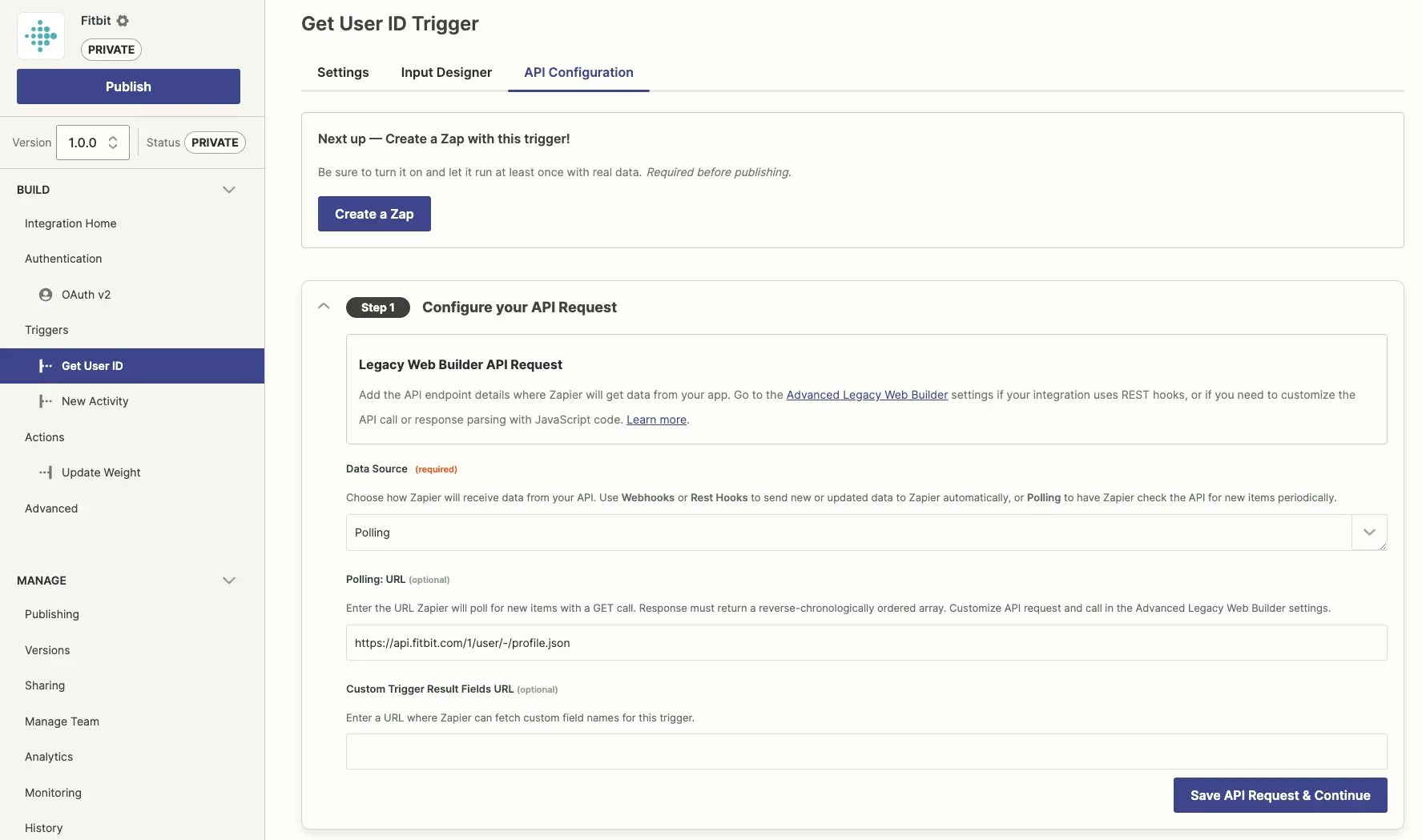
Converted legacy Web Builder integrations have slightly different API Configuration tabs for authentication, triggers, and actions then integrations (and new triggers or actions) built in Platform UI. In new integrations, each API field will let you set the API call settings in a form, or switch to Code Mode to add custom JavaScript code for that call and its response parsing. In converted integrations, however, you will see static text fields for each API call URL. If you need to customize the API call or response bundle parsing, you will need to do so from the Legacy Scripting settings.
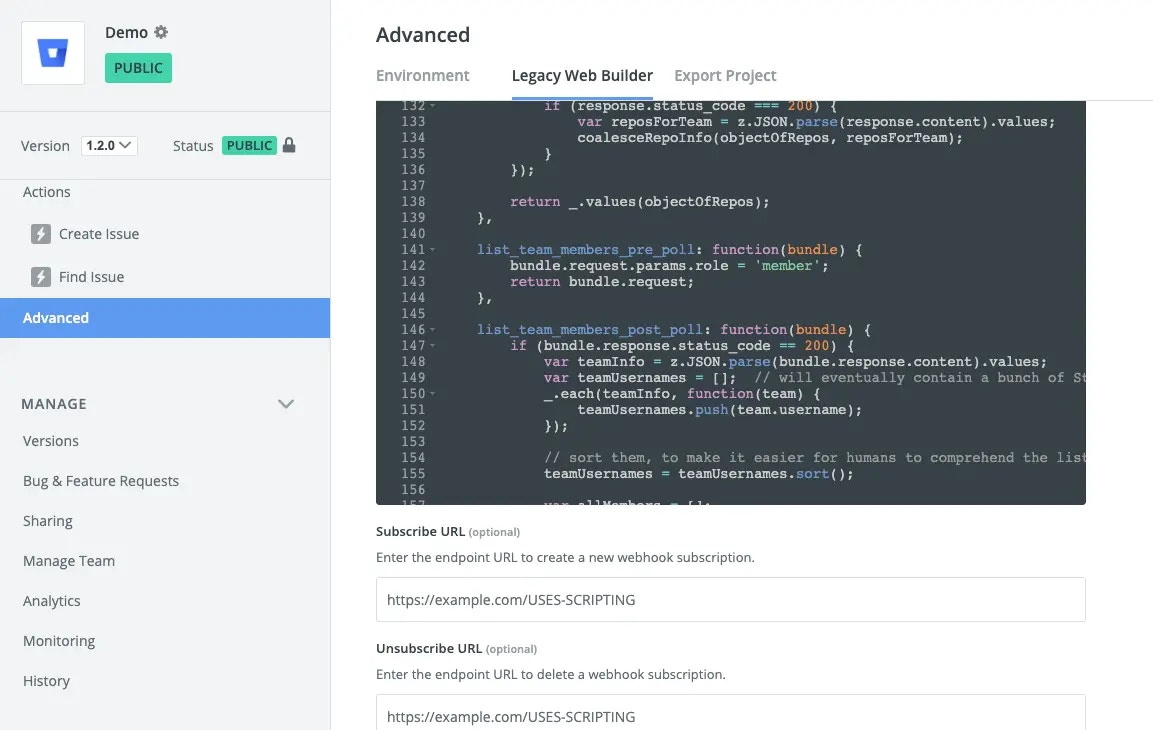
In the Build section in the left sidebar, click your Advanced.
Click the Legacy Web Builder tab.
Your converted integration looks a little different than if you’d started it from scratch in the Platform UI, but should feel pretty familiar (apart from versioning). One thing you may notice are sections where the configuration is a code block, and the code is calling z.legacyScripting.run(). To make integrations written in the old environment run without modification, in the new environment Zapier ‘wraps’ your custom code and API configuration, and created a runtime library that emulates the behavior of the old platform. So each time you see this, you can recognize it as an artifact of this emulation - we’re calling into the emulator to perform the operation we need using your original code and configuration.Where you added custom scripting code, the z.legacyScripting will call these functions to drive your triggers, actions, and authentication transactions.
You can edit this code as before, this time in a redesigned editor that does not take up your full screen. Be sure to click Save after editing your integration code, as Zapier does not auto-save changes.
→ Find detailed documentation on how to edit your integration’s code in Legacy Scripting.
What is not included in Platform UI?
Platform UI includes most of the features you would expect from the legacy Web Builder, along with new features to help better manage your integration. In converted integrations, you will see some additional features to manage existing authentication, triggers, and actions. If you add new triggers or actions to your integration, though, these features will not be available in the new items, including:
Scripting: The legacy Web Builder combined all code into one Scripting page that let you add custom code for authentication, triggers, actions, and response data parsing. If you add new triggers or actions to your integration, though, use Code Mode to customize your API call or response bundle parsing. Learn more in legacy scripting.
Custom results fields: The legacy Web Builder included an option in triggers and actions to make an API call that would fetch custom result field names. The Platform UI does not include this option for new triggers and actions, though it does let you continue to use this option in converted, existing triggers and actions. If you add new triggers or actions to your integration and need to fetch custom results fields, you will need to add that to the trigger or action’s API call in the code mode.
OAuth v1: Platform UI does not support OAuth v1 for new integrations, and instead requires new integrations to use OAuth v2 authentication. You may continue to maintain existing OAuth v1 authentication in converted integrations, but if you make a new version of your integration or re-build it in Platform UI, you will need to use a newer authentication scheme.
Advanced Editor: The legacy Web Builder included an Advanced Editor option to edit your integration in JSON text instead of the web UI editor. That feature is no longer available in Platform UI, for new or converted integrations. If you would prefer to manage your integration in JSON text and code, the better option would be to export your integration to Platform CLI to manage it from your local development environment. Once your app has been converted to the Platform UI, you will have the option of exporting your app to Platform CLI.
Files: The legacy Web Builder included some support for file handling. The Platform UI does not include capabilities for working with files. To work with files, export your app to the CLI after it is converted.
Creating new triggers and actions
You’ll be able to continue your development, creating new triggers and actions, in your converted Web Builder integration. When you create a new trigger or action, the interface will look a little bit different than those triggers and actions that were converted over from the legacy platform. It will look familiar to you. The big difference is when configuring an HTTP API request, you’ll have many more options to customize headers and parameters without having to write custom code. And when you do need to use custom code, you’ll do so in that trigger/actions’s UI, rather than in a common script file. We’ll talk about differences in the scripting environment next.
Differences when writing custom scripting code
The following applies when you’re building new triggers and actions, and working with custom scripting code. These are the idioms of the way operations are executed on the new platform.
Note: If you’re making changes to the code in the Legacy Web Builder tab, the following statements do not apply. That code is run in an “emulated” context and works just like the old environment.
Code is scoped to the individual trigger or action
When you’re writing custom scripting code in the new platform the scope of that code is local to that trigger or action. This makes it easier to understand when a request will be handled by custom code, or simply configuring a request for default request handling. It also means you can’t easily share code between different triggers and actions. For that, have a look at moving to the Zapier CLI, which is geared toward teams, projects with custom code, projects that need 3rd party libraries, etc.
Tip: A handy way to understand this is to have a look at the schema of the integration definition you’re building. Here you’ll see the structure of the definition of a polling trigger. Notice that the perform field takes a request configuration object, or it simply takes a Javascript function. The Platform UI reflects this. When you configure an API interaction, you use the Form Mode to configure a request, or you use Code Mode to write a function to be called instead.
No pre or post functions
In the legacy Web Builder, you could write custom code that ran before the request was made, or after the request returned, or you could take over complete control of making the request and returning data to Zapier. In Platform UI, there is only the ‘complete control’ option. Your request can implement a perform function that takes a bundle as input and is expected to return data when the request handling is completed.
Promise based API
A big difference in the API of the new environment is that the request API is asynchronous, using promises rather than synchronous requests or callbacks. For developers new to Javascript promises this can be a small stumbling block. We recommend spending a few minutes getting familiar with how promises work in general. The z.request library works very similarly to the promise-based Fetch API, so most articles and tutorials about that apply to working with custom code in Zapier’s environment.
Using promises(MDN)
JavaScript Promises in Depth(Egghead.io)
Using Fetch(MDN)
Re-introduction to JavaScript(MDN)
No libraries included
The legacy Web Builder tool included several JavaScript libraries, such as Underscore and jQuery, in its context that you could use in your script code. Those are no longer available when writing scripting code in the Platform UI. You’ll be able to use any JavaScript feature of Node.js (version 12 at the time of this writing, possibly v14 by the time you’re reading this), including its standard library with z.require.If you need, or prefer to use, a 3rd party Javascript library you’ll want to switch to the Platform CLI where you can install modules from npm and reference them throughout your code.
Structure and naming of the Bundle Object is different
Field names and structure of the Bundle is slightly different between the Legacy Web Builder and the new platform. Learn more details in our Bundle docs.
Last modified on October 22, 2026
Was this page helpful?
{"docsConfig":{"theme":"mint","$schema":"https://mintlify.com/docs.json","name":"Zapier","colors":{"primary":"#FF4F00","light":"#FE6C2A","dark":"#FF4F00"},"logo":{"light":"https://mintcdn.com/zapier-82f0e938/uPbDC0jSuXgHCaWD/logo/light.svg?fit=max\u0026auto=format\u0026n=uPbDC0jSuXgHCaWD\u0026q=85\u0026s=b6a37289cb22ac1a9681572651874765","dark":"https://mintcdn.com/zapier-82f0e938/b1yEJJDZ7v1EncmE/logo/dark.svg?fit=max\u0026auto=format\u0026n=b1yEJJDZ7v1EncmE\u0026q=85\u0026s=2c393c141bc7fbb0051aaa46b103f5e8","href":"https://zapier.com"},"favicon":"https://mintcdn.com/zapier-82f0e938/1jtyk4mqAs_J-p30/favicon.png?fit=max\u0026auto=format\u0026n=1jtyk4mqAs_J-p30\u0026q=85\u0026s=a26d7c83b71f1cdec48ae963245f407f","api":{"openapi":["https://api.zapier.com/schema","api-reference/specs/trigger-inbox.yaml","api-reference/specs/actions.yaml","api-reference/specs/connections.yaml","api-reference/specs/agentic-management.yaml"]},"background":{"color":{"light":"#FFFEFB"}},"navbar":{"primary":{"type":"button","label":"Sign Up","href":"https://zapier.com/sign-up"}},"footer":{},"seo":{"indexing":"all"},"integrations":{"gtm":{"tagId":"GTM-K7GFJTV"}},"contextual":{"options":["copy","view",{"title":"Open in ChatGPT","description":"Ask ChatGPT about this page","icon":"/images/logos/branded/openai.svg","href":{"base":"https://chatgpt.com/","query":[{"key":"q","value":"Read https://docs.zapier.com$path.md and help me apply it. Ask what I am building before giving steps."}]}},{"title":"Open in Claude","description":"Ask Claude about this page","icon":"/images/logos/branded/claude.svg","href":{"base":"https://claude.ai/new","query":[{"key":"q","value":"Read https://docs.zapier.com$path.md and help me apply it. Ask what I am building before giving steps."}]}},{"title":"Open in Perplexity","description":"Ask Perplexity about this page","icon":"/images/logos/branded/perplexity.svg","href":{"base":"https://www.perplexity.ai/search","query":[{"key":"q","value":"Read https://docs.zapier.com$path.md and help me apply it. Ask what I am building before giving steps."}]}},{"title":"Open in Claude Code","description":"Use this page in Claude Code","icon":"/images/logos/branded/claude.svg","href":{"base":"claude://code/new","query":[{"key":"q","value":"Read https://docs.zapier.com$path.md and help me apply it to this project. Check what is already here before giving steps."}]}},{"title":"Open in Codex","description":"Use this page in Codex","icon":"/images/logos/branded/openai.svg","href":{"base":"codex://new","query":[{"key":"prompt","value":"Read https://docs.zapier.com$path.md and help me apply it to this project. Check what is already here before giving steps."}]}},{"title":"Open in Cursor","description":"Use this page in Cursor","icon":"/images/logos/branded/cursor.svg","href":{"base":"cursor://anysphere.cursor-deeplink/prompt","query":[{"key":"text","value":"Read https://docs.zapier.com$path.md and help me apply it to this project. Check what is already here before giving steps."}]}}],"display":"header"},"metadata":{"timestamp":true},"styling":{"latex":false},"navigation":{"global":{"anchors":[{"anchor":"Community","icon":"users","href":"https://community.zapier.com/"},{"anchor":"Changelog","icon":"rss","href":"/white-label/changelog"},{"anchor":"Contact Us","icon":"envelope","href":"https://developer.zapier.com/contact"}]},"pages":[]}},"deployment":{"deploymentMetadataValue":{"subdomain":"zapier-82f0e938","hasAudioNarration":false,"actualSubdomain":"zapier-82f0e938","customDomains":["docs.zapier.com"],"gitSource":{"type":"gitlab","owner":"zapier/public-api","repo":"public-api-docs","projectId":56036607,"deployBranch":"main","contentDirectory":"","isPrivate":true,"mountPath":"","label":""},"feedback":{"thumbs":true},"entitlements":{"AI_CHAT":{"status":"ENABLED"},"REMOVE_BRANDING":{"status":"ENABLED"},"CONTEXTUAL_FEEDBACK":{"status":"ENABLED"},"CODE_SNIPPET_FEEDBACK":{"status":"ENABLED"},"WEB_MCP":{"status":"ENABLED"},"NARRATION":{"status":"ENABLED"}},"buildId":"6af70e49d091d1e54976f276","clientVersion":"0.0.4143","searchFilterCounts":[{"language":"default","tag":"Build a Zapier integration","count":149},{"language":"default","tag":"Developer Platform","count":149},{"language":"default","tag":"Embed Zapier","count":105},{"language":"default","tag":"Powered by Zapier","count":86},{"language":"default","tag":"Use Zapier in your tools","count":82},{"language":"default","tag":"Zapier MCP","count":71},{"language":"default","tag":"API reference","count":60},{"language":"default","tag":"Build with UI","count":52},{"language":"default","tag":"API specification","count":50},{"language":"default","tag":"Get started","count":49}]},"assistantConfig":{"enableStarterQuestions":true,"enableContextualStarterQuestions":false},"basePath":"","hasChatPermissions":true,"hasWebMcpPermissions":true,"toggles":[{"name":"kill-isr","enabled":true,"variant":{"name":"disabled","enabled":false,"feature_enabled":true},"impressionData":false},{"name":"custom-rbac-roles","enabled":true,"variant":{"name":"disabled","enabled":false,"feature_enabled":true},"impressionData":false},{"name":"agent-mintlify-slack","enabled":true,"variant":{"name":"disabled","enabled":false,"feature_enabled":true},"impressionData":false},{"name":"agent-integrations-settings","enabled":true,"variant":{"name":"disabled","enabled":false,"feature_enabled":true},"impressionData":false},{"name":"rbac-expansion","enabled":true,"variant":{"name":"disabled","enabled":false,"feature_enabled":true},"impressionData":false},{"name":"automations-pr-grouping","enabled":true,"variant":{"name":"disabled","enabled":false,"feature_enabled":true},"impressionData":false},{"name":"custom-prefix","enabled":true,"variant":{"name":"disabled","enabled":false,"feature_enabled":true},"impressionData":false},{"name":"analytics-v7","enabled":true,"variant":{"name":"disabled","enabled":false,"feature_enabled":true},"impressionData":false},{"name":"user-flows-analytics","enabled":true,"variant":{"name":"disabled","enabled":false,"feature_enabled":true},"impressionData":false},{"name":"no-publish-flow","enabled":true,"variant":{"name":"disabled","enabled":false,"feature_enabled":true},"impressionData":false},{"name":"workos-onboarding","enabled":true,"variant":{"name":"disabled","enabled":false,"feature_enabled":true},"impressionData":false},{"name":"snapshot-serving-live","enabled":true,"variant":{"name":"disabled","enabled":false,"feature_enabled":true},"impressionData":false},{"name":"stripTemperatureMiddleware","enabled":true,"variant":{"name":"disabled","enabled":false,"feature_enabled":true},"impressionData":false},{"name":"support-platform-pylon-zendesk","enabled":true,"variant":{"name":"disabled","enabled":false,"feature_enabled":true},"impressionData":false},{"name":"snapshot-serving","enabled":true,"variant":{"name":"disabled","enabled":false,"feature_enabled":true},"impressionData":false},{"name":"instant-rollback","enabled":true,"variant":{"name":"disabled","enabled":false,"feature_enabled":true},"impressionData":false},{"name":"granular-notifications-server","enabled":true,"variant":{"name":"disabled","enabled":false,"feature_enabled":true},"impressionData":false},{"name":"granular-notifications","enabled":true,"variant":{"name":"disabled","enabled":false,"feature_enabled":true},"impressionData":false},{"name":"automations-fable","enabled":true,"variant":{"name":"disabled","enabled":false,"feature_enabled":true},"impressionData":false},{"name":"fixed-ai-action-pricing","enabled":true,"variant":{"name":"disabled","enabled":false,"feature_enabled":true},"impressionData":false},{"name":"automation-resolve-merge-conflict","enabled":true,"variant":{"name":"disabled","enabled":false,"feature_enabled":true},"impressionData":false},{"name":"scoped-publishing","enabled":true,"variant":{"name":"disabled","enabled":false,"feature_enabled":true},"impressionData":false},{"name":"mintql","enabled":true,"variant":{"name":"disabled","enabled":false,"feature_enabled":true},"impressionData":false},{"name":"page-level-analytics","enabled":true,"variant":{"name":"disabled","enabled":false,"feature_enabled":true},"impressionData":false},{"name":"editor-version-history-v2","enabled":true,"variant":{"name":"disabled","enabled":false,"feature_enabled":true},"impressionData":false},{"name":"billing-page-v2","enabled":true,"variant":{"name":"disabled","enabled":false,"feature_enabled":true},"impressionData":false},{"name":"full-page-search","enabled":true,"variant":{"name":"disabled","enabled":false,"feature_enabled":true},"impressionData":false},{"name":"workspace-projects","enabled":true,"variant":{"name":"disabled","enabled":false,"feature_enabled":true},"impressionData":false},{"name":"assistant-v5","enabled":true,"variant":{"name":"disabled","enabled":false,"feature_enabled":true},"impressionData":false},{"name":"fork-pr-previews","enabled":true,"variant":{"name":"disabled","enabled":false,"feature_enabled":true},"impressionData":false},{"name":"revalidation-jwt","enabled":true,"variant":{"name":"disabled","enabled":false,"feature_enabled":true},"impressionData":false},{"name":"workos-sso-scim","enabled":true,"variant":{"name":"disabled","enabled":false,"feature_enabled":true},"impressionData":false},{"name":"hobby-abuse-scan","enabled":true,"variant":{"name":"disabled","enabled":false,"feature_enabled":true},"impressionData":false},{"name":"dashboard-inbox","enabled":true,"variant":{"name":"disabled","enabled":false,"feature_enabled":true},"impressionData":false},{"name":"workos-signup","enabled":true,"variant":{"name":"disabled","enabled":false,"feature_enabled":true},"impressionData":false},{"name":"turbopuffer-dual-write","enabled":true,"variant":{"name":"disabled","enabled":false,"feature_enabled":true},"impressionData":false},{"name":"workos-enabled","enabled":true,"variant":{"name":"disabled","enabled":false,"feature_enabled":true},"impressionData":false},{"name":"approve-review-flow","enabled":true,"variant":{"name":"disabled","enabled":false,"feature_enabled":true},"impressionData":false},{"name":"editor-metadata","enabled":true,"variant":{"name":"disabled","enabled":false,"feature_enabled":true},"impressionData":false},{"name":"sso-setup-deadline-banner","enabled":true,"variant":{"name":"disabled","enabled":false,"feature_enabled":true},"impressionData":false},{"name":"turbopuffer-serve","enabled":true,"variant":{"name":"disabled","enabled":false,"feature_enabled":true},"impressionData":false},{"name":"live-agents","enabled":true,"variant":{"name":"disabled","enabled":false,"feature_enabled":true},"impressionData":false},{"name":"llms-txt-v2","enabled":true,"variant":{"name":"disabled","enabled":false,"feature_enabled":true},"impressionData":false}],"starterQuestions":[{"_id":"6ac8f1f2b9b3f8640f05a146","deploymentId":"67001931f47db52dbf2b872a","questionText":"How do I build a public Zapier integration?","status":"active","generatedBy":"manual","createdAt":"2026-10-09T13:53:54.782Z","updatedAt":"2026-10-09T13:53:54.782Z","__v":0},{"_id":"6ac8f1e5b9b3f8640f05a0d1","deploymentId":"67001931f47db52dbf2b872a","questionText":"What's the difference between the SDK and Platform CLI?","status":"active","generatedBy":"manual","createdAt":"2026-10-09T13:53:41.586Z","updatedAt":"2026-10-09T13:53:41.586Z","__v":0},{"_id":"6ac8f1d4b9b3f8640f05a051","deploymentId":"67001931f47db52dbf2b872a","questionText":"How do I connect Zapier MCP to my MCP client?","status":"active","generatedBy":"manual","createdAt":"2026-10-09T13:53:24.465Z","updatedAt":"2026-10-09T13:53:24.465Z","__v":0}],"googleFontsInlined":false},"customCss":[{"filePath":"styles.css","content":"@font-face{font-family:\"Degular Display - Semibold\";src:url('https://fonts.zapier.com/Degular/DegularDisplay-Semibold.woff2');font-display:fallback;font-weight:400}@font-face{font-family:\"Serrif\";src:url('/fonts/serrif-300.woff2') format('woff2');font-display:swap;font-weight:300;font-style:normal}@font-face{font-family:\"Degular Display\";src:url('/fonts/degular-display-500.woff2') format('woff2');font-display:swap;font-weight:500;font-style:normal}@font-face{font-family:\"Degular Display\";src:url('/fonts/degular-display-600.woff2') format('woff2');font-display:swap;font-weight:600;font-style:normal}header h1,h2,h3,h4{font-family:\"Degular Display - Semibold\";font-weight:normal!important;letter-spacing:0.08rem!important}#chat-assistant-floating-input,.chat-assistant-floating-input,[data-component-part=\"chat-assistant-floating-input\"]{display:none!important}.card h2{font-size:1.2rem}.card code{text-decoration:none}:root:not(.dark) .card,:root:not(.dark) .code-block,:root:not(.dark) .code-block-background,:root:not(.dark) .code-group,:root:not(.dark) .shiki,:root:not(.dark) .code-block pre,:root:not(.dark) .code-group pre{background-color:#FFFEFB!important}.cta-button{display:inline-flex;align-items:center;gap:8px;padding:12px 24px;width:fit-content;background:#FF4F00;color:#FFFFFF!important;font-weight:600;font-size:15px;letter-spacing:0.01em;text-decoration:none!important;border:none;border-radius:8px;box-shadow:0 2px 8px rgba(255, 79, 0, 0.25);transition:all 0.2s ease;margin:1em 0}.cta-button:hover{background:#E64600;color:#FFFFFF!important;text-decoration:none!important;box-shadow:0 4px 12px rgba(255, 79, 0, 0.35);transform:translateY(-1px)}.cta-button:active{transform:translateY(0);box-shadow:0 1px 4px rgba(255, 79, 0, 0.3)}blockquote.sr-only+h2{margin-top:0}#navbar a[href=\"https://zapier.com\"],#navbar a[href=\"https://zapier.com\"] img{padding-right:0!important;margin-right:0!important}.docs-nav-label{color:#201515!important;font-family:\"Degular Display - Medium\", ui-sans-serif, system-ui, sans-serif;font-weight:400;font-size:1.5rem;letter-spacing:0.01em;margin-left:-0.6rem;text-decoration:none!important;transition:color 0.15s ease;vertical-align:middle;cursor:pointer}.docs-nav-label:hover{color:#939084!important;text-decoration:none!important}.dark .docs-nav-label{color:#FFFEFB!important}.dark .docs-nav-label:hover{color:#C5C0B1!important}[role=\"menu\"]:focus,[role=\"menu\"]:focus-visible{outline-width:1px}footer:not(#zapier-universal-footer){display:none!important}#zapier-universal-footer{display:block!important;background-color:#fffdf9;font-family:'Inter', Helvetica, arial, sans-serif;font-size:14px;line-height:24px;color:#201515;-webkit-font-smoothing:antialiased;width:100%;margin-top:2rem}.dark #zapier-universal-footer{background-color:#2d2e2e;color:#fffdf9}.zuf{max-width:1200px;margin:0 auto;padding:30px;display:grid;grid-template-rows:auto;grid-template-columns:100%;grid-template-areas:'links' 'socials' 'logo' 'meta';justify-items:center;align-items:center;gap:30px}@media (min-width: 650px){.zuf{grid-template-columns:max-content 1fr;grid-template-areas:'links links'\n 'socials socials'\n 'logo meta'}}@media (min-width: 980px){.zuf{grid-template-columns:max-content 1fr;grid-template-areas:'socials links'\n 'logo meta'}}.zuf-row--top,.zuf-row--bottom{display:contents}.zuf-socials{grid-area:socials;display:inline-flex;flex-wrap:wrap;align-items:center;gap:10px}@media (min-width: 980px){.zuf-socials{justify-self:start}}.zuf-follow{font-size:14px;line-height:20px;font-weight:400;color:#574e4c;white-space:nowrap}.dark .zuf-follow{color:#a8a5a0}.zuf-icon{display:flex;align-items:center;justify-content:center;width:30px;height:30px;border-radius:100%;background-color:#a8a5a0;text-decoration:none!important;transition:background-color 0.15s ease}.zuf-icon svg,.zuf-icon img{width:16px;height:16px;fill:#fffdf9}.dark .zuf-icon{background-color:#403f3e}.dark .zuf-icon svg{fill:#fffdf9}.zuf-icon[aria-label*=\"Facebook\"]:hover,.zuf-icon[aria-label*=\"Facebook\"]:focus{background-color:#3b5998;outline:none}.zuf-icon[aria-label*=\"LinkedIn\"]:hover,.zuf-icon[aria-label*=\"LinkedIn\"]:focus{background-color:#0976b4;outline:none}.zuf-icon[aria-label*=\"X\"]:hover,.zuf-icon[aria-label*=\"X\"]:focus{background-color:#00aced;outline:none}.zuf-icon[aria-label*=\"YouTube\"]:hover,.zuf-icon[aria-label*=\"YouTube\"]:focus{background-color:#e52d27;outline:none}.zuf-icon[aria-label*=\"blog\"]:hover,.zuf-icon[aria-label*=\"blog\"]:focus{background-color:#ff4f00;outline:none}.zuf-links{grid-area:links;display:flex;flex-wrap:wrap;align-items:center;justify-content:center;column-gap:12.5px;row-gap:10px;width:100%}@media (min-width: 980px){.zuf-links{justify-content:flex-end}}.zuf-links a{font-family:'Inter', Helvetica, arial, sans-serif;font-size:14px;line-height:24px;font-weight:500;color:#201515!important;padding:0 5px;white-space:nowrap;text-decoration:none!important}.zuf-links a:hover,.zuf-links a:focus{color:#3d4592!important;outline:none}.dark .zuf-links a{color:#fffdf9!important}.dark .zuf-links a:hover,.dark .zuf-links a:focus{color:#90a1ed!important}.zuf-logo{grid-area:logo;display:inline-flex;align-items:center;text-decoration:none!important}.zuf-logo svg{display:block}.zuf-logo path{fill:#201515}.dark .zuf-logo path{fill:#fffdf9}.zuf-logo path[fill=\"#FF4F00\"]{fill:#FF4F00!important}@media (min-width: 650px){.zuf-logo{justify-self:start}}.zuf-meta{grid-area:meta;font-size:14px;line-height:24px;font-weight:400;color:#574e4c;display:flex;flex-wrap:wrap;align-items:center;justify-content:center;row-gap:10px}.dark .zuf-meta{color:#a8a5a0}.zuf-meta a{padding:5px 10px;color:#574e4c!important;text-decoration:none!important}.zuf-meta a:hover,.zuf-meta a:focus{color:#3d4592!important;outline:none}.dark .zuf-meta a{color:#a8a5a0!important}.dark .zuf-meta a:hover,.dark .zuf-meta a:focus{color:#90a1ed!important}@media (min-width: 650px){.zuf-meta{justify-self:end;justify-content:flex-end}}.zuf-meta span{margin-right:10px}@media (max-width: 979px){.zuf{padding:20px}}"},{"filePath":"index.css","content":".docs-landing{width:100%;margin:0 auto}#navbar{background:#fffef8!important;backdrop-filter:none!important}.dark #navbar{background:#18181b!important}.docs-landing-hero-bg{background:#201515}.docs-landing-hero-bg .dl-hero-title{color:#ffffff}.docs-landing-hero-bg .docs-landing-lead{color:rgba(255, 255, 255, 0.6)}.dark .docs-landing-hero-bg{background:#26201f;border-bottom:1px solid rgba(255, 255, 255, 0.08)}.docs-landing-hero{display:grid;grid-template-columns:minmax(0, 1fr);gap:clamp(1.5rem, 3.5vw, 2.5rem);align-items:center;max-width:1180px;margin:0 auto;padding:48px clamp(1.25rem, 4vw, 2rem) clamp(1.25rem, 2.5vw, 1.75rem)}.docs-landing-hero-inner{text-align:center}.dl-hero-copy{text-align:center;max-width:640px;margin:0 auto}.docs-landing-eyebrow{font-family:\"Inter\", ui-sans-serif, system-ui, sans-serif;font-size:0.75rem;font-weight:600;letter-spacing:0.14em;text-transform:uppercase;color:#605d52;margin:0 0 1.25rem}.docs-landing-title{font-family:\"Degular Display - Semibold\", ui-sans-serif, system-ui, sans-serif;font-size:clamp(2.25rem, 4.5vw, 3.25rem);line-height:1.08;font-weight:400!important;margin:0 0 1rem;letter-spacing:0.08rem!important}.docs-landing-lead{font-family:\"Inter\", ui-sans-serif, system-ui, sans-serif;font-size:1rem;line-height:1.5;color:#201515;margin:0 auto;max-width:62ch}.dark .docs-landing-lead{color:var(--muted-foreground, #a1a1aa)}.docs-landing-media{border-radius:14px;overflow:hidden;box-shadow:0 1px 2px rgba(15, 23, 42, 0.06),\n 0 12px 40px rgba(15, 23, 42, 0.12);border:1px solid rgba(255, 79, 0, 0.12);background:rgba(255, 79, 0, 0.04)}.docs-landing-video{display:block;width:100%;height:auto;vertical-align:middle}.docs-landing-products{max-width:1180px;margin:0 auto;padding:clamp(2.5rem, 5vw, 4rem) clamp(1.25rem, 4vw, 2rem) clamp(3rem, 6vw, 5rem)}.docs-landing-section-title{font-family:\"Degular Display - Semibold\", ui-sans-serif, system-ui, sans-serif;font-size:clamp(1.5rem, 2.5vw, 1.875rem);font-weight:400!important;text-align:left;margin:0 0 2.25rem;letter-spacing:0.08rem!important}.dl-hero-title{font-family:\"Degular Display\", ui-sans-serif, system-ui, sans-serif;font-size:clamp(2.5rem, 4.8vw, 3.5rem);line-height:1.1;font-weight:500;letter-spacing:-0.03em!important;color:var(--foreground, #18181b);margin:0 0 0.6875rem}.dark .dl-hero-title{color:var(--foreground, #fafafa)}.dl-hero-title-accent{color:#ff4f00}.dark .dl-hero-title-accent{color:#ff8a5c}.dl-hero-demo{display:flex;align-items:center;justify-content:center;aspect-ratio:1 / 1;min-height:fit-content;padding:clamp(1rem, 3vw, 1.75rem);border:1px solid rgba(9, 9, 11, 0.1);border-radius:10px;background-image:url('/images/pattern-abstract.jpg');background-size:cover;background-position:center;background-repeat:no-repeat;overflow:hidden}.dark .dl-hero-demo{border-color:rgba(255, 255, 255, 0.12)}.dl-demo-panel{width:100%;border:1px solid rgba(9, 9, 11, 0.1);border-radius:12px;background:#ffffff;box-shadow:0 1px 2px rgba(15, 23, 42, 0.06),\n 0 12px 40px rgba(15, 23, 42, 0.14);overflow:hidden}.dark .dl-demo-panel{background:#18181b;border-color:rgba(255, 255, 255, 0.12)}.dl-demo-clients{display:flex;flex-wrap:wrap;align-items:center;gap:0.5rem;padding:0.5rem 0.75rem;border-bottom:1px solid rgba(9, 9, 11, 0.08)}.dark .dl-demo-clients{border-bottom-color:rgba(255, 255, 255, 0.1)}.dl-demo-chip{width:36px;height:36px;border-radius:8px;border:1px solid rgba(9, 9, 11, 0.1);background:#ffffff;flex:none;margin:0!important}.dark .dl-demo-chip{border-color:rgba(255, 255, 255, 0.14)}.dl-demo-chip--padded{padding:6px}.dl-demo-arch-agents{display:flex;gap:0.625rem;padding:1rem 1rem 0.75rem}.dl-demo-arch-col{flex:1;display:flex;flex-direction:column;gap:0.375rem}.dl-demo-arch-label{font-size:0.6875rem;font-weight:500;color:var(--muted-foreground, #71717a);margin:0 0 0.125rem;letter-spacing:0.01em}.dl-demo-arch-label--spacer{visibility:hidden;pointer-events:none;user-select:none}.dl-demo-arch-chip{display:flex;align-items:center;gap:0.4375rem;padding:0.3125rem 0.5625rem;border-radius:7px;border:1px solid rgba(9, 9, 11, 0.1);background:#ffffff;font-size:0.75rem;font-weight:500;color:#09090b;line-height:1;white-space:nowrap}.dl-demo-arch-chip--muted{background:transparent;border-style:dashed;color:var(--muted-foreground, #71717a)}.dl-demo-arch-chip--logo{justify-content:center;padding:0.375rem;width:36px;height:36px}.dl-demo-arch-icon{width:22px;height:22px;border-radius:4px;flex:none}.dl-demo-arch-chip--icon-pad .dl-demo-arch-icon{padding:3px}.dl-demo-arch-merge{position:relative;height:28px;margin:0 1rem}.dl-demo-arch-merge::before{content:'';position:absolute;left:25%;right:25%;top:0;height:14px;border-left:1px solid rgba(9, 9, 11, 0.1);border-right:1px solid rgba(9, 9, 11, 0.1);border-bottom:1px solid rgba(9, 9, 11, 0.1);border-bottom-left-radius:4px;border-bottom-right-radius:4px}.dl-demo-arch-merge::after{content:'';position:absolute;left:50%;transform:translateX(-50%);top:14px;bottom:0;width:1px;background:rgba(9, 9, 11, 0.1)}.dl-demo-arch-zapier{display:flex;align-items:center;justify-content:center;gap:0.5rem;margin:0 1rem;padding:0.625rem 1rem;border:1px solid rgba(9, 9, 11, 0.1);border-radius:10px;background:#ffffff}.dl-demo-arch-stem{display:flex;justify-content:center;height:20px}.dl-demo-arch-stem::after{content:'';width:1px;height:100%;background:rgba(9, 9, 11, 0.1)}.dl-demo-arch-apps{display:flex;flex-wrap:wrap;align-items:center;justify-content:center;gap:0.375rem;padding:0 1rem 0.875rem}.dl-demo-arch-app{display:inline-flex;align-items:center;padding:0.25rem 0.625rem;border-radius:6px;border:1px solid rgba(9, 9, 11, 0.1);background:#ffffff;font-size:0.6875rem;font-weight:500;color:#09090b;white-space:nowrap}.dl-demo-arch-app--more{background:transparent;border-color:#e06c2c;color:#e06c2c;font-weight:600;text-decoration:none}.dl-demo-arch-app--more:hover{background:rgba(224, 108, 44, 0.06)}.dark .dl-demo-arch-stem::after{background:rgba(255, 255, 255, 0.1)}.dark .dl-demo-arch-app{background:rgba(255, 255, 255, 0.06);border-color:rgba(255, 255, 255, 0.12);color:#fafafa}.dl-demo-arch-zapier-badge{font-size:0.8125rem;font-weight:600;color:#09090b;letter-spacing:-0.01em}.dl-demo-arch-zapier-plus{font-size:0.8125rem;font-weight:600;color:#e06c2c}.dark .dl-demo-arch-chip{background:rgba(255, 255, 255, 0.06);border-color:rgba(255, 255, 255, 0.12);color:#fafafa}.dark .dl-demo-arch-chip--muted{background:transparent;border-color:rgba(255, 255, 255, 0.15);color:var(--muted-foreground, #a1a1aa)}.dark .dl-demo-arch-merge::before{border-color:rgba(255, 255, 255, 0.1)}.dark .dl-demo-arch-merge::after{background:rgba(255, 255, 255, 0.1)}.dark .dl-demo-arch-zapier{background:rgba(255, 255, 255, 0.04);border-color:rgba(255, 255, 255, 0.1)}.dark .dl-demo-arch-zapier-badge{color:#fafafa}.dl-demo-more{display:inline-flex;align-items:center;justify-content:center;width:36px;height:36px;border-radius:8px;border:1px dashed rgba(9, 9, 11, 0.22);font-size:0.9375rem;font-weight:500;line-height:1;color:var(--muted-foreground, #52525b);flex:none}.dark .dl-demo-more{border-color:rgba(255, 255, 255, 0.2);color:var(--muted-foreground, #a1a1aa)}.dl-demo-body{display:flex;flex-direction:column;gap:0.375rem;padding:0.5625rem 0.75rem 0.625rem}.dl-demo-prompt{padding:0.4375rem 0.625rem;border:1px solid rgba(9, 9, 11, 0.1);border-radius:7px;font-size:0.75rem;color:var(--muted-foreground, #52525b)}.dl-demo-row{display:flex;align-items:center;justify-content:space-between;gap:1rem;padding:0.4375rem 0.625rem;border:1px solid rgba(9, 9, 11, 0.1);border-radius:7px}.dark .dl-demo-prompt,.dark .dl-demo-row{border-color:rgba(255, 255, 255, 0.12)}.dl-demo-status{font-size:0.6875rem;font-weight:700;letter-spacing:0.12em;text-transform:uppercase;color:#ff4f00}.dl-demo-action{display:flex;align-items:center;justify-content:space-between;gap:0.75rem;padding:0.375rem 0.625rem;border-left:2px solid #ff4f00;border-radius:0 7px 7px 0;background:rgba(9, 9, 11, 0.03)}.dark .dl-demo-action{background:rgba(255, 255, 255, 0.04)}.dl-demo-action span{font-size:0.75rem;text-align:right;color:var(--muted-foreground, #52525b)}.dl-demo-foot{display:flex;align-items:center;justify-content:space-between;gap:1rem;padding-top:0.25rem;font-size:0.75rem;color:var(--muted-foreground, #52525b)}.dl-hero-demo code{font-family:ui-monospace, SFMono-Regular, Menlo, Consolas, monospace;font-size:0.75rem;background:none;border:none;padding:0;color:var(--foreground, #18181b)}.dark .dl-hero-demo code{color:var(--foreground, #fafafa)}.dl-section{max-width:1180px;margin:0 auto;padding:clamp(1.5rem, 3vw, 2.25rem) clamp(1.25rem, 4vw, 2rem)}.dl-eyebrow{font-size:0.6875rem;font-weight:700;letter-spacing:0.12em;text-transform:uppercase;color:#ff4f00;margin:0 0 0.4375rem}.dl-heading{font-size:clamp(1.375rem, 2.4vw, 1.75rem);line-height:1.2;font-weight:600;letter-spacing:-0.01em!important;color:var(--foreground, #18181b);margin:0 0 0.5rem;max-width:40ch}.dark .dl-heading{color:var(--foreground, #fafafa)}.dl-lead{font-size:0.9375rem;line-height:1.55;color:var(--muted-foreground, #52525b);margin:0 0 1.25rem;max-width:68ch}.dark .dl-lead{color:var(--muted-foreground, #a1a1aa)}.dl-grid{display:grid;gap:0.75rem;align-items:stretch}.dl-grid--2{grid-template-columns:repeat(2, minmax(0, 1fr))}.dl-grid--3{grid-template-columns:repeat(3, minmax(0, 1fr))}.dl-grid--4{grid-template-columns:repeat(4, minmax(0, 1fr))}.dl-card{display:flex;flex-direction:column;gap:0.5rem;padding:1.125rem 1.25rem 1.25rem;border:1px solid rgba(9, 9, 11, 0.1);background:#f8f4f0}.dark .dl-card{border-color:rgba(255, 255, 255, 0.12);background:rgba(255, 255, 255, 0.02)}.dl-card-mark{align-self:flex-start;margin-bottom:0.25rem;color:#ff4f00}.dl-card-eyebrow{font-size:0.6875rem;font-weight:700;letter-spacing:0.12em;text-transform:uppercase;color:#ff4f00;margin:0}.dl-card-title{font-family:\"Serrif\", ui-serif, serif;font-size:1.5rem;font-weight:300;line-height:1.1;letter-spacing:-0.03em;color:var(--foreground, #18181b);margin:0}.dark .dl-card-title{color:var(--foreground, #fafafa)}.dl-card-desc{font-family:\"Inter\", ui-sans-serif, system-ui, sans-serif;font-size:0.9375rem;line-height:1.55;color:var(--muted-foreground, #52525b);margin:0}.dark .dl-card-desc{color:var(--muted-foreground, #a1a1aa)}.dl-pills{display:flex;flex-wrap:wrap;gap:0.375rem;margin:0.125rem 0 0}.dl-pill{font-size:0.75rem;line-height:1;padding:0.375rem 0.625rem;border-radius:999px;border:1px solid rgba(9, 9, 11, 0.14);color:var(--muted-foreground, #52525b);white-space:nowrap}.dark .dl-pill{border-color:rgba(255, 255, 255, 0.16);color:var(--muted-foreground, #a1a1aa)}.dl-pill>a{color:inherit!important;text-decoration:none!important}.dl-pill:has(>a):hover{border-color:rgba(9, 9, 11, 0.34)}.dark .dl-pill:has(>a):hover{border-color:rgba(255, 255, 255, 0.34)}.dl-pill--accent{border-color:rgba(255, 79, 0, 0.35);background:rgba(255, 79, 0, 0.06);color:#ff4f00}.dark .dl-pill--accent{border-color:rgba(255, 79, 0, 0.45);color:#ff8a5c}.dl-code{font-family:ui-monospace, SFMono-Regular, Menlo, Consolas, monospace;font-size:0.8125rem;line-height:1.7;background:rgba(9, 9, 11, 0.04);border-radius:8px;padding:0.75rem 0.875rem;margin:0.125rem 0;overflow-x:auto;color:var(--foreground, #18181b)}.dl-code span{display:block;white-space:pre}.dl-code--shell span::before{content:\"\\276F \";color:#ff4f00}.dark .dl-code{background:rgba(255, 255, 255, 0.05);color:var(--foreground, #fafafa)}.dl-cta{margin-top:auto;padding-top:0.5rem;font-size:0.875rem;font-weight:600;color:#ff4f00!important;text-decoration:none!important}.dl-cta:hover{text-decoration:underline!important}@media screen and (max-width: 1024px){.dl-grid--3,.dl-grid--4{grid-template-columns:repeat(2, minmax(0, 1fr))}}@media screen and (max-width: 640px){.dl-grid--2,.dl-grid--3,.dl-grid--4{grid-template-columns:1fr}}.docs-landing-next{max-width:1180px;margin:0 auto;padding:clamp(1.5rem, 3vw, 2.25rem) clamp(1.25rem, 4vw, 2rem) clamp(2.25rem, 4vw, 3.25rem)}.docs-landing-next-title{font-size:2rem;line-height:1.2;font-weight:600;letter-spacing:-0.01em!important;color:var(--foreground, #18181b);margin:0 0 1.25rem}.dark .docs-landing-next-title{color:var(--foreground, #fafafa)}.docs-landing-next-grid{display:grid;grid-template-columns:repeat(4, minmax(0, 1fr));column-gap:clamp(1.5rem, 4vw, 3rem)}.docs-landing-next-item{position:relative;display:block;padding:0.875rem 0 1.25rem;border-top:1px solid rgba(9, 9, 11, 0.12);text-decoration:none!important;transition:border-top-color 0.2s ease}.docs-landing-next-item:hover{border-top-color:#ff4f00}.dark .docs-landing-next-item{border-top-color:rgba(255, 255, 255, 0.14)}.docs-landing-next-item-title{display:block;font-size:1rem;font-weight:600;color:var(--foreground, #18181b);margin-bottom:0.25rem}.docs-landing-next-item-title::after{content:\" \\2192\";color:#ff4f00}.dark .docs-landing-next-item-title{color:var(--foreground, #fafafa)}.docs-landing-next-item:hover .docs-landing-next-item-title{text-decoration:underline}.docs-landing-next-item-desc{display:block;font-size:0.9375rem;line-height:1.55;color:var(--muted-foreground, #52525b)}.dark .docs-landing-next-item-desc{color:var(--muted-foreground, #a1a1aa)}@media screen and (max-width: 768px){.docs-landing-next-grid{grid-template-columns:1fr}}.hero-container{display:flex;flex-direction:row;align-items:center;justify-content:center;text-align:left;padding:6rem 2rem;width:80%;border-bottom:2px solid #ff4f00;margin:0 auto}.hero-text{width:600px;margin-right:2rem}@media screen and (max-width: 1024px){.docs-landing-hero{grid-template-columns:1fr}.docs-landing-media{max-width:640px;margin:0 auto}}@media screen and (max-width: 1300px){.hero-container{flex-direction:column;text-align:center}.hero-text{margin-right:0rem;margin-bottom:2rem}.hero-video{max-width:600px}}.dl-section-heading{font-size:2rem;line-height:1.2;font-weight:600;letter-spacing:-0.01em!important;color:var(--foreground, #18181b);margin:0 0 1.25rem}.dark .dl-section-heading{color:var(--foreground, #fafafa)}.dl-bands{display:grid;grid-template-columns:repeat(2, minmax(0, 1fr));gap:0.75rem}.dl-band{display:flex;flex-direction:column;border:1px solid rgba(9, 9, 11, 0.1);overflow:hidden;background:#f8f4f0}.dark .dl-band{border-color:rgba(255, 255, 255, 0.12);background:rgba(255, 255, 255, 0.02)}.dl-band-main{display:flex;flex-direction:column;gap:0.5rem;padding:1.125rem 1.25rem 1.25rem;border-bottom:1px solid rgba(9, 9, 11, 0.1)}.dark .dl-band-main{background:rgba(255, 255, 255, 0.02);border-bottom-color:rgba(255, 255, 255, 0.12)}.dl-band-badge{align-self:flex-start;margin:0;padding:0.1875rem 0.4375rem;border:1px solid rgba(255, 79, 0, 0.4);border-radius:5px;font-size:0.625rem;font-weight:700;letter-spacing:0.12em;text-transform:uppercase;color:#ff4f00}.dl-band-title{font-family:\"Serrif\", ui-serif, serif;font-size:1.5rem;font-weight:300!important;line-height:1.1;letter-spacing:-0.03em!important;color:var(--foreground, #18181b);margin:0.125rem 0 0!important}.dark .dl-band-title{color:var(--foreground, #fafafa)}.dl-band-title-mark{align-self:flex-start;margin-bottom:16px;color:#ff4f00}.dl-band-icon{align-self:flex-start;margin-bottom:8px;color:#ff4f00}.dl-band-desc{font-family:\"Inter\", ui-sans-serif, system-ui, sans-serif;font-size:0.9375rem;line-height:1.55;color:var(--muted-foreground, #52525b);margin:0;max-width:none}.dark .dl-band-desc{color:var(--muted-foreground, #a1a1aa)}.dl-band-main .dl-hero-demo{box-shadow:none;margin-top:0.375rem}.dl-band-media{display:block;width:100%;height:auto;border:1px solid rgba(9, 9, 11, 0.1);border-radius:10px;margin:0.375rem 0 0!important}.dark .dl-band-media{border-color:rgba(255, 255, 255, 0.12)}.dl-band-list{display:flex;flex:1;flex-direction:column}.dl-band-row{position:relative;display:grid;grid-template-columns:28px 1fr;grid-template-rows:auto auto;column-gap:0.625rem;row-gap:0.1875rem;align-items:center;flex:1;padding:0.8125rem 2.25rem 0.8125rem 1.25rem;border-bottom:1px solid rgba(9, 9, 11, 0.08);text-decoration:none!important;transition:background 0.15s ease}.dl-band-row .dl-band-row-icon{grid-row:1 / -1;align-self:center}.dl-band-row .dl-band-row-title{grid-column:2}.dl-band-row .dl-band-row-desc{grid-column:2}.dl-band-row:not(:has(.dl-band-row-icon)){grid-template-columns:1fr}.dl-band-row:not(:has(.dl-band-row-icon)) .dl-band-row-title,.dl-band-row:not(:has(.dl-band-row-icon)) .dl-band-row-desc{grid-column:1}.dark .dl-band-row{border-bottom-color:rgba(255, 255, 255, 0.1)}.dl-band-row:last-child{border-bottom:none}.dl-band-row:hover{background:rgba(255, 79, 0, 0.04)}.dl-band-row::after{content:\"\\2192\";position:absolute;top:50%;right:1rem;transform:translateY(-50%);font-size:1rem;color:#ff4f00;transition:transform 0.15s ease}.dl-band-row:hover::after{transform:translateY(-50%) translateX(2px)}.dl-band-row>a,.docs-landing-next-item>a{position:absolute;inset:0;z-index:1}.dl-band-row>a:focus-visible,.docs-landing-next-item>a:focus-visible{outline:2px solid #ff4f00;outline-offset:-2px}.dl-band-row-icon{display:flex;align-items:center;justify-content:center;flex-shrink:0;width:28px;height:28px;color:#ff4f00}.dark .dl-band-row-icon{color:#ff8a5c}.dl-band-row-icon svg{width:16px;height:16px}.dl-band-row-title{font-size:0.9375rem;font-weight:600;color:var(--foreground, #18181b)}.dark .dl-band-row-title{color:var(--foreground, #fafafa)}.dl-band-row:hover .dl-band-row-title{text-decoration:underline}.dl-band-row-desc{font-size:0.875rem;line-height:1.5;color:var(--muted-foreground, #52525b)}.dark .dl-band-row-desc{color:var(--muted-foreground, #a1a1aa)}@media screen and (max-width: 900px){.dl-bands{grid-template-columns:1fr}}"}],"page":{"pagePath":"integrations/manage/versions-legacy","slug":"/integrations/manage/versions-legacy","pageMetadata":{"title":"Manage a legacy integration","description":null,"href":"/integrations/manage/versions-legacy"},"pageType":"default","mdx":{"mdxSource":{"compiledSource":"\"use strict\";const{Fragment:_Fragment,jsx:_jsx,jsxs:_jsxs}=arguments[0];const{useMDXComponents:_provideComponents}=arguments[0];function _createMdxContent(props){const _components={a:`a`,blockquote:`blockquote`,code:`code`,em:`em`,li:`li`,ol:`ol`,p:`p`,strong:`strong`,ul:`ul`,..._provideComponents(),...props.components},{Card,CardGroup,Frame,Heading,OptimizedImage}=_components;if(!Card)_missingMdxReference(`Card`,true);if(!CardGroup)_missingMdxReference(`CardGroup`,true);if(!Frame)_missingMdxReference(`Frame`,true);if(!Heading)_missingMdxReference(`Heading`,true);if(!OptimizedImage)_missingMdxReference(`OptimizedImage`,true);return _jsxs(_Fragment,{children:[_jsx(Heading,{level:`2`,id:`legacy-api-configuration-settings`,children:`Legacy API configuration settings`}),`\n`,_jsx(Frame,{children:_jsx(OptimizedImage,{src:`https://mintcdn.com/zapier-82f0e938/MptVjeuYuatFg3LM/images/69285c90f9e37fc2803a06beb1395946.webp?fit=max\u0026auto=format\u0026n=MptVjeuYuatFg3LM\u0026q=85\u0026s=f46261c306c0632647f5b8f93bc98471`,\"data-og-width\":`1775`,width:`1775`,\"data-og-height\":`1049`,height:`1049`,\"data-path\":`images/69285c90f9e37fc2803a06beb1395946.webp`,\"data-optimize\":`true`,\"data-opv\":`3`,srcset:`https://mintcdn.com/zapier-82f0e938/MptVjeuYuatFg3LM/images/69285c90f9e37fc2803a06beb1395946.webp?w=280\u0026fit=max\u0026auto=format\u0026n=MptVjeuYuatFg3LM\u0026q=85\u0026s=a28c5dcca462b71bf5f43e0409b048f0 280w, https://mintcdn.com/zapier-82f0e938/MptVjeuYuatFg3LM/images/69285c90f9e37fc2803a06beb1395946.webp?w=560\u0026fit=max\u0026auto=format\u0026n=MptVjeuYuatFg3LM\u0026q=85\u0026s=1510664ba4ddd0bcb9d9559fd05c99f1 560w, https://mintcdn.com/zapier-82f0e938/MptVjeuYuatFg3LM/images/69285c90f9e37fc2803a06beb1395946.webp?w=840\u0026fit=max\u0026auto=format\u0026n=MptVjeuYuatFg3LM\u0026q=85\u0026s=64beb7ba5375ec9a66ac9712388285e5 840w, https://mintcdn.com/zapier-82f0e938/MptVjeuYuatFg3LM/images/69285c90f9e37fc2803a06beb1395946.webp?w=1100\u0026fit=max\u0026auto=format\u0026n=MptVjeuYuatFg3LM\u0026q=85\u0026s=e132860ebc6561e41c53c35b3fdcc0a8 1100w, https://mintcdn.com/zapier-82f0e938/MptVjeuYuatFg3LM/images/69285c90f9e37fc2803a06beb1395946.webp?w=1650\u0026fit=max\u0026auto=format\u0026n=MptVjeuYuatFg3LM\u0026q=85\u0026s=5b113d22a79ca9d8dfdf91d2f25505ed 1650w, https://mintcdn.com/zapier-82f0e938/MptVjeuYuatFg3LM/images/69285c90f9e37fc2803a06beb1395946.webp?w=2500\u0026fit=max\u0026auto=format\u0026n=MptVjeuYuatFg3LM\u0026q=85\u0026s=89eebb2bc54d3dd0cc8c8949e49c70f7 2500w`})}),`\n`,_jsxs(_components.p,{children:[`Converted legacy Web Builder integrations have slightly different API Configuration tabs for authentication, triggers, and actions then integrations (and new triggers or actions) built in Platform UI. In new integrations, each API field will let you set the API call settings in a form, or switch to `,_jsx(_components.a,{href:`/integrations/build/code-mode`,children:`Code Mode`}),` to add custom JavaScript code for that call and its response parsing. In converted integrations, however, you will see static text fields for each API call URL. If you need to customize the API call or response bundle parsing, you will need to do so from the `,_jsx(_components.a,{href:`/integrations/reference/legacy-scripting`,children:`Legacy Scripting`}),` settings.`]}),`\n`,_jsx(Heading,{level:`2`,id:`where’s-my-code`,children:`Where’s my code?`}),`\n`,_jsx(_components.p,{children:`To find your find your previous code:`}),`\n`,_jsxs(_components.ol,{children:[`\n`,_jsxs(_components.li,{children:[`Log into the `,_jsx(_components.a,{href:`https://zapier.com/app/developer`,children:`Platform UI`}),`.`]}),`\n`,_jsxs(_components.li,{children:[`Select your `,_jsx(_components.strong,{children:`integration`}),`.`]}),`\n`,_jsxs(_components.li,{children:[`In the `,_jsx(_components.em,{children:`Build`}),` section in the left sidebar, click your `,_jsx(_components.strong,{children:`Advanced`}),`.`]}),`\n`,_jsxs(_components.li,{children:[`Click the `,_jsx(_components.strong,{children:`Legacy Web Builder`}),` tab.`]}),`\n`]}),`\n`,_jsxs(_components.p,{children:[`Your converted integration looks a little different than if you’d started it from scratch in the Platform UI, but should feel pretty familiar (apart from versioning). One thing you may notice are sections where the configuration is a code block, and the code is calling `,_jsx(_components.code,{children:`z.legacyScripting.run()`}),`. To make integrations written in the old environment run without modification, in the new environment Zapier ‘wraps’ your custom code and API configuration, and created a runtime library that emulates the behavior of the old platform. So each time you see this, you can recognize it as an artifact of this emulation - we’re calling into the emulator to perform the operation we need using your original code and configuration.`]}),`\n`,_jsxs(_components.p,{children:[`Where you added custom scripting code, the `,_jsx(_components.code,{children:`z.legacyScripting`}),` will call these functions to drive your triggers, actions, and authentication transactions.`]}),`\n`,_jsx(Frame,{children:_jsx(OptimizedImage,{src:`https://mintcdn.com/zapier-82f0e938/MptVjeuYuatFg3LM/images/79bb2a1ea31a301f286e07e209994dcd.webp?fit=max\u0026auto=format\u0026n=MptVjeuYuatFg3LM\u0026q=85\u0026s=7fddd4d53f6806974c8ee20b8520748f`,\"data-og-width\":`1153`,width:`1153`,\"data-og-height\":`730`,height:`730`,\"data-path\":`images/79bb2a1ea31a301f286e07e209994dcd.webp`,\"data-optimize\":`true`,\"data-opv\":`3`,srcset:`https://mintcdn.com/zapier-82f0e938/MptVjeuYuatFg3LM/images/79bb2a1ea31a301f286e07e209994dcd.webp?w=280\u0026fit=max\u0026auto=format\u0026n=MptVjeuYuatFg3LM\u0026q=85\u0026s=2738020d344022230df294fc702b5a42 280w, https://mintcdn.com/zapier-82f0e938/MptVjeuYuatFg3LM/images/79bb2a1ea31a301f286e07e209994dcd.webp?w=560\u0026fit=max\u0026auto=format\u0026n=MptVjeuYuatFg3LM\u0026q=85\u0026s=38acf7ca486b351a96a4fbca144e1a78 560w, https://mintcdn.com/zapier-82f0e938/MptVjeuYuatFg3LM/images/79bb2a1ea31a301f286e07e209994dcd.webp?w=840\u0026fit=max\u0026auto=format\u0026n=MptVjeuYuatFg3LM\u0026q=85\u0026s=847a8732d57ca403a89f39420d0a743a 840w, https://mintcdn.com/zapier-82f0e938/MptVjeuYuatFg3LM/images/79bb2a1ea31a301f286e07e209994dcd.webp?w=1100\u0026fit=max\u0026auto=format\u0026n=MptVjeuYuatFg3LM\u0026q=85\u0026s=6619ca3f1e81d7968ef7b2cda32d60a5 1100w, https://mintcdn.com/zapier-82f0e938/MptVjeuYuatFg3LM/images/79bb2a1ea31a301f286e07e209994dcd.webp?w=1650\u0026fit=max\u0026auto=format\u0026n=MptVjeuYuatFg3LM\u0026q=85\u0026s=ea57a5d8e7316314ab802d7ab20f1868 1650w, https://mintcdn.com/zapier-82f0e938/MptVjeuYuatFg3LM/images/79bb2a1ea31a301f286e07e209994dcd.webp?w=2500\u0026fit=max\u0026auto=format\u0026n=MptVjeuYuatFg3LM\u0026q=85\u0026s=40766dbdc969937ba9b8800df5841682 2500w`})}),`\n`,_jsxs(_components.p,{children:[`You can edit this code as before, this time in a redesigned editor that does not take up your full screen. Be sure to click `,_jsx(_components.strong,{children:`Save`}),` after editing your integration code, as Zapier does not auto-save changes.`]}),`\n`,_jsxs(_components.blockquote,{children:[`\n`,_jsxs(_components.p,{children:[_jsx(_components.strong,{children:`Note`}),`: Zapier recommends to understand `,_jsx(_components.a,{href:`/integrations/manage/versions`,children:`versioning model of the Platform UI`}),` before making any code changes.`]}),`\n`]}),`\n`,_jsx(_components.p,{children:_jsxs(_components.em,{children:[`→ Find detailed documentation on how to edit your integration’s code in `,_jsx(_components.a,{href:`/integrations/reference/legacy-scripting`,children:`Legacy Scripting`}),`.`]})}),`\n`,_jsx(Heading,{level:`2`,id:`what-is-not-included-in-platform-ui`,children:`What is not included in Platform UI?`}),`\n`,_jsx(_components.p,{children:`Platform UI includes most of the features you would expect from the legacy Web Builder, along with new features to help better manage your integration. In converted integrations, you will see some additional features to manage existing authentication, triggers, and actions. If you add new triggers or actions to your integration, though, these features will not be available in the new items, including:`}),`\n`,_jsxs(_components.ul,{children:[`\n`,_jsxs(_components.li,{children:[_jsx(_components.strong,{children:`Scripting`}),`: The legacy Web Builder combined all code into one Scripting page that let you add custom code for authentication, triggers, actions, and response data parsing. If you add new triggers or actions to your integration, though, use `,_jsx(_components.a,{href:`/integrations/build/code-mode`,children:`Code Mode`}),` to customize your API call or response bundle parsing. Learn more in `,_jsx(_components.a,{href:`/integrations/reference/legacy-scripting`,children:`legacy scripting`}),`.`]}),`\n`,_jsxs(_components.li,{children:[_jsx(_components.strong,{children:`Custom results fields`}),`: The legacy Web Builder included an option in triggers and actions to make an API call that would fetch custom result field names. The Platform UI does not include this option for new triggers and actions, though it does let you continue to use this option in converted, existing triggers and actions. If you add new triggers or actions to your integration and need to fetch custom results fields, you will need to add that to the trigger or action’s API call in the code mode.`]}),`\n`,_jsxs(_components.li,{children:[_jsx(_components.strong,{children:`OAuth v1`}),`: Platform UI does not support OAuth v1 for new integrations, and instead requires new integrations to use OAuth v2 authentication. You may continue to maintain existing OAuth v1 authentication in converted integrations, but if you make a new version of your integration or re-build it in Platform UI, you will need to use a newer authentication scheme.`]}),`\n`,_jsxs(_components.li,{children:[_jsx(_components.strong,{children:`Advanced Editor`}),`: The legacy Web Builder included an `,_jsx(_components.em,{children:`Advanced Editor`}),` option to edit your integration in JSON text instead of the web UI editor. That feature is no longer available in Platform UI, for new or converted integrations. If you would prefer to manage your integration in JSON text and code, the better option would be to export your integration to Platform CLI to manage it from your local development environment. Once your app has been converted to the Platform UI, you will have the option of `,_jsx(_components.a,{href:`/integrations/manage/export-cli`,children:`exporting your app to Platform CLI`}),`.`]}),`\n`,_jsxs(_components.li,{children:[_jsx(_components.strong,{children:`Files`}),`: The legacy Web Builder included some support for `,_jsx(_components.a,{href:`/integrations/reference/legacy-scripting#files`,children:`file handling`}),`. The Platform UI does not include capabilities for working with files. To work with files, `,_jsx(_components.a,{href:`/integrations/manage/export-cli`,children:`export your app to the CLI`}),` after it is converted.`]}),`\n`]}),`\n`,_jsx(Heading,{level:`2`,id:`creating-new-triggers-and-actions`,children:`Creating new triggers and actions`}),`\n`,_jsx(_components.p,{children:`You’ll be able to continue your development, creating new triggers and actions, in your converted Web Builder integration. When you create a new trigger or action, the interface will look a little bit different than those triggers and actions that were converted over from the legacy platform. It will look familiar to you. The big difference is when configuring an HTTP API request, you’ll have many more options to customize headers and parameters without having to write custom code. And when you do need to use custom code, you’ll do so in that trigger/actions’s UI, rather than in a common script file. We’ll talk about differences in the scripting environment next.`}),`\n`,_jsx(Heading,{level:`2`,id:`differences-when-writing-custom-scripting-code`,children:`Differences when writing custom scripting code`}),`\n`,_jsxs(_components.p,{children:[`The following applies when you’re building `,_jsx(_components.em,{children:`new`}),` triggers and actions, and working with custom scripting code. These are the idioms of the way operations are executed on the new platform.`]}),`\n`,_jsxs(_components.blockquote,{children:[`\n`,_jsxs(_components.p,{children:[_jsx(_components.strong,{children:`Note`}),`: If you’re making changes to the code in the `,_jsx(_components.strong,{children:`Legacy Web Builder tab`}),`, the following statements do not apply. That code is run in an “emulated” context and works just like the old environment.`]}),`\n`]}),`\n`,_jsx(Heading,{level:`3`,id:`code-is-scoped-to-the-individual-trigger-or-action`,children:`Code is scoped to the individual trigger or action`}),`\n`,_jsx(_components.p,{children:`When you’re writing custom scripting code in the new platform the scope of that code is local to that trigger or action. This makes it easier to understand when a request will be handled by custom code, or simply configuring a request for default request handling. It also means you can’t easily share code between different triggers and actions. For that, have a look at moving to the Zapier CLI, which is geared toward teams, projects with custom code, projects that need 3rd party libraries, etc.`}),`\n`,_jsx(Frame,{children:_jsx(`video`,{controls:true,autoplay:true,muted:true,loop:true,src:`https://mintcdn.com/zapier-82f0e938/1jtyk4mqAs_J-p30/images/27b0a08799b047fc9db1ed204d030377.mp4?fit=max\u0026auto=format\u0026n=1jtyk4mqAs_J-p30\u0026q=85\u0026s=7b0566c3ac41137809518a8ba9e8c8ea`,\"data-path\":`images/27b0a08799b047fc9db1ed204d030377.mp4`})}),`\n`,_jsxs(_components.blockquote,{children:[`\n`,_jsxs(_components.p,{children:[_jsx(_components.strong,{children:`Tip`}),`: A handy way to understand this is to have a look at the `,_jsx(_components.a,{href:`https://github.com/zapier/zapier-platform/blob/main/packages/schema/docs/build/schema.md`,children:`schema`}),` of the integration definition you’re building. `,_jsx(_components.a,{href:`https://github.com/zapier/zapier-platform/blob/main/packages/schema/docs/build/schema.md#basicpollingoperationschema`,children:`Here`}),` you’ll see the structure of the definition of a polling trigger. Notice that the `,_jsx(_components.code,{children:`perform`}),` field takes a request configuration object, or it simply takes a Javascript function. The Platform UI reflects this. When you configure an API interaction, you use the Form Mode to configure a request, or you use Code Mode to write a function to be called instead.`]}),`\n`]}),`\n`,_jsx(Heading,{level:`3`,id:`no-pre-or-post-functions`,children:`No pre or post functions`}),`\n`,_jsxs(_components.p,{children:[`In the legacy Web Builder, you could write custom code that ran before the request was made, or after the request returned, or you could take over complete control of making the request and returning data to Zapier. In Platform UI, there is only the ‘complete control’ option. Your request can implement a `,_jsx(_components.code,{children:`perform`}),` function that takes a bundle as input and is expected to return data when the request handling is completed.`]}),`\n`,_jsx(Heading,{level:`3`,id:`promise-based-api`,children:`Promise based API`}),`\n`,_jsxs(_components.p,{children:[`A big difference in the API of the new environment is that the request API is asynchronous, using promises rather than synchronous requests or callbacks. For developers new to Javascript promises this can be a small stumbling block. We recommend spending a few minutes getting familiar with how promises work in general. The `,_jsx(_components.code,{children:`z.request`}),` library works very similarly to the promise-based Fetch API, so most articles and tutorials about that apply to working with custom code in Zapier’s environment.`]}),`\n`,_jsxs(CardGroup,{children:[_jsx(Card,{title:`Using promises(MDN)`,icon:`link`,href:`https://developer.mozilla.org/en-US/docs/Web/JavaScript/Guide/Using_promises`,horizontal:true}),_jsx(Card,{title:`JavaScript Promises in Depth(Egghead.io)`,icon:`js`,href:`https://egghead.io/courses/javascript-promises-in-depth`,horizontal:true}),_jsx(Card,{title:`Using Fetch(MDN)`,icon:`link`,href:`https://developer.mozilla.org/en-US/docs/Web/API/Fetch_API/Using_Fetch`,horizontal:true}),_jsx(Card,{title:`Re-introduction to JavaScript(MDN)`,icon:`js`,href:`https://developer.mozilla.org/en-US/docs/Web/JavaScript/A_re-introduction_to_JavaScript`,horizontal:true})]}),`\n`,_jsx(Heading,{level:`3`,id:`no-libraries-included`,children:`No libraries included`}),`\n`,_jsxs(_components.p,{children:[`The legacy Web Builder tool included several JavaScript libraries, such as Underscore and jQuery, in its context that you could use in your script code. Those are no longer available when writing scripting code in the Platform UI. You’ll be able to use any JavaScript feature of Node.js (version 12 at the time of this writing, possibly v14 by the time you’re reading this), including its standard library with `,_jsx(_components.code,{children:`z.require`}),`.`]}),`\n`,_jsx(_components.p,{children:`If you need, or prefer to use, a 3rd party Javascript library you’ll want to switch to the Platform CLI where you can install modules from npm and reference them throughout your code.`}),`\n`,_jsx(Heading,{level:`4`,id:`structure-and-naming-of-the-bundle-object-is-different`,children:`Structure and naming of the Bundle Object is different`}),`\n`,_jsxs(_components.p,{children:[`Field names and structure of the Bundle is slightly different between the Legacy Web Builder and the new platform. Learn more details in our `,_jsx(_components.a,{href:`/integrations/reference/cli-docs#bundle-object`,children:`Bundle docs`}),`.`]})]})}function MDXContent(props={}){const{wrapper:MDXLayout}={..._provideComponents(),...props.components};return MDXLayout?_jsx(MDXLayout,{...props,children:_jsx(_createMdxContent,{...props})}):_createMdxContent(props)}return{default:MDXContent};function _missingMdxReference(id,component){throw new Error(`Expected `+(component?`component`:`object`)+\" `\"+id+\"` to be defined: you likely forgot to import, pass, or provide it.\")}","frontmatter":{},"scope":{"config":{},"pageMetadata":{"title":"Manage a legacy integration","description":null,"href":"/integrations/manage/versions-legacy"}}},"mdxSourceWithNoJs":null},"mdxExtracts":{"tableOfContents":[{"title":"Legacy API configuration settings","slug":"legacy-api-configuration-settings","depth":2,"children":[]},{"title":"Where’s my code?","slug":"where’s-my-code","depth":2,"children":[]},{"title":"What is not included in Platform UI?","slug":"what-is-not-included-in-platform-ui","depth":2,"children":[]},{"title":"Creating new triggers and actions","slug":"creating-new-triggers-and-actions","depth":2,"children":[]},{"title":"Differences when writing custom scripting code","slug":"differences-when-writing-custom-scripting-code","depth":2,"children":[{"title":"Code is scoped to the individual trigger or action","slug":"code-is-scoped-to-the-individual-trigger-or-action","depth":3,"children":[]},{"title":"No pre or post functions","slug":"no-pre-or-post-functions","depth":3,"children":[]},{"title":"Promise based API","slug":"promise-based-api","depth":3,"children":[]},{"title":"No libraries included","slug":"no-libraries-included","depth":3,"children":[]},{"title":"Structure and naming of the Bundle Object is different","slug":"structure-and-naming-of-the-bundle-object-is-different","depth":4,"children":[]}]}],"codeExamples":{}},"jsLinks":["/_mintlify/custom/zapier-82f0e938/f426fe1f80e04ec5/content/welcome.js","/_mintlify/custom/zapier-82f0e938/8e22ee5176c0f2d3/content/page-view.js","/_mintlify/custom/zapier-82f0e938/ba23268896a334a3/content/events-core.js","/_mintlify/custom/zapier-82f0e938/4309c68d24e0365b/content/webmcp.js","/_mintlify/custom/zapier-82f0e938/00b5c2b78afe2715/logo-nav.js","/_mintlify/custom/zapier-82f0e938/4312bb950916a05a/universal-footer.js"],"subdomain":"zapier-82f0e938","siteName":"Zapier","title":"Manage a legacy integration - Zapier","navMaps":{"firstHrefInVersion":{},"firstHrefInLanguage":{}},"lastModified":"2026-11-06T08:11:05.127Z","gitLastModified":"2026-10-22T11:56:13.000Z","originalFileLocation":"integrations/manage/versions-legacy.mdx"},"headHtml":"\u003cscript data-mint-head>(function(){var d=document.documentElement,p=null;if(!p){try{p=localStorage.getItem(\"isDarkMode\")}catch(e){}if(p==='true')p='dark';else if(p==='false')p='light';if(p!=='light'\u0026\u0026p!=='dark'\u0026\u0026p!=='system')p=\"system\"}var r=p==='system'?(matchMedia(\"(prefers-color-scheme: dark)\").matches?'dark':'light'):p;d.classList.remove(r==='dark'?'light':'dark');d.classList.add(r);d.setAttribute(\"data-theme-preference\",p)})();\u003c/script>\u003cmeta data-mint-head name=\"application-name\" content=\"Zapier\">\u003cmeta data-mint-head name=\"generator\" content=\"Mintlify\">\u003clink data-mint-head rel=\"icon\" type=\"image/png\" sizes=\"192x192\" href=\"/mintlify-assets/_mintlify/favicons/zapier-82f0e938/YBlPOOl2M7kSqqiA/_generated/favicon/android-chrome-192x192.png\" media=\"(prefers-color-scheme: light)\">\u003clink data-mint-head rel=\"apple-touch-icon\" type=\"image/png\" sizes=\"180x180\" href=\"/mintlify-assets/_mintlify/favicons/zapier-82f0e938/YBlPOOl2M7kSqqiA/_generated/favicon/apple-touch-icon.png\">\u003clink data-mint-head rel=\"icon\" type=\"image/png\" sizes=\"16x16\" href=\"/mintlify-assets/_mintlify/favicons/zapier-82f0e938/YBlPOOl2M7kSqqiA/_generated/favicon/favicon-16x16.png\" media=\"(prefers-color-scheme: light)\">\u003clink data-mint-head rel=\"icon\" type=\"image/png\" sizes=\"32x32\" href=\"/mintlify-assets/_mintlify/favicons/zapier-82f0e938/YBlPOOl2M7kSqqiA/_generated/favicon/favicon-32x32.png\" media=\"(prefers-color-scheme: light)\">\u003clink data-mint-head rel=\"shortcut icon\" type=\"image/x-icon\" href=\"/mintlify-assets/_mintlify/favicons/zapier-82f0e938/YBlPOOl2M7kSqqiA/_generated/favicon/favicon.ico\" media=\"(prefers-color-scheme: light)\">\u003clink data-mint-head rel=\"icon\" type=\"image/png\" sizes=\"192x192\" href=\"/mintlify-assets/_mintlify/favicons/zapier-82f0e938/YBlPOOl2M7kSqqiA/_generated/favicon-dark/android-chrome-192x192.png\" media=\"(prefers-color-scheme: dark)\">\u003clink data-mint-head rel=\"icon\" type=\"image/png\" sizes=\"16x16\" href=\"/mintlify-assets/_mintlify/favicons/zapier-82f0e938/YBlPOOl2M7kSqqiA/_generated/favicon-dark/favicon-16x16.png\" media=\"(prefers-color-scheme: dark)\">\u003clink data-mint-head rel=\"icon\" type=\"image/png\" sizes=\"32x32\" href=\"/mintlify-assets/_mintlify/favicons/zapier-82f0e938/YBlPOOl2M7kSqqiA/_generated/favicon-dark/favicon-32x32.png\" media=\"(prefers-color-scheme: dark)\">\u003clink data-mint-head rel=\"shortcut icon\" type=\"image/x-icon\" href=\"/mintlify-assets/_mintlify/favicons/zapier-82f0e938/YBlPOOl2M7kSqqiA/_generated/favicon-dark/favicon.ico\" media=\"(prefers-color-scheme: dark)\">\u003cmeta data-mint-head property=\"og:title\" content=\"Manage a legacy integration - Zapier\">\u003cmeta data-mint-head property=\"og:site_name\" content=\"Zapier\">\u003cmeta data-mint-head property=\"og:url\" content=\"https://docs.zapier.com/integrations/manage/versions-legacy\">\u003cmeta data-mint-head property=\"og:type\" content=\"website\">\u003cmeta data-mint-head property=\"og:image\" content=\"https://zapier-82f0e938.mintlify.site/_mintlify/api/og/v2?division=Versions\u0026amp;title=Manage+a+legacy+integration\u0026amp;theme=f38249568906c3b8e9c7c960\u0026amp;signature=ece0d0e00e40f4931f0a4ed1b4ec174294f85444c3d1f02b25f4ae2b034f6e01\">\u003cmeta data-mint-head property=\"og:image:width\" content=\"1200\">\u003cmeta data-mint-head property=\"og:image:height\" content=\"630\">\u003cmeta data-mint-head name=\"twitter:card\" content=\"summary_large_image\">\u003cmeta data-mint-head name=\"twitter:title\" content=\"Manage a legacy integration - Zapier\">\u003cmeta data-mint-head name=\"twitter:image\" content=\"https://zapier-82f0e938.mintlify.site/_mintlify/api/og/v2?division=Versions\u0026amp;title=Manage+a+legacy+integration\u0026amp;theme=f38249568906c3b8e9c7c960\u0026amp;signature=ece0d0e00e40f4931f0a4ed1b4ec174294f85444c3d1f02b25f4ae2b034f6e01\">\u003cmeta data-mint-head name=\"twitter:image:width\" content=\"1200\">\u003cmeta data-mint-head name=\"twitter:image:height\" content=\"630\">\u003cmeta data-mint-head name=\"msapplication-config\" content=\"/mintlify-assets/_mintlify/favicons/zapier-82f0e938/YBlPOOl2M7kSqqiA/_generated/favicon/browserconfig.xml\">\u003cmeta data-mint-head name=\"apple-mobile-web-app-title\" content=\"Zapier\">\u003cmeta data-mint-head name=\"msapplication-TileColor\" content=\"#FF4F00\">\u003clink data-mint-head rel=\"canonical\" href=\"https://docs.zapier.com/integrations/manage/versions-legacy\">\u003clink data-mint-head rel=\"alternate\" type=\"application/xml\" href=\"/sitemap.xml\">\u003clink data-mint-head rel=\"alternate\" type=\"text/markdown\" href=\"/integrations/manage/versions-legacy.md\">\u003cscript data-mint-head type=\"application/ld+json\">{\"@context\":\"https://schema.org\",\"@graph\":[{\"@type\":\"Organization\",\"@id\":\"https://docs.zapier.com/#organization\",\"name\":\"Zapier\",\"url\":\"https://docs.zapier.com\",\"logo\":{\"@type\":\"ImageObject\",\"url\":\"https://mintcdn.com/zapier-82f0e938/uPbDC0jSuXgHCaWD/logo/light.svg?fit=max\u0026auto=format\u0026n=uPbDC0jSuXgHCaWD\u0026q=85\u0026s=b6a37289cb22ac1a9681572651874765\"}},{\"@type\":\"WebSite\",\"@id\":\"https://docs.zapier.com#website\",\"name\":\"Zapier\",\"url\":\"https://docs.zapier.com\",\"publisher\":{\"@id\":\"https://docs.zapier.com/#organization\"}},{\"@type\":\"WebPage\",\"@id\":\"https://docs.zapier.com/integrations/manage/versions-legacy#webpage\",\"url\":\"https://docs.zapier.com/integrations/manage/versions-legacy\",\"name\":\"Manage a legacy integration\",\"dateModified\":\"2026-10-22T11:56:13.000Z\",\"isPartOf\":{\"@id\":\"https://docs.zapier.com#website\"},\"breadcrumb\":{\"@id\":\"https://docs.zapier.com/integrations/manage/versions-legacy#breadcrumb\"}},{\"@type\":\"BreadcrumbList\",\"@id\":\"https://docs.zapier.com/integrations/manage/versions-legacy#breadcrumb\",\"itemListElement\":[{\"@type\":\"ListItem\",\"position\":1,\"name\":\"Manage\",\"item\":\"https://docs.zapier.com/integrations/manage/add-team\"},{\"@type\":\"ListItem\",\"position\":2,\"name\":\"Versions\",\"item\":\"https://docs.zapier.com/integrations/manage/versions\"},{\"@type\":\"ListItem\",\"position\":3,\"name\":\"Manage a legacy integration\",\"item\":\"https://docs.zapier.com/integrations/manage/versions-legacy\"}]},{\"@type\":[\"Article\",\"TechArticle\"],\"@id\":\"https://docs.zapier.com/integrations/manage/versions-legacy#article\",\"headline\":\"Manage a legacy integration\",\"name\":\"Manage a legacy integration\",\"url\":\"https://docs.zapier.com/integrations/manage/versions-legacy\",\"mainEntityOfPage\":{\"@id\":\"https://docs.zapier.com/integrations/manage/versions-legacy#webpage\"},\"dateModified\":\"2026-10-22T11:56:13.000Z\",\"publisher\":{\"@id\":\"https://docs.zapier.com/#organization\"},\"isPartOf\":{\"@id\":\"https://docs.zapier.com#website\"}}]}\u003c/script>","agentPointerHref":"/integrations/manage/versions-legacy.md","siteName":"Zapier","nav":{"global":{"anchors":[{"anchor":"Community","icon":"users","href":"https://community.zapier.com/"},{"anchor":"Changelog","icon":"rss","href":"/white-label/changelog"},{"anchor":"Contact Us","icon":"envelope","href":"https://developer.zapier.com/contact"}]},"tabs":[{"tab":"Home","hidden":true,"searchable":true,"pages":[{"title":"Home","href":""}]},{"tab":"Use Zapier in your tools","menu":[{"item":"Install Zapier","description":"Gets you to a first action. Zapier MCP by default, with the SDK and CLI as alternatives.","pages":[{"title":"Install Zapier","href":"/install"}]},{"item":"Zapier MCP","description":"Connect from inside your AI client. Your agent runs actions across 9,000+ apps.","pages":[{"title":"Zapier MCP","href":"/mcp/home"}]},{"item":"Zapier SDK","description":"TypeScript for code projects, with OAuth and retries handled. Open beta.","pages":[{"title":"Zapier SDK","href":"/sdk"}]},{"item":"Proxy API","description":"Make authenticated HTTP requests to any app API through Zapier.","pages":[{"title":"Proxy API","href":"/proxy-api/overview"}]}],"pages":[{"title":"Use Zapier in your tools","href":"/install"}]},{"tab":"Build a Zapier integration","menu":[{"item":"Developer Platform","description":"Build a private integration for your own team, or a public one for the App Directory.","groups":[{"group":" ","pages":[{"title":"Zapier integration builder: developer documentation and guides","sidebarTitle":"Welcome","icon":"party-horn","href":"/integrations"},{"title":"Integration platform login","url":"https://zapier.com/platform/login","icon":"user","href":"/integrations/dev-platform-login"},{"title":"Platform News","icon":"rss","href":"/integrations/news"}]},{"group":"Quick start","pages":[{"title":"Zapier Developer Platform integration guide: build with UI or CLI","sidebarTitle":"Introduction","href":"/integrations/quickstart/build-integration"},{"group":"Developer tools","pages":[{"title":"Platform UI vs Platform CLI","href":"/integrations/quickstart/ui-vs-cli"},{"title":"Zapier Developer Platform UI quickstart tutorial","sidebarTitle":"Platform UI tutorial","href":"/integrations/quickstart/ui-tutorial"},{"title":"Zapier Platform CLI tutorial: authentication, triggers, deployment","sidebarTitle":"Platform CLI tutorial","href":"/integrations/quickstart/cli-tutorial"},{"title":"Get help with the Zapier Developer Platform","href":"/integrations/quickstart/get-help"}]},{"group":"Glossary","pages":[{"title":"Zapier Glossary","mode":"wide","href":"/integrations/quickstart/glossary"}]},{"group":"How it works","pages":[{"title":"How Zapier integrations work: authentication, triggers, actions","sidebarTitle":"How Zapier works","href":"/integrations/quickstart/how-zapier-works"},{"title":"Zapier Developer Platform: Integration structure reference","sidebarTitle":"Integration structure","href":"/integrations/quickstart/zapier-integration-structure"},{"title":"Zapier integration types: private vs public developer guide","sidebarTitle":"Private vs public integrations","href":"/integrations/quickstart/private-vs-public-integrations"}]},{"title":"Plan Zapier integration triggers and actions by app category","sidebarTitle":"Recommended triggers and actions","href":"/integrations/quickstart/recommended-triggers-and-actions"},{"title":"App Developer Services","href":"/integrations/quickstart/app-developer-services"}]},{"group":"Build with UI","pages":[{"title":"Zapier Developer Platform UI quickstart tutorial","sidebarTitle":"Platform UI tutorial","href":"/integrations/quickstart/ui-tutorial"},{"group":"Actions","pages":[{"title":"Zapier actions: Create, search, delete API implementation","sidebarTitle":"Action","href":"/integrations/build/action"},{"title":"Add a create action","href":"/integrations/build/create"},{"title":"Add a search action","href":"/integrations/build/search"},{"title":"Reorder or remove action","href":"/integrations/build/reorder-action"},{"title":"Add a search or create action","href":"/integrations/build/search-or-create"}]},{"group":"Advanced features","pages":[{"title":"Zapier environment variables: OAuth and API key management","sidebarTitle":"Use environment variables in your API call","href":"/integrations/build/env"},{"title":"Add error response handling","href":"/integrations/build/errors"},{"title":"Reference user-entered details with data bundles","href":"/integrations/build/bundle"},{"title":"Use Code Mode to refine your API call","href":"/integrations/build/code-mode"},{"title":"Static IP address configuration for Zapier integrations","sidebarTitle":"Enable static IP address connection for customers","href":"/integrations/build/static-ip"}]},{"group":"Authentication","pages":[{"title":"Zapier integration authentication: OAuth v2, API key, session auth","sidebarTitle":"Overview","href":"/integrations/build/auth"},{"title":"Zapier API key authentication: implementation guide","sidebarTitle":"Add authentication with API key","href":"/integrations/build/apikeyauth"},{"title":"Basic authentication configuration in Zapier visual builder","sidebarTitle":"Basic authentication","href":"/integrations/build/basicauth"},{"title":"Add authentication with Digest Authentication","href":"/integrations/build/digestauth"},{"title":"OAuth v2 authentication configuration: Zapier Platform UI guide","sidebarTitle":"Add authentication with OAuth v2","href":"/integrations/build/oauth"},{"title":"Session auth implementation guide for Zapier integrations","sidebarTitle":"Session authentication","href":"/integrations/build/sessionauth"},{"title":"Add a connection label","href":"/integrations/build/connection-label"},{"title":"Use computed fields in OAuth or Session Authentication","href":"/integrations/build/computed-fields"},{"title":"Compute a field from the data of the Test API call","href":"/integrations/build/computed-test-field"},{"title":"Add authentication fields to Request Template","href":"/integrations/build/requesttemplate"},{"title":"Validate domain and subdomain input fields during authentication","href":"/integrations/build/subdomain-validation"}]},{"group":"Input fields","pages":[{"title":"Zapier Developer Platform input field types and definitions","sidebarTitle":"Field types","href":"/integrations/build/field-definitions"},{"title":"Zapier Platform UI: add input fields to triggers and actions","sidebarTitle":"Add input fields to triggers and actions","href":"/integrations/build/add-fields"},{"title":"Dynamic fields: Fetch API fields in Zapier integrations","sidebarTitle":"Dynamic fields","href":"/integrations/build/dynamic-field"},{"title":"Line item groups in Zapier actions: Developer documentation","sidebarTitle":"Line item groups","href":"/integrations/build/line-items"}]},{"group":"Output fields","pages":[{"title":"Sample data and output fields in Zapier integration triggers","sidebarTitle":"Output data, defining sample data and output fields","href":"/integrations/build/sample-data"},{"title":"Response types Zapier expects","href":"/integrations/build/response-types"}]},{"group":"Testing","pages":[{"title":"Test authentication","href":"/integrations/build/test-auth"},{"title":"Test triggers and actions - Zapier integration builder docs","sidebarTitle":"Test triggers or actions","href":"/integrations/build/test-triggers-actions"},{"title":"Zapier CLI canary testing: integration version validation","sidebarTitle":"Testing tools","href":"/integrations/build/test-tools"},{"title":"Test and monitor Zapier integrations: Zapier Developer Platform UI","sidebarTitle":"Test and monitor","href":"/integrations/build/test-monitoring"}]},{"group":"Triggers","pages":[{"title":"Zapier integration triggers: polling and REST Hook implementation","sidebarTitle":"Trigger","href":"/integrations/build/trigger"},{"title":"Add a polling trigger","href":"/integrations/build/polling-trigger"},{"title":"REST Hook trigger implementation guide: Zapier Platform UI","sidebarTitle":"Add a REST Hook trigger","href":"/integrations/build/hook-trigger"},{"title":"Reorder or remove triggers","href":"/integrations/build/reorder-trigger"},{"title":"Zapier polling trigger deduplication: Implementation guide","sidebarTitle":"Deduplication","href":"/integrations/build/deduplication"},{"title":"Use pagination in triggers","href":"/integrations/build/pagination-trigger"},{"title":"REST hook triggers: Zapier CLI webhook subscription guide","sidebarTitle":"REST Hook triggers","href":"/integrations/build/cli-hook-trigger"}]},{"group":"Troubleshooting","pages":[{"title":"Zapier operating constraints","href":"/integrations/build/operating-constraints"},{"title":"Troubleshoot trigger timeouts","href":"/integrations/build/troubleshoot-trigger-timeouts"},{"title":"Troubleshoot trigger request or response payload sizes","href":"/integrations/build/troubleshoot-trigger-payload"},{"title":"Zapier action timeouts: handling the 30-second limit","sidebarTitle":"Troubleshoot action timeouts","href":"/integrations/build/troubleshoot-action-timeouts"},{"title":"Troubleshoot Zapier action payload: 20MB response, 6MB request","sidebarTitle":"Troubleshoot payload size","href":"/integrations/build/troubleshoot-action-payload"},{"title":"Troubleshoot custom fields","href":"/integrations/build/troubleshoot-custom-fields"},{"title":"Reduce requests to your API","href":"/integrations/build/reduce-api-requests"},{"title":"Zapier throttle types: API, webhook, and polling limits","sidebarTitle":"Troubleshoot throttles","href":"/integrations/build/troubleshoot-throttles"},{"title":"Hydration/dehydration limits","href":"/integrations/build/hydration-limits"},{"title":"Error: An array is expected","href":"/integrations/build/error-array-expected"},{"title":"Error: Got a non-object result, expected an object from create","href":"/integrations/build/error-non-object"},{"title":"Error: Got a non-object result in the array, expected only objects","href":"/integrations/build/error-non-object-array"},{"title":"Error: Cannot retrieve App******CLIAPI@*** app","href":"/integrations/build/error-cannot-retrieve-app"}]},{"title":"Use form mode to setup your API calls","href":"/integrations/build/form-mode"}]},{"group":"Build with CLI","pages":[{"title":"Zapier Platform CLI tutorial: authentication, triggers, deployment","sidebarTitle":"Platform CLI tutorial","href":"/integrations/quickstart/cli-tutorial"},{"title":"Zapier Platform CLI: Node.js integration development framework","sidebarTitle":"Overview","href":"/integrations/build-cli/overview"},{"group":"Input fields","pages":[{"title":"Define Zapier CLI input fields: types, dynamic, line items","sidebarTitle":"Configuration","href":"/integrations/build-cli/input-fields"},{"title":"Zapier Developer Platform input field types and definitions","sidebarTitle":"Field types","href":"/integrations/build/field-definitions"},{"title":"Dynamic dropdowns: Zapier CLI API integration implementation","sidebarTitle":"Dynamic dropdowns","href":"/integrations/build-cli/dynamic-dropdowns"}]},{"title":"Zapier CLI: making HTTP requests with z.request","sidebarTitle":"Making HTTP requests","href":"/integrations/build-cli/making-http-requests"},{"title":"Testing and debugging","href":"/integrations/build-cli/testing-and-debugging"},{"title":"Zapier CLI: Dehydration and hydration for API optimization","sidebarTitle":"Hydration","href":"/integrations/build-cli/hydration"},{"title":"Zapier CLI TypeScript integration development guide","sidebarTitle":"TypeScript integrations","href":"/integrations/build-cli/typescript-integrations"},{"group":"Advanced topics","pages":[{"title":"Download the source code of a CLI integration","href":"/integrations/build-cli/download-source-code"},{"title":"Empty values in input data","sidebarTitle":"Empty values in input data","href":"/integrations/build-cli/empty-values-in-input-data"}]},{"title":"Zapier CLI FAQs: Node.js, XML/SOAP, pagination, and more","sidebarTitle":"FAQs","href":"/integrations/build-cli/faqs"},{"title":"Zapier CLI core reference: z object and bundle object","sidebarTitle":"Core reference","href":"/integrations/build-cli/core"},{"title":"CLI command reference","url":"https://github.com/zapier/zapier-platform/blob/main/packages/cli/docs/cli.md","href":"/integrations/reference/cli"},{"title":"Schema reference","url":"https://github.com/zapier/zapier-platform/blob/main/packages/schema/docs/build/schema.md","href":"/integrations/reference/schema"}]},{"group":"Manage","pages":[{"group":"Account and team","pages":[{"title":"Zapier integration teams: admin and collaborator roles","sidebarTitle":"Add team members to integration","href":"/integrations/manage/add-team"}]},{"group":"Integration changes","pages":[{"title":"Planning and implementing integration changes","href":"/integrations/manage/planning-changes"},{"title":"Change OAuth scope","href":"/integrations/manage/auth-scope"},{"title":"Change authentication type","href":"/integrations/manage/auth-scheme"},{"title":"Add required authentication field","href":"/integrations/manage/auth-required"},{"title":"Change authentication field keys","href":"/integrations/manage/auth-keys"},{"title":"Change trigger or action key","href":"/integrations/manage/change-keys"},{"title":"Add new required input field","href":"/integrations/manage/required-input"},{"title":"Change input form field key","href":"/integrations/manage/input-key"},{"title":"Change output field key","href":"/integrations/manage/output-key"},{"title":"Change output data response","href":"/integrations/manage/output"},{"title":"Change trigger from polling to REST Hook","href":"/integrations/manage/change-trigger"},{"title":"Update perform method for polling trigger","href":"/integrations/manage/change-perform"},{"title":"Changes to your API can impact your integration","href":"/integrations/manage/change-api"},{"title":"Zapier Developer Platform: Export UI integration to CLI","sidebarTitle":"Export to CLI","href":"/integrations/manage/export-cli"},{"title":"Export integration to Platform UI","href":"/integrations/manage/export-ui"},{"title":"Essential tips for integrating quality health practices","href":"/integrations/manage/essential-tips-iq"}]},{"group":"Integration performance","pages":[{"title":"Zapier integration API outage error handling reference","sidebarTitle":"API outage","href":"/integrations/manage/api-outage"},{"title":"Embed insights definitions","href":"/integrations/manage/embed-insights"},{"title":"Zapier integration issue tracker and user feedback","sidebarTitle":"User feedback and bugs","href":"/integrations/manage/user-feedback"},{"title":"Zapier error handling: HTTP status codes \u0026 API responses","sidebarTitle":"Error response handling","href":"/integrations/manage/error-handling"},{"title":"Active users retention","href":"/integrations/manage/active-users"},{"title":"Integration insights definitions","href":"/integrations/manage/integration-insights"},{"title":"Zap activation rates","href":"/integrations/manage/zap-activation"},{"title":"Embed activation rates","href":"/integrations/manage/embed-activation"}]},{"group":"Sharing","pages":[{"title":"Zapier integration sharing: public links and email invites","sidebarTitle":"Share your integration","href":"/integrations/manage/sharing"}]},{"group":"Versions","pages":[{"title":"Zapier integration versioning: semantic versioning implementation","sidebarTitle":"Versions","href":"/integrations/manage/versions"},{"title":"Work with labeled versions","href":"/integrations/manage/labeled-versions"},{"title":"Clone a version","href":"/integrations/manage/clone"},{"title":"Zapier integration version promotion: UI and CLI","sidebarTitle":"Promote a version","href":"/integrations/manage/promote"},{"title":"Zapier Developer Platform: Integration version migration","sidebarTitle":"Migrate users","href":"/integrations/manage/migrate"},{"title":"Automatic migrations between versions","href":"/integrations/manage/automatic-migrations"},{"title":"Version lifecycle states","href":"/integrations/manage/version-lifecycle-states"},{"title":"Zapier integration version deprecation and deletion process","sidebarTitle":"Deprecate a version","description":"How to deprecate Zapier integration versions via Zapier Developer Platform UI or CLI. Dates must be 3 weeks to 1 year out; users notified 14 days before.","href":"/integrations/manage/deprecate"},{"title":"Manage a legacy integration","href":"/integrations/manage/versions-legacy"},{"title":"Integration CI Pipelines using Changesets and Snapshot Versions","description":"Use changesets with snapshot versions to set up an automated pipeline for integration version updates.","href":"/integrations/manage/changeset-workflow"}]},{"title":"Manage integration maintenance preferences","href":"/integrations/manage/manage-integration-maintenance-preference"}]},{"group":"Publish","pages":[{"group":"Branding","pages":[{"title":"Zapier integration branding guidelines: logo, naming, and directory","sidebarTitle":"Integration branding guidelines","href":"/integrations/publish/branding-guidelines"},{"title":"Zapier integration branding: UI and CLI configuration","sidebarTitle":"Integration branding","href":"/integrations/publish/add-or-modify-branding"},{"title":"Add integration branding in Platform CLI","href":"/integrations/publish/branding-cli"}]},{"group":"Launch process","pages":[{"title":"Zapier public integration publishing: Developer Platform guide","sidebarTitle":"Build your first public integration on Zapier","href":"/integrations/publish/public-integration"},{"title":"Zapier integration guidelines: OAuth, webhooks, REST APIs","sidebarTitle":"Build guidelines","href":"/integrations/publish/integration-build-guidelines"},{"title":"Zapier integration publishing requirements documentation","sidebarTitle":"Publishing requirements","href":"/integrations/publish/integration-publishing-requirements"},{"title":"Zap templates for developers: create and publish workflows","sidebarTitle":"Zap templates","href":"/integrations/publish/zap-templates"},{"title":"Create help documentation for your users","href":"/integrations/publish/user-help"},{"title":"Best practices for showcasing your integration","href":"/integrations/publish/best-practices"},{"title":"Zapier Partner Sandbox: free developer workspace","sidebarTitle":"Zapier Partner Sandbox","href":"/integrations/publish/zps"}]},{"group":"Partner program","pages":[{"title":"Zapier Partner Program: 4-tier system for integration partners","sidebarTitle":"Partner Program","href":"/integrations/publish/partner-program"},{"title":"Integration success strategies","href":"/integrations/publish/partner-faq"},{"title":"Zapier partner program benefits by tier level","sidebarTitle":"Partner program benefits","href":"/integrations/publish/benefits-guide"}]},{"group":"Validation checks","pages":[{"title":"Zapier integration validation checks: error code reference","sidebarTitle":"Integration check reference","href":"/integrations/publish/integration-checks-reference"}]}]},{"group":"Embed","pages":[{"title":"Powered by Zapier: Embed guide for published integrations","sidebarTitle":"Powered by Zapier","href":"/integrations/embed/powered-by-zapier"}]},{"group":"Reference","pages":[{"group":"Use cases","pages":[{"title":"Zapier integration structure for a forms app","href":"/integrations/reference/forms-app"},{"title":"Zapier integration structure for a CRM app","href":"/integrations/reference/crm-app"},{"title":"Zapier integration structure for a project management app","href":"/integrations/reference/project-app"},{"title":"Zapier integration structure for an AI app","href":"/integrations/reference/ai-app"}]},{"group":"Video tutorials","pages":[{"title":"Creating dynamic dropdown fields","href":"/integrations/reference/dynamic-dropdown-tutorial"},{"title":"Managing integration team members","href":"/integrations/reference/managing-team-tutorial"},{"title":"Cloning a version","href":"/integrations/reference/cloning-a-version-tutorial"},{"title":"Promoting a version","href":"/integrations/reference/promoting-a-version-tutorial"},{"title":"Zapier integration OAuth v2 authentication tutorial","sidebarTitle":"OAuth v2 tutorial","href":"/integrations/reference/implementing-oauth-tutorial"},{"title":"Zapier environment variables: OAuth credential management tutorial","sidebarTitle":"Using environment variables","href":"/integrations/reference/using-environment-variables-tutorial"},{"title":"Utilizing Request Template","href":"/integrations/reference/request-template-tutorial"},{"title":"Embedding the Zapier Workflow Element","href":"/integrations/reference/zapier-workflow-element-tutorial"},{"title":"Implementing REST Hook triggers","href":"/integrations/reference/rest-hook-trigger-tutorial"},{"title":"Utilizing the Monitoring Tool","href":"/integrations/reference/monitoring-tool-tutorial"},{"title":"Zapier integration error handling: API response control","sidebarTitle":"Error handling tutorial","href":"/integrations/reference/error-handling-tutorial"},{"title":"Using Dictionary Fields","href":"/integrations/reference/dictionary-fields-tutorial"}]},{"title":"Zapier Custom Actions and API requests: Support policy","sidebarTitle":"Custom Actions and API requests","href":"/integrations/reference/custom-actions-api-requests"},{"title":"Scripting in converted legacy Web Builder integrations","href":"/integrations/reference/legacy-scripting"},{"title":"CLI command reference","url":"https://github.com/zapier/zapier-platform/blob/main/packages/cli/docs/cli.md","href":"/integrations/reference/cli"},{"title":"Schema reference","url":"https://github.com/zapier/zapier-platform/blob/main/packages/schema/docs/build/schema.md","href":"/integrations/reference/schema"}]}]}]},{"tab":"Embed Zapier","menu":[{"item":"Powered by Zapier","description":"Embed Zapier. Users pay Zapier directly.","pages":[{"title":"Powered by Zapier","href":"/powered-by-zapier"}]},{"item":"White Label","description":"Native automation. No user Zapier account; your product pays Zapier.","pages":[{"title":"White Label","href":"/white-label/getting-started"}]}],"pages":[{"title":"Embed Zapier","href":"/powered-by-zapier"}]},{"tab":"API reference","pages":[{"title":"API reference","href":"/api-reference/overview"}]}]},"basePath":"","title":"Manage a legacy integration - Zapier","buildId":"dpl_Fyv1NbzwP68g2bEH2Roy98uY1zmE","deploymentId":"dpl_Fyv1NbzwP68g2bEH2Roy98uY1zmE","dynamics":["07c022d89b","a74be98ba7"],"chunks":["Frame-D2acuaLg.js","DynamicMarkdown-Co5nikxh.js","zoom-image-lightbox-BbK2OBGL.js","lightbox-handle-r17bVUz3.js"]}